
claude-context-viewer
v0.4.0
Published
See what Claude Code actually loads into a session: every injected context layer, per project and per session, plus the health of the auto-memory
Downloads
261

Maintainers
 vincweb
Readme
claude-context-viewer
See what Claude Code actually loads into a session. Every injected layer, per project and per session, down to the exact text — and whether the auto-memory around it still holds together.





npx claude-context-viewer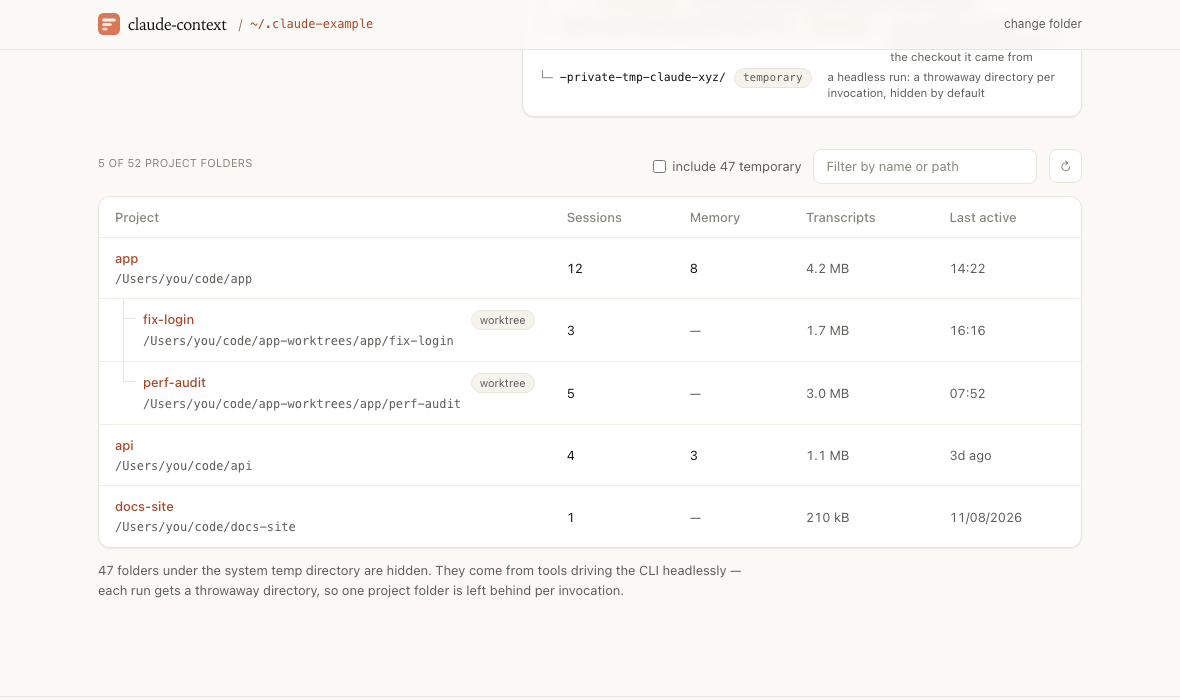
Screenshot taken against an example folder of invented projects.
Why
/context in the terminal gives you a token total per layer, for the session you are sitting in.
This reads the transcripts on disk instead. So it works for any session, past or present, across
every project on the machine — and it shows the contents of each layer, not only its size.
Which answers questions the total cannot:
- Why is my
CLAUDE.mdnot being read? A file that exists, holds nothing, and is never seen is a different problem from one that is missing. Only the two side by side tell you which you have. - What is my auto-memory costing me?
MEMORY.mdis loaded whole on every single session. Its size is a fixed cost, and the page states it as one — in tokens, and per line. - Which memory is broken? A
[[link]]to a memory that was never written, a file with no line in the index, atype:written at the frontmatter root where it is read as no type at all. - What did that sub-agent read? A sub-agent runs a context window of its own and only its final report comes back, so none of it lands in the session's figures. Its transcript is the only record, and it is sitting in the project folder.
Install
Nothing to install:
npx claude-context-viewerOr keep it around:
npm i -g claude-context-viewer
claude-context-viewer
It serves http://127.0.0.1:4700 and opens it in your default browser. Run it again and it opens
the copy already running instead; if something else holds the port, it takes the next free one.
Node 20 or newer, no runtime dependencies, and nothing leaves the machine.
Options
  -p, --port <n>      port to serve on (default: 4700, or the next free one)
      --host <host>   host to bind (default: 127.0.0.1)
      --no-open       do not open the page in the browser
  -h, --help          show this message
  -v, --version       show the version
Set CLAUDE_CONFIG_DIR to change which Claude folder it offers first; any other folder can be
picked in the page.
What it shows
Home. A picker, and three short explainers with diagrams: how the system prompt is assembled
and sent as one text, how a conversation fills a finite window until the older turns are compacted,
and what a token is — including the rule this page uses to estimate them. The folder it opens on is
one of the Claude folders found on this machine (~/.claude, CLAUDE_CONFIG_DIR, any
~/.claude-* sibling) or one you name. The choice lives in the URL, so a link to a project
survives a reload and two tabs can hold two folders.
Projects. One folder per working directory Claude Code has run in — the screenshot above. Worktrees are grouped under their checkout: a worktree gets its own transcripts but loads the memory of the checkout it came from, and that is the only record of which, since the folder names cannot say. A group is as recent as the most recent thing in it, so work in a worktree floats its checkout up. The throwaway folders a headless run leaves behind sit behind a checkbox. And last active is read from the last record in the transcript rather than the file's date, which gets touched by a session resumed without a word said.
Instructions. Every file that can put instructions into a session here, next to whether it
ever did: the machine-wide ~/.claude/CLAUDE.md, an organisation's managed settings, the
repository's CLAUDE.md and CLAUDE.local.md, the memory index, every subdirectory CLAUDE.md
— loaded only when Claude touches a file under it — and any @import they pull in. Each row opens
onto the file, rendered as Markdown or shown as source. A link inside one of these files is a path
on disk rather than a URL, so following one reads that path and shows it, ../../ and all. Only
paths inside the project or the Claude folder are served.
Memory. The files in memory/, their frontmatter, what each one costs, and what does not add
up: a [[link]] to a memory that was never written, a file with no line in MEMORY.md, an index
line pointing at a file that is gone, and eight ways a frontmatter can stop a file working — no
--- block, no name: for a link to reach, a name: written as a sentence, a name: that
disagrees with the filename, no description:, a type: at the root instead of under metadata:,
no type, or one outside the four the instructions ask for. Style is deliberately left alone:
measured against a real folder of 77 memories, checking for the **Why:** and **How to apply:**
lines flagged more than half of them, which buries the faults that matter. A Fix these button
writes the repair up as a prompt to paste into Claude Code. This page never writes.
Other files. What the tabs above skip. A session that spawned sub-agents keeps their transcripts in a subdirectory of its own; a tool result too large to sit inline is spilled to a file beside it; workflow runs, published artifacts, hook output and the desktop app's own markers land there too. Sub-agents are named by the type they ran as and what they were asked to do.
Session layers. The system prompt block by block, the CLAUDE.md and nested CLAUDE.md files,
the memory index, the schema of every tool on offer — built-in and MCP apart — the deferred tool,
skill and sub-agent listings, the MCP instructions, the hooks that injected context, the per-turn reminders, and everything the work itself dragged in: files read and edited,
directory listings, plans, queued prompts. Grouped, sorted by weight, expandable down to the exact
text. Startup context and what accumulated while working are counted separately. A session that was
compacted opens on what is in context now — the stack injected again after the last compaction, its
summary and whatever was added since — and can be switched to everything it loaded from the start.
The size of the context before and after that compaction is shown too, as the API measured it.
Where the data comes from
~/.claude/projects/<slug>/<session>.jsonl. Each session's attachment records are the layers,
and one of them — prompt_snapshot — holds the system prompt itself and, under tools, the
definition of every tool sent with it. The tool, skill, sub-agent and MCP listings are recorded as
deltas — names added, names removed — and are summed back into what the session was offered. A
compact_boundary record marks each compaction; its compactMetadata holds the measured token
counts and the earlier records kept in context. Beside the transcripts sit
memory/ and, for a session that needed them, a subdirectory of its own holding
subagents/agent-*.jsonl, tool-results/, workflows/ and any artifact it published.
The page follows the folder while it is open: the server watches it and names the project folders that changed, and only the matching data is read again. Nothing is polled, so an idle folder costs one open connection and no work.
What it does not do is swap the page out from under you. The change is offered instead: the button
beside the project filter wakes up with a bar running across it, and the table takes the change in
when the bar runs out, or the moment you click. Idle it is disabled — and it says so plainly when
the folder cannot be watched at all, rather than reading as current while the page quietly stops
keeping up. Then the list moves rather than jumping: a folder that has just been worked in travels
up to where it now belongs, the rows it displaced follow in a wave, and a folder seen for the first
time fades in. All of it is skipped under prefers-reduced-motion.
What it cannot tell you
Token counts are characters over four, and every total here is a lower bound. Two gaps are worth knowing about before reading too much into a number.
- Each layer is recorded bare. The tool schemas are in the transcript — the
toolskey of theprompt_snapshotrecord, which this counts; only itssystemPromptarray has none. What is missing is the wrapping Claude Code puts around a layer before sending it — the reminder tags, the sentence that introduces a listing — and the prose of the few layers recorded only as settings, such as the advisor tool. - Which individual memories were recalled is recorded nowhere. The fixed cost of
MEMORY.mdis measurable; the memories that actually fired are not. They show up only when Claude opened one as a file, which lands in the runtime group like any other read.
Nothing is written. The server binds 127.0.0.1, refuses cross-site requests, and answers only to
localhost, an IP address or the name given to --host — so a page that rebinds its own domain to
127.0.0.1 cannot read it either. Transcripts hold whatever was said and pasted into a session.
Development
pnpm install
pnpm dev          # API from source on :4700, Vite on :4701
pnpm test         # unit tests, node:test through tsx
pnpm check        # lint, type-check, test, build
pnpm format       # prettier
CI runs those checks and then a smoke test of the built server: it points the CLI at a fixture Claude folder and asserts the page comes up, the project and its memory are read back, a cross-site request and a request addressed to a foreign host are both refused, and nothing in the folder was written to.
A release is a tag. git tag v0.2.0 && git push --tags verifies the tag matches package.json,
attaches the tarball to a GitHub Release, and publishes to npm with provenance through trusted
publishing — no token is stored anywhere.
The server is plain node:http with no framework; the page is React and Tailwind, with TanStack
Query for the reads. src/server reads the transcripts, src/client draws them, and src/shared
holds the types and the routes both ends agree on.
Licence
MIT © Vincent Caudron
A personal tool, not affiliated with or endorsed by Anthropic.