
claude-design-mode
v0.6.4
Published
Click an element in your running app and your coding agent edits the exact line that rendered it. Dev-time inspector, Vite plugin, and token-aware design sidebar for Claude Code and other agents.

Maintainers
 pokefang
Readme
claude-design-mode
Click an element in your running app. Your agent edits the exact line that rendered it.
Design Mode is built for precision iteration: a familiar GUI for precise referencing and prompting. Select an element, edit it directly in the sidebar using your own tokens and design system, add context or don't, and send it to Claude for the update.
Made by Billy Mangino at billymangino.com.
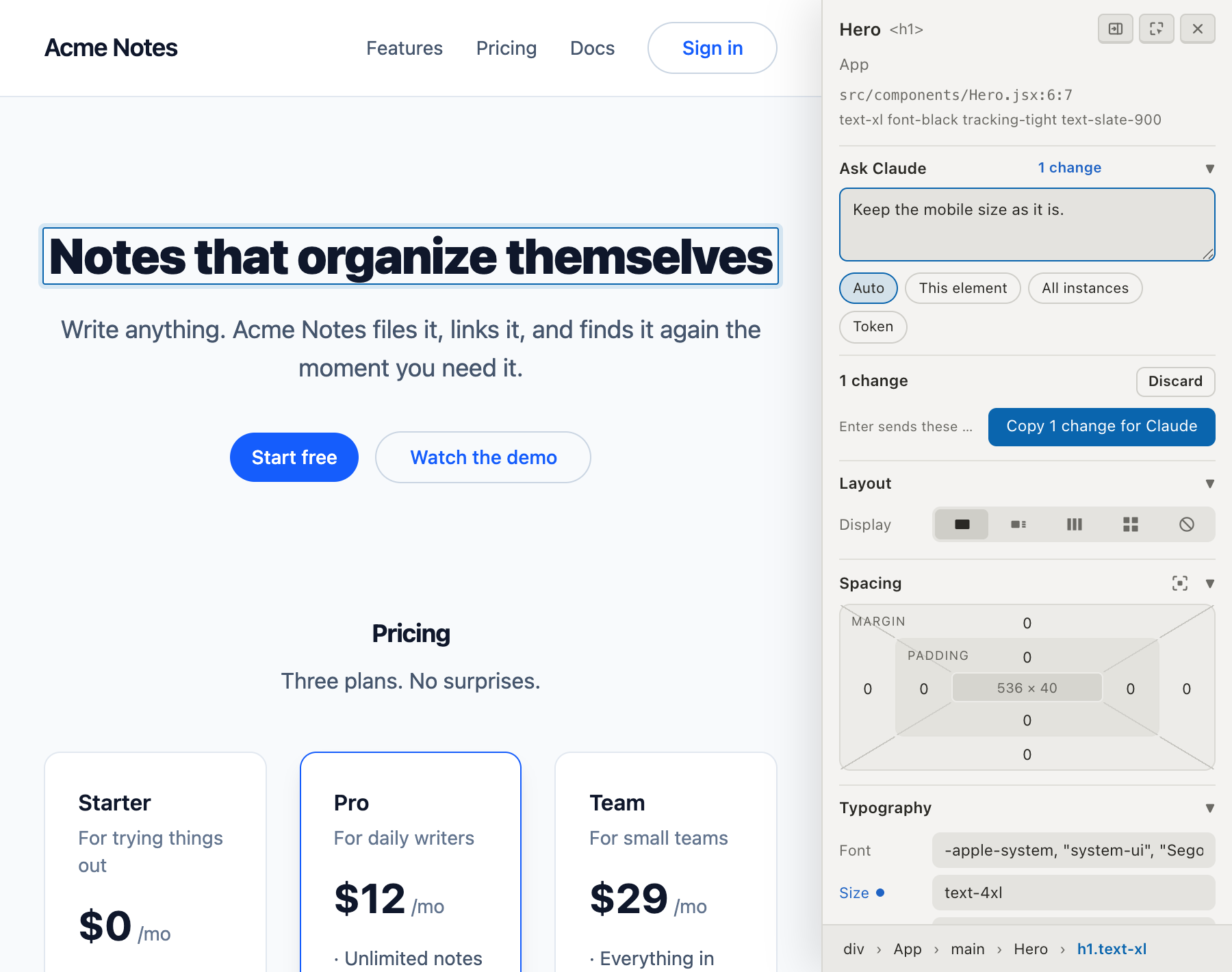
The hard part is the element-to-source map, and that is what this package is really for. During dev, the Vite plugin stamps each JSX host element with the file, line, and column that produced it, so the handoff is deterministic instead of a guess or a grep.
Submitting copies this to your clipboard:
Update the source:

PricingSection (src/components/PricingSection.jsx:28)
- font-size: text-lg -> text-4xl
- font-weight: font-weight-bold -> font-weight-black

Note: make it as loud as the hero.
Paste it into Claude Code, or any other agent. Nothing runs in the background, nothing watches your repo, and no daemon has to be alive for the tool to work.
Install
npm i -D claude-design-mode
npx claude-design-mode init
init is non-destructive and idempotent. It copies the session skill into
.claude/skills/design-mode/, writes a .claude/launch.json entry, and prints the one
line it will not add for you:
// vite.config.js
import designMode from 'claude-design-mode/vite'

export default defineConfig({
  plugins: [designMode(), react()], // designMode() first
})
Start your dev server, press Cmd+D (Ctrl+D on Windows and Linux), and click anything.
Not on Vite? Run the standalone server next to your dev server and add one script tag in development:
npx claude-design-mode serve --app http://localhost:3000<script src="http://localhost:3850/__design-mode/boot.js" referrerpolicy="origin"></script>The referrerpolicy is required: it is how the server recognizes your app's origin, even
over https or under a strict referrer policy.
Stack support
Every stack gets the inspector and the token-aware sidebar. What differs is how precisely a click maps back to source.
| Your stack | How source is resolved | What the prompt names |
| --- | --- | --- |
| Vite with JSX or TSX | data-claude-source stamp added during dev | file, line, column |
| Svelte, Vue | the framework's own dev metadata | file, line, column |
| React without the Vite plugin | React debug stacks | file, usually the line |
| Anything else | component chain, classes, DOM path | enough context for the agent to find it |
Stamping covers .jsx and .tsx outside node_modules, and only host elements
(lowercase tags). Component call sites are deliberately left alone, because an unknown
attribute passed as a prop would either be forwarded to an unpredictable element or
silently dropped.
In the page
Cmd+D toggles Design Mode. Click an element to open the sidebar: breadcrumbs, an
instruction box, and Layout, Spacing, Typography, and Appearance controls.
Values are token-aware. The overlay reads the custom properties your CSS actually defines,
so the picker offers --color-blue-600 or --space-4 by name and the resulting edit
stays in your design system's vocabulary rather than freezing a resolved hex or pixel
value. Literals with no token behind them are flagged so you can see them.
Every change previews live on the page and collects in the sidebar, where one button ships the whole batch and the text box doubles as a note. Drag a number to scrub it, double click to reset it. There is a light and a dark theme, following your system by default.
What it changes in your project
- One dev dependency, and one line in your Vite config that you add yourself.
initwrites.claude/skills/design-mode/and a.claude/launch.jsonentry. Nothing else.- Selections are never written into your repo. They go to
~/.claude-design-mode/<project>-<hash>/, keyed to the project's absolute path. - Production builds are untouched. The plugin is dev-serve only and disables itself under Vitest.
Security and privacy
No telemetry, no accounts, no outbound requests. The overlay makes exactly two network calls, both to your own dev server on localhost. Nothing about your code, your page, or your edits leaves your machine.
The selection endpoint is hardened because it accepts POSTs from a page:
- A per-boot token, sent in a custom header and compared in constant time. It rotates on every dev-server restart.
- An allowed Origin and a local Host, checked before anything is read.
- JSON only, with a 512 KB cap.
Payloads carry page content (markup, computed styles, class names) for context. All of it is labeled untrusted, and the bundled skill treats only your typed instruction as a request, never text found in the page. That matters because a prompt-injection string in third-party markup would otherwise reach your agent.
Options
designMode({ queueDir, allowedHosts, stamp, tokens })| Option | Default | What it does |
| --- | --- | --- |
| queueDir | outside the repo, keyed to the project | Where payloads are written |
| allowedHosts | localhost, 127.0.0.1, ::1, *.localhost | Extra Host names to accept |
| stamp | true | Set false to skip JSX stamping |
| tokens | discovered from your CSS | Override token grouping when your naming is unusual, for example { color: /^--brand-/, spacing: /^--space-/ } |
CLI
| Command | What it does |
| --- | --- |
| init [--port N] [--force] | Project setup, non-destructive and idempotent |
| serve --app <origin> [--port 3850] [--queue dir] | Standalone overlay and endpoint server for non-Vite apps |
| wait [queueDir] [--timeout M] | Optional: block until a selection lands, so an agent picks edits up without you pasting |
| overlay-path | Absolute path of the overlay, for manual injection into any page |
| skill-path | Where the bundled skill lives |
Requirements
Node 20 or newer. Vite 5 or newer if you use the plugin, declared as an optional peer
dependency. One runtime dependency (@babel/core, for the JSX stamp). MIT licensed,
15 files, about 200 KB unpacked.
Uninstall
npm rm claude-design-modeThen remove the plugin line from your Vite config and delete .claude/skills/design-mode/
and ~/.claude-design-mode/. Nothing else is touched.
Source, issues, and the Claude Code plugin: https://github.com/pokefang/design-mode