
claude-finops
v0.8.0
Published
Local FinOps dashboard for Claude Code: what you used, what it cost, why it cost that much, and what to change. Reads your own transcripts, no API key, no data leaves the machine.

Maintainers
 mohitrj49
Readme
Claude FinOps Command Center
A local, executive-and-developer FinOps dashboard for your own Claude usage, built from the Claude Code transcripts already on this machine.
It answers, in a few clicks:
What I used → what it cost → why it cost that much → whether it was efficient → what is likely to happen next → and what I should change.
Everything runs on 127.0.0.1 with the Python standard library. No dependencies, and
no data leaves the machine. No outbound calls except a once-a-day version check
against the npm registry (disable with --no-update-check), and provider APIs only
if you add a key.
npx claude-finopsThat is the whole setup. It finds your transcripts, builds a local warehouse, and opens the dashboard at http://127.0.0.1:8787. No account, no API key, no config file to write first.
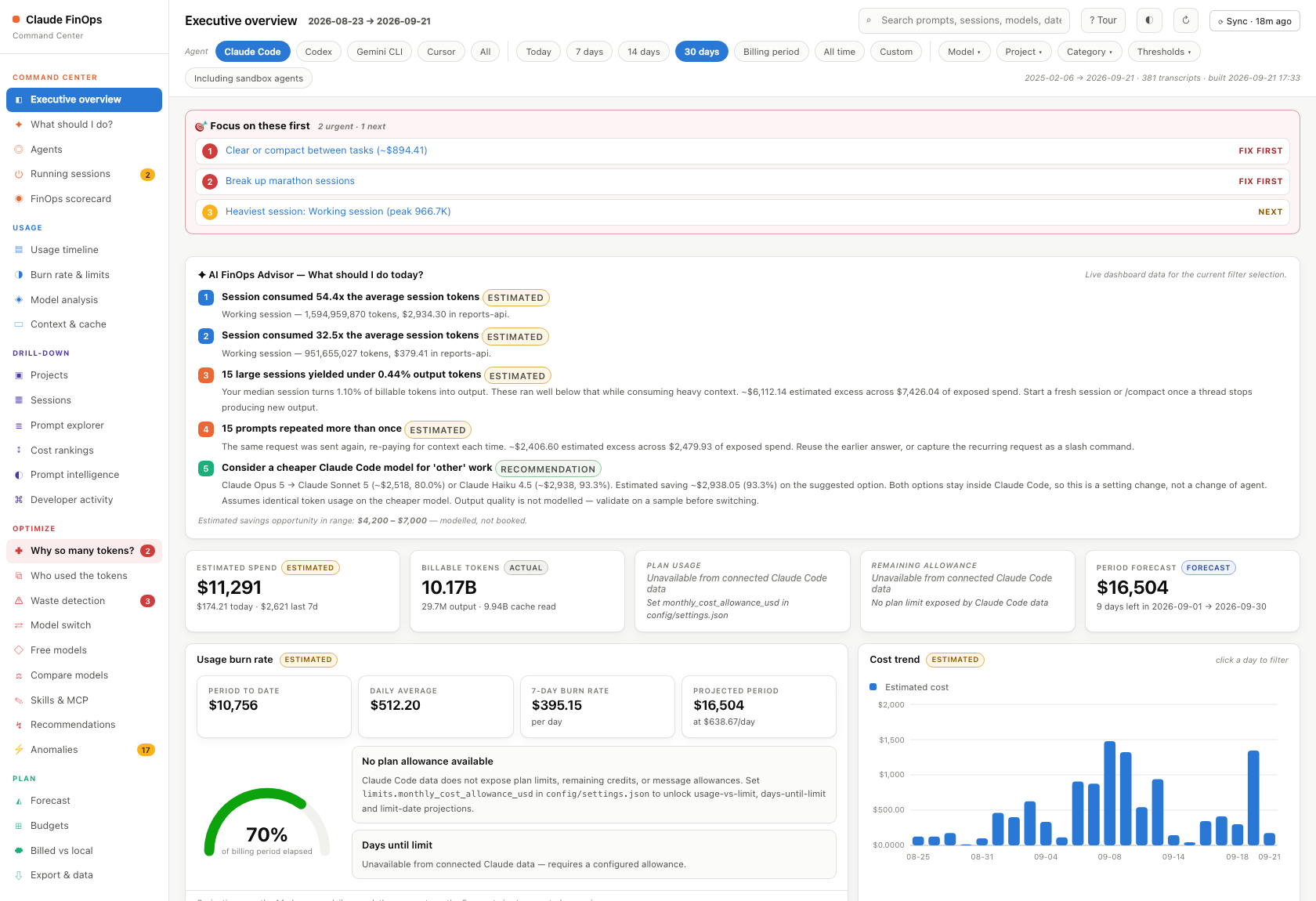
Screenshots are real output from a real warehouse; project names, session titles and prompt text have been replaced with placeholders.
Try it in 60 seconds
1. Run it. Nothing to install first — npx fetches and runs it.
npx claude-finopsFirst run reads ~/.claude/projects and builds the warehouse (roughly a minute for a
few hundred transcripts). Every run after that starts in about a second.
2. Open http://127.0.0.1:8787. You land on the executive overview above: spend, tokens, burn rate, forecast, and a ranked list of what to fix first.
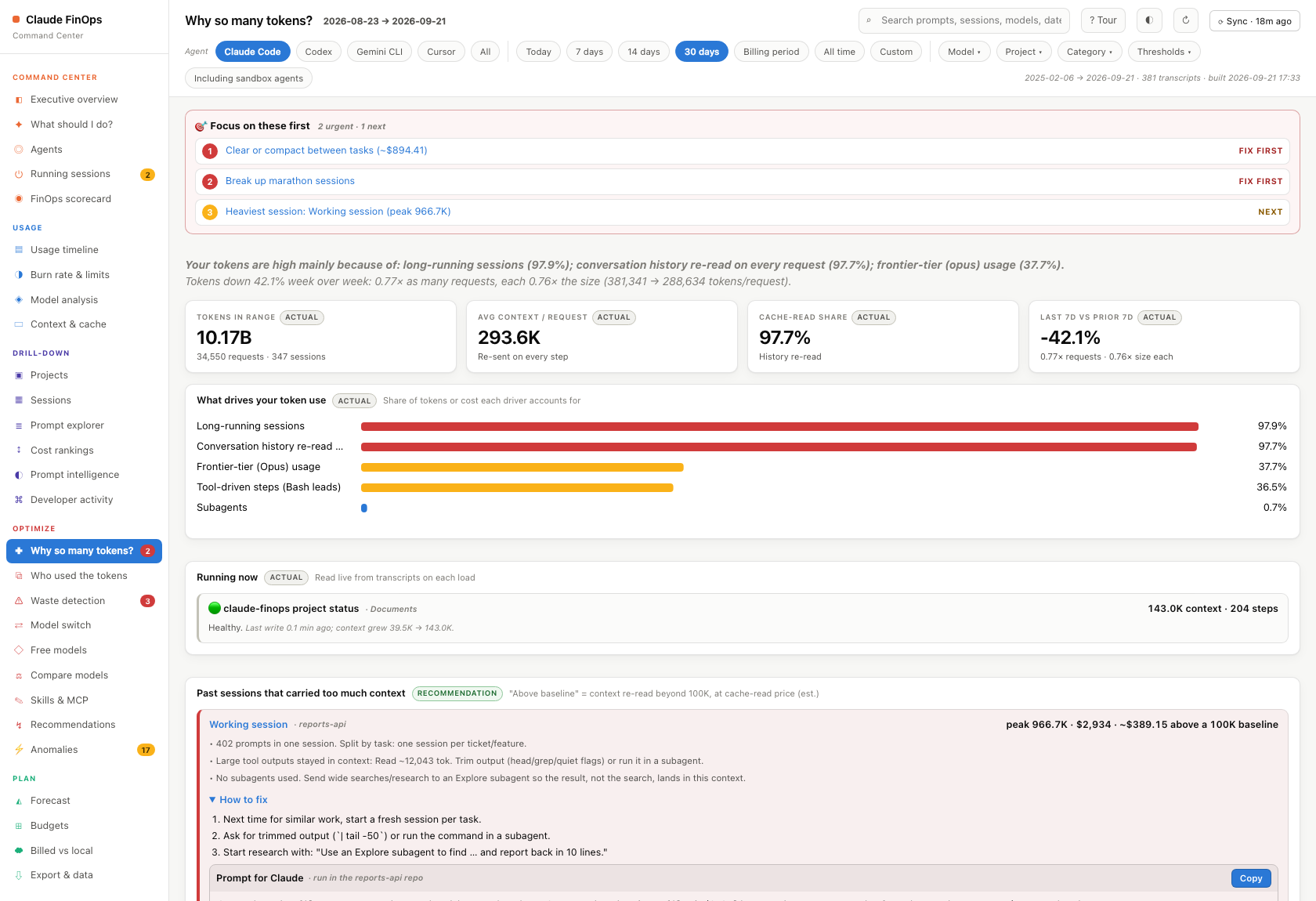
3. Ask it what to do. "Why so many tokens?" explains where your tokens actually went and gives you a prompt you can paste straight into Claude Code to fix it.
4. Stop when you are done.
claude-finops --stopWant it permanently available?
npm install -g claude-finops # then `claude-finops` from anywhereWhat you actually get
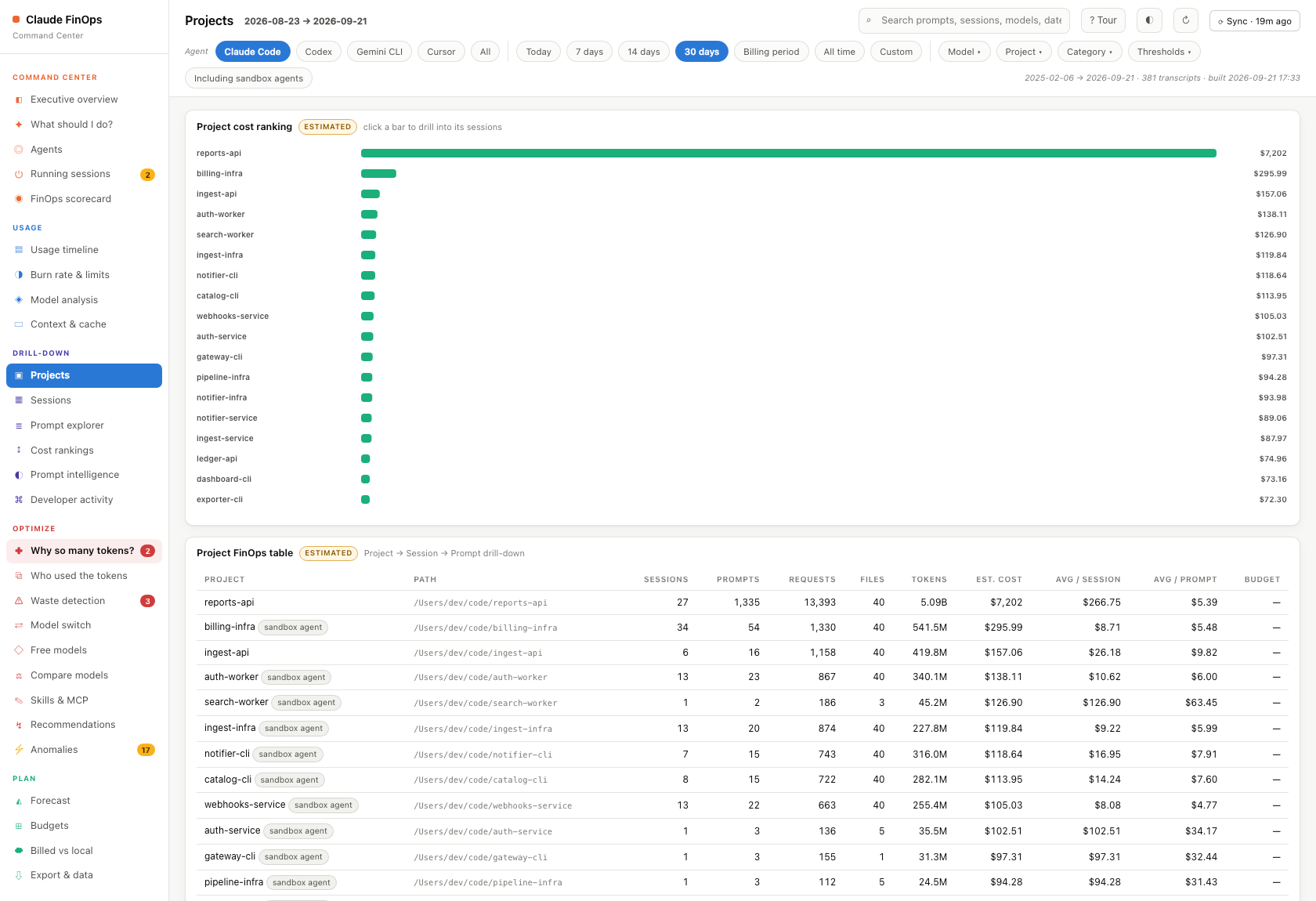
Where the money goes, per project. Every project ranked by cost, drilling down Project → Session → Prompt.
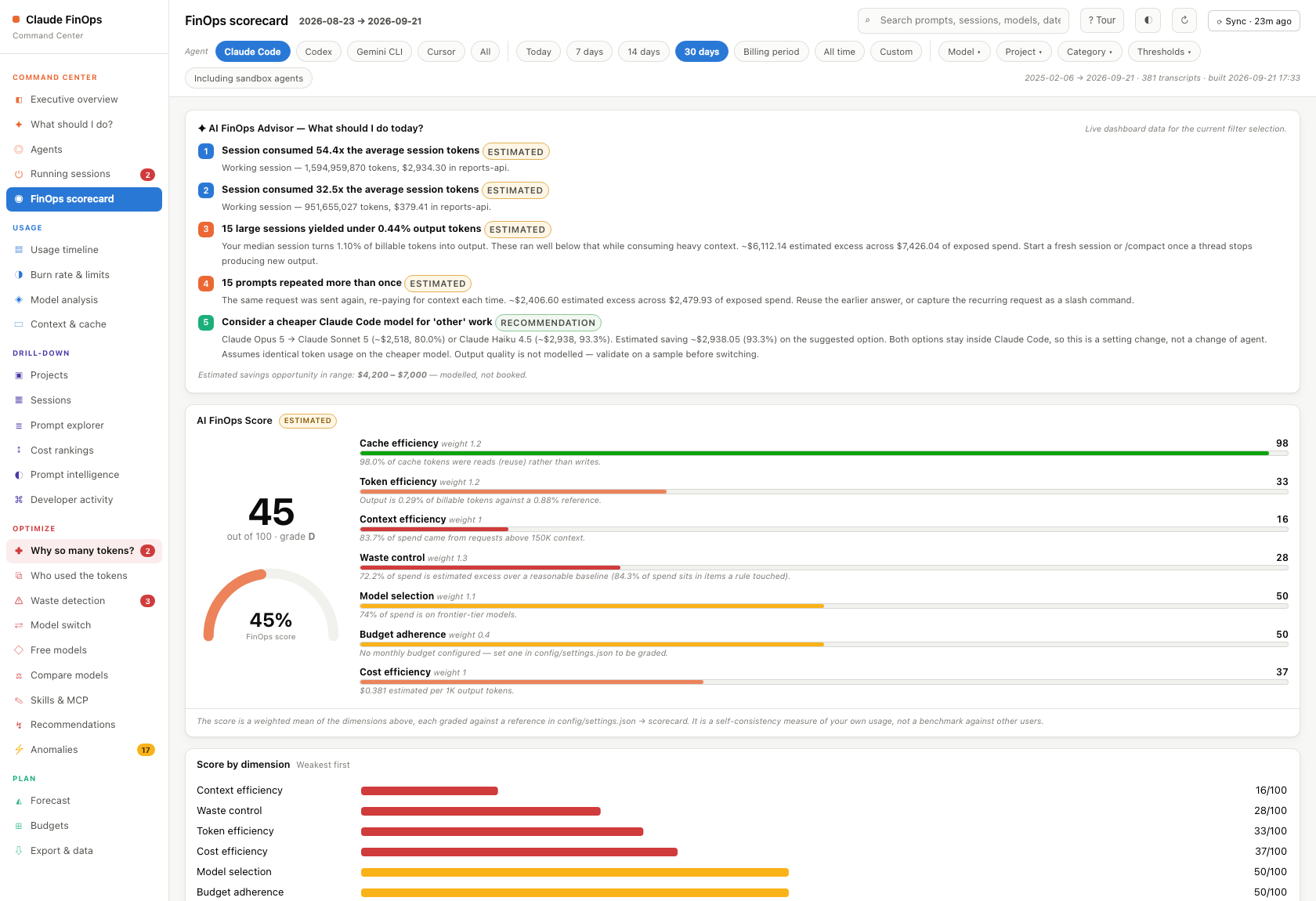
A grade, not just numbers. A 0–100 FinOps scorecard across five dimensions, each with the reasoning behind the score, so you know whether your usage is healthy.
Waste you can act on. Repeated prompts, abandoned sessions, context carried for no reason — each with the estimated money attached.
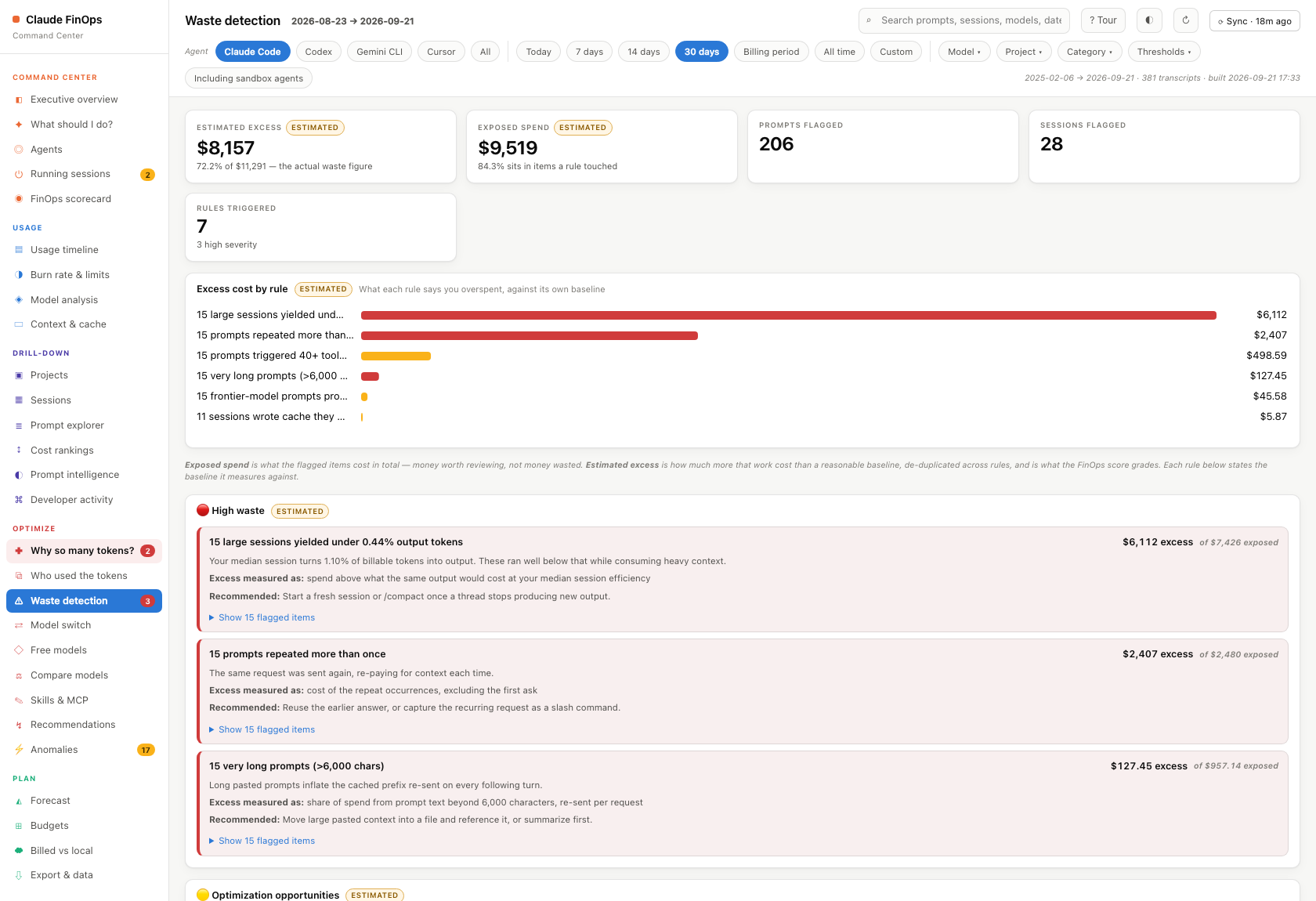
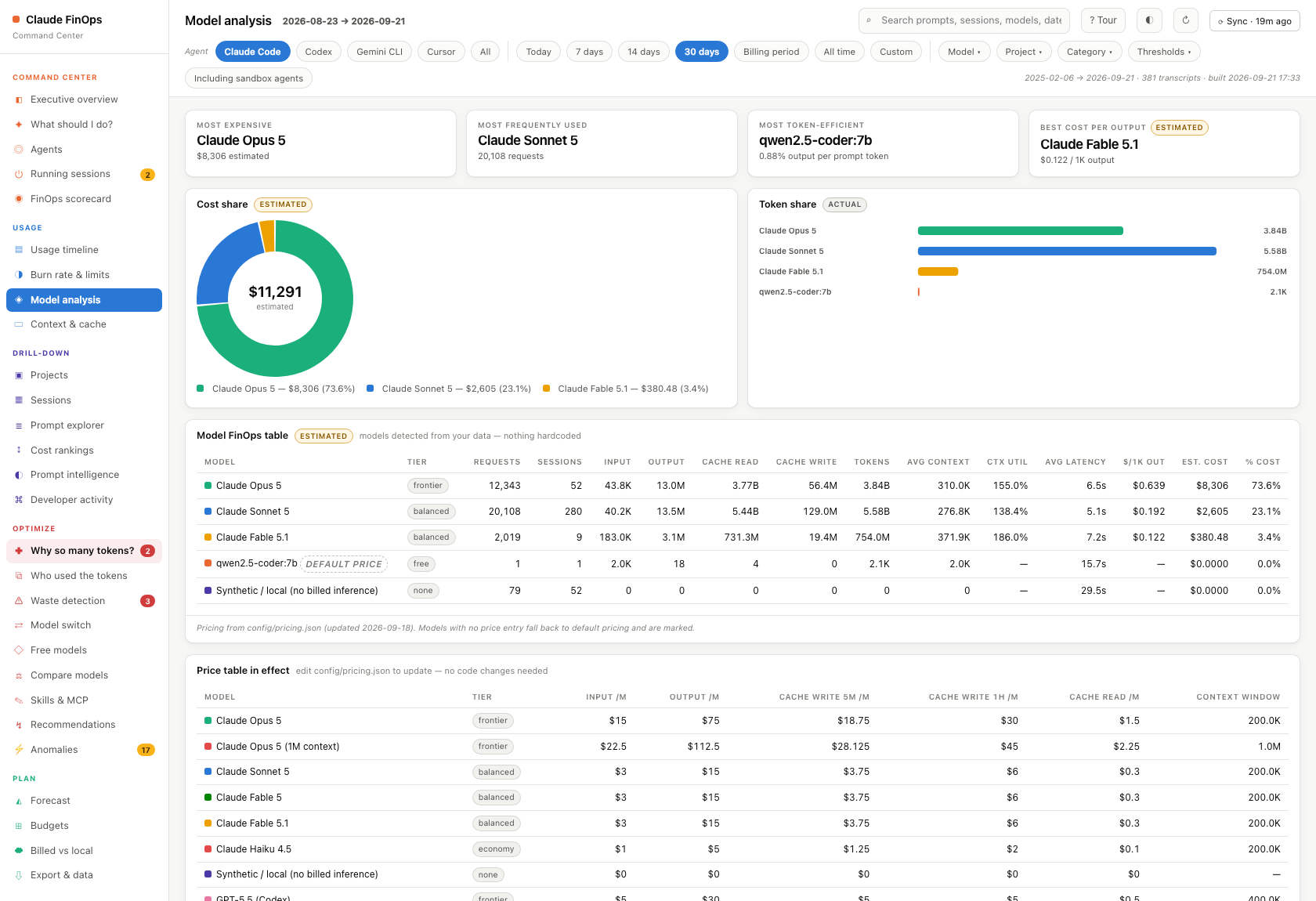
Whether the model you are on is the right one. Per-model cost and efficiency, plus a switch analysis that prices the same workload on a cheaper model.
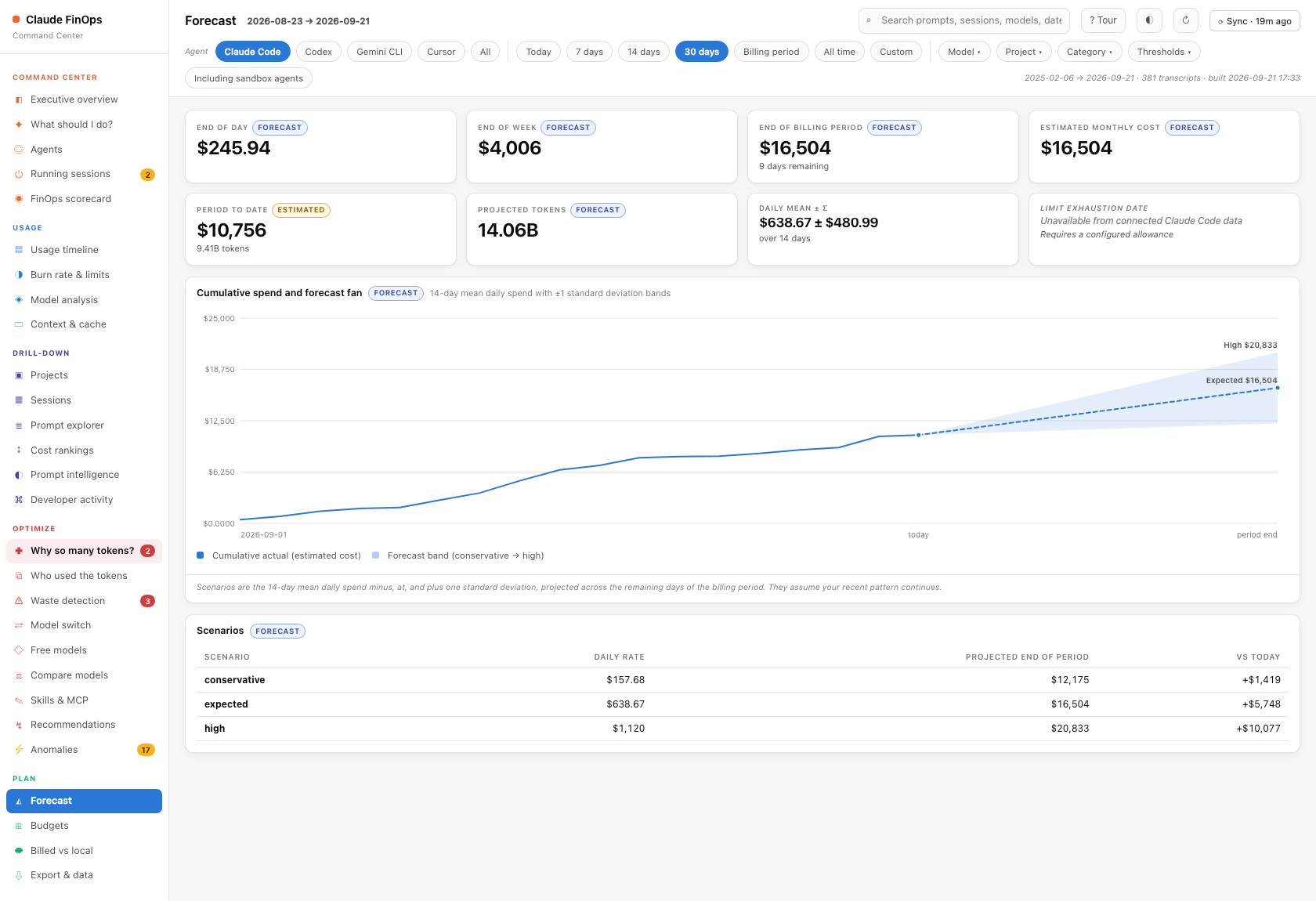
What next month looks like. Forecast from your own history, against budgets you set.
Why it is easy to use
- One command, zero configuration.
npx claude-finops. No API key, no sign-up, no config file — it reads transcripts Claude Code already wrote. - No dependencies. Pure Python standard library. Nothing to
pip install, nothing to build, no lockfile to resolve. - Nothing to learn. Every screen states its own conclusion in plain English before it shows you a chart, and every number carries a badge saying whether it is measured or estimated.
- Your data stays put. It binds to
127.0.0.1. No outbound calls except a once-a-day version check against the npm registry (disable with--no-update-check), and provider APIs only if you add a key. The warehouse lives in~/.claude-finops, so upgrading or deleting the package never touches it. - It tells you what to change, not just what happened — usually with a prompt you can paste into Claude Code.
The accuracy contract
This is the part that matters most, so it is stated first. Every figure in the UI carries one of four badges, and nothing is invented.
| Badge | Meaning |
|---|---|
| Actual | Read straight out of your transcripts: token counts, timestamps, models, effort, tool calls, file paths, session and project identity. |
| Estimated | Derived. Every dollar figure is estimated, because Claude Code transcripts contain token counts but no billed amount. Cost = tokens × the price table in config/pricing.json. |
| Forecast | Projected from your history. Assumes the recent pattern continues. |
| Recommendation | A recommendation grounded in an observed share of spend. No saving is estimated. |
Deliberately not fabricated
These are simply not present in Claude Code transcripts, so the dashboard says so rather than guessing:
- Plan tier, allowance, and remaining credits
- Message / request allowances
- Billed invoice amounts
- Assistant response text (only usage metadata is extracted)
- Lines changed, commits, pull requests, bugs fixed
Wherever one of these would appear, you get "Unavailable from connected Claude
data". Several of them can be declared by you in config/settings.json — do that
and the usage-vs-limit, days-until-limit, and limit-date projections light up, clearly
labelled as your own configured figures.
What is in it
Command center — Executive overview (spend, tokens, usage %, remaining, forecast), an AI FinOps Advisor that answers "what should I do today?" from live data, and a 0–100 FinOps scorecard with per-dimension reasoning.
Usage — Interactive timeline across 10 metrics and 6 time ranges with day drill-down; burn rate and limits with a gauge, days-until-limit and projected overage; per-model FinOps table with superlatives (most expensive, most used, most token-efficient, best cost-per-output); context-size distribution and cache with-vs-without analysis.
Drill-down — Project → Session → Prompt, everywhere. A prompt explorer over every prompt with full text, category, tokens, cache split, tool calls, files touched, latency and efficiency; five leaderboards; prompt intelligence (spend by activity); and a Claude Code view (tools, files, branches, cost per repository).
Optimize — A waste detector with seven rules, each showing the exact prompts or sessions it flagged; a recommendation engine that stays quiet without evidence; and anomaly detection you can click through to the underlying sessions.
Plan — Forecast with conservative/expected/high scenario bands, and budgets with Budget → Actual → Forecast → Variance and configurable alert thresholds.
Global search spans prompt text, sessions, projects, models, tools and dates. Global filters (date, model, project, category, cost/token thresholds, sandbox toggle) update every chart and KPI. Everything exports to CSV/JSON, plus a printable PDF report.
Configuration
Two files, both editable without touching code. The server picks up changes to
settings.json immediately; pricing.json needs a restart.
config/pricing.json
Model prices per million tokens, kept strictly separate from usage data so the table
can be updated as prices change. A claude-* model with no entry is priced as
unpriced ($0, flagged as such in the Model analysis view) rather than silently
billed at another model's rate.
config/settings.json
{
  "billing_period": { "mode": "calendar_month", "anchor_day": 1 },
  "limits": {                        // null => reported as unavailable, never guessed
    "monthly_cost_allowance_usd": null,
    "monthly_token_allowance": null,
    "monthly_request_allowance": null,
    "remaining_credits_usd": null
  },
  "budgets": { "monthly_usd": null, "daily_usd": null, "per_project_usd": {} },
  "alert_thresholds_pct": [50, 75, 90, 100],
  "waste_rules": { /* thresholds for each detector */ },
  "anomaly":    { /* z-score and ratio triggers */ },
  "scorecard":  { /* the reference points each dimension is graded against */ }
}
The Budgets view edits limits, budgets and thresholds from the browser and writes them back to this file.
Note on waste_rules.low_output_ratio_vs_median: sessions are flagged relative to
your own median output ratio rather than an absolute number, because a healthy ratio
depends entirely on how agentic your workload is.
How it works
~/.claude/projects/**/*.jsonl
        │
        ▼  finops/etl.py     stream-parse, normalize, roll up
   ~/.claude-finops/data/finops.db   SQLite warehouse
        │
        ▼  finops/analytics.py   KPIs · burn · forecast · waste · anomalies · scorecard
   finops/api.py             stdlib HTTP: JSON API + static files (127.0.0.1 only)
        │
        ▼  web/              vanilla JS, inline-SVG charts, no build step
Data model
projects → sessions → prompts → requests (the usage event) → tool_calls,
plus files_touched. A request carries the full token split (input, output, thinking,
cache read, cache write 5m/1h), derived billable_tokens and context_tokens,
estimated cost, a no-cache counterfactual cost, and measured latency.
Definitions worth knowing
- billable_tokens = input + output + cache read + cache write. Agentic coding is dominated by cache reads, so this number is large by nature.
- context_tokens = input + cache read + cache write — the prompt side of one request, used as the context-size proxy.
- latency = gap to the preceding message, discarded above 15 minutes since that is idle time rather than model latency.
- Cache savings price every cached token at the plain input rate as a counterfactual. It is a model, not a bill you avoided.
- Prompt categories are transparent keyword rules (
finops/classify.py); every prompt records the matched terms and a confidence, both visible in its detail view.
Rebuilding
python3 -m finops.etl                     # default ~/.claude/projects
python3 -m finops.etl /path/to/transcripts # or a specific directory
The build is destructive and idempotent — it drops and recreates ~/.claude-finops/data/finops.db.
Commands
claude-finops                 start the dashboard
claude-finops --rebuild       re-read transcripts, then start
claude-finops --stop          stop it
claude-finops --where         where your data, settings and keys live
claude-finops --set-key       store a provider API key (hidden prompt, 0600)
claude-finops --keys          which provider keys are configured
claude-finops --help          everything
Installed globally (npm i -g claude-finops) or run ad hoc (npx claude-finops),
these work from any directory. From a source checkout, ./run.sh takes the same flags.
Where your data lives
Everything the app writes lives outside the install folder, in one state directory:
~/.claude-finops/
  data/finops.db          SQLite warehouse (your prompt text)
  data/cloud_cache.json   cached billing figures
  data/server.pid|.log    running server
  settings.local.json     budgets and limits set in the UI
  secrets.local.json      provider API keys (0600)
Set CLAUDE_FINOPS_HOME=/some/path to put it elsewhere. The install folder holds
only code and the shared defaults in config/, so it can be replaced on upgrade —
or shipped as a package — without touching your data. An older in-tree data/
layout is copied across automatically on first run; the originals are left in
place for you to delete once you are happy.
Privacy
~/.claude-finops/data/finops.db and the prompt/CSV exports contain your full prompt text. The
server binds to 127.0.0.1 only, but treat the database and any export you
generate as sensitive.
The app makes exactly one outbound request of its own: once a day it asks
registry.npmjs.org what the latest claude-finops version is, so it can tell
you when an upgrade is out (npm has no way to push one at you). It sends nothing
about you or your usage. Turn it off with NO_UPDATE_NOTIFIER=1 or
CLAUDE_FINOPS_NO_UPDATE_CHECK=1. Provider cost APIs are called only if you
configure a key with --set-key.
Sharing it
The app has nothing tied to one person. Whoever runs it sees their own Claude usage:
- It reads
~/.claude/projectson the machine it runs on (override withCLAUDE_PROJECTS=/path). - The account label comes from that machine's
~/.claude.json. - Budgets and limits you set in the UI are saved to
~/.claude-finops/settings.local.json. The committedconfig/settings.jsonholds only shared defaults.
Requirements: macOS, Windows or Linux; Python 3.9+; Claude Code used at least once. Nothing else to install.
| OS | Start | Stop | Package to share |
|---|---|---|---|
| macOS / Linux | ./run.sh | ./run.sh --stop | ./share.sh |
| Windows | run.cmd (or py run.py) | Ctrl-C | py run.py --share |
To share: run ./share.sh, which writes ../claude-finops.zip containing code and defaults
only. Your data never lives in the folder, so there is nothing to strip. Never send
~/.claude-finops/, because finops.db holds your prompt text.
Recipient: unzip, then ./run.sh (macOS/Linux) or double-click run.cmd (Windows), and open
http://127.0.0.1:8787.
Free-model setup per OS: macOS installs Ollama with Homebrew, Windows with winget. Linux needs
sudo, so the app shows the one command to run yourself. Launchers go to ~/.local/bin, as .cmd
files on Windows.
Actions (these change your machine, and only when you click)
- ⟳ Sync (top bar) re-reads
~/.claudeand swaps in fresh data without restarting. - Free models adds a launcher such as
claude-qwenin~/.local/binthat runs Claude Code on a free model (Ollama locally, or OpenRouter). It lists every step first, and asks before it installs Ollama or downloads a model. Your normalclaudeis unchanged. Edit the list inconfig/free_models.json. - Skills & MCP suggests MCP servers and skills from work you repeat, with the evidence.
"Add" runs
claude mcp add -s user …; "Create skill" writes~/.claude/skills/<name>/SKILL.md.
Multi-agent
Besides Claude Code, the warehouse loads every other coding agent it finds on the machine:
| Agent | Read from | What it gives |
|---|---|---|
| Codex | ~/.codex/sessions | Tokens + model per turn; cost at OpenAI list price |
| Gemini CLI | ~/.gemini/tmp/*/chats | Tokens + model per reply; cost at Gemini list price |
| Cursor | ~/.cursor/projects/*/agent-transcripts, Cursor IDE state.vscdb (read-only) | Prompts + tool calls; tokens only where Cursor stored them; no model, not priced |
Pick agents with the chips at the top: click for one, Cmd/Ctrl-click to combine, All for
everything. Every page follows the selection, and Agents shows them side by side.
Prices for the other providers live in config/pricing.json with their source URLs.
License and trademarks
MIT — see LICENSE.
Not affiliated with, endorsed by, or sponsored by Anthropic. "Claude" and "Claude Code" are trademarks of Anthropic, PBC, used here only to describe what this tool reads.