
claude-knowledge-transfer
v2.0.7
Published
A standardized solution for preserving context across Claude Code's automatic compaction

Maintainers
 edwinanderson
Readme
Claude Knowledge Transfer System
A standardized, project-scoped solution for preserving context across Claude Code's automatic compaction at 95% capacity. This npm package automatically installs commands and templates into your project for seamless team collaboration.
Overview
Claude Code automatically compacts its context when reaching 95% capacity, which can result in loss of important project context. This knowledge transfer system provides a project-scoped, standardized approach to:
- Save your context before compaction in a consistent 6-file format
- Restore your context after compaction with full continuity
- Verify the restoration worked correctly
- Share context consistency across your entire development team
🚀 New: Parallel Sub-Agent Approach
The latest version implements a revolutionary parallel sub-agent approach that:
- Uses only 2-4% context (vs 15-20% for traditional approach)
- Enables knowledge transfer at 96-97% capacity (vs 80% previously)
- Generates all 6 files simultaneously using parallel sub-agents
- Prevents context pollution by never reading generated files
- Provides each sub-agent fresh 200k token contexts for comprehensive output
This means you can continue working much longer before needing to transfer knowledge, and the transfer itself is much more efficient!
Quick Start
Installation (Project-Scoped)
Install the system in any project using npx (no global installation needed):
# Install in your current project
npx claude-knowledge-transfer

# Or add to your project dependencies for team sharing
npm install --save-dev claude-knowledge-transfer
This automatically creates a .claude/ directory in your project with:
- 4 Claude Code commands (accessible as
/project:command-name) - 6 standardized templates for consistent knowledge files
- Project configuration and quick start guide
⚠️ Required Setup: Compaction Rules
CRITICAL for optimal performance: Add compaction rules to your project's CLAUDE.md file to maintain the 2-4% context efficiency.
# Copy the compaction rules to your project's CLAUDE.md
cat node_modules/claude-knowledge-transfer/CLAUDE_COMPACTION_RULES.md
Why this matters: Without these rules, Claude Code may include sub-agent conversations during compaction, consuming 60-100x more context than intended and defeating the efficiency benefits.
Quick setup: Copy the "Compaction Instructions" section from CLAUDE_COMPACTION_RULES.md and paste it into your project's CLAUDE.md file. See the file for detailed instructions and optimal placement.
Basic Workflow
# 0. Get help on available commands
/project:help-knowledge-transfer

# 1. Save context before compaction (now safe even at ~96% capacity!)
/project:initiate-knowledge-transfer

# 2. After compaction, restore context
/project:retrieve-knowledge-transfer

# 3. Verify context was restored correctly
/project:check-context
Visual Examples
Initiating Knowledge Transfer
When you run /project:initiate-knowledge-transfer, Claude spawns 6 parallel sub-agents:
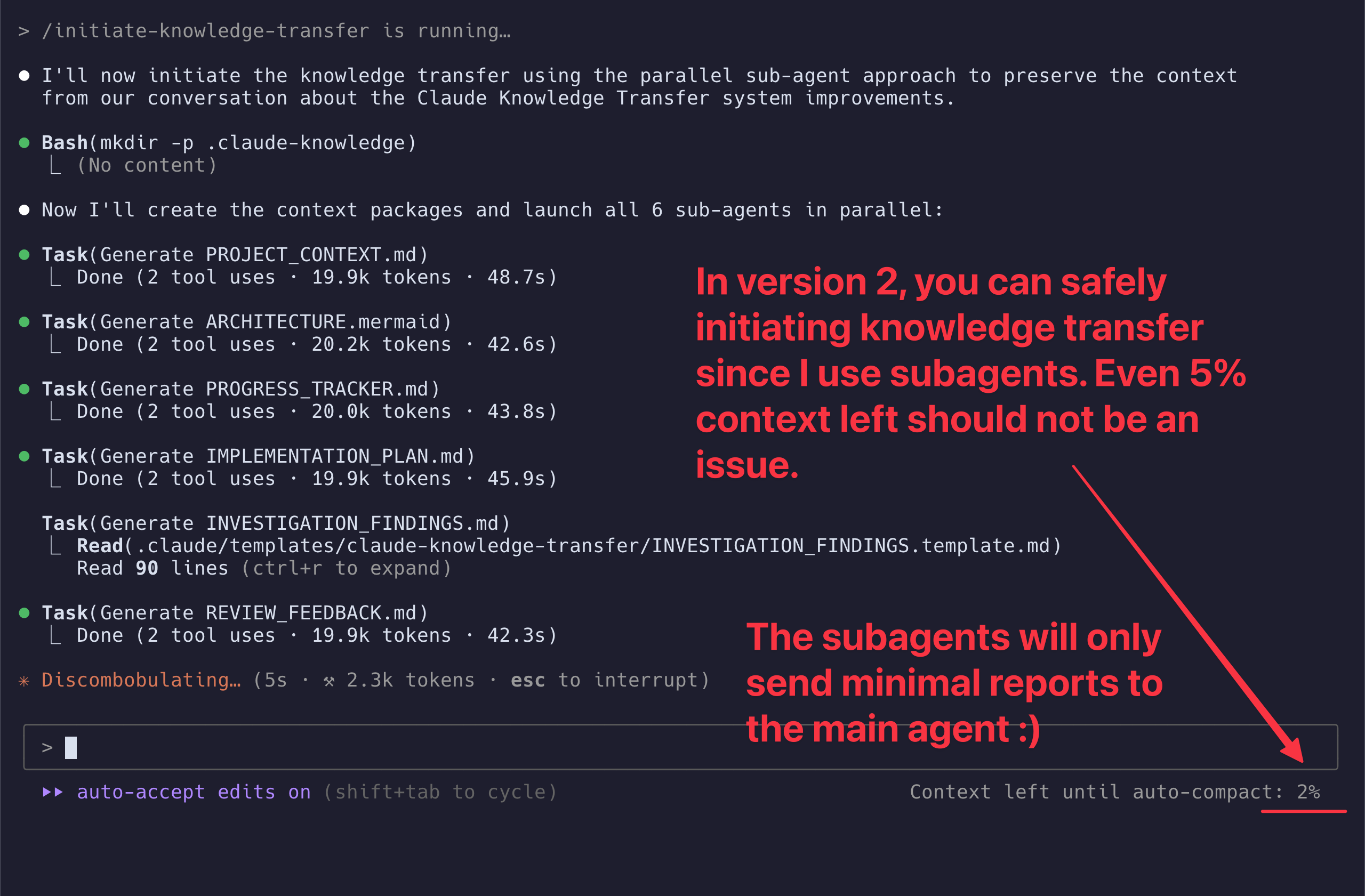
Each sub-agent generates one knowledge file simultaneously, using only 2-4% of context.
Retrieving Knowledge After Compaction
When you run /project:retrieve-knowledge-transfer, Claude restores all context:
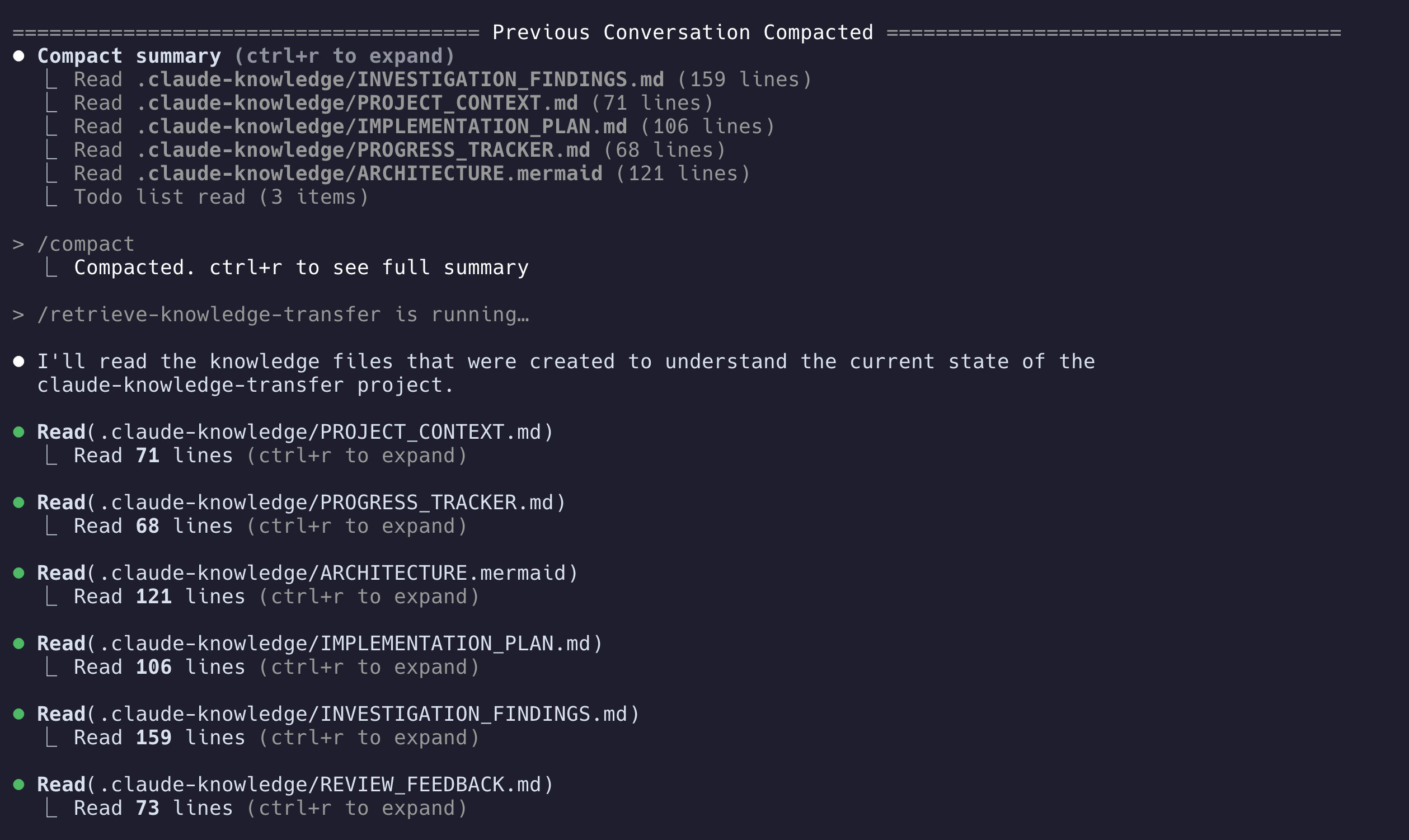
The command now works from any subdirectory in your project!
Available Commands
Four essential project-scoped commands for complete context management:
| Command | Purpose | When to Use |
|---------|---------|-------------|
| /project:help-knowledge-transfer | Show comprehensive help and usage guide | When you need assistance |
| /project:initiate-knowledge-transfer | Create standardized context package | At ~96% capacity (2-4% usage) |
| /project:retrieve-knowledge-transfer | Restore context from package | After compaction |
| /project:check-context | Verify restoration worked | After retrieve |
Standardized Knowledge Structure
The system always creates exactly these 6 files in .claude-knowledge/:
📁 .claude-knowledge/
├── 📄 PROJECT_CONTEXT.md           # Main project context and state
├── 📊 ARCHITECTURE.mermaid         # Visual system architecture
├── 📋 PROGRESS_TRACKER.md          # Task completion tracking
├── 📝 IMPLEMENTATION_PLAN.md       # Detailed implementation steps
├── 🔍 INVESTIGATION_FINDINGS.md    # Research results and findings
└── 👀 REVIEW_FEEDBACK.md           # Code review and optimization notes
File Purposes
- PROJECT_CONTEXT.md: Session metadata, problem statement, critical files, environment setup, test commands, and current blockers
- ARCHITECTURE.mermaid: Visual system diagram showing components, data flow, and integration points
- PROGRESS_TRACKER.md: Completed tasks, current work, failed attempts, and next steps in priority order
- IMPLEMENTATION_PLAN.md: Remaining work phases, file modifications needed, testing strategy, and risk assessment
- INVESTIGATION_FINDINGS.md: Working solutions, failed approaches, codebase discoveries, and external resources
- REVIEW_FEEDBACK.md: Code quality observations, performance opportunities, technical debt, and security considerations
Project Structure After Installation
📁 your-project/
├── 📁 .claude/
│   ├── 📁 commands/
│   │   ├── 📄 help-knowledge-transfer.md
│   │   ├── 📄 initiate-knowledge-transfer.md
│   │   ├── 📄 retrieve-knowledge-transfer.md
│   │   └── 📄 check-context.md
│   ├── 📁 templates/
│   │   └── 📁 claude-knowledge-transfer/
│   │       ├── 📄 PROJECT_CONTEXT.template.md
│   │       ├── 📊 ARCHITECTURE.mermaid.template
│   │       ├── 📋 PROGRESS_TRACKER.template.md
│   │       ├── 📝 IMPLEMENTATION_PLAN.template.md
│   │       ├── 🔍 INVESTIGATION_FINDINGS.template.md
│   │       └── 👀 REVIEW_FEEDBACK.template.md
│   └── 📁 claude-knowledge-transfer/
│       ├── 📄 config.json
│       └── 📄 QUICK_START.md
├── 📁 .claude-knowledge/           # Created by first use
└── 📄 .gitignore                   # Updated automatically
Template System
The system uses templates stored in .claude/templates/claude-knowledge-transfer/ (installed by the npm package).
This namespace approach ensures that multiple template systems can coexist in the same project without conflicts.
Customizing Templates
To customize templates for your project:
# Edit templates directly in the claude-knowledge-transfer directory
vim .claude/templates/claude-knowledge-transfer/PROJECT_CONTEXT.template.md
The commands will automatically use your customized templates when creating knowledge files.
Team Collaboration
Sharing with Your Team
Since everything is project-scoped, sharing is automatic:
# Setup in your project
npx claude-knowledge-transfer
git add .claude/
git commit -m "Add Claude Knowledge Transfer system"
git push

# Team members get it automatically
git pull
# Commands are immediately available as /project:* commands
Project Onboarding
New team members get instant access:
# New developer joins the project
git clone [your-repo]
cd [project]
/project:retrieve-knowledge-transfer
# Instantly understand current project state
Daily Development Workflow
Morning Routine
# Check current context status
claude
/project:check-context

# If context is unclear, restore it
/project:retrieve-knowledge-transfer
During Development
# When Claude warns about approaching capacity (~90%)
/project:initiate-knowledge-transfer

# Continue working until compaction occurs...
After Compaction
# Immediately restore your context
/project:retrieve-knowledge-transfer

# Verify everything looks correct
/project:check-context
Git Integration
The knowledge files are designed to be committed with your code:
# Save knowledge with your code changes
/project:initiate-knowledge-transfer
git add .claude-knowledge/
git commit -m "Knowledge snapshot: implementing user authentication"
git push

# Team member can pull and restore context
git pull
/project:retrieve-knowledge-transfer
The system automatically updates your .gitignore to include:
# Claude Knowledge Transfer temporary files
.claude-knowledge/tmp/
Package.json Integration
For consistent team setup, add to your package.json:
{
  "scripts": {
    "setup-claude": "npx claude-knowledge-transfer",
    "postinstall": "npx claude-knowledge-transfer"
  },
  "devDependencies": {
    "claude-knowledge-transfer": "^1.1.0"
  }
}
This ensures every npm install sets up the knowledge transfer system.
Troubleshooting
Commands Not Found?
# Re-run the setup
npx claude-knowledge-transfer

# Check .claude directory exists
ls -la .claude/
Context Not Restored?
# First, verify what's available
/project:check-context

# If unclear, try retrieving again
/project:retrieve-knowledge-transfer
Retrieve Command Can't Find Knowledge Base?
The retrieve command now searches up to 10 parent directories for .claude-knowledge/:
# Works from any subdirectory
cd src/components/deep/nested/folder
/project:retrieve-knowledge-transfer

# The command will search upward and find the knowledge base at project root
# Shows: "✅ Found .claude-knowledge/ at: /path/to/project/.claude-knowledge/"
If it still can't find the knowledge base:
- Ensure
.claude-knowledge/exists at your project root - Check you're within the project directory tree
- Run
ls -laat project root to verify
Knowledge Transfer Not Efficient / High Context Usage?
If you notice knowledge transfer consuming much more than 2-4% context:
# Check if you've added the compaction rules to CLAUDE.md
cat CLAUDE.md | grep -A 10 "Compaction Instructions"

# If missing, copy the rules from the package
cat node_modules/claude-knowledge-transfer/CLAUDE_COMPACTION_RULES.md
Common cause: Missing compaction rules in CLAUDE.md causes Claude Code to include sub-agent conversations during compaction, consuming 60-100x more context than intended.
Solution: Copy the "Compaction Instructions" section from CLAUDE_COMPACTION_RULES.md into your project's CLAUDE.md file.
Missing Knowledge Files?
# Check git history
git log -- .claude-knowledge/

# Restore from git if needed
git checkout HEAD~1 -- .claude-knowledge/

# Look for recent backups
find . -name "*.bak" -path "*/.claude-knowledge/*"
Template Issues?
# Verify template locations
ls -la .claude/templates/claude-knowledge-transfer/

# Check template syntax
head .claude/templates/claude-knowledge-transfer/PROJECT_CONTEXT.template.md
Advanced Usage
Multiple Projects
Each project gets its own independent setup:
cd project-a
npx claude-knowledge-transfer
# Commands work in project-a

cd ../project-b
npx claude-knowledge-transfer
# Separate commands for project-b
Custom Project Templates
Create project-specific template standards:
# In your project template repository
npx claude-knowledge-transfer
# Customize .claude/templates/claude-knowledge-transfer/ for your organization
# Include .claude/ in your project template
CI/CD Integration
# .github/workflows/setup.yml
- name: Setup Claude Knowledge Transfer
  run: npx claude-knowledge-transfer
System Requirements
- Node.js: 12.0.0 or higher
- Claude Code: Any recent version
- Git: For version control and team sharing
Best Practices
- Save Early: Run knowledge transfer at ~90% capacity, not 95%
- Commit Everything: Include both
.claude/and.claude-knowledge/in git - Team Consistency: Customize templates for your project's specific needs
- Regular Verification: Use check-context to ensure continuity
- Project-Scoped: Always use
/project:commands, not/user:commands
Migration from User-Scoped
If you were using a user-scoped version:
# In each project
npx claude-knowledge-transfer

# Update command usage:
# /user:initiate-knowledge-transfer → /project:initiate-knowledge-transfer
# /user:retrieve-knowledge-transfer → /project:retrieve-knowledge-transfer
# /user:check-context → /project:check-context
Contributing
This system is designed to be simple and standardized. If you have suggestions for improvements, please ensure they maintain the core principle of consistency - always the same 6 files with the same purposes.
License
MIT License - Use freely in personal and commercial projects.