
claude-replay
v0.8.0
Published
Convert Claude Code, Cursor, and Codex session transcripts into self-contained, embeddable HTML replays

Maintainers
 es617
es617Readme
claude-replay









Community tool — not affiliated with or endorsed by Anthropic.
AI coding sessions are great for development, but hard to share. Screen recordings are bulky and transcripts are hard to navigate.
claude-replay turns Claude Code, Cursor, Codex CLI, Gemini CLI, and OpenCode session logs into interactive, shareable HTML replays. The generated replay is a single self-contained HTML file with no external dependencies — you can email it, host it anywhere, or embed it in documentation. Use --serve --watch to monitor agent sessions live as they run.
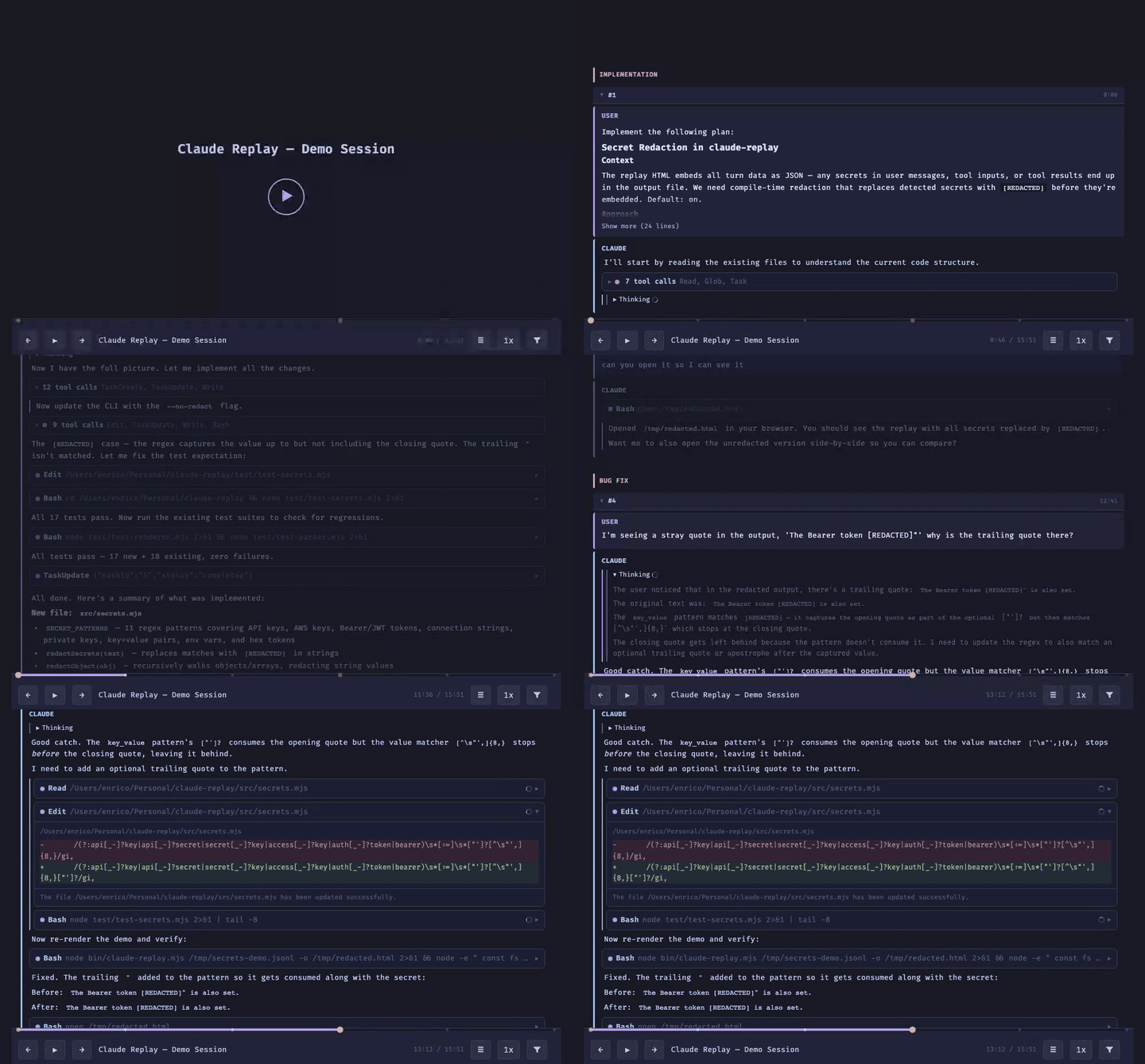
Claude Code, Cursor, Codex CLI, Gemini CLI, and OpenCode store conversation transcripts on disk. claude-replay auto-detects the format and converts them into visual replays suitable for blog posts, demos, and documentation.
| Source | Transcript location |
|---|---|
| Claude Code | ~/.claude/projects/<project>/ |
| Cursor | ~/.cursor/projects/<project>/agent-transcripts/<id>/ |
| Codex CLI | ~/.codex/sessions/<date>/ |
| Gemini CLI | ~/.gemini/tmp/<projectHash>/chats/ |
| OpenCode | Export via opencode export <sessionID> |
Features
- Self-contained HTML output (no dependencies)
- Interactive playback with speed control
- Collapse/expand tool calls and thinking blocks (Claude's internal reasoning traces)
- Bookmarks / chapters
- Secret redaction before export
- Multiple color themes
- Terminal-style bottom-to-top scroll
- File activity sidebar — see which files were touched and navigate to their tool calls
- Embeddable via iframe
- Live watch mode — monitor agent sessions in real time (
--serve --watch) - Web-based editor UI for visual session editing and preview
Use cases
claude-replay is useful for:
- Blog posts — show AI-assisted development sessions interactively
- Documentation — embed AI debugging sessions or code walkthroughs
- Demos — share reproducible sessions without video
- Bug reports — attach a replay instead of long logs
- Teaching — step through AI reasoning and tool usage
- Live monitoring — watch agent sessions in real time on remote machines or containers
Installation
npm install -g claude-replayOr run directly with npx (zero install):
npx claude-replayDocker
docker run --rm --init -p 7331:7331 \
  -v ~/.claude/projects:/root/.claude/projects:ro \
  ghcr.io/es617/claude-replay
Open http://localhost:7331 for the web editor. Session directories are mounted read-only.
For CLI usage:
docker run --rm --init \
  -v ~/.claude/projects:/root/.claude/projects:ro \
  -v $(pwd):/output \
  ghcr.io/es617/claude-replay \
  /root/.claude/projects/my-project/session.jsonl -o /output/replay.html
Quick start
# Launch the web editor (default)
claude-replay

# Generate a replay by session ID (auto-finds the file)
claude-replay abc123def456 -o replay.html

# Or pass the full path
claude-replay ~/.claude/projects/-Users-me-myproject/session-id.jsonl -o replay.html

# Chain multiple sessions into one replay
claude-replay session1-id session2-id -o combined.html
Running claude-replay with no arguments opens a browser-based editor that auto-discovers your Claude Code and Cursor sessions. From there you can browse, edit, preview, and export replays visually.
For CLI usage, you can pass just a session ID — claude-replay will search ~/.claude/projects/, ~/.cursor/projects/, ~/.codex/sessions/, and ~/.gemini/tmp/ to find the matching file. Or pass the full path to a session file directly.
Cursor
Cursor transcripts are also supported — the format is auto-detected. Cursor transcripts don't include timestamps, so playback uses paced timing by default (see Timing modes).
claude-replay ~/.cursor/projects/*/agent-transcripts/<id>/<id>.jsonl -o replay.htmlCodex CLI
Codex CLI (OpenAI) transcripts are also supported — the format is auto-detected. Codex tool calls (exec_command, apply_patch) are mapped to their Claude Code equivalents (Bash, Edit/Write) so they render with the same diff views and command previews.
claude-replay ~/.codex/sessions/2026/03/12/rollout-<id>.jsonl -o replay.htmlGemini CLI
Gemini CLI transcripts are also supported — the format is auto-detected. Gemini stores sessions as single JSON files (not JSONL) with inline thinking blocks and tool calls. Tool names are mapped to their Claude Code equivalents (run_shell_command → Bash, read_file → Read, etc.) for consistent rendering.
claude-replay ~/.gemini/tmp/<projectHash>/chats/session-<id>.json -o replay.htmlYou can also search by session ID:
claude-replay <session-id> -o replay.html # searches ~/.gemini/tmp/ automaticallyOpenCode
OpenCode transcripts are supported — the format is auto-detected. OpenCode stores sessions in a SQLite database, so you'll need to export the session first using the OpenCode CLI. Thinking/reasoning blocks are rendered natively.
# Export a session from OpenCode, then replay it
opencode export <sessionID> > session.jsonl
claude-replay session.jsonl -o replay.html
Web Editor
The default experience. Launch it by running claude-replay with no arguments:
claude-replay
claude-replay --port 8080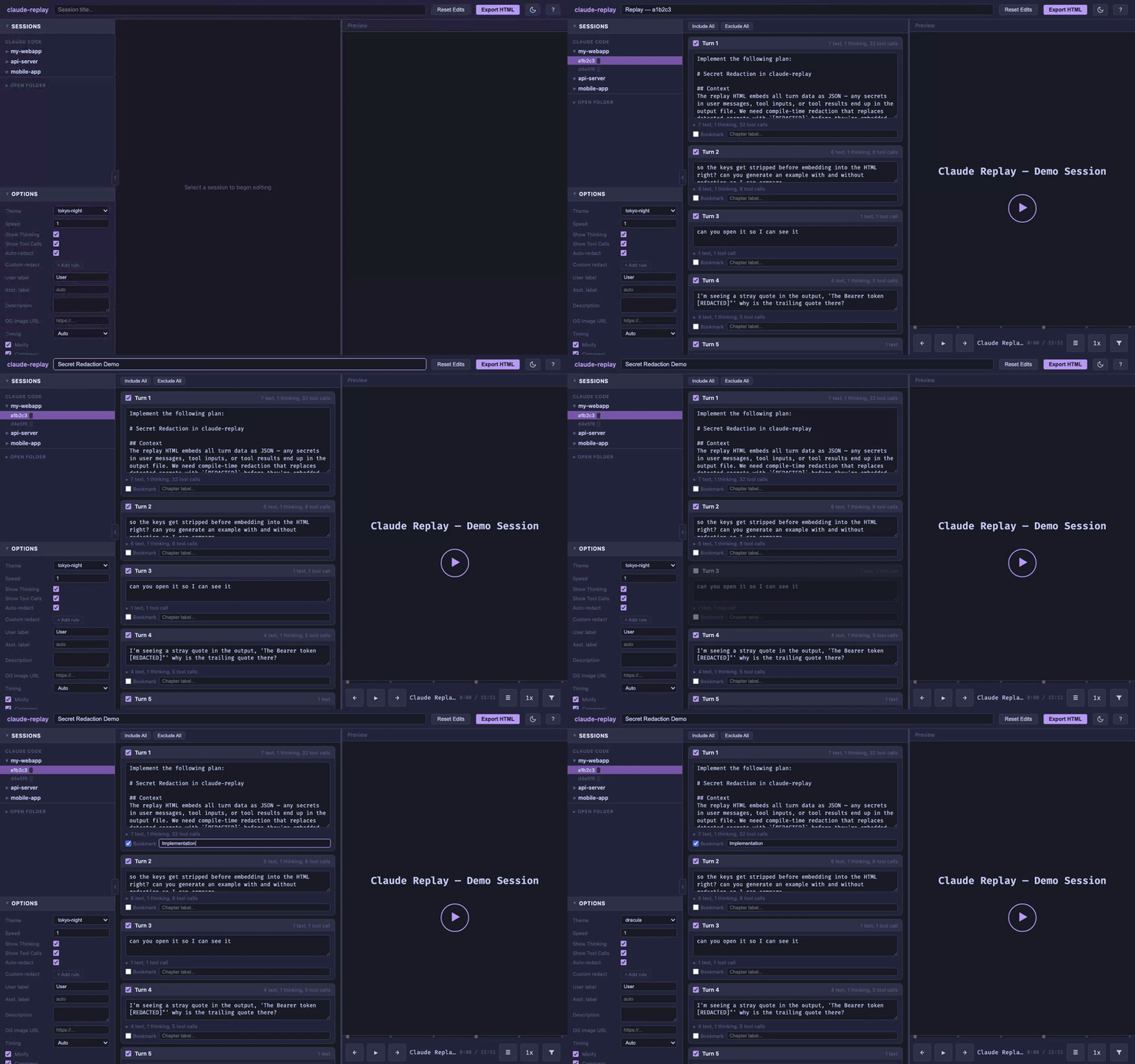
The editor provides:
- Session browser — auto-discovers sessions from
~/.claude/projects/,~/.cursor/projects/,~/.codex/sessions/, and~/.gemini/tmp/, plus a folder navigator for session files stored elsewhere - Turn editor — include/exclude turns, edit user prompts, expand assistant blocks (read-only), add bookmarks
- Options panel — theme, speed, thinking/tool call toggles, redaction rules, labels
- Live preview — updates as you edit, renders the same output as the CLI
- Export — download the final HTML replay
The editor runs a local server on 127.0.0.1 (localhost only, not exposed to the network). It never modifies your original JSONL files — all edits are held in memory and only affect the exported output.
Usage
claude-replay [--port N]                        Launch the web editor (default)
claude-replay <input> [input2...] [options]     Generate replay from CLI
claude-replay extract <replay.html> [-o output.jsonl] [--format jsonl|json]
Each <input> can be a session file path or a session ID. If it is not an existing file path, it is treated as a session ID. claude-replay searches ~/.claude/projects/, ~/.cursor/projects/, ~/.codex/sessions/, and ~/.gemini/tmp/ for a matching session file. You can find your current session ID in Claude Code by running /status.
Multiple inputs are concatenated into a single replay (up to 20). When all sessions have timestamps, turns are sorted chronologically; otherwise command-line order is used. This is useful when accepting a plan creates a new session — chain the sessions to get the full story in one replay.
Commands
editor [file|session-id]
Launches the web-based replay editor. Optionally pass a file path or session ID to auto-load it on startup. See Web Editor above.
claude-replay editor                              # empty editor
claude-replay editor ~/.claude/projects/.../session.jsonl  # auto-load file
claude-replay editor abc123                       # auto-load by session ID
extract
Extract the embedded turn data from a previously generated replay HTML file. Outputs JSONL by default (one turn per line, bookmarks embedded). Use --format json for the legacy JSON format.
claude-replay extract replay.html -o session.jsonl            # JSONL (default)
claude-replay extract replay.html -o data.json --format json  # JSON

# Round-trip: extract, then regenerate with different options
claude-replay extract replay.html -o session.jsonl
claude-replay session.jsonl -o new-replay.html --theme dracula
The extracted JSONL can be fed back into claude-replay to regenerate with different options. Bookmarks are preserved as a bookmark field on each turn.
Options
| Flag | Description |
|---|---|
| -o, --output FILE | Output HTML file (default: stdout) |
| --turns N-M | Only include turns N through M |
| --exclude-turns N,N,... | Exclude specific turns by index |
| --from TIMESTAMP | Start time filter (ISO 8601) |
| --to TIMESTAMP | End time filter (ISO 8601) |
| --speed N | Initial playback speed, e.g. 2.0 (default: 1.0) |
| --no-thinking | Hide thinking blocks by default |
| --no-tool-calls | Hide tool call blocks by default |
| --font-size SIZE | Font size: small, normal, large (default: normal) |
| --mark "N:Label" | Add a bookmark/chapter at turn N (repeatable) |
| --bookmarks FILE | JSON file with bookmarks [{turn, label}] |
| --no-auto-redact | Disable automatic secret redaction |
| --redact "text" | Replace all occurrences of text with [REDACTED] (repeatable) |
| --redact "text=repl" | Replace all occurrences of text with custom replacement (repeatable) |
| --title TEXT | Page title (default: derived from input path) |
| --description TEXT | Meta description for link previews (default: Interactive AI session replay) |
| --og-image URL | OG image URL for link previews (default: hosted default). A default image is always included; to use your own, host it and pass the URL. |
| --user-label NAME | Label for user messages (default: User) |
| --assistant-label NAME | Label for assistant messages (default: auto-detected) |
| --timing MODE | Timestamp mode: auto, real, paced (default: auto) |
| --theme NAME | Built-in theme (default: tokyo-night) |
| --theme-file FILE | Custom theme JSON file (overrides --theme) |
| --no-minify | Use unminified template (default: minified if available) |
| --no-compress | Embed raw JSON instead of compressed data (for older browsers) |
| --open | Open the generated HTML in the default browser |
| --serve | Serve the replay on a local HTTP server instead of writing to file |
| --watch | Watch input files for changes and auto-regenerate |
| --list-themes | List available built-in themes and exit |
| --port N | Port for the editor/serve server (default: 7331 editor, 7332 serve) |
Examples
# Replay turns 5 through 15 at 2x speed
claude-replay session.jsonl --turns 5-15 --speed 2.0 -o replay.html

# Filter by time range
claude-replay session.jsonl --from "2026-02-26T02:00" --to "2026-02-26T03:00" -o replay.html

# Clean output: no thinking, no tools
claude-replay session.jsonl --no-thinking --no-tool-calls -o replay.html

# Use a different theme
claude-replay session.jsonl --theme dracula -o replay.html

# Pipe to stdout for further processing
claude-replay session.jsonl --turns 1-5 > snippet.html

# Chain multiple sessions into one replay
claude-replay abc123 def456 ghi789 -o combined.html

# Live preview: serve and auto-reload on changes
claude-replay session.jsonl --serve --watch

# Serve without watching (one-shot preview)
claude-replay session.jsonl --serve

# Watch and write to file on changes
claude-replay session.jsonl --watch -o replay.html
Timing modes
The --timing flag controls how playback speed is derived:
| Mode | Behavior |
|---|---|
| auto | Uses real timestamps if available, falls back to paced (default) |
| real | Uses original timestamps from the transcript |
| paced | Generates synthetic timing based on content length |
paced mode creates presentation-style timing — similar to how slides appear in a presentation or subtitles are timed in a video. Block reveal speed scales with text length. This is the default for Cursor transcripts (which have no timestamps) and can also be used with Claude Code transcripts for smoother demos:
# Use paced timing even for Claude Code transcripts
claude-replay session.jsonl --timing paced -o demo.html
Player controls
The generated HTML file is a fully self-contained interactive player:
- Play/Pause — auto-advances through turns with block-by-block animation
- Step forward/back — navigate one block at a time within turns
- Progress bar — click to jump to any point; session timer shows elapsed/total time
- Speed control — 0.5x to 5x playback speed
- Toggle checkboxes — show/hide thinking blocks and tool calls
Keyboard shortcuts
| Key | Action |
|---|---|
| Space / K | Play / Pause |
| → / L | Step forward (block) |
| ← / H | Step back (block) |
| Shift+→ / Shift+L | Jump to next turn |
| Shift+← / Shift+H | Jump to previous turn |
| T | Jump to next thinking/tool block |
| Shift+T | Jump to previous thinking/tool block |
Themes
Built-in themes
claude-replay --list-themesAvailable themes: tokyo-night (default), monokai, solarized-dark, github-light, dracula, bubbles.
Custom themes
Create a JSON file with CSS color values:
{
  "bg": "#0d1117",
  "bg-surface": "#161b22",
  "bg-hover": "#1c2128",
  "text": "#e6edf3",
  "text-dim": "#7d8590",
  "text-bright": "#ffffff",
  "accent": "#ff7b72",
  "accent-dim": "#c9514a",
  "green": "#3fb950",
  "blue": "#58a6ff",
  "orange": "#d29922",
  "red": "#f85149",
  "cyan": "#39d2c0",
  "border": "#30363d",
  "tool-bg": "#0d1117",
  "thinking-bg": "#0b0f14"
}
claude-replay session.jsonl --theme-file my-theme.json -o replay.htmlAny missing keys are filled from the tokyo-night defaults, so you only need to specify the colors you want to change.
For advanced customization, add an extraCss key with arbitrary CSS rules to override layout, fonts, or any other styles:
{
  "bg": "#ffffff",
  "text": "#1c1e21",
  "extraCss": ".assistant-text { border-radius: 12px; border: 1px solid #ddd; }"
}
See the built-in bubbles theme for an example of a fully custom layout using extraCss.
| Variable | Used for |
|---|---|
| bg | Main background |
| bg-surface | Controls bar, elevated surfaces |
| bg-hover | Hover states |
| text | Primary text |
| text-dim | Secondary text, timestamps, labels |
| text-bright | User input, emphasized text |
| accent | Prompt symbol, progress bar, active states |
| accent-dim | Active button backgrounds |
| green | Tool results |
| blue | Tool call indicators |
| orange | (reserved for warnings) |
| red | (reserved for errors) |
| cyan | Tool names |
| border | Borders and separators |
| tool-bg | Tool call block background |
| thinking-bg | Thinking block background |
Embedding
The output is a single HTML file with no external dependencies. Embed it in blog posts or docs with an iframe:
<iframe src="replay.html" width="100%" height="600" style="border: 1px solid #333; border-radius: 8px;"></iframe>How it works
- Parser reads the JSONL transcript line by line, handling Claude Code's streaming format (where a single assistant message appears as multiple lines with incremental content blocks)
- Turns are grouped as: user message + assistant response (text, tool calls, thinking blocks) + tool results
- Renderer compresses the parsed turns (deflate + base64) and injects them into the HTML template
- The player is vanilla JS — no frameworks, no external requests. Data is decompressed at load time using the browser-native
DecompressionStreamAPI
Output optimization
Generated HTML files use two layers of optimization (zero external dependencies):
- Minified CSS/JS — the player template is minified with esbuild (mangled variable names, whitespace removed). Use
--no-minifyfor readable output. - Compressed data — transcript JSON is deflate-compressed and base64-encoded, typically reducing output size by ~60-70%. The browser decompresses it natively at load time using
DecompressionStream(Chrome 80+, Firefox 113+, Safari 16.4+). For older browsers, use--no-compressto embed raw JSON.
Development
To rebuild the minified template after editing template/player.html:
npm install    # installs esbuild (devDependency)
npm run build  # generates template/player.min.html
The minified template is built in CI and included in npm releases. Without it, the CLI falls back to the unminified template automatically.
Secret redaction
By default, claude-replay scans all embedded text for common secret patterns and replaces them with [REDACTED] before they are written into the output HTML. This means secrets from your session (API keys, tokens, connection strings, etc.) never end up in the generated file.
Detected patterns include:
- API keys (
sk-...,sk-ant-...,key-...) - AWS access key IDs (
AKIA...) - Bearer and JWT tokens
- Database connection strings (
postgres://...,mongodb://..., etc.) - Private key blocks (
-----BEGIN ... PRIVATE KEY-----) - Generic key/value secrets (
api_key=...,auth_token: ...) - Environment variable secrets (
PASSWORD=...,TOKEN=...) - Long hex tokens (40+ characters)
Important: Pattern-based redaction is a best-effort safety net — it cannot catch every possible secret format. Always review the generated HTML before sharing publicly.
To disable redaction (e.g. for internal/private replays):
claude-replay session.jsonl --no-auto-redact -o replay.htmlSupported transcript formats
Claude Code
One JSON object per line with a type field (user, assistant, system, progress, etc.). Includes timestamps, thinking blocks, and tool calls with results.
Cursor
One JSON object per line with a top-level role field. No timestamps. Thinking appears as inline text. The format is auto-detected — no flags needed.
Codex CLI
Event-based JSONL with typed events (session_meta, response_item, event_msg, etc.). Includes timestamps. Tool calls (exec_command, apply_patch) are mapped to Claude Code equivalents for consistent rendering. Codex's encrypted reasoning blocks are skipped; commentary messages are shown as thinking blocks. The format is auto-detected — no flags needed.
Gemini CLI
Single JSON file with a sessionId field and a messages array containing user and gemini typed entries. Includes timestamps, inline thinking blocks (thoughts), and tool calls with nested results. Tool names (run_shell_command, read_file, edit_file, etc.) are mapped to Claude Code equivalents for consistent rendering. The format is auto-detected — no flags needed.
Requirements
- Node.js 18+
- Zero runtime dependencies (esbuild is a dev-only dependency for building the minified template)
Privacy
Replay files embed the full session transcript, including source code, file paths, tool inputs/outputs, and thinking traces. Review the generated HTML before sharing publicly — it may contain proprietary code, internal paths, or other sensitive information. Secret redaction (enabled by default) catches common credential patterns but does not filter code or file contents.
The transcript data is stored as a compressed blob inside the HTML file. Editing the player JavaScript to hide or filter turns only affects rendering — the original data remains in the blob and can be recovered. To exclude sensitive content, use the CLI flags at generation time (e.g. --turns, --exclude-turns). Use --redact to strip specific strings (usernames, paths, project names) at generation time. Always review the generated replay before sharing publicly.