
claude-sdk
v0.1.13
Published
Claude SDK: manage Solana wallets with an AI agent
Downloads
120

Maintainers
 claudeliquid
Readme

Claude SDK
SDK for managing Solana wallets with an AI agent (Claude).
Goal: give an AI agent a safe way to propose wallet actions (read balance, build tx, send tx), while private keys stay local and every action can be validated and confirmed.
Install
npm i claude-sdkQuick start
1) Check RPC + ask agent for a plan
import { Connection } from "@solana/web3.js";
import { ClaudeAgent } from "claude-sdk";

const conn = new Connection("https://api.devnet.solana.com");
console.log("slot:", await conn.getSlot());

const agent = new ClaudeAgent({ apiKey: process.env.CLAUDE_API_KEY ?? "dummy" });
console.log(await agent.decide("check balance"));
2) Read wallet balance (keys stay local)
import { Connection } from "@solana/web3.js";
import { keypairFromSource, getBalanceLamports } from "claude-sdk";

const conn = new Connection("https://api.devnet.solana.com");

// DO NOT commit secrets
const payer = keypairFromSource({
  kind: "secretKeyBase58",
  secretKeyBase58: process.env.SOLANA_SECRET_BASE58!,
});

const bal = await getBalanceLamports(conn, payer.publicKey);
console.log("balance lamports:", bal);
Architecture
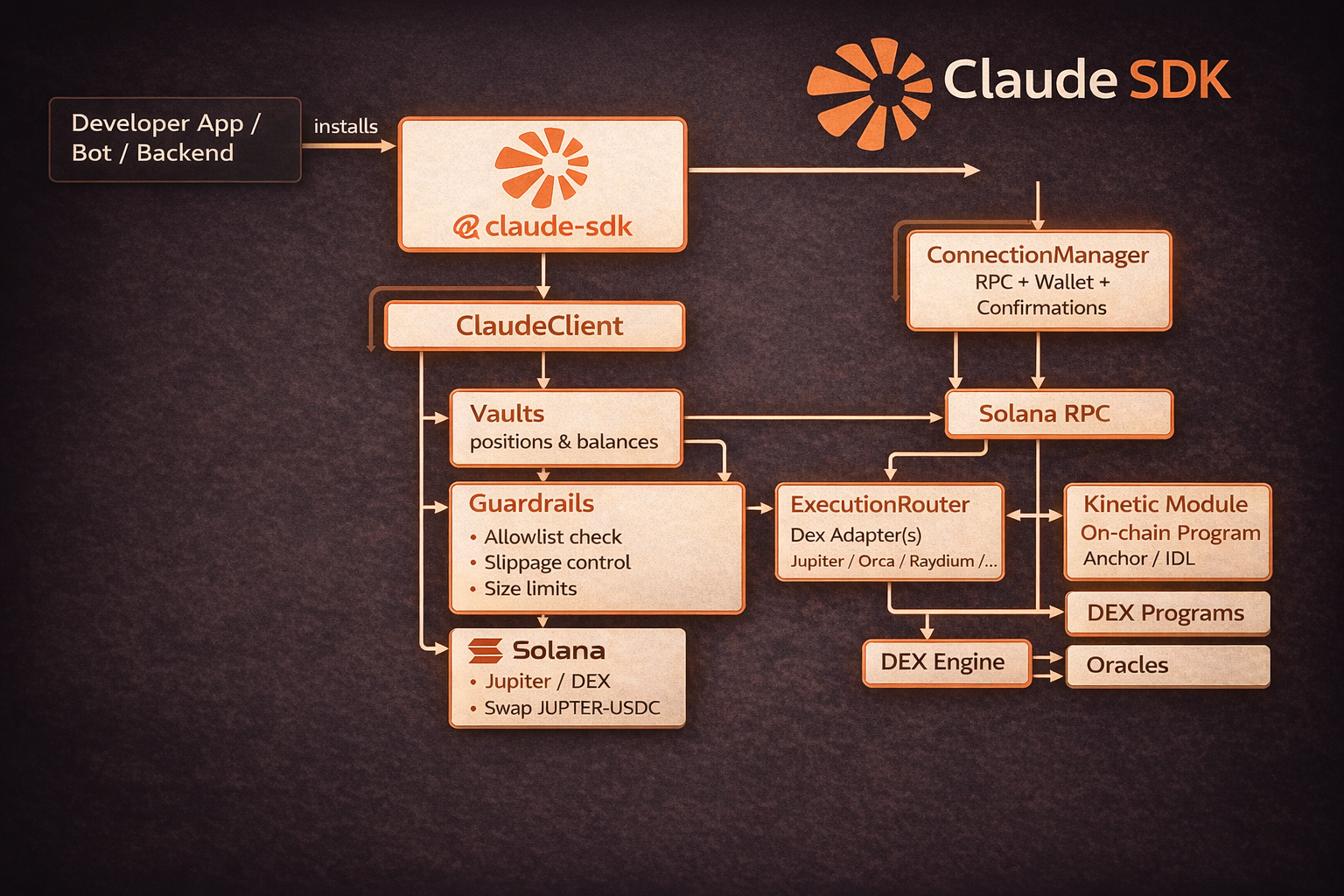
What this package provides
Solana helpers (local signing)
keypairFromSource(...)— load aKeypairfrom Base58 or JSON secret keygetBalanceLamports(conn, pubkey)— get SOL balance in lamportstransferSol(conn, payer, to, lamports)— send SOL (signs locally)
Agent interface (Claude)
ClaudeAgent— returns a structured decision (currently a stub; you can plug real Claude API calls)
Security model (important)
This SDK is designed with a strict rule:
- Private keys never go to Claude
- Claude returns a plan (structured actions)
- Your app validates the plan (limits, allowlists, confirmations)
- Only then a transaction is signed locally and sent
Recommended safety checks in your app:
- allowlist destination addresses
- max lamports per tx
- require manual confirmation for transfers
- run on devnet while testing
Memecoin trading
ClaudeSDK is designed to let Claude act as an AI trading agent on Solana, including memecoins.
How it works (high-level):
- The agent analyzes your instruction (e.g. “buy BONK for 0.1 SOL”).
- The agent returns a structured plan (token to buy/sell, amount, slippage, route).
- Your app validates the plan (limits, allowlists, confirmations).
- ClaudeSDK executes the swap via a DEX / aggregator integration (planned), then returns the transaction signature.
Important notes:
- Trading is risky. Memecoins are highly volatile.
- ClaudeSDK does NOT provide financial advice.
- You should use strict guardrails: max trade size, allowlist tokens, slippage caps, and manual confirmation.
Recommended guardrails for trading:
- Allowlist tokens (mints) that can be traded
- Max SOL per trade / max daily limit
- Max slippage (e.g. 0.5%–2%)
- Simulate transaction before sending
- Require manual confirmation for every swap (default)
Environment variables
Suggested env vars for examples:
CLAUDE_API_KEY— your Claude API key (when you connect real API calls)SOLANA_SECRET_BASE58— Base58 secret key for a test wallet (devnet)SOLANA_RPC_URL— custom RPC URL (optional)
Example:
export CLAUDE_API_KEY="..."
export SOLANA_SECRET_BASE58="..."
export SOLANA_RPC_URL="https://api.devnet.solana.com"
Roadmap
Planned:
- real Claude API integration (tool-calling / structured outputs)
- policy/guardrails module (limits, allowlists, confirmations)
- SPL token helpers (balances, transfers)
- transaction simulation before signing
- optional integrations (Phantom/Ledger) — no raw secret keys
- Swap module (Jupiter / DEX aggregator integration)
- Token discovery + validation (mint allowlist, decimals, freeze authority checks)
- Price/quote step before swap (expected out, price impact)
- Post-trade reporting (tx link, received amount, fees)
License
MIT