
claude-storehouse
v1.5.0
Published
A local web dashboard for your Claude Code setup. See, edit, switch on or off, and favorite every skill, agent, plugin, hook, MCP server, setting, and CLAUDE.md, global and per project.
Downloads
1,528

Maintainers
 sumonta056
Readme
npx claude-storehouseContents
- Why Claude Storehouse
- Features
- Live demo
- Install
- CLI options
- Keyboard shortcuts
- How on/off works
- Safety and privacy
- How it works
- Limitations
- Contributing
- Tests
- Changelog
- License
Why Claude Storehouse
After a few months with Claude Code you have dozens of skills, a handful of plugins from several marketplaces, hooks in two settings files, and MCP servers spread over ~/.claude.json and .mcp.json. The only views are the /plugin menu, /skills, and raw JSON.
- Everything in one place. Global and project items side by side, with a scope filter.
- One click instead of a JSON edit. Switches use the keys Claude Code itself reads.
- Nothing breaks. Every write makes a backup first, and every change can be undone.
- Nothing leaves your machine. A local server on
127.0.0.1, no account, no analytics.
Features
Dashboard and usage
- Counts for skills, agents, plugins, hooks, and MCP servers, with how many are on and off.
- API-equal cost of your Claude Code use, by model, from the session files in
~/.claude/projects. A tier card ranks your last 30 days from Bronze ($0) to Legend ($7,500), just for fun. - Tokens, sessions, prompt-cache savings, the current 5-hour block, the cost per day, and your top 3 projects by tokens.
- Session files give only token counts, tool names, and the skill, agent, or MCP server name of each call. Never prompts or message text.
- Your favorites, recent changes, and which Claude Code files this project has.
Skills and agents
- Global, project, and plugin skills and agents in one list.
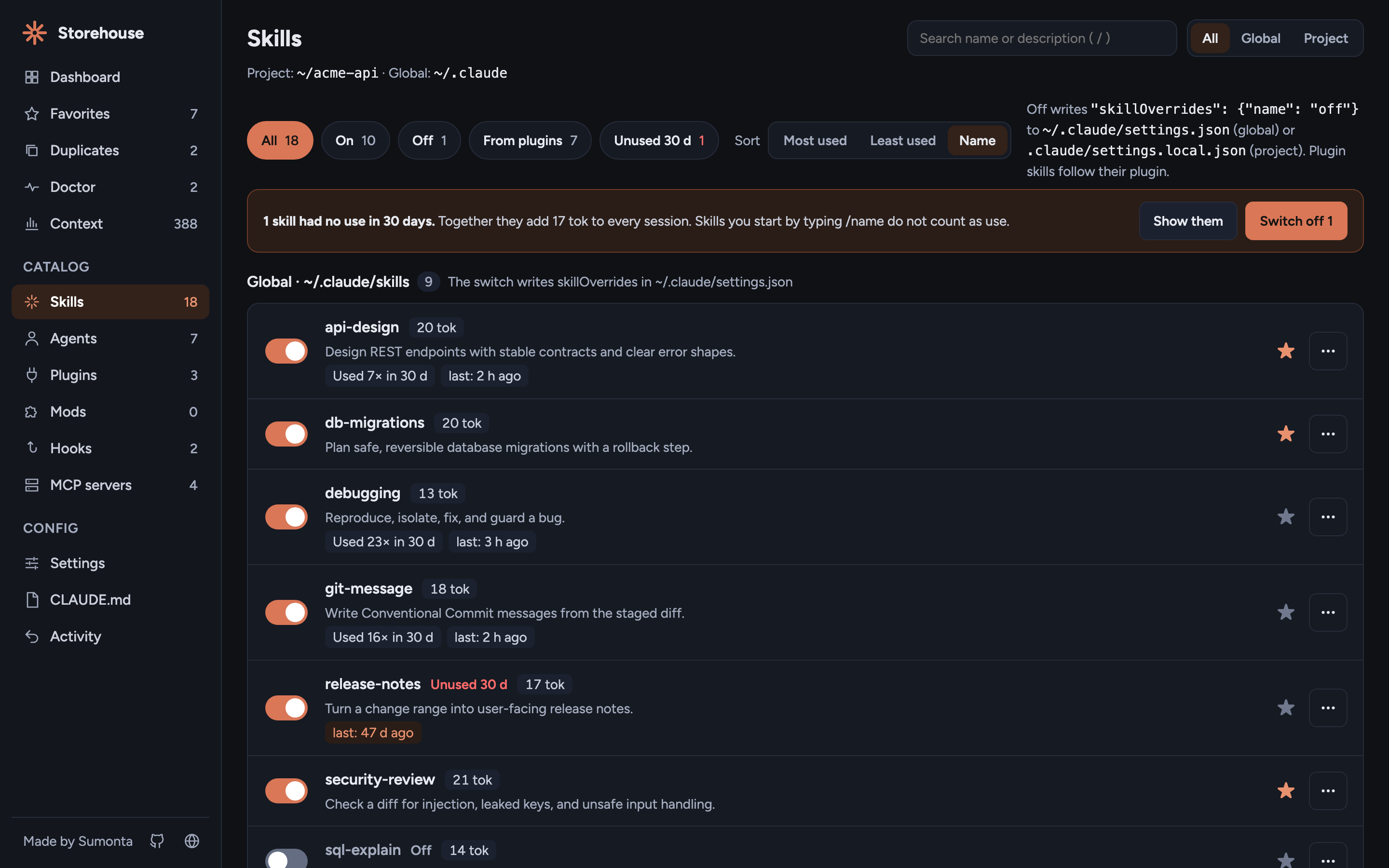
- Each switch shows the file it writes before you click. A toast names the file after.
- Filter by scope (All, Global, Project) and press
/to search. - Plugin skills show "via plugin X" and follow their plugin. Fork one to
~/.claude/skillsto make your own version. - Use in the last 30 days for each skill, agent, and MCP server, with an Unused 30 d filter, a sort by use, and "Switch off N" for the unused ones.
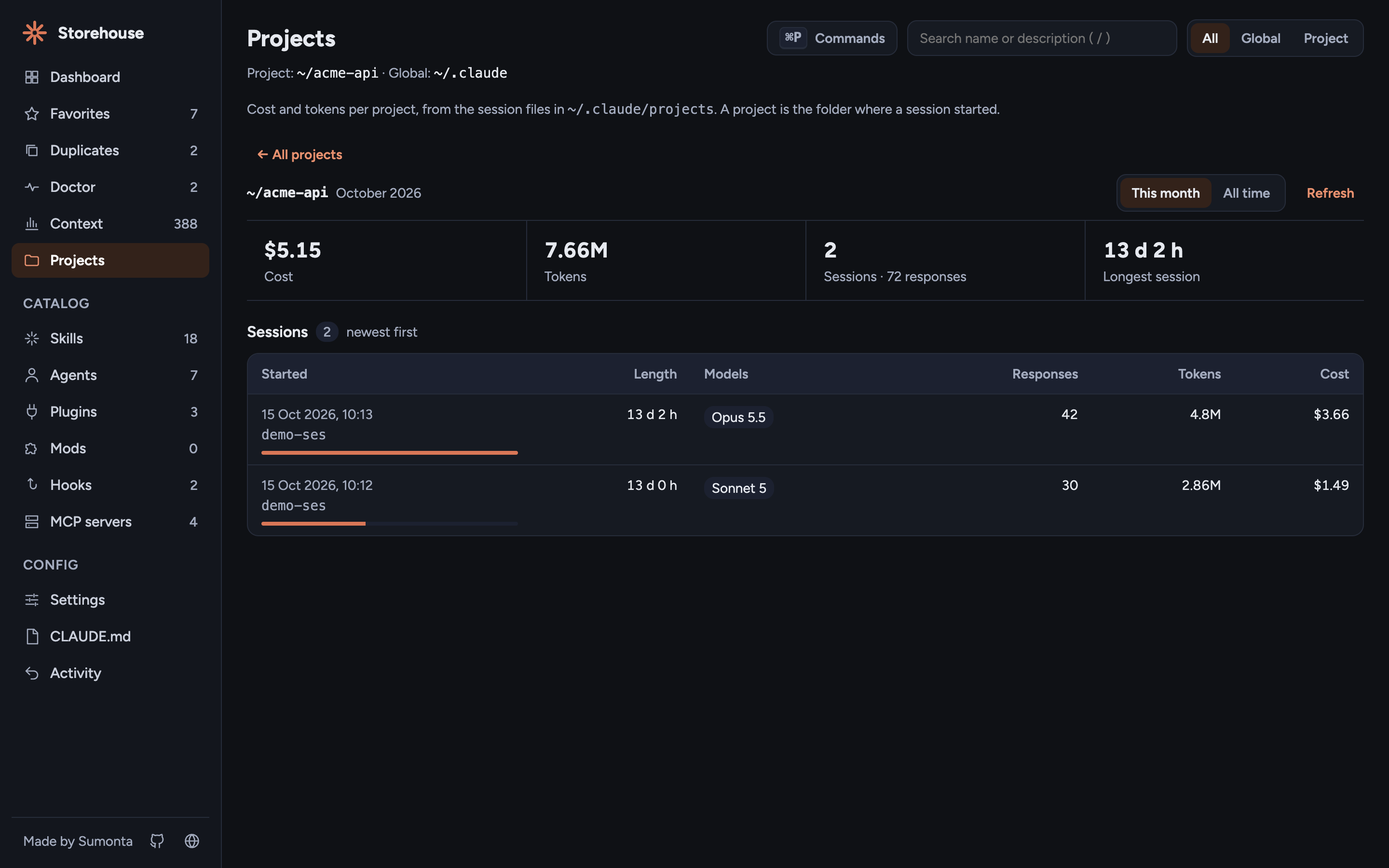
Cost by project and session
- The Dashboard shows your top 3 projects by tokens. Click a card to open that project.
- The Projects page lists every project with its sessions, tokens, cost, and last active time.
- Click a project to see each session: start time, length, models, responses, tokens, and cost.
- Switch between this month and all time. The search box filters project names.
- A session shows its id, not a title: Storehouse never reads prompts or message text.
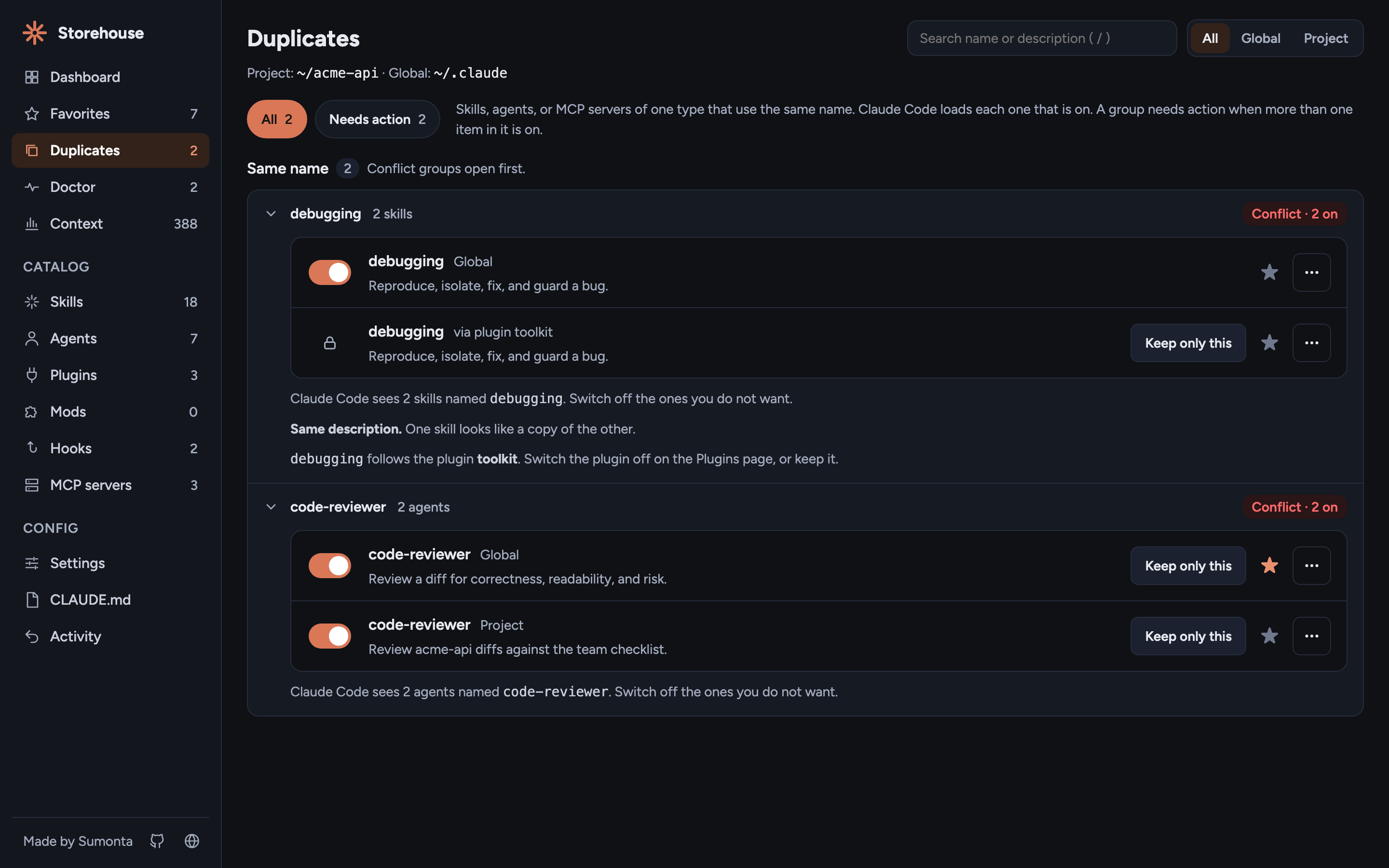
Find duplicates
- The Duplicates page groups skills, agents, and MCP servers of one type that use the same name.
- A group shows Conflict when more than one item in it is on, so you know Claude Code loads both.
- Keep only this switches off the other items in the group. Plugin items name the plugin that controls them.
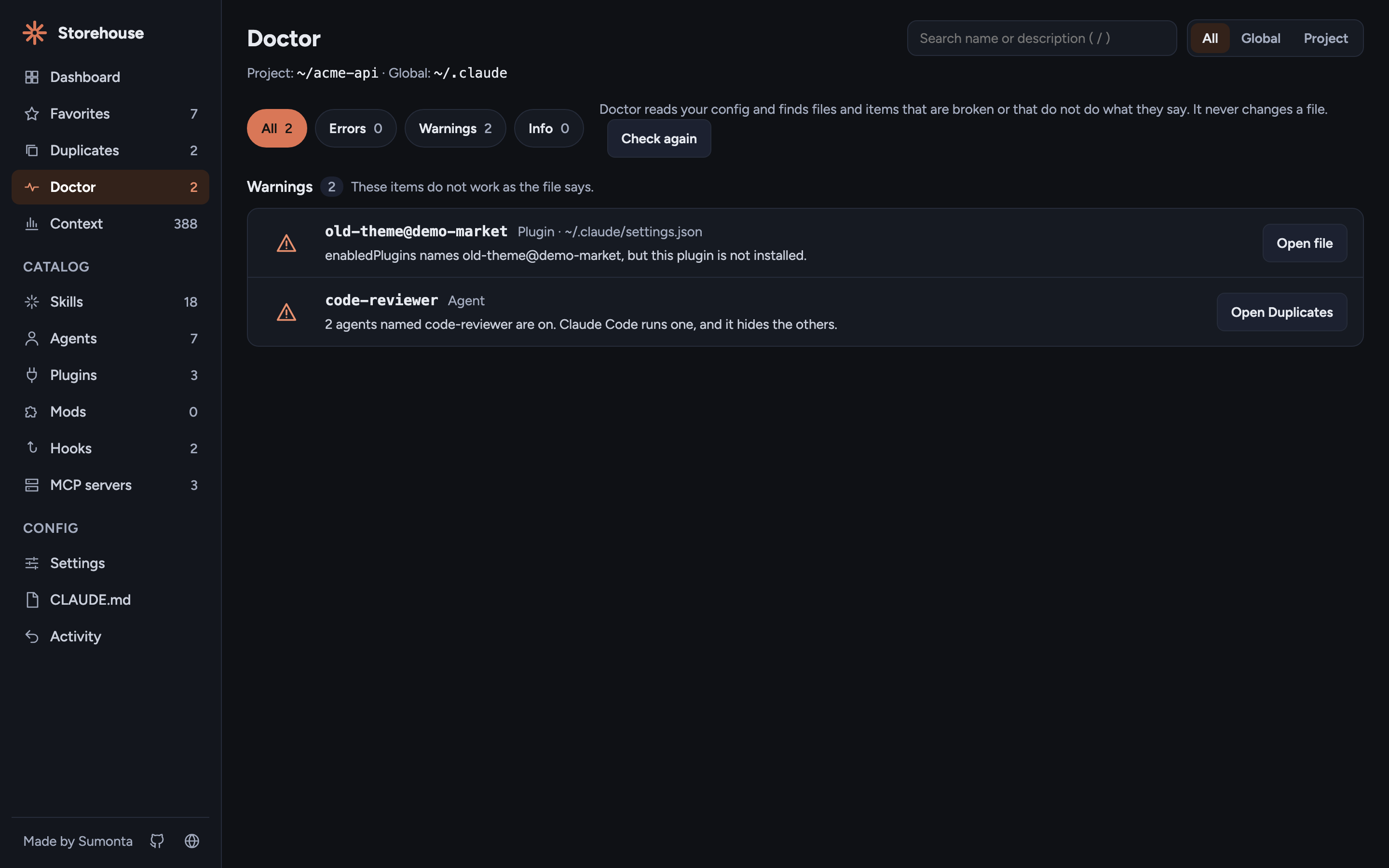
Check your setup with Doctor
- The Doctor page finds config that is broken or that does not do what it says. Claude Code often fails on these without a message.
- Errors: a config file with invalid JSON.
- Warnings: a hook script that does not exist, an MCP command not on the PATH of this terminal, an unset
${VAR}, a staleenabledPluginskey, askillOverrideskey for a plugin skill, and local or project items with one name that are all on. - Info: a
skillOverrideskey that matches no local skill, a skill or agent with no description, a broken symlink, and a CLAUDE.md longer than 200 lines. - Each row has Open file or Open item. Doctor never writes a file or runs a command.
Settings, and which file wins
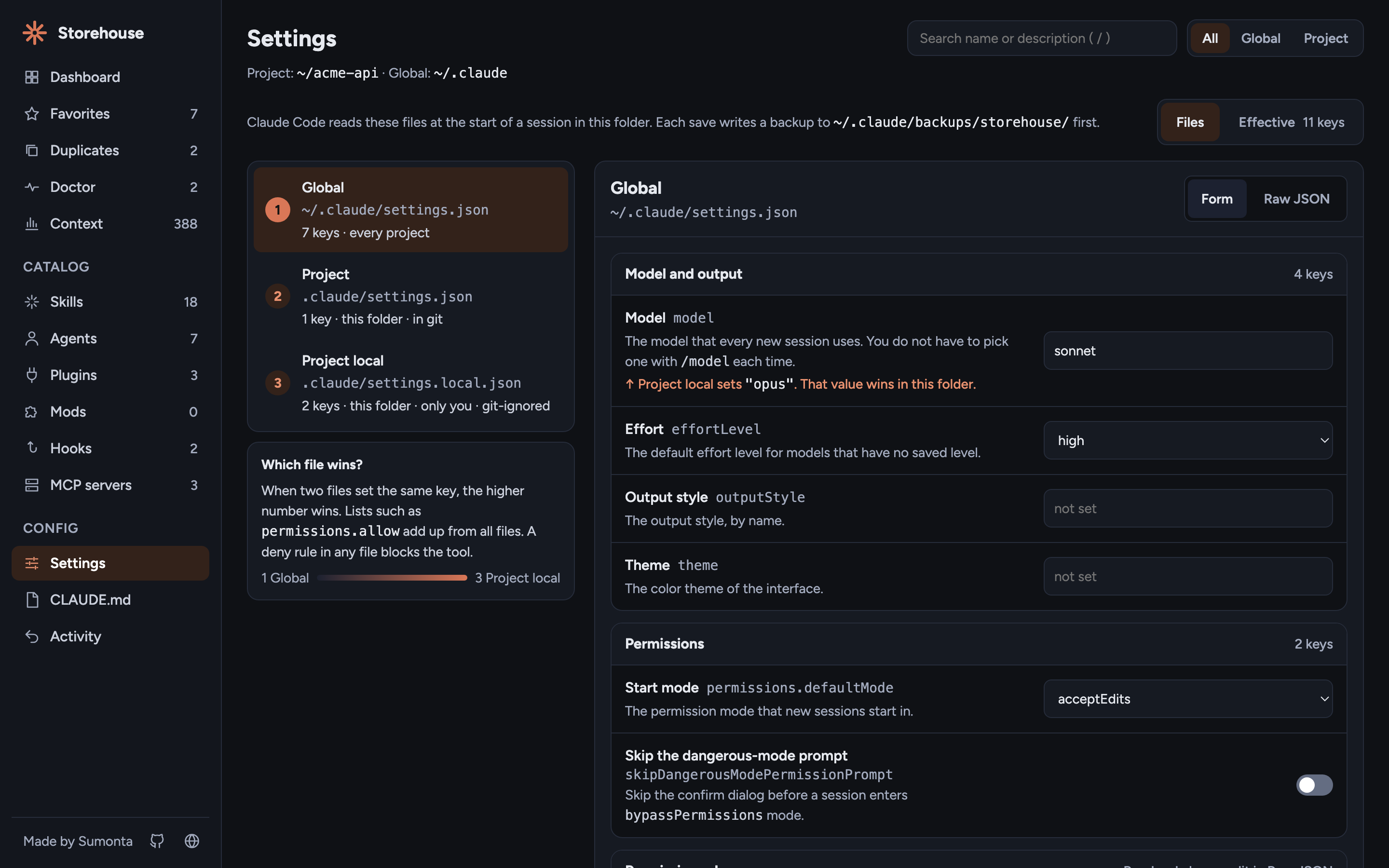
- The Settings page shows one file at a time: global
~/.claude/settings.json, project.claude/settings.json, and local.claude/settings.local.json. The higher number wins. - One form for all three files, with a plain name, one line of help, and the JSON key for each field. Raw JSON is one tab away.
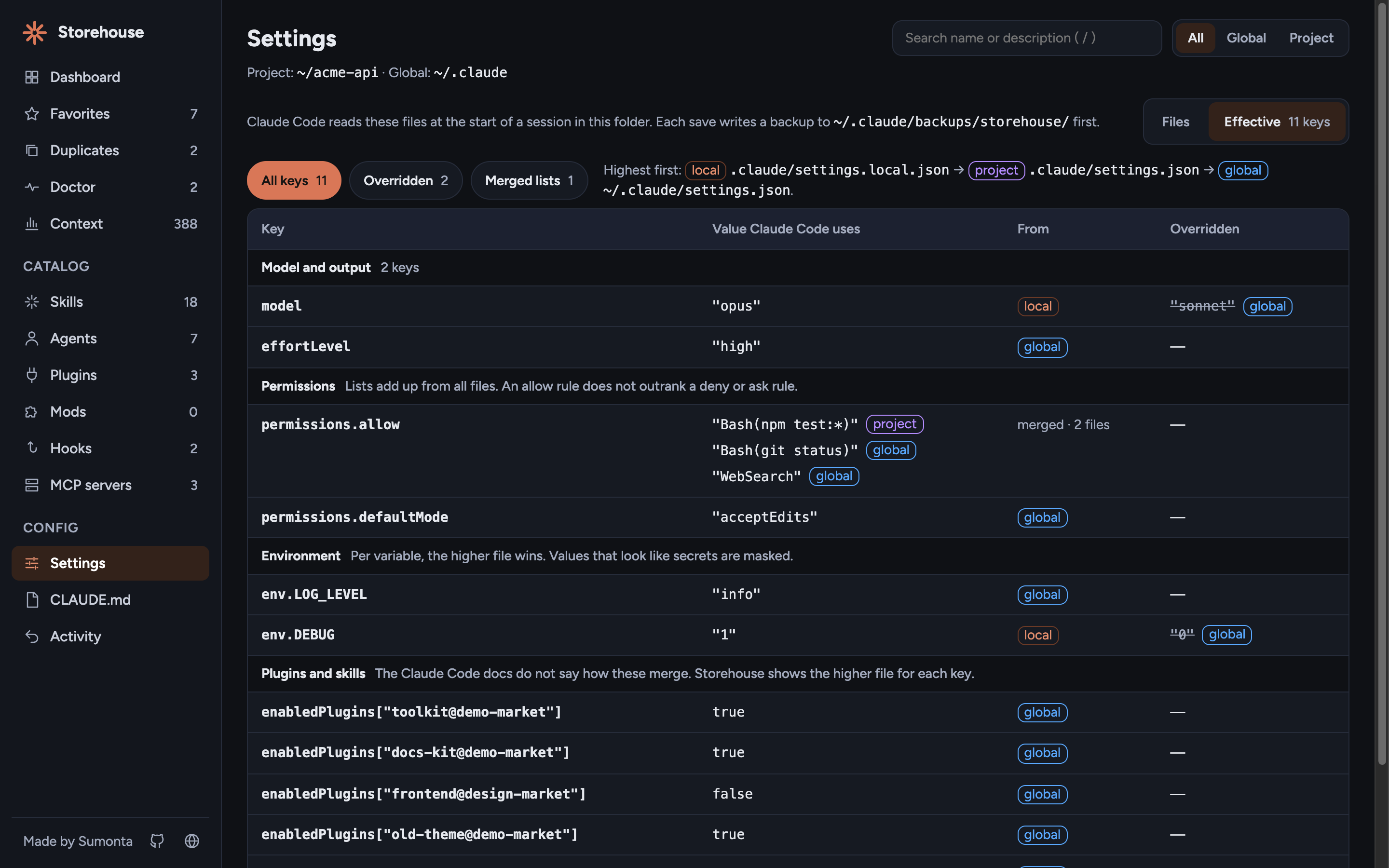
- The Effective view shows the value Claude Code uses for each key, the file it comes from, and the values it overrides.
- Lists such as
permissions.allowadd up from all files.autoandbypassPermissionsstart modes in a project file are marked ignored. - Env values that look like secrets are masked.
See context cost
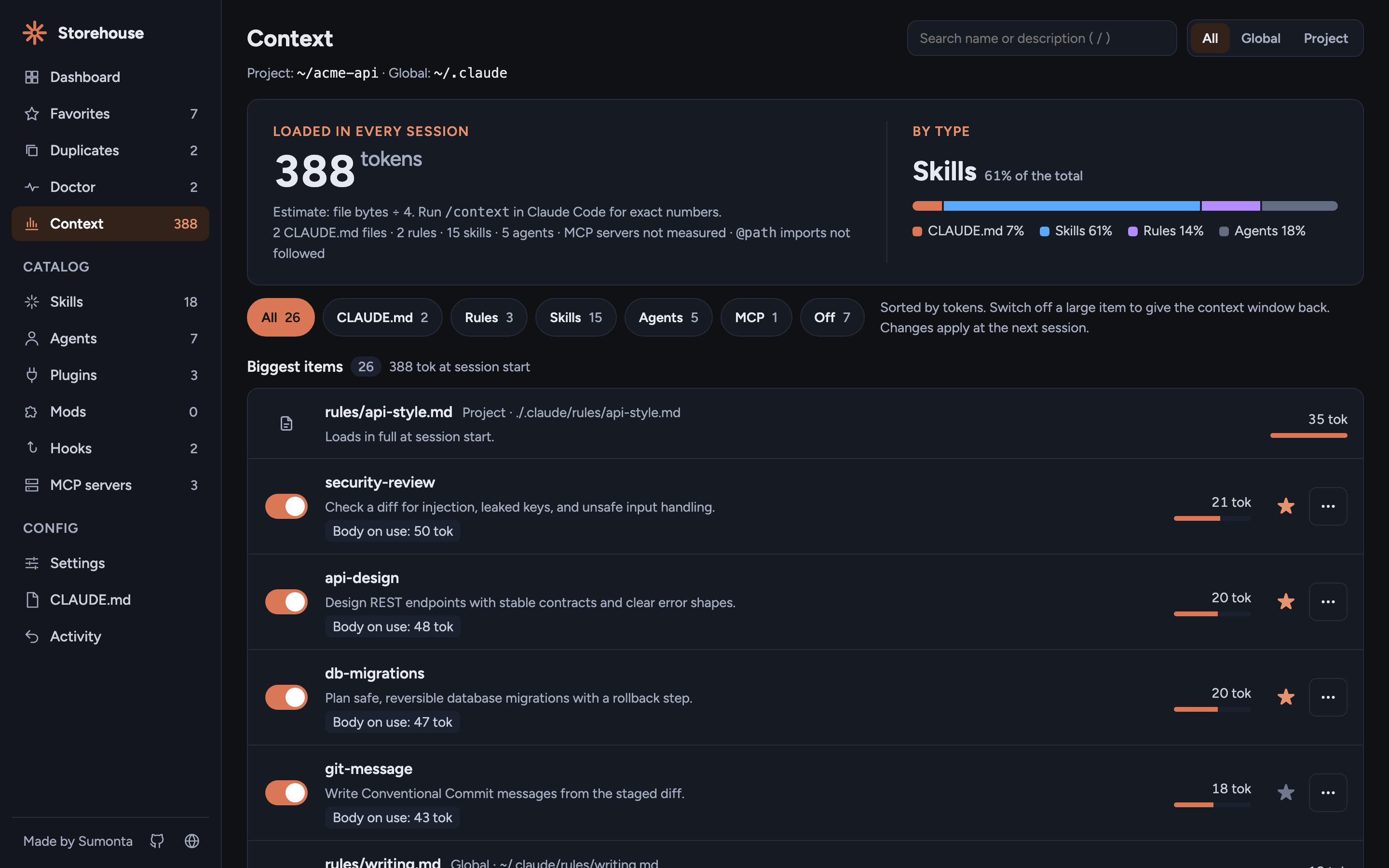
- The Context page estimates the tokens that each item adds to every session before you type a word.
- It counts CLAUDE.md files, rules in
.claude/rules/, and skill and agent descriptions. The estimate is file bytes ÷ 4. - The list shows only items that load. The Off chip lists switched-off items and the tokens they save.
- Items sort by tokens, each with its switch. Switch one off and the total goes down.
- Rows on the Skills and Agents pages show a small token chip.
- For exact numbers, run
/contextin Claude Code.
Favorites
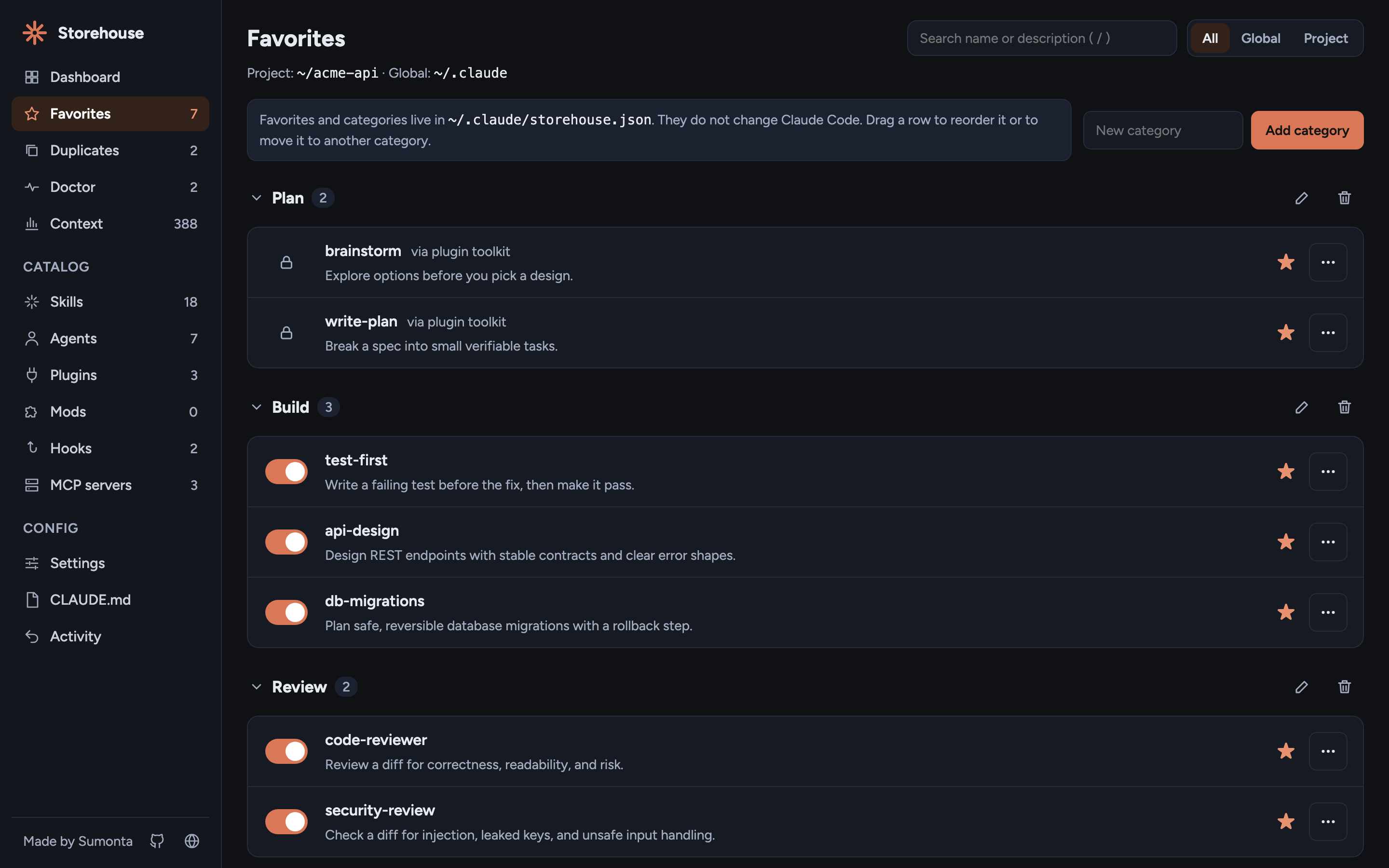
- Star the skills, agents, and plugins you use most, and drag them into order.
- Group them in your own categories. Rename and delete a category, with undo.
- A favorite stays listed when you switch it off, and shows "missing" when its file is gone.
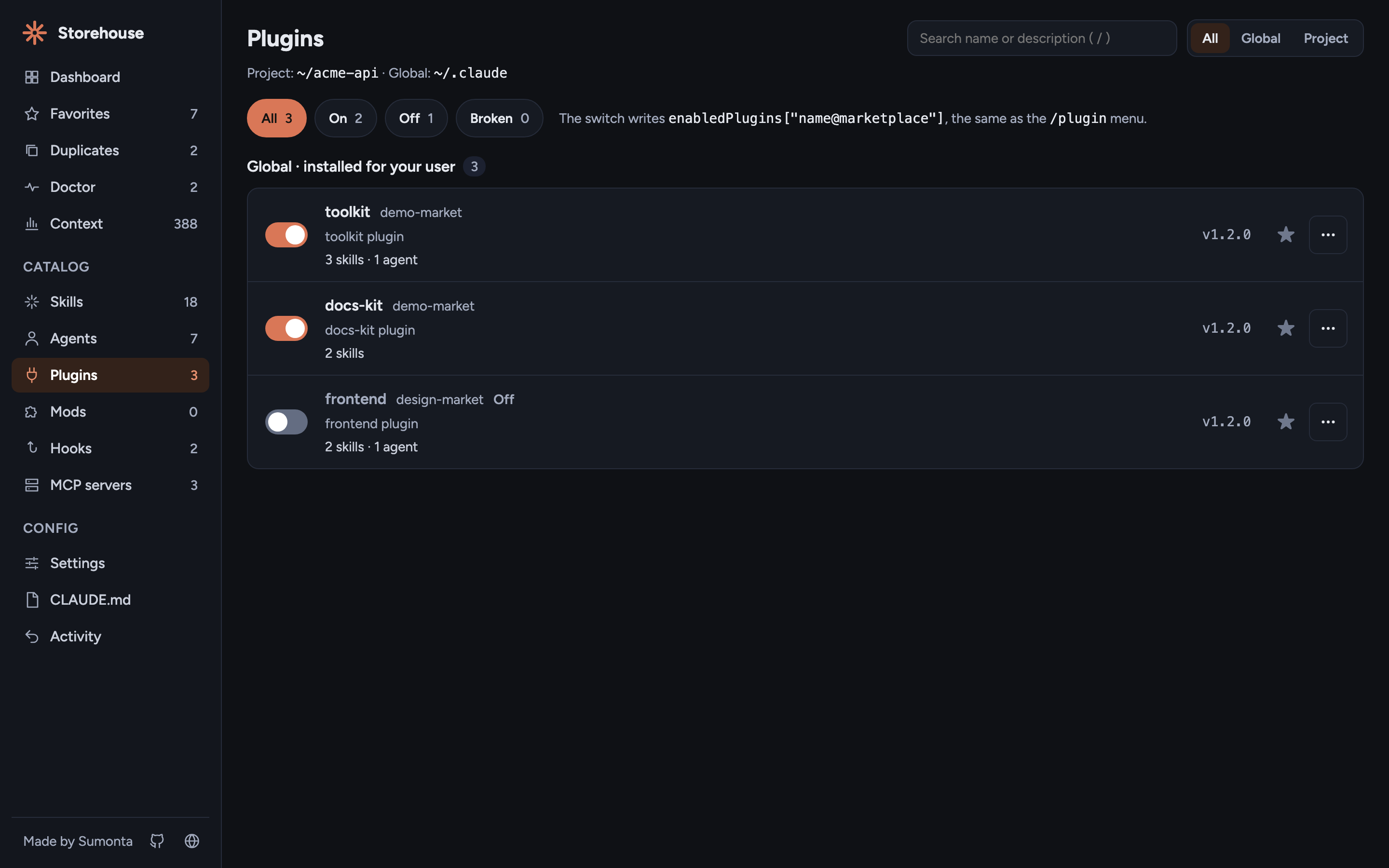
Plugins and mods
- Every installed plugin with its marketplace, version, skills, agents, hooks, and MCP servers.
- Switch a plugin off and all its parts go off with it.
- Uninstall runs
claude plugin uninstallfor you, with the right scope. - The Mods page shows installed mods and the mods in
~/.claude/dev-mods.
Hooks and MCP servers
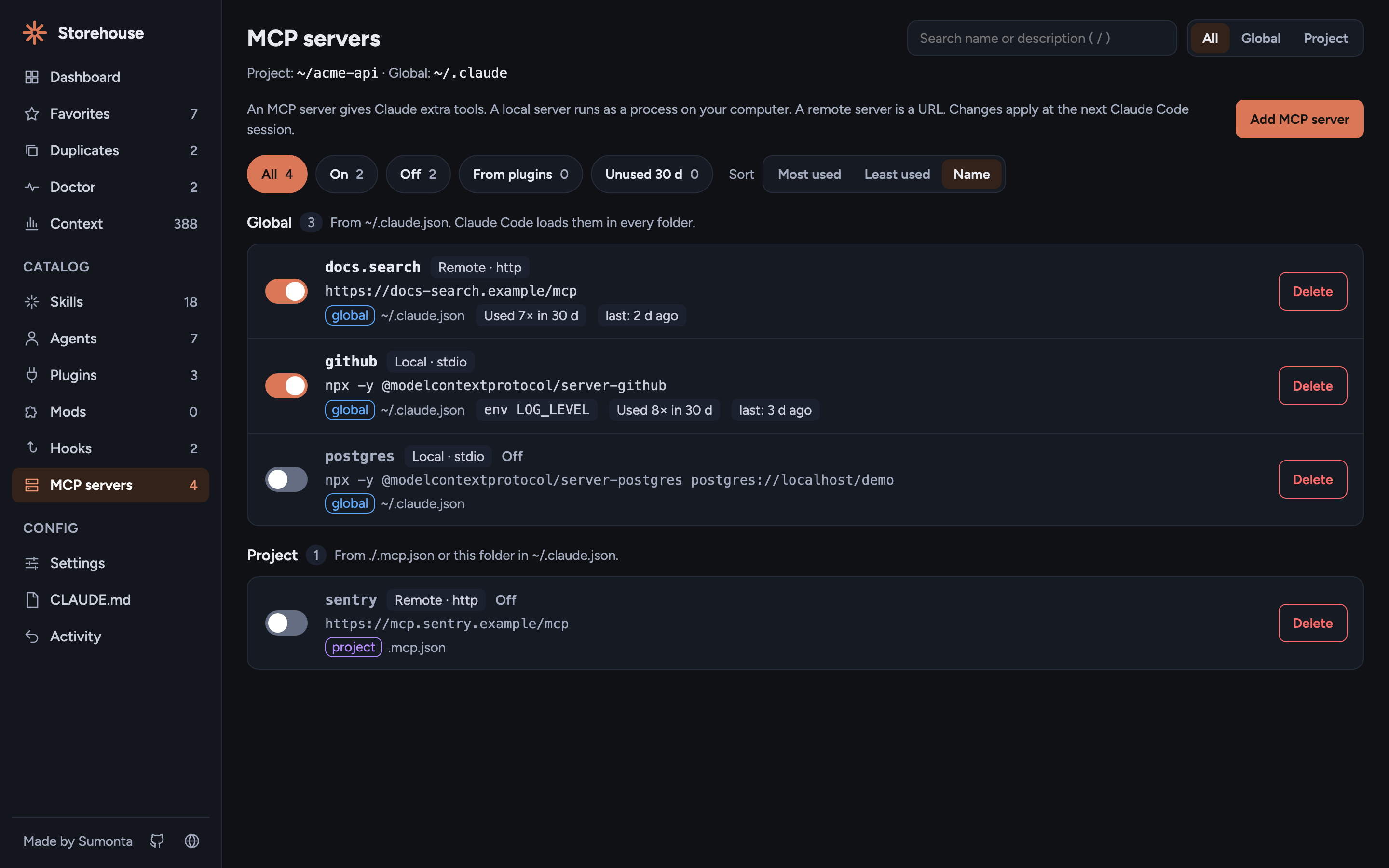
- Hooks from every settings file and plugin, by event and matcher.
- MCP servers from
~/.claude.json,.mcp.json, and plugins, with secrets masked. - Add a hook or an MCP server from a form, or remove one.
Edit in place, undo anything
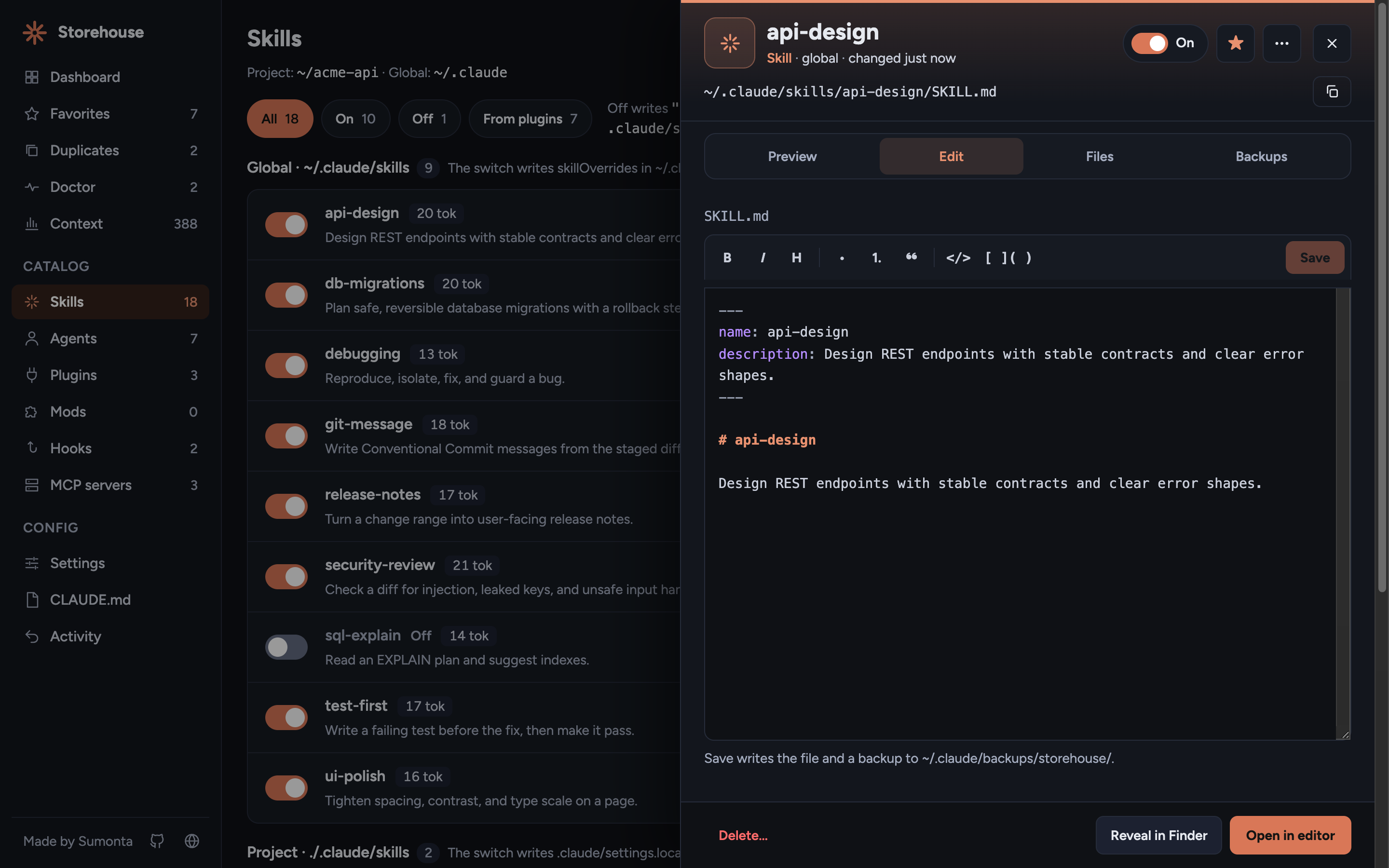
- Open any file you own in the drawer, edit it, and save with
⌘S. Plugin cache files stay read-only. - Every switch, star, and save shows on the Activity page with Undo.
- The latest save of each file can be restored from its backup.
- The CLAUDE.md page lists each
CLAUDE.mdthat Claude Code loads in this folder, with an editor for each. - Create a missing
CLAUDE.md,.claude/settings.json,.claude/settings.local.json, or.mcp.json.
Live demo
Open the live demo. It is the real app code, running in your browser with a sample setup. Switches, stars, and edits change only that page. Reload to start again.
The site builds the demo from public/ on every push to main, so the demo always shows the current UI.
Install
Run it inside the project you want to manage. You need Node 20 or newer.
npx claude-storehouseYour browser opens on a local address with a one-time token. Press Ctrl+C to stop.
Or install it once:
npm i -g claude-storehouse
claude-storehouse
CLI options
| Flag | Default | Meaning |
| --------------- | ---------------- | ---------------------------------------------------- |
| --dir <path> | current folder | Project folder to manage. Must exist. |
| --home <path> | your home folder | Folder that holds .claude. Must contain .claude. |
| --port <n> | free port | Port to listen on. Exits with an error if busy. |
| --no-open | off | Do not open the browser. |
| --help | | Print usage. |
| --version | | Print the version. |
Keyboard shortcuts
| Key | Action |
| -------------------- | -------------------------------------------------------------- |
| ⌘P / Ctrl+P | Open the command palette. Change the key in its footer |
| ↵ in the palette | Open the item in the drawer, go to the page, or run the action |
| ⌘↵ / Ctrl+↵ | Switch the selected item on or off in the palette |
| ⇧↵ | Star or unstar the selected item in the palette |
| / | Search names and descriptions |
| ⌘S / Ctrl+S | Save the open file |
| ⌘B, ⌘I | Bold and italic in the editor |
| Esc | Close the drawer, the palette, or a dialog |
| ↑ ↓ Home End | Move between items in a list |
The Commands button at the top of each page shows the palette key. To set your own key, open the palette, select Change, and press the new key with ⌘, Ctrl, or Alt. The browser keeps it. Reset restores ⌘P.
How on/off works
| Type | Off | Native to Claude Code |
| ---------------------------- | ----------------------------------------------------------------------- | --------------------- |
| Plugin | enabledPlugins[id] = false | yes |
| Global or project skill | skillOverrides[name] = "off" | yes |
| Plugin skill, agent, or hook | no own switch, follows its plugin | n/a |
| MCP in .mcp.json | name moves to disabledMcpjsonServers | yes |
| MCP global or from a plugin | name added to disabledMcpServers for this project in ~/.claude.json | yes, per project |
| Hook | entry parked in ~/.claude/storehouse.json | no |
| Agent | file renamed to name.md.disabled | no |
Global switches write ~/.claude/settings.json. Project switches write ./.claude/settings.local.json, never the shared settings.json. Claude Code applies changes at the next session.
Safety and privacy
| Topic | Rule |
| -------------- | --------------------------------------------------------------------------------------------------------------------------- |
| Backups | Before any write, the old file is copied to ~/.claude/backups/storehouse/. The last 20 per file are kept. |
| Atomic writes | Each write goes to a temp file, then a rename. A file that does not parse is never touched. |
| Delete | Moves the item to ~/.claude/backups/storehouse/trash/. Restore it from the Backups panel. |
| Local only | The server listens on 127.0.0.1 and rejects a foreign Host header. |
| Token | Every API call needs the random token from the start URL. Without it the server returns 401. |
| Allow-list | Writes are limited to ~/.claude, ~/.claude.json, and the project folder. Plugin cache files are read-only. |
| Session files | Usage reads token counts, tool names, and the skill, agent, or MCP server name of each call. Never prompts or message text. |
| Doctor | Reads only. It never writes a file or runs a command, and it returns env key names, never values. |
| Effective view | Reads only. Env values that look like secrets are masked before they leave the server. |
| Dependencies | The only runtime dependency is open, to launch the browser. |
How it works
Claude Storehouse is plain JavaScript with ES modules on Node 20 or newer. There is no framework, no bundler, and no build step. The server scans the Claude Code files on each request, and the page re-renders from the content that each write returns.
bin/storehouse.js      CLI: flags, token, start the server, open the browser
src/server.js          HTTP server on 127.0.0.1 and the route table
src/api.js             API handlers: inventory, usage, doctor, files, toggles, favorites, undo
src/api-config.js      API handlers: hooks, MCP servers, create, fork
src/scan/*.js          Read-only scanners, one per item type, and the usage reader
src/write/*.js         Atomic JSON writes with backups, toggles, files, favorites, activity
public/                The dashboard UI: index.html, app.js, api.js, core/, logic/, pages/, ui/, css/
site/                  Website and live demo, deployed to GitHub Pages
  build.js             Builds _site/: records the demo data and copies public/ into demo/
  demo/demo-api.js     In-browser stand-in for the server API, used only by the demo
scripts/demo-home.js   Builds a fake home with sample data for the demo and screenshots
docs/images/           README and website screenshots
test/                  node:test suites and fixtures
The full behavior spec is in .claude/rules/business-logic.md.
Limitations
- Plugin skills have no own on/off switch. Switch the plugin.
- Agent off is a rename to
.md.disabled. - Hook off parks the entry in
~/.claude/storehouse.json. - Changes apply at the next Claude Code session.
commandsandoutput-stylesare not shown yet. Rules are read-only and show only on the Context page.- Context cost is an estimate. It does not measure MCP tool schemas or follow
@pathimports in CLAUDE.md.
Contributing
Issues and pull requests are welcome. Use the issue templates.
- Clone the repo and run
npm install. It installs ESLint, Prettier, and the git hooks. - Run the app against a fake home, never your real
~/.claude:node scripts/demo-home.js /tmp/storehouse-demo node bin/storehouse.js --dir /tmp/storehouse-demo/home/acme-api --home /tmp/storehouse-demo/home - Commits follow Conventional Commits.
- Run
npm run checkand make sure it is green before you open a pull request.
Tests
No test framework: Node's built-in test runner.
npm test               # all tests
npm run check          # lint + format check + tests
npm run site           # build the website and live demo into _site/
python3 -m http.server 8811 -d _site   # then open http://127.0.0.1:8811/
Tests never touch your real ~/.claude. Each one makes a fake home with fs.mkdtempSync.
Changelog
- 1.5.0 — Full history in CHANGELOG.md.
- Skeleton loaders for the page and the usage band, and usage loads at the same time as the inventory.
- 1.3.0 — Full history in CHANGELOG.md.
- Use per item: 30-day use for skills, agents, and MCP servers, an Unused 30 d filter, a sort by use, and "Switch off N".
- Context page with the tokens each item adds to every session.
- Doctor page for broken config and settings that do nothing.
- Settings page redesign with the Effective view, and a This month / All time switch on the Dashboard.
- 1.2.0 — Full history in CHANGELOG.md.
- Duplicates page for skills, agents, and MCP servers that use the same name, with "Keep only this".
- 1.1.0 — Full history in CHANGELOG.md.
- Dashboard usage band: API-equal cost, tokens, sessions, and prompt-cache savings, from token counts only.
- Mods page for installed mods and mods in development.
- New Activity panel, app icon, and a website with a live demo.
- 1.0.0 — First stable release. Full history in CHANGELOG.md.
- Dashboard, Favorites, Skills, Agents, Plugins, Hooks, MCP servers, Settings, and CLAUDE.md pages, with a scope filter and search.
- On/off switches that use the keys Claude Code reads, with project switches in
settings.local.json. - Edit in place, favorites in your own categories, undo for every change, and backups for every write.
License
MIT © 2026 Sumonta Saha Mridul