
clawcal
v0.2.0
Published
iCal feed for OpenClaw agent activity

Maintainers
 severment
Readme
ClawCal — your agent's activity, in your calendar
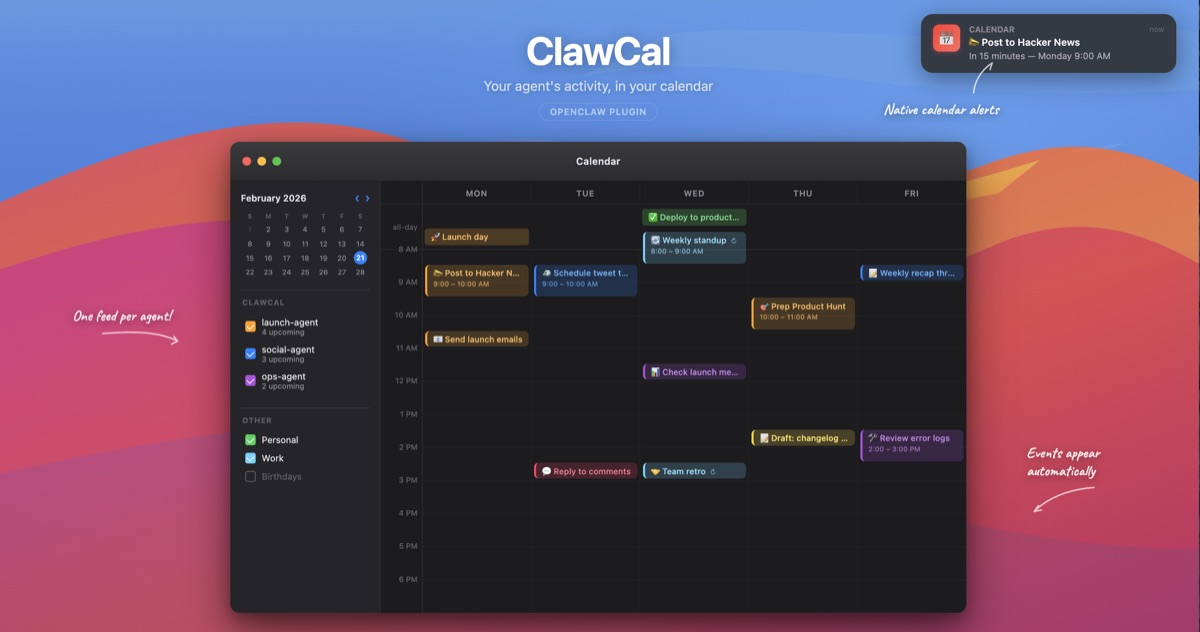





Your agent schedules posts, plans launches, and completes tasks around the clock. The only way to see what it's doing is to check the terminal or dig through session logs. ClawCal puts all of that into your calendar. Subscribe once, see everything.
Not a dashboard. Not a web app. Your calendar — the one you already have open.
Requirements
- OpenClaw v2026.3.2 or later (ClawCal uses
registerHttpRoutewhich replaced the removedregisterHttpHandlerAPI) - If upgrading OpenClaw to v2026.3.7+ and you have both
gateway.auth.tokenandgateway.auth.passwordconfigured, you must setgateway.auth.modeexplicitly (see OpenClaw v2026.3.7 release notes)
Quick start
1. Install
openclaw plugins install clawcalOr via npm if you're developing or integrating directly:
npm install clawcal2. Register
// ~/.openclaw/openclaw.json
{
  plugins: {
    entries: {
      clawcal: {
        enabled: true
      }
    }
  }
}
That's it. Events start flowing the moment the gateway boots.
3. Subscribe
macOS — events are pushed directly into Apple Calendar by default (with native alerts). No subscription needed.
Other platforms / calendar apps — subscribe to the feed URL:
http://localhost:18789/clawcal/feed.ics| App | How | |---|---| | Google Calendar | Other calendars (+) > From URL > paste URL | | Fantastical | File > New Calendar Subscription > paste URL | | Any calendar app | Add subscription by URL |
Your calendar app polls periodically. New events appear automatically as the agent works.
Recommended starter config
If your agent completes many tasks per day, aggregate them into a daily summary to avoid calendar noise:
// ~/.openclaw/openclaw.json
{
  plugins: {
    entries: {
      clawcal: {
        enabled: true,
        config: {
          taskCompletions: {
            mode: "off",
            aggregate: "daily"
          }
        }
      }
    }
  }
}
This tracks scheduled posts, launches, reminders, and check-ins as individual events, but rolls task completions into one "Shipped N tasks" event per agent per day.
What shows up
| Event | Calendar entry | Example | |---|---|---| | Scheduled post | Timed event with alert | "Tweet: MyApp v2 launch" at Tue 12pm | | Launch sequence | Series of timed events | "Show HN" Mon 9am > "Tweet" Mon 12pm > "Reddit" Tue 10am | | Task completed | All-day event | "Landing page shipped — myapp.com" | | Analytics check-in | Auto-scheduled after launch | "Check analytics" at +24h, +48h, +1 week | | Cron automation | Recurring event | "Weekly digest" every Monday 8am | | Content draft | Timed event | "Draft ready: blog post on UTM tracking" | | Reminder | Timed event | "Reply to HN comments — MyApp launch" |
Every event type gets a default alert so you actually get notified. Posts alert 15 minutes before. Launches alert at 15 minutes and 1 hour. Check-ins and reminders alert at event time. Task completions don't alert — they're already done.
Multi-feed support
One combined feed with everything, plus a separate feed per agent. Subscribe to what you care about.
/clawcal/feed.ics                    <-- all agents, all events
/clawcal/feed/marketing-agent.ics    <-- just marketing
/clawcal/feed/dev-agent.ics          <-- just dev
List all available feeds:
GET /clawcal/feeds{
"combined": "/clawcal/feed.ics",
"agents": [
{ "id": "marketing-agent", "url": "/clawcal/feed/marketing-agent.ics" },
{ "id": "dev-agent", "url": "/clawcal/feed/dev-agent.ics" }
]
}Configure which feeds to generate:
// ~/.openclaw/openclaw.json
{
  plugins: {
    entries: {
      clawcal: {
        enabled: true,
        config: {
          feeds: {
            combined: true,   // all-agents.ics
            per_agent: true   // one .ics per agent
          }
        }
      }
    }
  }
}
How it works
Dual input
Passive — ClawCal hooks into the gateway event bus. When an agent schedules a post, completes a task, or registers a cron job, it shows up on your calendar automatically. No agent configuration needed.
Active — ClawCal registers a clawcal_schedule tool on the gateway. The agent can explicitly add events:
"I've scheduled the Show HN post for Tuesday at 9am ET."
> clawcal_schedule(title="Show HN: utmgate", date="2025-02-25T09:00:00-05:00", category="launch", url="https://news.ycombinator.com/submitlink")
> event appears on your calendar with a 1-hour and 15-minute alert and a clickable link
Architecture
Gateway events --> listener.ts --> events.ts --> feed-manager.ts --> .ics files
                                                      |                 |
Agent tool call --> events.ts --> feed-manager.ts -----+---> HTTP routes
                                                      |          |
                                                      |   Calendar app polls
                                                      |
                                                local-push.ts --> osascript
                                                      |
                                               Apple Calendar (native alerts)
Zero runtime dependencies. iCal is a text format — generating it requires no library.
Auth
ClawCal inherits the gateway's auth configuration. Every feed route is protected — no extra setup.
| Gateway auth mode | How it works for calendar feeds | |---|---| | Token | Calendar app sends the token via Basic Auth (any username, token as password) | | Password | Calendar app sends credentials via Basic Auth | | Trusted proxy | Reverse proxy (Caddy, Pomerium, nginx) handles auth via headers | | None | Feeds served openly (local-only setups) |
Apple Calendar, Google Calendar, and every major calendar app support Basic Auth natively — you get prompted for credentials once when subscribing.
Running on a VPS? Put the gateway behind HTTPS. ClawCal doesn't add its own auth layer because the gateway already has one.
Alerts
Every event type has configurable default alerts (VALARM). Your phone gets notified automatically via the ICS feed.
macOS local push
Apple Calendar's calaccessd silently drops VALARM alerts from subscribed ICS feeds. Events show up but you never get notified. ClawCal works around this by pushing events directly into local Apple Calendar calendars via osascript, where alerts fire as native macOS notifications.
This happens automatically on macOS alongside the ICS feeds. On Linux the local push is a no-op — alerts still work via other calendar apps that poll the feed.
// ~/.openclaw/openclaw.json
{
  plugins: {
    entries: {
      clawcal: {
        enabled: true,
        config: {
          localPush: {
            enabled: true,          // default, no-ops on non-macOS
            calendarSource: "iCloud" // which macOS Calendar account to target
          }
        }
      }
    }
  }
}
By default, events are pushed to the iCloud calendar source, which syncs to all Apple devices. If you use a different calendar account (Gmail, Exchange, etc.), set calendarSource to match the account name shown in Calendar.app's sidebar.
| Event type | Default alerts | |---|---| | Scheduled posts | 15 min before | | Launch sequences | 15 min + 1 hour before | | Analytics check-ins | At event time | | Cron automations | At event time | | Content drafts | At event time | | Reminders | At event time | | Task completions | No alert (already done) |
Override defaults per event type:
// ~/.openclaw/openclaw.json
{
  plugins: {
    entries: {
      clawcal: {
        enabled: true,
        config: {
          defaults: {
            alerts: {
              scheduled_posts: [15],        // 15 min before
              launch_sequences: [15, 60],   // 15 min and 1 hour before
              analytics_checkins: [0],      // at event time
              task_completions: []          // no alert
            }
          }
        }
      }
    }
  }
}
Task completion aggregation
A productive agent can complete 30+ tasks per week, each creating a separate all-day calendar event. ClawCal can aggregate these into a single daily summary per agent.
// ~/.openclaw/openclaw.json
{
  plugins: {
    entries: {
      clawcal: {
        enabled: true,
        config: {
          taskCompletions: {
            mode: "off",           // skip individual events
            aggregate: "daily"     // one summary per agent per day
          }
        }
      }
    }
  }
}
This produces events like "Shipped 3 tasks -- dev-agent" with a bullet-point description listing each completed task. The aggregate event updates in place as tasks complete throughout the day.
| mode | Behavior |
|---|---|
| all_day | Individual all-day event per task (default) |
| timed | Individual 15-minute event per task |
| off | No individual events |
| aggregate | Behavior |
|---|---|
| none | No aggregation (default) |
| daily | One summary event per agent per day |
Both settings work independently. Set mode: "all_day" with aggregate: "daily" to get both individual events and a daily summary.
Inspecting runtime config
GET /clawcal/configReturns the full resolved configuration (defaults merged with your overrides). Useful for verifying what ClawCal is actually running with.
curl -u ":$(openclaw config get gateway.auth.token)" http://localhost:18789/clawcal/configConfiguration reference
| Key | Type | Default | Purpose |
|---|---|---|---|
| feeds.combined | boolean | true | Generate combined all-agents feed |
| feeds.per_agent | boolean | true | Generate per-agent feeds |
| localPush.enabled | boolean | true | Push events to local Apple Calendar (macOS only) |
| localPush.calendarSource | string | "iCloud" | Which macOS Calendar account to target (iCloud, Gmail, Exchange, etc.) |
| taskCompletions.mode | string | "all_day" | Per-task event style: all_day, timed, or off |
| taskCompletions.aggregate | string | "none" | Daily rollup: daily or none |
| events.scheduled_posts | boolean | true | Track scheduled social posts |
| events.launch_sequences | boolean | true | Track multi-step launch plans |
| events.task_completions | boolean | true | Track completed tasks |
| events.analytics_checkins | boolean | true | Auto-schedule post-launch check-ins |
| events.cron_automations | boolean | true | Track cron/recurring automations |
| events.content_drafts | boolean | true | Track draft-ready content |
| events.reminders | boolean | true | Track follow-up reminders |
| defaults.analytics_checkin_offsets | string[] | [24h, 48h, 7d] | When to schedule check-ins after launch |
| defaults.event_duration_minutes | number | 15 | Default event length |
| defaults.alerts.* | number[] | varies | Minutes before event to alert (per type) |
| cleanup.max_past_events | number | 100 | Max completed events to keep |
| cleanup.retention_days | number | 90 | Drop completed events older than this |
Repo structure
clawcal/
├── package.json
├── tsconfig.json
├── src/
│   ├── index.ts           <-- plugin entry point, HTTP routes, auth
│   ├── listener.ts        <-- gateway event hooks
│   ├── feed-manager.ts    <-- multi-feed management (combined + per-agent)
│   ├── calendar.ts        <-- iCal generation, VALARM, file I/O
│   ├── events.ts          <-- maps gateway events to calendar events
│   ├── config.ts          <-- deep merge for user config overrides
│   ├── local-push.ts      <-- macOS Apple Calendar push via osascript
│   └── types.ts           <-- type definitions
├── tests/
│   ├── calendar.test.ts   <-- iCal output, alerts, URL, sanitization (38 tests)
│   ├── events.test.ts     <-- event mapping, alert defaults, aggregation (31 tests)
│   ├── aggregation.test.ts <-- task completion aggregation flow (9 tests)
│   ├── feed-manager.test.ts <-- multi-feed routing (11 tests)
│   ├── local-push.test.ts <-- local push, AppleScript gen, caching (26 tests)
│   ├── config.test.ts     <-- deep merge config (8 tests)
│   └── auth.test.ts       <-- token, password, proxy auth, SecretRef, fail-closed (20 tests)
├── README.md
├── CONTRIBUTING.md
└── LICENSE
Contributing
The best contributions are iCal compatibility fixes tested against real calendar apps. See CONTRIBUTING.md.