
clawd-models
v1.2.2
Published
TUI (Text User Interface) config tool to manage OpenClaw models & providers

Maintainers
 qidu_github_npm
Readme
clawd-models
Terminal UI for managing the model configuration used by OpenClaw.
The TUI is built on @earendil-works/pi-tui and reads/writes a single JSON file at ~/.openclaw/openclaw.json.
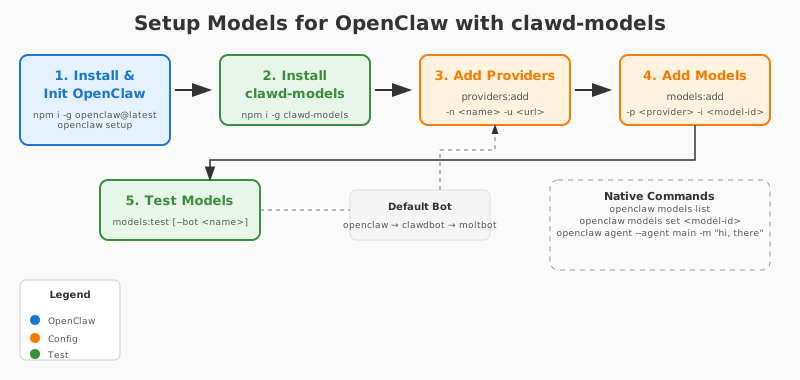
Prerequisite
Install and initialize openclaw's config firstly:
openclaw setup
# or
openclaw configure
Installation
npm i -g clawd-modelsUsage
clawd-models            # launch the interactive TUI
clawd-models --tui      # launch the interactive TUI
clawd-models --list-providers   # print configured providers
clawd-models --list-models      # print configured models (compact: provider/model  ctx 128k  max 8k)
clawd-models --view-config      # dump the full config JSON
clawd-models --test             # run a sample prompt + tool call against the primary model
clawd-models --help             # show CLI usage
The TUI requires a real terminal. Use H to open the built-in setup guide.
Key Bindings
| Key | Action |
| --- | --- |
| P | add a provider |
| M | add a model to the current provider |
| T | test the current model |
| D | delete the current provider or model |
| A | open agents.defaults editor |
| R | reload config from disk |
| H | show setup guide |
| ↑ / ↓ / j / k | move the cursor |
| Enter / E | edit the current row |
| q / Ctrl+C | quit |
In picker overlays:
Enter— confirm selectionEsc— cancelSpace— toggle the current item (only in the multi-select pickers)
In the agents.defaults submenu (A):
Enterto edit the highlighted fieldSpaceto toggle items inside the models and fallbacks multi-select pickers
Screen Layout
The main screen is divided into two sections:
Agents Defaults — always visible at the top. Three navigable rows:
primary— the model used by defaultfallbacks— ordered list of models tried when the primary is unavailablemodels— the active model pool; only models listed here can be chosen as primary or fallbacks
Providers — scrollable list below Agents Defaults. Each provider expands to show its models with ctx N and max N token counts. A green ● marks models that last passed a connectivity test.
The ▶ cursor indicates the currently selected row. Navigation order follows the visual order: primary → fallbacks → models → provider 1 → model 1 → … → provider N → model N.
Features
Providers
- Add a new provider (
P). - Edit a provider's
apiSchema,baseUrl, andapiKey. - Browse the providers list with their base URLs.
- Delete a provider (
Dwith a provider row selected — requires typing the provider name to confirm).
Models
- Add a model to the current provider (
Mwith a provider row highlighted). - Edit model
id,name,contextWindow,maxTokens, andreasoningflag. - Run a sample prompt + tool call against a model to verify connectivity (
T). A green●marks successful models; the marker is cleared when a new test starts and reappears on success. - Delete a model (
Dwith a model row selected — type "yes" to confirm). - Token counts are shown compactly:
ctx 262k max 8k(≥1K →Nk, ≥1M →Nm).
Agents Defaults (A)
Three fields, each navigable with ↑↓:
- models — multi-select picker over all provider models.
Spacetoggles,Entersaves. Only these models are available for primary and fallbacks. - primary — single-select picker from the active models list.
- fallbacks — multi-select picker from the active models list; select one or more in any order.
If no provider models are configured, the pickers fall back to a comma-separated text prompt.
Setup Guide (H)
A framed overlay listing the six configuration steps:
- Add a provider (
P) - Add models to the provider (
Mwith provider selected) - Test a model (
Twith model selected) - Choose active models in agents.defaults.models (
A, thenmodels) - Set the primary model (
A, thenprimary) - Choose fallback models (
A, thenfallbacks)
Configuration Location
The TUI manages the OpenClaw configuration at:
~/.openclaw/openclaw.jsonOverride the path with OPENCLAW_CONFIG_PATH=/some/other/path.
Architecture
clawd-models/
├── bin/
│   └── clawd-models.js        # CLI entry; dispatches to the TUI or non-interactive commands
├── src/
│   ├── openclaw-tui.js        # Main TUI (renderer, overlays, input handling)
│   ├── openclaw-config.js     # Config load/save + ensureConfigShape + qualifyModelId helpers
│   ├── core/                  # Business logic (provider/model/agent managers, API tester)
│   └── tui/                   # Legacy / auxiliary TUI scaffolding
├── docs/
│   ├── openclaw.example.json
│   ├── setup-flow.svg
│   └── uni-example.md
└── package.json
openclaw-tui.js is the runtime heart of the tool: it owns the AppView (the main list), the ListOverlay / PromptOverlay / HelpOverlay widgets, and the input dispatch table. openclaw-config.js handles load/save, the qualifyModelId resolver (which turns bare model ids like code-small into provider/model-id format), and pruning stale defaults when models are removed.
Migration from CLI (1.0.7 → 1.1.0)
The pre-1.1.0 flag-style CLI was replaced by the TUI. The old commands map to TUI flows as follows:
providers:add -n <name> -u <url>→P, then editbaseUrl/apiKey/apiSchemamodels:add -p <provider> -i <model-id>→ select a provider row, pressMmodels:test→ select a model row, pressTagents:primary/agents:fallback→ pressAfor the agents.defaults editor
Existing configurations are loaded without modification. Model ids stored as bare names (code-small) are automatically qualified to provider/code-small on first display.
Development
npm install
npm start          # alias for: node bin/clawd-models.js
npm run tui        # same
Debug log is written to /tmp/clawd-models.log.
License
MIT