
clawock-dsh
v0.1.9
Published
DSH (DeepSeek Harness) plugin for investment decisions: evidence-gated research, a forced bull/bear debate, Python-settled outcomes the model cannot grade, and the Decision Mind tab that pins every real trade to its plan and T+1 verdict
Downloads
1,633

Maintainers
 kcnyu
kcnyuReadme
clawock-dsh



AI argues. Code settles. The losses stay on the page.
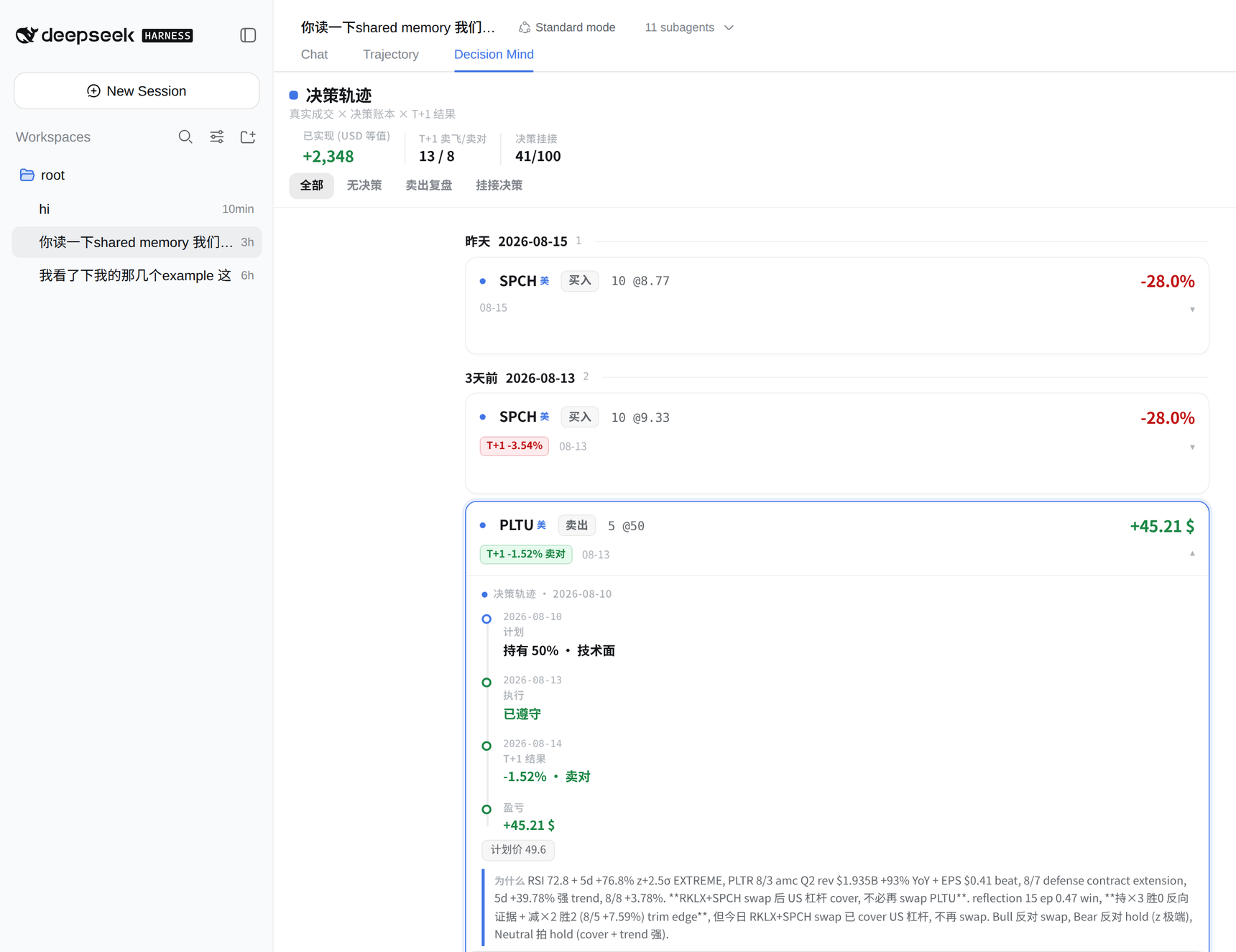
The clawock investment-decision workflow, as a DeepSeek Harness plugin. A skill package that makes the agent walk four steps — read the request, research and argue both sides, write the decision, then let Python validate and settle it — plus a Decision Mind tab that renders every real fill as an expandable decision trace inside the DSH web GUI.
The fourth step is the one that matters: the model never touches settlement. Prices, FX, P&L and the scorecard are computed by code the agent cannot write to, so a wrong call shows up as a loss on a public page instead of as a better-sounding paragraph.
- Live proof — a real Hong Kong + US brokerage account, run this way every trading day: https://kcnyu.github.io/clawock/
- Evidence, wins and losses both — https://kcnyu.github.io/clawock/evidence.html
- Source and issues — https://github.com/KCNyu/clawock
dsh plugin --profile web add clawock-dshInstallation needs one more step on rc.6 and later (skill discovery), covered in the installation section below. The rest of this README is in Chinese.
DeepSeek Harness 的投资决策工作流插件:agent 走完 「读请求 → 研究 + 正反辩论 → 写决策 → Python 校验结算」四步, web GUI 多一个 Decision Mind tab 把每笔成交的决策轨迹钉在页面上。
第四步是核心:模型永远不能给自己打分——价格、风控、账本、战绩全部由 Python 独立结算,agent 写不到那段代码,下错单显示为一笔公开页上的亏损, 而不是一段更好听的文字。
前提
agent 所在环境需要 Python ≥ 3.11,并且:
python -m pip install clawock安装
三步,缺一不可(rc.6 及以后 DSH 只扫项目根与用户根、不扫 node_modules, 所以 skill 必须手动放一步到可发现的位置):
# 1. 装插件本体
dsh plugin --profile web add clawock-dsh

# 2. 把 skill 放到 DSH 可发现的位置(任选其一,不选这步 agent 不会带这个 skill)
cp -r ~/.dsh/profiles/web/node_modules/clawock-dsh/skills/investment-decision ~/.dsh/skills/
# 或项目级:
cp -r ~/.dsh/profiles/web/node_modules/clawock-dsh/skills/investment-decision <project>/.agents/skills/

# 3. 重启 web profile
重启后 skill 即出现在 agent 的 skill 目录。
快速开始
装完直接问:
你:帮我分析一下 0700.HK 能不能加点仓agent 走完四步,给你一张决策卡——bull / bear / thesis / confidence / action / run_id,判定和结算是 Python 算的,不是模型说的:
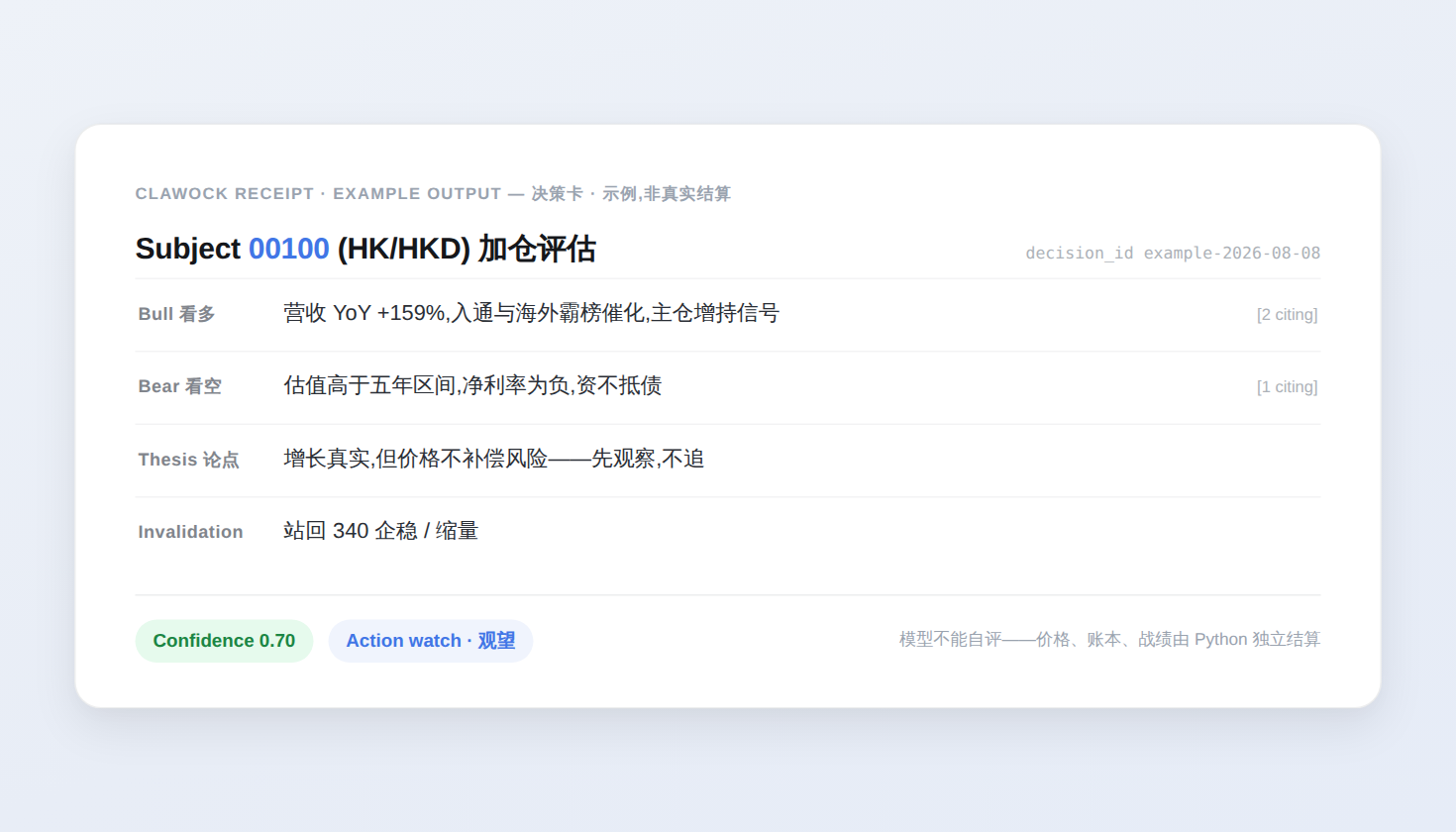
你得到什么
一个会辩论、不会自评的 agent
- 主动收集正反双方证据——发布时 Python 强制至少一条 opposing 论据, 熊方必须是真反驳,不是稻草人;
- 有界行动:动作、数量、触发条件写进
decision.json,由 Python 校验; - 情绪状态自认,non-calm 才会出现在面板里。
一个只读的 Decision Mind tab
装完后 web GUI 的会话视图多一个 Decision Mind tab。它只做一件事: 每一笔真实成交,都是一条可以点开的决策轨迹。
- 账本式分组:一天一组,行内 = 日期 · 标的 · 动作 · 数量@价 · T+1 判定 · 与计划反向标记 · 盈亏焦点数字,同组对齐、竖着扫就是比同一件事;
- T+1 判定用官方逐日收盘(
memory/bars/),绝不读实时快照;未判出就 显式写「T+1 未判」,不假装没这回事; - 点开一条轨迹:当时的计划 → 真实成交(与计划同向/反向)→ T+1 收盘 → 本笔已实现 / 该持仓当前浮动——两个量永不共用一个「盈亏」标签;
- 没有当日计划的成交显式标注——不假装有判断。
面板是只读 Remote,不改任何文件;结算仍归 clawock 自己的机制。
会话头部的多 Provider 余额芯片
会话标题行右侧一枚毛玻璃余额芯片(utilities 座位,所有 tab 可见、零常驻 高度)——胶囊头条显示一个 provider 的读数(默认第一行;在面板里点任意一行 即钉选为头条,选择存在注册 store 里,重挂不丢),带双窗口的 provider(MiniMax 5h+周、Claude 会话+本周)在头条直接附周限额副读数,不用点开就能看到; 点开小面板看全部 provider 明细(每窗口一行文字读数 + 发丝进度条;条的 填充色按用量档位走:低=绿、≥60% 黄、≥80% 红,阈值由 lowPct 派生)与手动 刷新。它不是 Decision Mind 的一部分:账户状态是应用级 chrome, 不是交易语义。配额读数一律是已使用 %(kcn:「剩余」不直观;头条数字 与进度条同用这套档位配色):
| Provider | 口径 | 读数 |
| :--- | :--- | :--- |
| DeepSeek | 官方 GET /user/balance(凭据缝 → 环境变量) | 余额 ¥(CNY 行优先,金额口径不变),面板见赠金/充值拆分 |
| MiniMax | 官方 GET /v1/token_plan/remains(Token Plan 配额窗口) | 窗口已使用 %(上游报剩余则取补;general 桶);key 解析链=凭据缝 → env → openclaw 网关配置(~/.openclaw/openclaw.json 的 models.providers.minimax.apiKey) |
| Claude | 订阅制额度:OAuth GET /api/oauth/usage(anthropic-beta: oauth-2025-04-20),token 读自 ~/.claude/.credentials.json | 会话窗口已使用 %(utilization 本来就是用量,直读不再取补)+ 本周已使用;面板附各窗口重置时间 |
- OpenCode Zen 无公开余额接口(上游 issue 还开着),不做假装有数的行;
- 某家未配置 = 面板里诚实的一行「未配置」,不隐藏也不报错;
- 低额红点:DeepSeek ≤¥20、MiniMax/Claude 已使用 ≥80%(即剩余 ≤20%);
*LowPct配置字段保持「剩余水位」原义不动,已有配置值无需改,只是展示 方向翻转了;进度条与头条数字按同一档位变色(60% 黄 / 80% 红),圆点仍是 provider 状态灯(绿正常/黄过期/红异常),两者正交;档位只染色不减信息 (kcn 反馈 #908):进红档后面板行的每窗读数、进度条、重置时间与头条的 副读数、↻ 全部保留,水位警示句只是并排多讲一句,不顶掉任何字段; - 刷新失败保留最近一次快照并标注 stale(黄点);瞬时 429 不抹掉真数字;
- Claude 的 OAuth token 归 Claude Code 所有,本插件只读不刷新——过期时 面板显示「请在终端跑一次 claude 刷新登录」;
- 宿主侧每 provider 60s TTL 缓存、并发合并;客户端静默轮询 ≥60s。
可选配置(profile 的 cordis.patch.yml 行内,改后重启 dsh 生效):
balanceBaseUrl / balanceThreshold / balanceRefreshMs /
minimaxBaseUrl / minimaxKeyRef / minimaxLowPct / minimaxOpenclawConfigPath /
claudeCredentialsPath / claudeUsageUrl / claudeLowPct。
它不做什么
- 不改文件。面板只读;账本写入、发布只走
clawock run/ brief 管线。 - 不替代 clawock。skill 只把「什么时候跑、产出什么」讲给 agent 听, agent 调用的仍是同一套 CLI 与文件契约。
- 不发明判定。没有 bar 就没有 T+1;
execution.status只渲染为 「账本自评」小标签,成交与计划同向/反向另有独立判定。
验证装好了
重启后在会话里问「你现在带哪些 skill?」,应能看到 investment-decision;
或直接让 agent 执行 clawock run prepare,看它是否打印 request_file。
FAQ
skill 没出现?
DSH 只扫 ~/.dsh/skills/ 和 <project>/.agents/skills/ 两个根,不扫
node_modules——回到安装那一节检查 cp 那一步。
Decision Mind 是空白的?
面板读的是 clawock workspace(CLAWOCK_WORKSPACE)里的真实成交与决策
记录;workspace 还没有数据时 tab 是空的,不是装坏了。
面板和公开 dashboard 是什么关系?
同一个「决策轨迹」数据契约,两套渲染:插件是运行期读 workspace 的
TypeScript,网页是构建期算好塞进 dashboard.json 的 Python。两边的
规则常量与判词由测试钉住,不会漂移。
维护者
cd examples/dsh/packages/clawock-dsh
npm install --include=dev && npm run build   # 生成的 lib/ 提交入库,CI 断言零漂移
npm publish                                   # 发布当前版本
把当前 checkout 装进 self-hosted DSH(开发/自部署):
ops/host/install_dsh_plugin.sh --restart。README 截图一条命令:
node site/tools/shoot_dsh_plugin.js + clawock validate-sidecar screenshots;
决策卡示例图:node site/tools/shoot_decision_card.js。