
claws-office
v1.0.3
Published
Real-time monitoring dashboard for OpenClaw agents with an office-themed UI

Maintainers
 jackjiang
Readme
🏢 Claws Office





Built collaboratively with OpenAI Codex, Claude Code, and OpenClaw.
本项目由 OpenAI Codex、Claude Code 与 OpenClaw 协作开发。
A real-time monitoring dashboard for OpenClaw agents with an office-themed UI.
Features
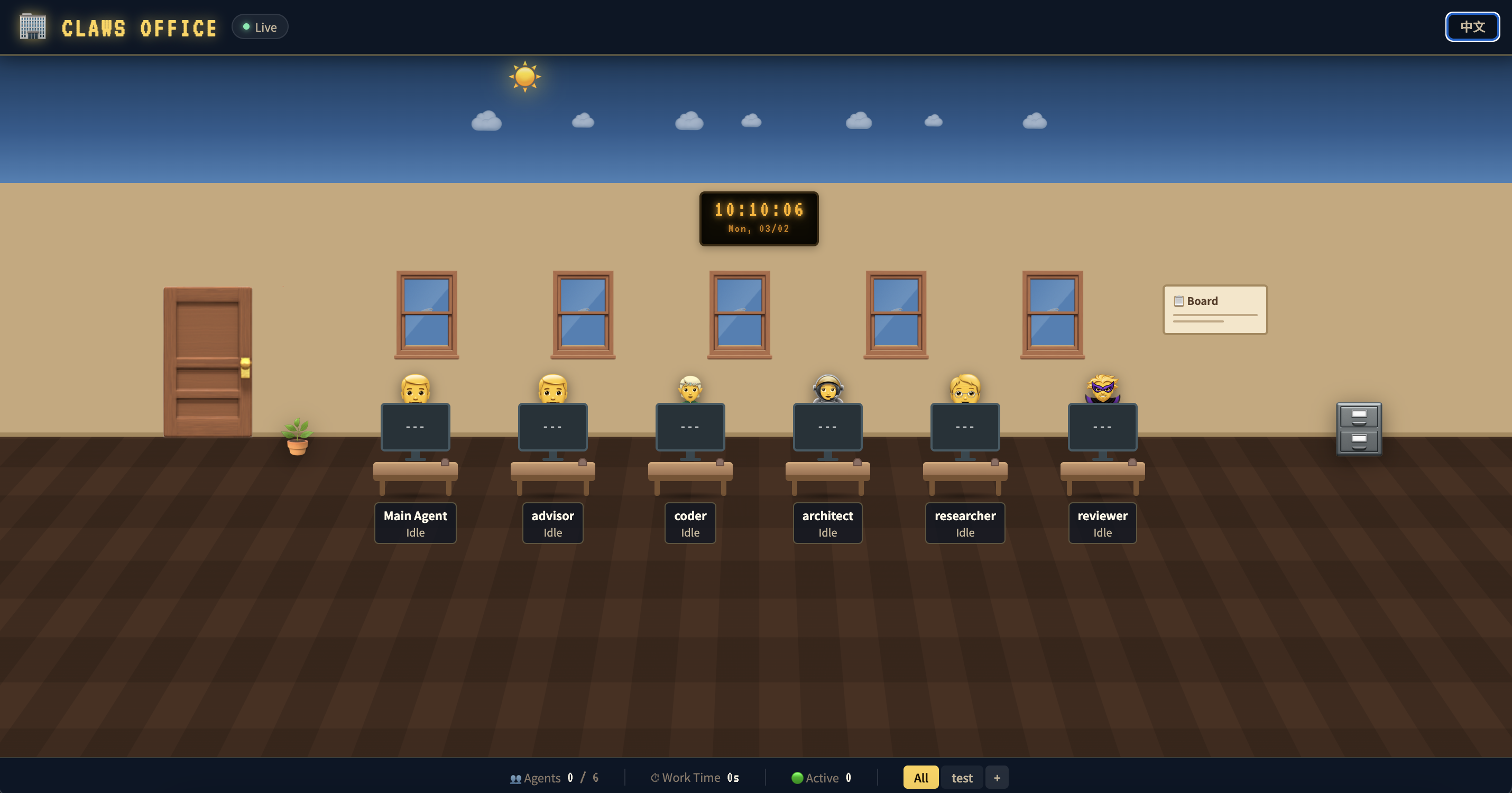
- 🔄 Real-time Status Monitoring — SSE-based live updates
- 🤖 Agent Task Visualization — Workstations show avatar, monitor status, current task
- 🎮 Game-style UI — Office scene with day/night cycle
- 🌙 Day/Night Cycle — Time-based sky (day/dusk/night), stars, meteors, moon
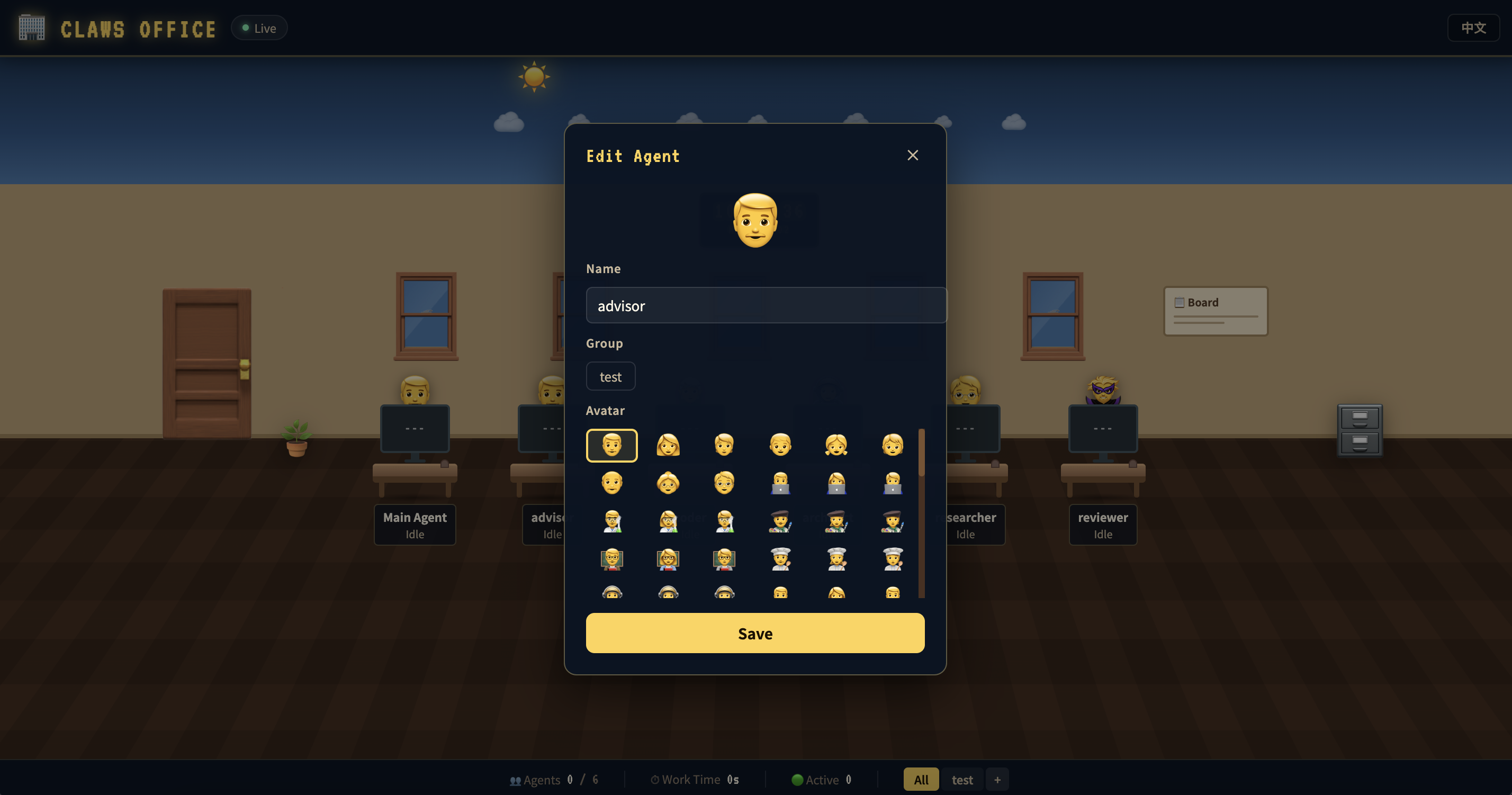
- ✏️ Agent Editing — Click avatar to edit name, avatar, group
- 👥 Group Management — Add/delete groups, filter by group
- 🌐 Bilingual — Chinese/English support
Screenshot
Tech Stack
- React 18 + TypeScript
- Vite
- Framer Motion (animations)
- Server-Sent Events (real-time updates)
- CSS3 (gradients, perspective effects)
Quick Start
# One-command start (recommended)
OPENCLAW_SESSIONS_DIR="$HOME/.openclaw/agents" PORT=3000 npx claws-office
# One-command start via Docker
mkdir -p ./claws-office-data
test -f ./claws-office-data/config.json || printf '{\n "groups": [],\n "agents": []\n}\n' > ./claws-office-data/config.json
docker run -d \
-p 3000:3000 \
-e NODE_ENV=production \
-e OPENCLAW_SESSIONS_DIR=/data/openclaw/agents \
-v "$HOME/.openclaw:/data/openclaw:ro" \
-v "$PWD/claws-office-data/config.json:/app/server/config.json" \
--name claws-office \
jack85/claws-office:latest# From source
npm install
# Development
npm run dev
# Production
npm run build
npm startRuntime Configuration
This project is a dashboard only. Agent sessions are read from OpenClaw session files. It does not create or delete agents by itself.
| Variable | Default | Description |
| ----------------------- | -------------------- | ------------------------------------------------- |
| PORT | 3000 | HTTP server port for both frontend and backend |
| NODE_ENV | development | Set to production to serve dist static assets |
| OPENCLAW_SESSIONS_DIR | ~/.openclaw/agents | Root directory of OpenClaw agent sessions |
Quality Checks
npm run lint
npm run build
Docker
docker run -d \
  -p 3000:3000 \
  -e NODE_ENV=production \
  -e OPENCLAW_SESSIONS_DIR=/data/openclaw/agents \
  -v "$HOME/.openclaw:/data/openclaw:ro" \
  -v "$PWD/claws-office-data/config.json:/app/server/config.json" \
  --name claws-office \
  jack85/claws-office:latest
Before first run, make sure ./claws-office-data/config.json exists.
If you do not mount ~/.openclaw, the container cannot read host agent sessions.
If you do not mount config.json, group/agent display settings will be reset after container recreation.
Visit http://localhost:3000
Project Structure
├── src/
│   ├── components/
│   │   ├── WorkstationCard.tsx   # Workstation card component
│   │   └── AgentEditPanel.tsx    # Agent edit modal
│   ├── App.tsx                   # Main app component
│   ├── App.css                   # Main styles
│   └── index.css                 # Global styles
├── server/
│   └── api.js                    # Unified backend + frontend HTTP server
├── Dockerfile
└── README.md
Backend API
GET /api/config— Get groups and agent configGET /api/agents— Get all agent statusesGET /api/agents/stream— SSE real-time updatesPOST /api/config/agent/:id— Update agent display info (name/avatar/group)POST /api/config/agent/:id/group— Update agent groupPOST /api/groups— Add groupDELETE /api/groups/:id— Delete group
Claws Office
实时监控 OpenClaw 所有 Agent 工作状态的 Web 应用,办公室风格的监控面板。
功能特性
- 🔄 实时状态监控 — 通过 SSE 实时获取 Agent 工作状态
- 🤖 Agent 任务可视化 — 每个工位显示员工头像、显示器状态、当前任务
- 🎮 游戏化 UI — 办公室场景,支持日夜循环
- 🌙 日夜循环 — 根据时间显示白天/黄昏/夜晚,星星、流星、月亮
- ✏️ 员工编辑 — 点击员工头像修改姓名、头像、所属分组
- 👥 分组管理 — 添加、删除分组,按分组筛选显示
- 🌐 中英文双语 — 支持中文/英文切换
截图
快速开始
# 一条命令启动(推荐)
OPENCLAW_SESSIONS_DIR="$HOME/.openclaw/agents" PORT=3000 npx claws-office
# 使用 Docker 一键启动
mkdir -p ./claws-office-data
test -f ./claws-office-data/config.json || printf '{\n "groups": [],\n "agents": []\n}\n' > ./claws-office-data/config.json
docker run -d \
-p 3000:3000 \
-e NODE_ENV=production \
-e OPENCLAW_SESSIONS_DIR=/data/openclaw/agents \
-v "$HOME/.openclaw:/data/openclaw:ro" \
-v "$PWD/claws-office-data/config.json:/app/server/config.json" \
--name claws-office \
jack85/claws-office:latest# 从源码运行
npm install
# 开发模式
npm run dev
# 生产模式
npm run build
npm start运行配置
本项目本质是看板。Agent 数据来源于 OpenClaw 会话文件, 项目本身不会创建或删除 Agent。
| 变量 | 默认值 | 说明 |
| ----------------------- | -------------------- | ---------------------------------------- |
| PORT | 3000 | 前后端同一个 HTTP 服务端口 |
| NODE_ENV | development | 设为 production 时托管 dist 静态文件 |
| OPENCLAW_SESSIONS_DIR | ~/.openclaw/agents | OpenClaw Agent 会话目录根路径 |
质量检查
npm run lint
npm run build
Docker
docker run -d \
  -p 3000:3000 \
  -e NODE_ENV=production \
  -e OPENCLAW_SESSIONS_DIR=/data/openclaw/agents \
  -v "$HOME/.openclaw:/data/openclaw:ro" \
  -v "$PWD/claws-office-data/config.json:/app/server/config.json" \
  --name claws-office \
  jack85/claws-office:latest
首次运行前请确保宿主机存在 ./claws-office-data/config.json。
如果不挂载 ~/.openclaw,容器内将无法读取宿主机上的 agent 会话状态。
如果不挂载 config.json,重建容器后分组和展示配置会被重置。
访问 http://localhost:3000
目录结构
├── src/
│   ├── components/
│   │   ├── WorkstationCard.tsx   # 工位卡片组件
│   │   └── AgentEditPanel.tsx    # 员工编辑面板
│   ├── App.tsx                   # 主应用组件
│   ├── App.css                   # 主样式
│   └── index.css                 # 全局样式
├── server/
│   └── api.js                    # 统一前后端 HTTP 服务
├── Dockerfile
└── README.md
后端 API
GET /api/config— 获取分组和员工配置GET /api/agents— 获取所有 Agent 状态GET /api/agents/stream— SSE 实时推送POST /api/config/agent/:id— 更新展示信息(名称/头像/分组)POST /api/config/agent/:id/group— 更新员工分组POST /api/groups— 添加分组DELETE /api/groups/:id— 删除分组