
clean-this-shit
v1.0.2
Published
Ultimate Mac disk space cleaner with TUI
Downloads
34

Maintainers
 andycufari
Readme
🧹 Clean This Shit
Your Mac says 232 GB in "Documents" but you can't find where? Yeah. We fix that.
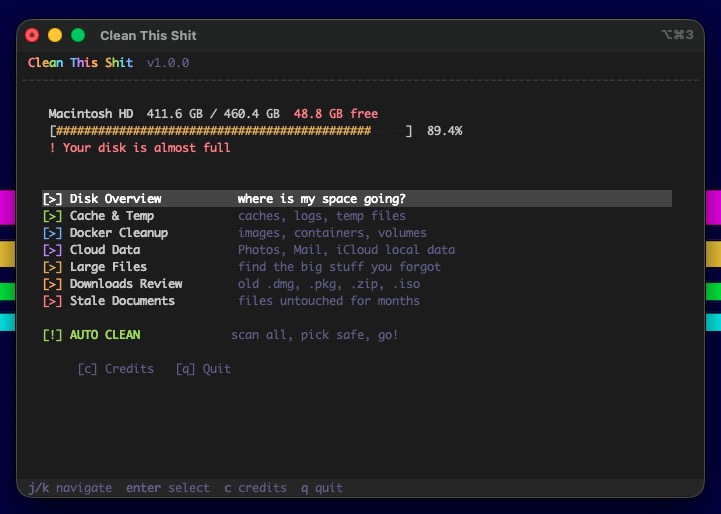
A no-bullshit Mac disk cleaner with a beautiful terminal UI. Scans everything, explains what it found, lets you pick what to nuke, and only cleans with your explicit say-so.
Install
npm install -g clean-this-shitOr clone it:
git clone https://github.com/andycufari/clean-this-shit.git
cd clean-this-shit
npm install && npm link
Usage
# interactive menu — browse each category
clean-this-shit

# auto mode — scan everything, review checklist, clean
clean-this-shit --auto
What it does
- Scans your entire system for space hogs — caches, logs, Docker, dev tools, cloud data, large forgotten files
- Shows you exactly what's eating your disk with size bars and plain-English explanations
- Lets you pick what to clean with an interactive checklist (safe items pre-selected)
- Cleans only what you confirm — never touches your documents unless you explicitly ask
Features
🔍 Disk Overview
Full breakdown of where your space goes. APFS-aware — shows real container usage, not the misleading df numbers.
🧹 Cache & Temp Cleaner
Browser caches (Safari, Chrome, Arc, Firefox), app caches (Slack, Discord, Spotify), dev caches (Xcode, Homebrew, npm, Yarn, pip, Cargo, CocoaPods), logs, crash reports, temp files, Trash.
🐳 Docker Cleanup
Shows docker system df alongside the actual VM disk size on your Mac — explains the gap. Prune images, containers, volumes, build cache, or full nuke.
☁️ Cloud Data
Photos Library, Mail, iMessage, iCloud Drive local caches. Shows what's cleanable vs info-only with tips.
🐘 Large Files Hunter
Scans your home directory for files > 50 MB with a live progress bar. Multi-select with spacebar, type DELETE to confirm. Shows file age and path.
📥 Downloads Review
Finds old .dmg, .pkg, .zip, .iso, .rar files and anything untouched for 30+ days in your Downloads folder.
💀 Stale Documents
Files > 10 MB in Documents/Downloads/Desktop not accessed in 90+ days.
🚀 Auto Clean
The star of the show. Three steps:
- Scan — live progress bar scanning 20 locations
- Review — interactive checklist with safe items pre-checked, toggle what you want
- Clean — processes your selection with before/after disk stats
What it cleans
Safe — apps regenerate these, marked [x] by default:
~/Library/Caches— app & browser caches~/Library/Logs— app logs & crash reports/tmp— temp files older than 1 day- Homebrew, npm, Yarn, pip, Cargo, CocoaPods caches
- Xcode DerivedData, device support, simulators
- Trash
With caution — marked [ ], you opt-in:
- iMessage attachments (pics & vids from chats)
- Docker full prune (re-downloads images next time)
Info only — shows size and what to do:
- Photos Library → enable "Optimize Mac Storage"
- Mail Data → IMAP cache managed by Mail.app
- iCloud Drive → right-click files > Remove Download
Controls
| Key | Action |
|-----|--------|
| ↑/↓ or j/k | Navigate |
| Space | Toggle item on/off |
| Enter | Select / Confirm / Delete |
| a | Toggle all |
| s | Select safe items only |
| o | Reveal in Finder |
| i | File details |
| c | Credits |
| Esc | Back |
| q | Quit |
How it works
- Uses
diskutilfor accurate APFS container stats (falls back todfon non-APFS) - Scans with async
find+duso the UI stays responsive - Cleanup commands use
find -exec rmwith error suppression — cleans what it can, skips protected system files - Never runs
sudo. Never touches files outside known cache/temp/log paths unless you explicitly select them in Large Files
Requirements
- macOS (optimized for APFS, works on HFS+ too)
- Node.js 18+
Author
Made by andycufari
License
MIT