
client-cert-login-component
v0.1.7
Published
Web component for client certificate authentication and registration form.

Maintainers
 isysd
isysdReadme
Client TLS Certificate Login & Registration Web Component
Demo
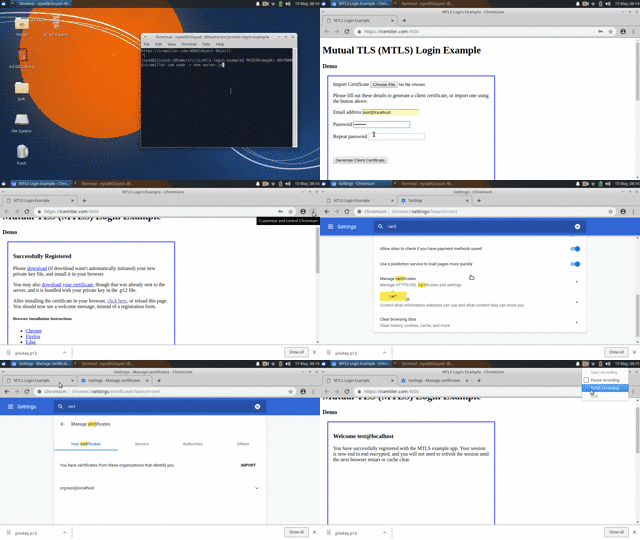
Another online demo is available on webcomponents.org.
About
This web component lets users register with an existing client TLS certificate, or generate one in their browser, using forge. Once registered, the native browser certificate selection dialogue handles "login".
Usage
This component requires forge and optionally webcomponents polyfill to be present.
<!--
  Will display a modal form prompting user to import or generate a key.
  Upon key generation/import, the key is sent to this.register().
-->
<create-client-login></create-client-login>

<!--
  Would display only customizable this.showAuthenticated() response
  Use this to mark the user as "logged in", to suppress the modal.

  <create-client-login cn="currentUser"></create-client-login>
-->
The server needs to be configured to prompt for the client certificate, and renegotiate sessions. The client-certificate-auth middleware will make this much easier. For an full example, see the demo server.
Install
It is recommended to install this package directly from git. If you want to use the npm version of forge, then also run npm i.
git clone https://github.com/isysd-mirror/client-cert-login-component.git
cd client-cert-login-component
npm i
Example server (for demo)
Run npm start.
Server runs on localhost port 4000, and will authenticate users with certificates in the CLIENT_CERT_DIR.
Example Configuration
This example server has very basic configuration via environment variables.
| Variable | Default | |----------|---------| | PKIDIR | ./pki | | CLIENT_CERT_DIR | ./clients |
The example works best with a server TLS certificate that is trusted by the browser, or the browser may not display the client certificate selection. Either use a real SSL cert signed by a normal CA, or first install the server cert in your browser for the demo session.
For chrome you can also set chrome://flags/#allow-insecure-localhost for the test environment.
License
This app Copyright Ira Miller, available under the MIT license.