
clodr-cli
v1.2.1
Published
Clodr - manage all your Claude Code sessions from a single menu

Maintainers
 suhailmahmood
Readme
Clodr




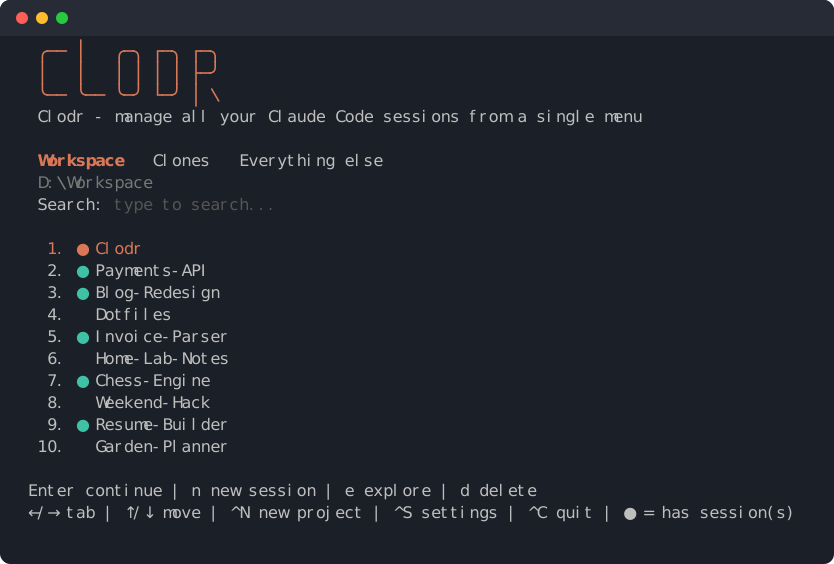
Clodr - manage all your Claude Code sessions from a single menu. No more cd-ing into your project folders just to start Claude Code from there. Just launch your terminal and then run clodr and all your Claude Sessions are at your fingertips! Creating throwaway sessions is now a breeze with Clodr! Clodrs also lets you clean up leftovers.
Cross-platform (Windows, macOS, Linux), Node ≥ 18, zero dependencies.
Install
Needs Node ≥ 18 and git.
npm install -g clodr-cliOr straight from GitHub: npm install -g github:suhailmahmood/clodr.
From a clone: npm install -g . (or npm link while developing).
Update: rerun the install command. Uninstall: npm uninstall -g clodr-cli.
Requirements: claude on PATH. Cleanup of orphaned projects needs Claude Code v2.1.288+ (claude purge).
Usage
Run clodr (arguments are ignored). It opens an arrow-key menu, most recent session activity first, with a cyan ● on folders that have session(s). Clodr stays running while Claude does, then returns to a refreshed menu. Ctrl+C quits from any page.
The menu opens on a Search field under the workspace path. Type to filter (case-insensitive): names starting with the text come first, then names containing it. Esc clears the text, ↓ moves into the list, ↑ at the top (or Backspace) goes back to search.
| Key | Where | Action |
|---|---|---|
| Enter | list | Opens the session list of the project: newest first, with name, age, size and id. ↑/↓ move, Enter resumes, n starts a new session, e explores the folder, Esc or Backspace goes back. With no session, starts a new one. |
| Ctrl+Enter or n | list | Start a new session (claude). Ctrl+Enter needs a terminal that tells it from Enter; n always works. |
| e | list | Explore: open the folder in the file manager (nothing listed: the workspace). |
| d | list | Delete the folder and its Claude sessions after a red [y/N] (only y confirms). |
| Ctrl+N | search / list | New project: asks for a name, creates that folder in the current workspace, offers git init, then starts Claude. Esc at the name prompt goes back. |
| Ctrl+S or s | search / list | Settings. |
| ↑ ↓ Home End PgUp PgDn | list | Move. |
| Mouse wheel | list | Move. Clodr has no mouse handling of its own: many terminals (e.g. Windows Terminal) send the wheel as ↑/↓ while a full-screen app is showing, others don't, so it may do nothing in yours. |
| ← → | both | Switch tab. |
Letter shortcuts only act while the list has focus (in search, letters are typed); the Ctrl chords work from both. If Claude cannot start (not on PATH, folder gone), the reason shows in the menu status row. On every other page Esc or Backspace goes back.
Workspace
At the heart of Clodr is the concept called Workspace, which is just a folder containing your projects. Add as many workspace as you need. Your Claude Code sessions that do not belong to any of your defined Workspaces show up under Everything else.
Workspaces are managed inside Clodr (Settings › Manage workspaces). Until a config file exists it uses ~/Workspace.
Config lives in %APPDATA%\clodr\config.json (Windows) or ~/.config/clodr/config.json (CLODR_HOME overrides): workspaces ([{path, name?}], in order), view (a workspace path or else).
Session list
Enter on a project that has sessions opens its session list, newest first. Enter resumes the highlighted session (claude --resume <id>). You can also create a new session from this screen with n (simply runs calude).
Tabs
←/→ switch tabs: one per workspace (in the order set in Settings), then Everything else at the right end. When there are too many tabs for the screen width, the bar scrolls around the active one (‹ / › mark hidden tabs). The last used tab is remembered (view in config.json).
| Tab | Shows |
|---|---|
| Workspace | Every folder directly inside the workspace, plus deeper folders under it that have a Claude session (shown relative to the workspace). Delete removes the folder and its sessions. Ctrl+N creates a new project here. |
| Everything else | Every existing folder with a Claude session outside all workspaces, as folder name plus dimmed parent path. Delete removes only that folder's Claude sessions, never the folder. |
Workspaces can be nested: if D:\Workspace and D:\Workspace\Clones are both workspaces, everything rooted in Clones (the folder itself and any folder below it) is shown only under Clones, not under D:\Workspace. A workspace root itself is never listed as a folder.
Settings
Manage workspaces (own page): one row per workspace.
aadds one (full path,~and%VAR%expand; then an optional name: empty = folder name).Enterrenames,Ctrl+↑/Ctrl+↓move up/down,dremoves it from the list (folder kept). Rows readName - path.Cleanup: checkbox list of
- Orphaned projects: session folders whose project folder is gone (or never recorded), plus
~/.claude.jsonproject entries for deleted folders. Removed withclaude purge(transcripts, file history, config entry, history lines). Folders on an unplugged drive are never treated as orphans. For sessions with no recorded folder, the folder is derived from the session dir name, so a config entry / prompt history may remain. - Legacy
~/.claude.json.backup*files.
Spacetoggles,Enteropens a review screen listing exactly what will be removed, then one[y/N]. Refused while Claude is running. A.bakcopy of~/.claude.jsonandhistory.jsonlis kept first (one each, overwritten next time). Orphan cleanup is disabled with a message if the installedclaudehas nopurge.- Orphaned projects: session folders whose project folder is gone (or never recorded), plus
Session detection
Claude stores sessions at ~/.claude/projects/<folder path, every non-alphanumeric char → "-">/*.jsonl (CLAUDE_CONFIG_DIR honored). That encoding is lossy, so the real folder is read from the cwd recorded inside the transcripts.
Tests
npm testHeadless: a scripted terminal feeds keys to the real screens and frames are asserted on; a stub claude on PATH stands in for purge. Everything runs in a temp dir (own CLAUDE_CONFIG_DIR and CLODR_HOME).
Code
bin/clodr.js (CLI), src/ (core: config, sessions, cleanup categories), src/ui/ (screens and shared drawing helpers), test/.