
cms-table
v1.0.3
Published
一个基于Element-UI的后台通用表格组件


Readme
简介
在使用VUE开发后台类型的项目时,我们通常会选择Element-UI来搭建界面,而后台类型的项目用的最多的组件就是表格了,我们经常使用el-table来展示一组数据,但我们发现很多页面的开发都是在做重复性的工作,因此这个通用表格组件为你提供了一种通过JSON数据配置来快速开发表格的方案。
依赖
- Vue
- Element-UI
安装
$ npm install cms-table效果图
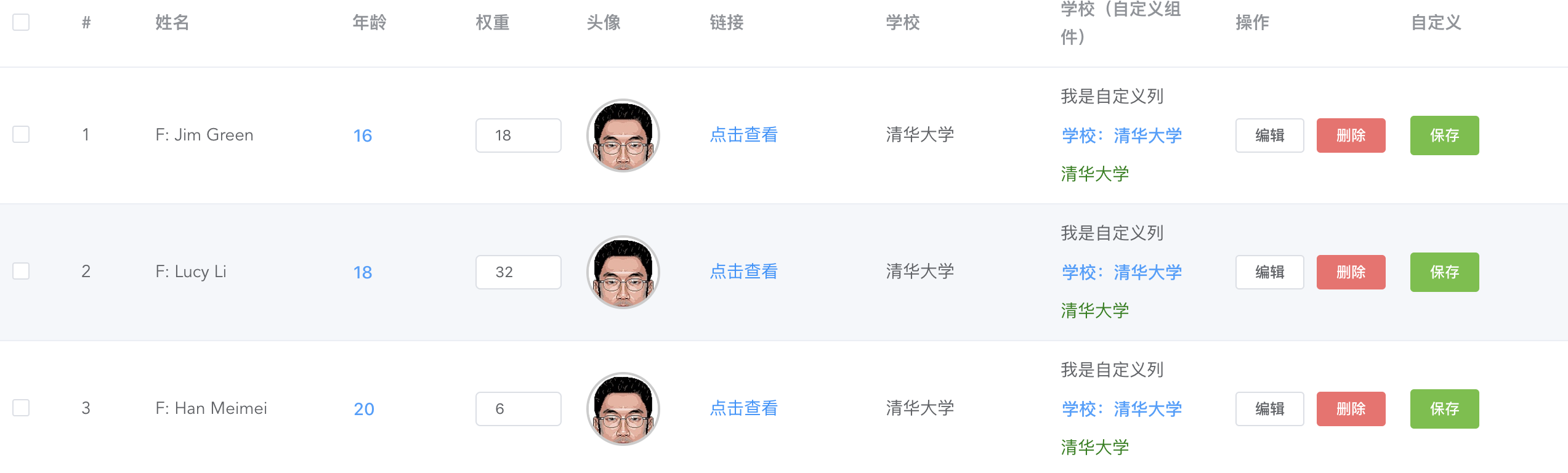
使用
cms-table是基于Element-UI二次封装的通用组件,使用前请务必导入Element以及样式模板。
全局引入
import Vue from 'vue'
import Element from 'element-ui'
import 'element-ui/lib/theme-chalk/index.css'
import cmsTable from 'cms-table' // 导入cms-table

Vue.use(Element)
Vue.use(cmsTable) // 全局注册cms-table
在你的页面中使用cms-table组件
cms-table有两个属性:
| 属性名 | 数据类型 | 说明 | | ------ | ------ | ------ | | fields | 数组 | 用来定义每一列的属性 | | data | 数组 | 表格的数据源 |
以下是一个简单的示例:
<template>
    <div>
        <cms-table :fields="fields" :data="list"></cms-table>
    </div>
</template>

<script>
export default {
	data () {
        return {
            fields: [
                { width: 60, type: 'selection' },
                { width: 80, type: 'index' },
                { label: '姓名', prop: 'name', filter: val => val.trim() }
            ],
            list: [
                { name: '张三', age: 16, school: '清华大学' },
                { name: '李四', age: 18, school: '北京大学' },
                { name: '王五', age: 20, school: '复旦大学' }
            ]

        }
    }
}
</script>
fields 列属性
下面列出了fields中的对象可被支持的所有属性以及说明:
| 属性名 | 数据类型 | 是否必填 | 说明 | 示例 | | ------ | ------ | ------ | ------ | ------ | | width | 数值 | 否 | 列宽度,不填就自适应 | width: 60 | | type | 字符串 | 否 | 列类型,目前仅支持 selection(复选框)和 index(序号列) | type: 'selection' | | label | 字符串 | 未设置type时必填 | 列标题(表头) | label: '姓名' | | prop | 字符串 | 未设置type时必填 | 数据源对象的渲染字段 | prop: 'name' | | filter | 函数 | 否 | 数据过滤器,如果需要对数据做处理,请传入此函数并返回数据处理结果 | filter: val => val.trim() | | template | 字符串 | 否 | 列模板,如输入框、操作按钮等,受支持的模板请参见下表 | template: 'text-button' | | operateCallback | 函数 | 否 | 列模板操作回调函数,用户在列模板内操作会回调此函数,未设置template则不支持 | operateCallback: (index, event, row) => {} | | maxLength | 数值 | 否 | 当template为input时,定义输入框的最大字符数 | maxLength: 10 | | placeHolder | 数值 | 否 | 当template为input时,定义输入框的提示文字 | placeHolder: '请输入' | | style | 对象 | 否 | 当template为image时,定义图片容器的内联样式 | style: { borderColor: '2px' } | | target | 字符串 | 否 | 当template为link时,定义链接打开的窗口类型,默认为_blank | target: 'self' | | text | 字符串 | 否 | 当template为link时,定义链接的显示文本,默认显示原始链接 | text: '点击查看' | | btns | 数组 | 否 | 当template为button-group时,定义每个按钮的类型、文本等属性 | btns: [{ size: 'small', label: '保存', flag: 'save' }] | | customTemplate | 对象 | 否 | 自定义列模板,请设置已导入到当前页面的vue组件 | customTemplate: MyComponent |
template 列模板
下面列出了template受支持的列模板类型:
| 模板值 | 模板名称 | 事件类型 | 展示形式 | | ------ | ------ | ------ | ------ | | text-button | 文本按钮 | add | 一个蓝色的文本按钮,不支持换行 | | link | 超链接 | 无 | 一个超链接文本,支持换行 | | input | 输入框 | change | 一个输入框,会对数据源进行v-model绑定 | | image | 缩略图 | tap | 一个图片,默认宽60像素,可自定义样式 | | edit-button | 操作按钮 | edit, delete | 一个编辑按钮和一个删除按钮 | | button-group | 按钮组 | 自定义flag,默认为click | 按钮组,需要自定义各个按钮的属性 |
customTemplate 自定义列模板
如果以上列模板没有你需要的展示形式,可以开发自定义列模板,开发说明请等待更新......