
cmux-browser-element-pick
v0.1.0
Published
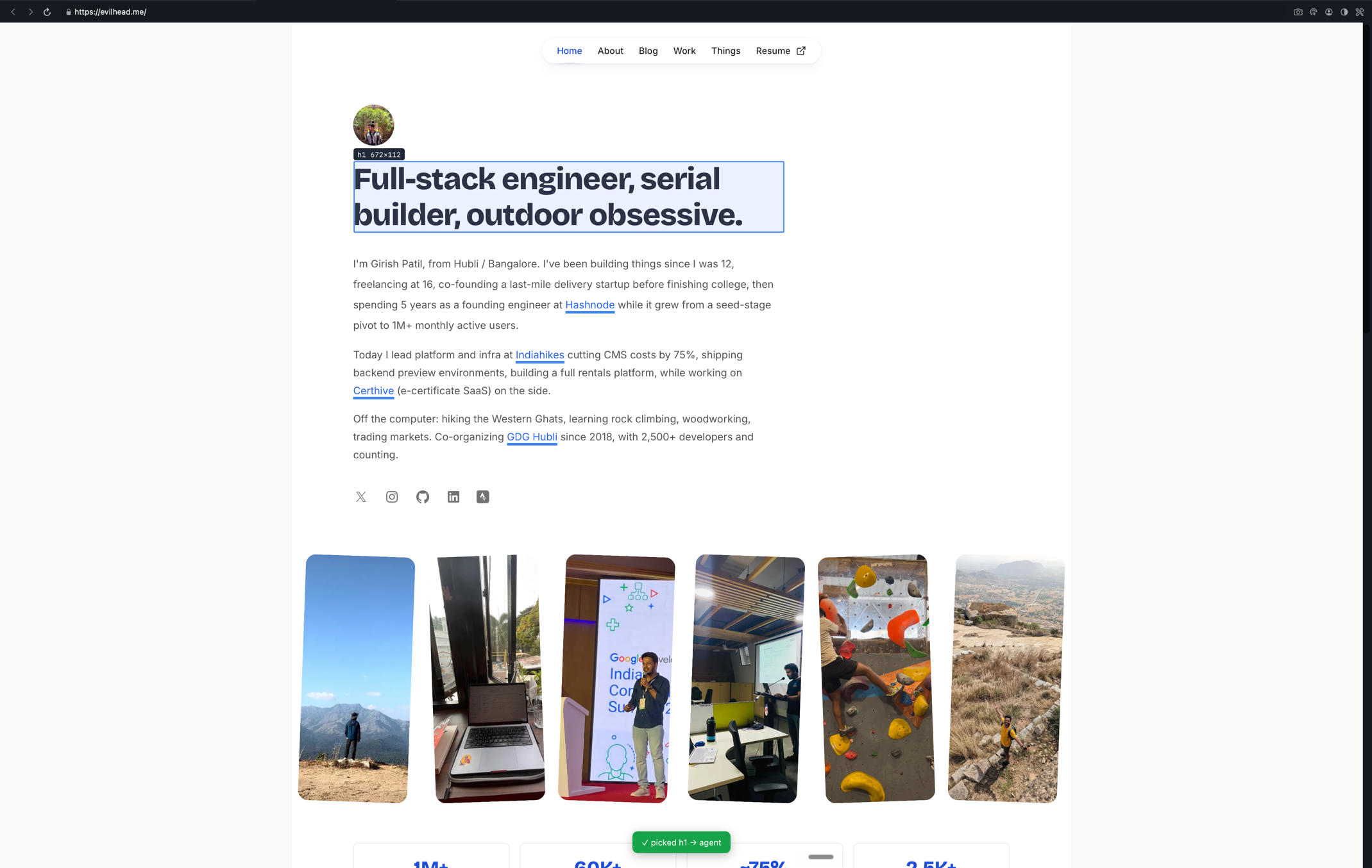
Option+Click an element in the cmux in-app browser and send its DOM + computed CSS + design tokens to your coding agent's pane.

Maintainers
 evilhead
Readme
cmux-browser-element-pick
Click an element in the cmux in-app browser and send its **DOM + computed CSS
- design tokens** straight into your coding agent's pane (Claude Code, Codex, etc.). It's the "annotate the UI, feed it to the agent" loop, built entirely on cmux's existing CLI primitives - no Chrome extension, no MCP server, no daemon.
Why
A coding agent in a terminal can't see what you're looking at in the browser. cmux-browser-element-pick closes that gap: hover an element, click it, and a clean HTML context file lands where your agent can read it.
Requirements
- macOS with cmux installed (the
cmuxCLI onPATH). - Node 18+.
- A cmux workspace with the in-app browser open (
Cmd+Shift+L) and a coding agent running in another pane.
Install
npm i -g cmux-browser-element-pick   # provides the `cmux-browser-element-pick` command
cmux-browser-element-pick init                       # adds a Dock control to ~/.config/cmux/dock.json
cmux reload-config                   # pick it up without restarting cmux
cmux-browser-element-pick init writes (and backs up) ~/.config/cmux/dock.json so a
Pick element → agent control appears in the cmux Dock. Open that control,
open the in-app browser, and Option+Click elements - they land in your agent
pane. Prefer manual setup? See Launch from the cmux Dock.
From source
git clone https://github.com/theevilhead/cmux-browser-element-pick
cd cmux-browser-element-pick
npm link            # exposes `cmux-browser-element-pick` globally
cmux-browser-element-pick init
How it works
cmux-browser-element-pick (driver)
  1. cmux identify / tree   -> find the browser surface + the agent terminal
  2. cmux browser <b> eval  -> inject a hover/click picker into the WKWebView
  3. browser eval (poll ~400ms) -> drain window.__cmuxPicks, re-arm if navigated
  4. write context to a file -> /tmp/cmux-browser-element-pick/pick-*.html (DOM + CSS + tokens)
  5. send <agent>          -> send a single reference line pointing at the HTML
                              file, then one Enter to submit it
Transport: it talks to cmux over the Unix socket ($CMUX_SOCKET_PATH,
newline-delimited JSON - system.tree, browser.eval,
surface.send_text, surface.send_key) using one persistent connection. If the
socket is unavailable it transparently falls back to the cmux CLI. Surface
targeting differs per backend (socket = UUID, CLI = surface:N ref); that's
normalized internally so the picker is identical.
Polling, not long-poll: there's no push channel from the page to the driver.
cmux does have a browser.wait long-poll, but it holds the WKWebView's JS main
thread for the whole timeout - which freezes the page (macOS beachball, dead
clicks). So the driver instead runs a short, non-blocking browser.eval every
--poll ms (default 400) that drains queued picks and re-arms the picker if a
navigation cleared it. Each eval is ~30ms and yields the page thread between
checks, so browsing stays smooth. The driver exits on its own if the browser
surface goes away.
The picker (src/picker.js) runs in the page and is armed by the Option/Alt
modifier: hold Option to highlight elements, then Option+Click to capture.
Plain clicks pass straight through, so normal browsing keeps working while the
picker stays running. On Option+Click a small comment box opens so you can
attach a note (Enter to send, Esc to cancel that pick).
Each capture collects: pageUrl, selector, selectedElementHtml (trimmed
outerHTML), computedStyles (a UI-dev allowlist), the CSS custom properties
(--*) the element actually references, boundingBox, visibleText, xpath,
parentHierarchy (ancestors up to body), and your userComment. The full bundle
is written as a standalone .html file the agent can open. Esc with no comment
box open turns the picker off. The driver re-injects the picker automatically
after you navigate.
Each pick writes the full element context - identity (tag, text, note), location
(page, selector, xpath, box), class/role, the ancestor chain, computed
styles, design tokens, and the element's DOM - to a standalone .html file under
the temp dir, then sends the agent a single reference line pointing at that file
and submits it. Nothing else is typed into the prompt, so there's no multi-line
paste, no "pasted text" chip, and no line-by-line submission.
Use --no-enter to leave the reference line in the prompt without submitting.
Usage
node bin/cmux-browser-element-pick.mjs            # auto-detect browser + agent surfaces
node bin/cmux-browser-element-pick.mjs --no-enter  # leave the reference line unsubmitted
node bin/cmux-browser-element-pick.mjs --once     # capture one element then exit
node bin/cmux-browser-element-pick.mjs --browser surface:12 --agent surface:11
Flags:
| flag | meaning |
|------|---------|
| --browser surface:N | browser surface to pick from (default: active/first browser) |
| --agent surface:M | terminal surface to send to (default: caller / sibling terminal) |
| --no-enter | do not auto-submit; leave the reference line in the prompt |
| --once | capture a single element then exit |
| --poll <ms> | poll interval between non-blocking checks (default 400) |
Run it, then Option+Click elements in the cmux browser. Each pick drops a
context file and a reference into your agent's prompt. Ctrl+C in the terminal
stops the driver; Esc in the browser stops the picker overlay.
Launch from the cmux Dock (stays running)
.cmux/dock.json adds a sidebar control that runs the picker in its own section.
A Dock control runs its command when the section opens and the driver loops, so
cmux-browser-element-pick stays armed continuously - and because capture is gated on
Option+Click, normal browsing is unaffected while it runs.
{
  "controls": [
    { "id": "cmux-browser-element-pick", "title": "Pick element → agent",
      "command": "node ./bin/cmux-browser-element-pick.mjs", "cwd": ".", "height": 200 }
  ]
}
cmux shows a trust gate the first time it sees a project Dock config. See
cmux docs dock.
When launched from the Dock, cmux-browser-element-pick runs in its own terminal section. It excludes that section when choosing where to send picks, and targets another terminal - preferring one whose title looks like a coding agent (claude, codex, opencode, aider, gemini, …). If it guesses wrong, pin the target explicitly:
{ "id": "cmux-browser-element-pick", "title": "Pick element → agent",
  "command": "node ./bin/cmux-browser-element-pick.mjs --agent surface:3", "cwd": "." }
Global install (optional)
npm link        # or: pnpm -g add file:$(pwd)
cmux-browser-element-pick --help
Then point a Dock control or global ~/.config/cmux/dock.json at cmux-browser-element-pick.
Limitations / roadmap
- macOS + cmux only (by design - uses the cmux browser + socket).
- No source
file:linemapping yet (Phase 2: React DevTools hook in dev builds). - Design tokens are resolved from same-origin stylesheets; cross-origin sheets are skipped.
- If cmux ships the native element picker
(issue #1975), the
eval-poll loop can be swapped for native
browser.pickedevents.