
cmux-diff
v0.2.12
Published
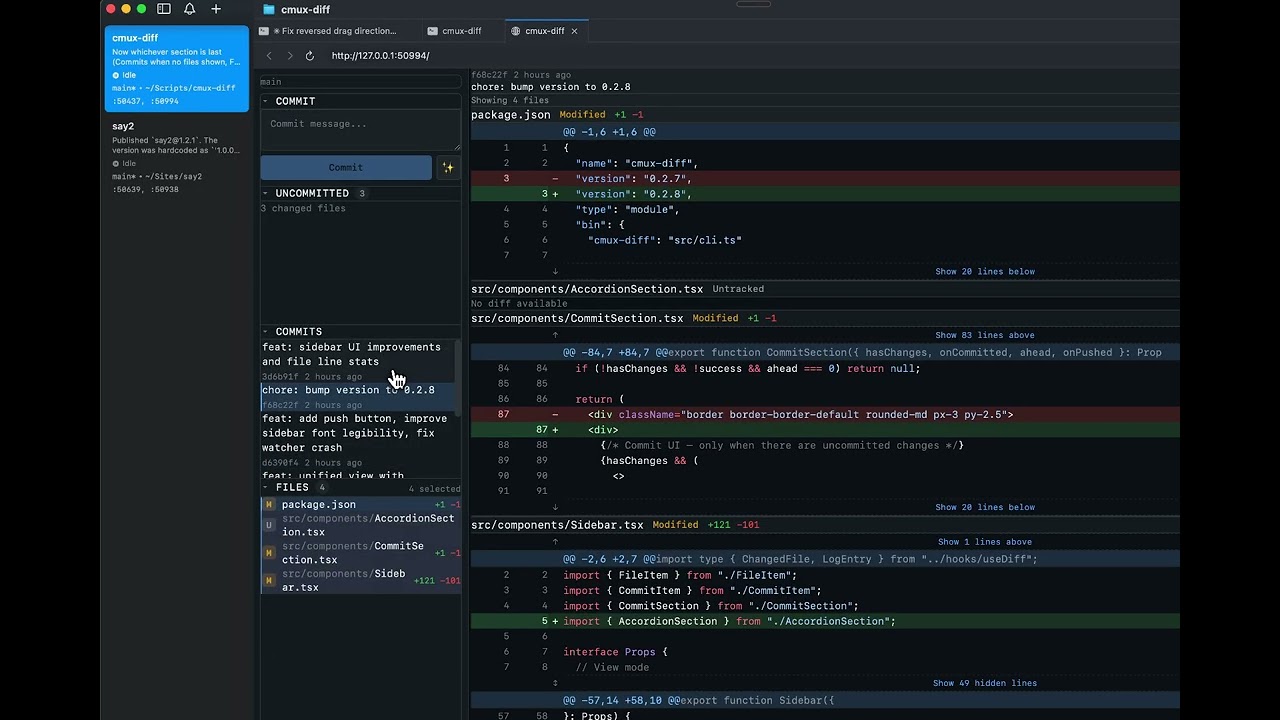
A Cursor / VSCode style Changes panel for the [cmux](https://cmux.dev) terminal environment. See which files changed, click to view syntax-highlighted diffs, including ability to generate AI-generated commit messages.


Readme
cmux-diff
A Cursor / VSCode style Changes panel for the cmux terminal environment. See which files changed, click to view syntax-highlighted diffs, including ability to generate AI-generated commit messages.
Install
npm install -g cmux-diffRequires Bun runtime.
Run
cd your_project
cmux-diff
Features
- File sidebar — all changed files with status badges (Added, Modified, Deleted, Renamed, Untracked)
- Syntax-highlighted diffs — powered by Shiki with GitHub Dark theme
- Multi-file selection — click to toggle files, shift+click for range select, Cmd+A for all
- Expand context — show more lines above, below, or between hunks
- AI commit messages — click "Generate" to create conventional commit messages using Claude
- Commit from UI — stage and commit directly from the changes panel
- Real-time updates — WebSocket-powered live refresh when files change
- Resizable sidebar — drag to resize, width persisted across sessions
- Keyboard navigation — j/k or arrow keys to move between files
- Smart diff range — auto-detects feature branches and diffs against merge-base
- cmux integration — opens in cmux browser split
- Dark theme — GitHub-dark color palette
Keyboard Shortcuts
| Key | Action |
|-----|--------|
| j / Arrow Down | Next file |
| k / Arrow Up | Previous file |
| Cmd/Ctrl + A | Select all files |
| Shift + Click | Range select files |
| Cmd/Ctrl + Enter | Commit (when in message input) |
Claude Code Integration
Use as a Claude Code skill by adding to your global skills:
mkdir -p ~/.claude/skills/cmux-diffThen create ~/.claude/skills/cmux-diff/SKILL.md — see skills/start/SKILL.md for the template.
Invoke with /cmux-diff from any project.
API
| Endpoint | Description |
|----------|-------------|
| GET /api/diff/files | List changed files with status |
| GET /api/diff/file?path=&context= | Diff for a single file with syntax tokens |
| GET /api/commit/message | AI-generated conventional commit message |
| POST /api/commit | Stage all and commit { message } |
| GET /api/status | Current branch and working directory |
| GET /api/branches | List branches |
| WS /ws | Real-time diff-updated events |
Tech Stack
- Runtime: Bun
- Frontend: React 19, Tailwind CSS v4
- Syntax highlighting: Shiki (GitHub Dark)
- Commit messages: Claude CLI (conventional commits)
- cmux integration: Unix domain socket (JSON-RPC)
Development
git clone https://github.com/jaequery/cmux-diff.git
cd cmux-diff
bun install
bun run dev                # Dev server with hot reload
bun run typecheck          # TypeScript check
bun run build:compile      # Build standalone binary
License
MIT