
coc-vscode-loader
v1.6.8
Published
Run VS Code extensions seamlessly in coc.nvim

Maintainers
 chuyanlon
Readme
coc-vscode-loader
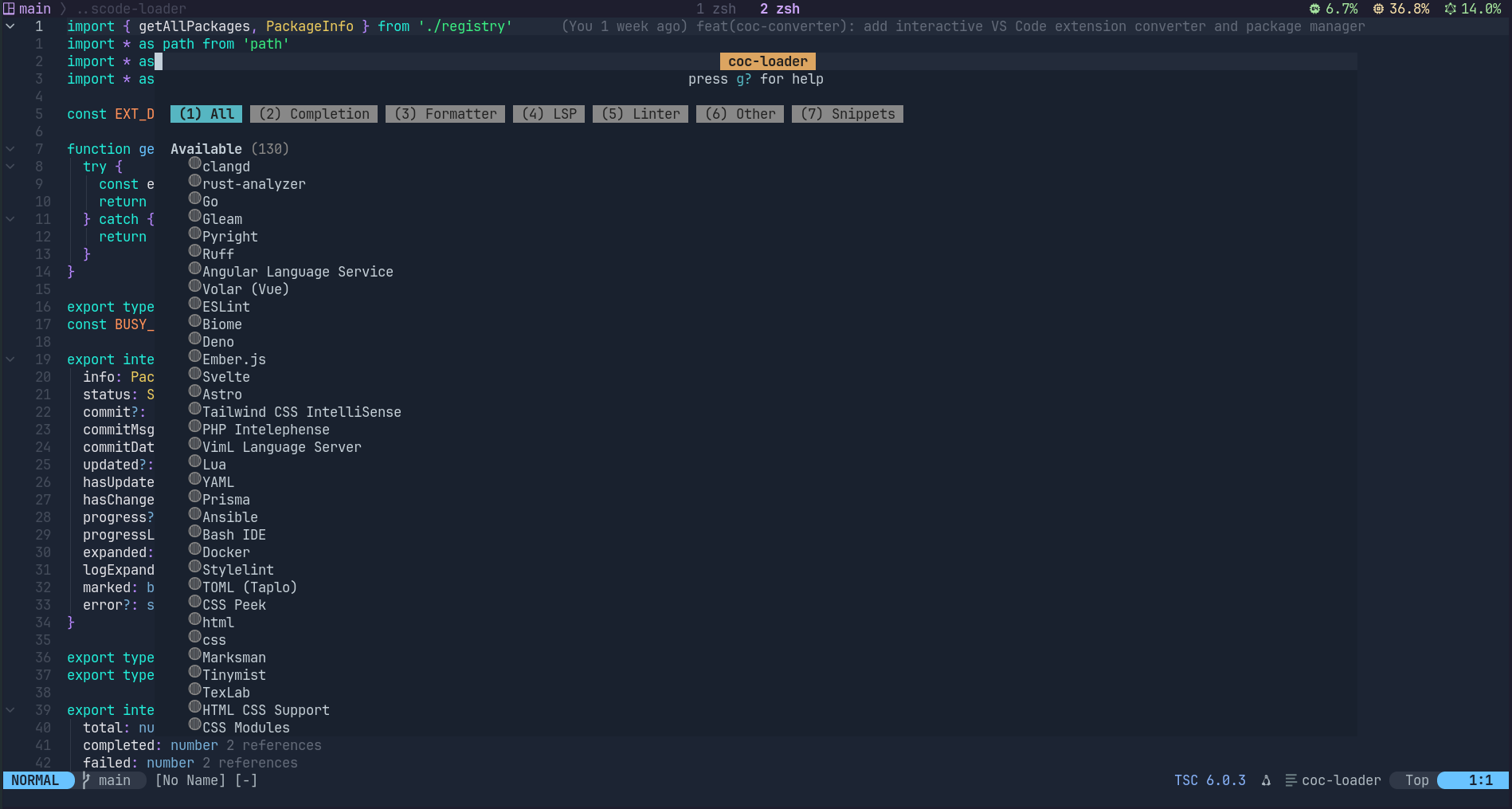
AOT (Ahead-of-Time) converter: install VS Code extensions and convert them to coc.nvim plugins at install time.
Install/update/uninstall converted VS Code extensions via a terminal UI. Supports Neovim 0.8+ (floating window + extmark) and Vim 9.0+ (split window + text properties).
⚠️ IMPORTANT: Keep Updated Each release includes critical converter fixes. Outdated versions silently produce broken plugins. After updating, the loader auto-detects which plugins changed — look for
[changed]markers in the TUI and reinstall only those. Run:CocCommand loader.open→ check for[changed]markers → pressRon marked plugins.All 134 upstream VS Code repos are monitored daily for API-breaking changes. When detected, automated PRs are created for review — so your plugins stay working.
Install
:CocInstall coc-vscode-loaderOr via npm:
cd ~/.config/coc/extensions
npm install coc-vscode-loader
TUI Keymaps
| Key | Action |
|-----|--------|
| I | Install mode (button highlight) |
| U | Update all installed packages (max 3 concurrent) |
| C | Check for remote updates (git ls-remote commit compare) |
| H | Home (reset all state) |
| ? | Help |
| i | Install package under cursor |
| u | Update package under cursor |
| X | Uninstall package under cursor |
| R | Reinstall package under cursor |
| f | Cycle filter: all → installed → available |
| s | Cycle sort: default → name → status → type |
| j / k | Scroll through packages (virtual scroll) |
| gg | Jump to first package |
| G | Jump to last package |
| <CR> | Open detail popup (info / install log with syntax highlights) |
| / | Search filter |
| q | Close (auto :CocRestart if changes detected) |
| <Esc> | Language filter→Search→Close |
Commands
| Command | Action |
|---------|--------|
| :CocCommand loader.open | Open TUI |
| :CocCommand loader.install <name> | Install a package |
| :CocCommand loader.uninstall <name> | Uninstall a package |
| :CocCommand loader.update <name> | Update a package |
| :CocCommand loader.reinstall <name> | Reinstall a package (uninstall + install) |
| :CocCommand loader.uninstallAll | Uninstall all (with confirmation) |
| :CocCommand loader.updateRegistry | Fetch latest registry from remote |
| :CocCommand loader.cleanCache | Clean build cache for all packages |
| :CocCommand loader.whatChanged | Cross-version impact analysis |
| :CocCommand loader.list | List installed packages (copied to clipboard) |
Global Extensions (auto-install)
Define extensions to auto-install on plugin activation via vim variable:
" .vimrc
let g:coc_loader_global_extensions = ['vscode-pyright', 'vscode-eslint', 'vscode-lua']
-- init.lua
vim.g.coc_loader_global_extensions = { 'vscode-pyright', 'vscode-eslint', 'vscode-lua' }On next :CocRestart, the plugin will fetch the registry and install any missing extensions concurrently (max 3 at a time). Installed extensions are skipped.
Features
- Real conversion pipeline — git clone → converter → npm install → esbuild → register to coc
- Source-compiled servers — pipeline auto-installs Go servers via
go install(goPackages) and Rust servers viacargo install(cargoPackages), binaries go toserver/directory - Binary server download — auto-downloads pre-built server binaries from GitHub Releases (
.zip,.tar.gz,.gz) - Pre-built VSIX server — auto-downloads & extracts compiled server from VS Code marketplace for
kind: "module"servers that need compilation (TypeScript, wasm, etc.) - Local server build — auto-copies
server/directory from source, installs deps, compiles TypeScript during build - Pip install — auto-installs Python packages via
pipfor plugins that need them (e.g. ansible-lint) - Auto-fetch registry — remote registry fetched in background when TUI opens, no manual refresh needed
- Virtual scrolling —
j/ksmooth scroll through packages, handles 100k+ registry entries - Incremental cache — source/ keeps git repo, updates via git fetch + reset
- Commit tracking — records commit SHA after install, visible in detail view
- Update check —
Ckey compares against remote HEAD, shows↑when outdated - Cross-version impact —
:CocCommand loader.whatChangedcompares baseline between versions, shows which installed plugins need reinstall - Auto restart —
:CocRestarttriggered automatically on close when changes detected - Manual registry update —
:CocCommand loader.updateRegistryalso available for re-fetch - Detail popup —
<CR>opens centered float window with package info or live install log (syntax highlighted, auto-scroll to latest) - Filter & sort —
fcycle view filter,scycle sort order (name/status/type) - Concurrency limit — max 3 parallel operations for
U(Update All) - Desktop notifications —
showInformationMessageon install/update/uninstall complete - Auto-check updates — silent check on startup, notifies only when updates found
- Cross-version change detection — on startup after upgrade, silently detects which installed plugins' output files changed, marks them
[changed]in TUI, and notifies the user - Cache cleanup —
:CocCommand loader.cleanCacheremoves build artifacts - Export package list —
:CocCommand loader.listcopies installed package names to clipboard
Architecture
| File | Description |
|------|-------------|
| src/index.ts | Plugin entry + 11 CocCommands |
| src/tui.ts | TUI window management + rendering + key dispatch |
| src/state.ts | State management (debounced rendering) |
| src/registry.ts | Remote registry fetch + disk cache |
| src/pipeline.ts | Real install/update/uninstall flow (git + npx tsx + npm + node + cp). Handles local servers (copies server/ dir, installs deps), binary server download, Go/Cargo source-compiled servers, pip install. |
| src/renderer.ts | LineBuffer render engine (inspired by lazy.nvim) |
| src/editor-api.ts | Editor abstraction interface |
| src/nvim-editor.ts | Neovim backend (float window + extmark) |
| src/vim-editor.ts | Vim backend (split window + text properties) |
| src/editor-factory.ts | Auto-detects has('nvim') → picks the right backend |
Build
npm install
npm run build    # esbuild → lib/index.js
Test
Integration tests use coc-test, which starts Vim/Neovim with coc.nvim and the activated extension:
npm test              # Neovim (default)
npm run test:vim      # Vim
npm run test:watch    # watch mode