
code-migrator
v2.0.0
Published
Create code migration tool for your tool/library/framework.

Maintainers
 azu
azuReadme
code-migrator 
This library help to create code migration tool.
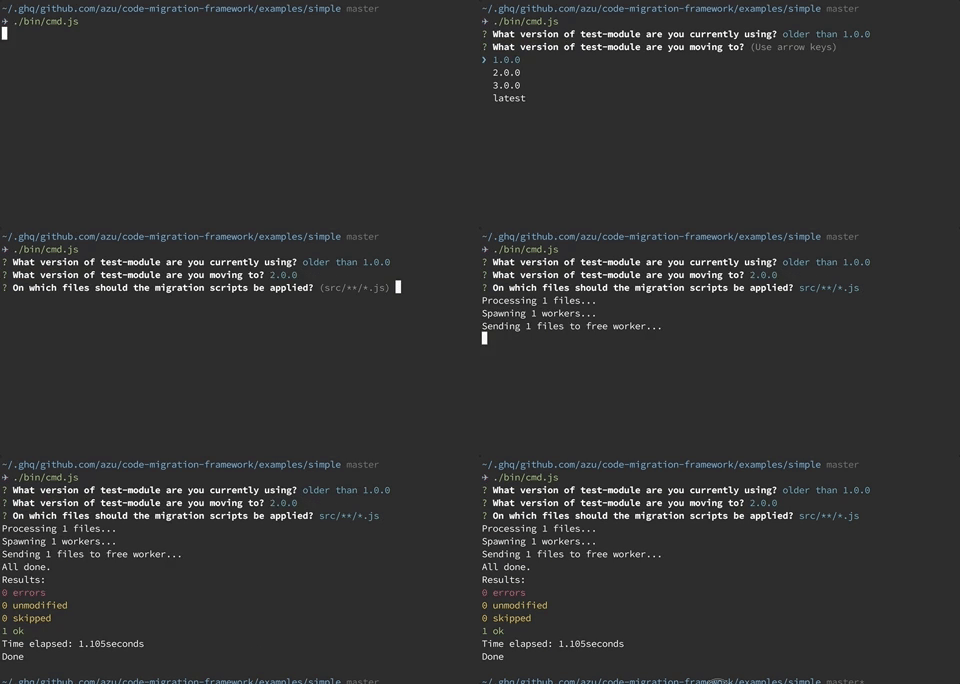
This library help to create migration tool for your library/framework/tool.
- This library aim to provide command line interface for migration
- This library help to run migration scripts
- This library does not provide migration scripts
- You have to write migration script
- You choose codemod tool by own
- Your migration script must not depended on this library
codemod tools
You have to write migration scripts using following codemod tools.
- facebook/jscodeshift: A JavaScript codemod toolkit.
- square/babel-codemod: babel-codemod rewrites JavaScript using babel plugins.
- KnisterPeter/tscodeshift: tscodeshift is a toolkit for running codemods over multiple TS files
code-migrator is a launcher library for the above tools.
Install
Install with npm:
npm install code-migratorRequirements
- Your library/framework/tool should follow Semantic Versioning
- You have to prepare migration scripts
Usage
Define MigrationList
module.exports = {
    scripts: [
        {
            name: "use-strict",
            // absolute path for codemod scripts
            filePath: require.resolve("./scripts/use-strict")
        }
    ],
    versions: [
        // 0.x.x -> 1.0.0 apply "use-strict"
        {
            version: "1.0.0",
            scripts: ["use-strict"]
        },
        // 1.0.0 -> 2.0.0 does not apply anything
        {
            version: "2.0.0",
            scripts: []
        },
        {
            version: "3.0.0",
            scripts: []
        }
    ]
};
Example:
const { CodeMigrator } = require("code-migrator");
const meow = require("meow");

const cli = meow(
    `
    Usage
      $ code-migration-example <input>

    Options:
      --dry-run Enable dry run mode

    Examples
      $ code-migration-example "src/**/*.js"
`,
    {
        flags: {
            dryRun: {
                type: "boolean"
            }
        }
    }
);

const migrator = new CodeMigrator({
    moduleName: "test-module", // <= target npm module name if needed
    migrationList: require("../migrations"), // load migration list
    binCreator: ({ script, filePathList }) => {
        // migration script is executed by jscodeshift
        const binArgs = cli.flags.dryRun ? ["--dry"] : [];
        return {
            binPath: require.resolve(".bin/jscodeshift"),
            binArgs: binArgs.concat(["-t", script.filePath]).concat(filePathList)
        };
    }
});
migrator
    .run({
        filePatterns: cli.input
    })
    .then(() => {
        console.log("Done");
    })
    .catch(error => {
        console.error(error);
    });
For more details, see examples/
How to write unit test?
Code Migrator use Inquirer.js for building interactive interface. It is useful, but it is difficult to test.
You can run Code Migrator with non-interactive mode.
run(options: CodeMigratorRunOption)
If you set all defaultValue option, you can run code without interactive prompt.
const migrationList: MigrationList = require("./fixtures/scripts/migrations.js");
const codeMigrator = new CodeMigrator({
    migrationList: migrationList,
    moduleName: "test",
    binCreator: ({ script, filePathList }) => {
        return {
            binPath: require.resolve(".bin/jscodeshift"),
            binArgs: ["--dry", "-t", script.filePath].concat(filePathList)
        };
    }
});
codeMigrator
    .run({
        force: true,
        defaultValue: {
            currentVersion: "0.1.0",
            nextVersion: "3.0.0",
            files: [path.join(__dirname, "fixtures/scripts/src/**/*.js")]
        }
    });
runScripts(options: RunScriptsOptions)
runScripts is non-interactive mode by default.
const migrationList: MigrationList = require("./fixtures/scripts/migrations.js");
const codeMigrator = new CodeMigrator({
    migrationList: migrationList,
    moduleName: "test",
    binCreator: ({ script, filePathList }) => {
        return {
            binPath: require.resolve(".bin/jscodeshift"),
            binArgs: ["--dry", "-t", script.filePath].concat(filePathList)
        };
    }
});
codeMigrator.runScripts({
    force: true,
    scripts: migrationList.scripts,
    files: [path.join(__dirname, "/fixtures/scripts/src/**/*.js")]
});
User
Following migration tools use code-migrator.
Changelog
See Releases page.
Running tests
Install devDependencies and Run npm test:
npm i -d && npm testContributing
Pull requests and stars are always welcome.
For bugs and feature requests, please create an issue.
- Fork it!
- Create your feature branch:
git checkout -b my-new-feature - Commit your changes:
git commit -am 'Add some feature' - Push to the branch:
git push origin my-new-feature - Submit a pull request :D
Author
License
MIT © azu
Acknowledgment
This library is based on ava-codemods.