
code-session-memory
v0.18.0
Published
Automatically index OpenCode, Claude Code, Cursor, VS Code, Codex, and Gemini CLI sessions into a shared sqlite-vec vector database for semantic search across your AI coding history
Downloads
301

Maintainers
 djannot
Readme
code-session-memory
Automatic vector memory for OpenCode, Claude Code, Cursor, VS Code, Codex, and Gemini CLI sessions — shared across all tools.
Every time the AI agent finishes its turn, code-session-memory automatically indexes the new messages into a vector database. Past sessions become semantically searchable — both by the AI agent (via the MCP server) and by you. Sessions from OpenCode, Claude Code, Cursor, VS Code, Codex, and Gemini CLI are stored in the same database, so memory is shared across tools.
By default, data is stored locally in a sqlite-vec database. Optionally, you can use PostgreSQL + pgvector (e.g. Supabase) as a centralized backend to share memory across multiple machines.
How it works
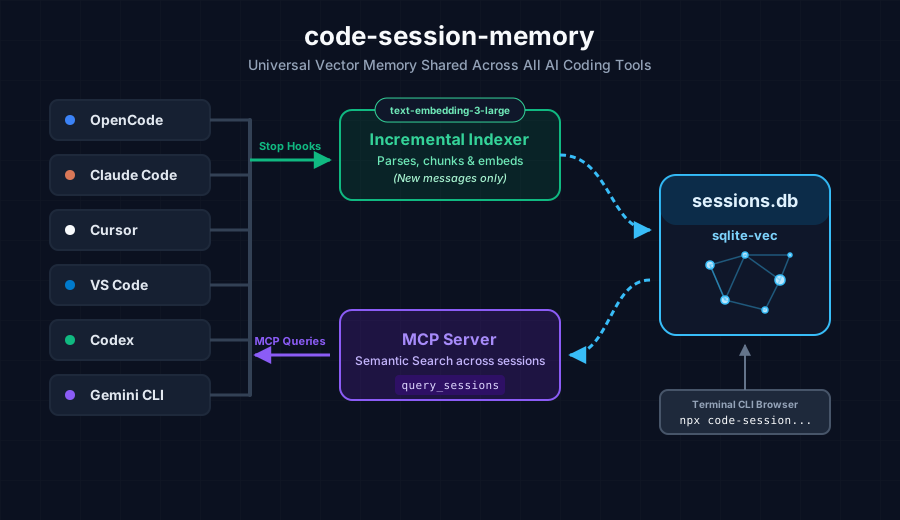
Only new messages are indexed on each turn — previously indexed messages are skipped (tracked via sessions_meta table). This makes each indexing pass fast, even in long sessions.
Installation
Prerequisites
- Node.js ≥ 18
- An OpenAI API key (for
text-embedding-3-large) - At least one supported tool installed (OpenCode, Claude Code, Cursor, VS Code, Codex, or Gemini CLI)
Install
npx code-session-memory installThe install command sets up everything for all detected tools on your machine:
OpenCode:
- Copies the plugin to
~/.config/opencode/plugins/code-session-memory.ts - Copies the skill to
~/.config/opencode/skills/code-session-memory/SKILL.md - Writes the MCP server entry into
~/.config/opencode/opencode.json
Claude Code:
- Writes a
Stophook to~/.claude/settings.json(fires after each agent turn) - Copies the skill to
~/.claude/skills/code-session-memory/SKILL.md - Writes the MCP server entry into
~/.claude.json
Cursor:
- Writes a
stophook to~/.cursor/hooks.json(fires after each agent turn; requires Cursor v2.5+) - Writes the MCP server entry into
~/.cursor/mcp.json - Copies the skill to
~/.cursor/skills/code-session-memory/SKILL.md
VS Code:
- Writes a
Stophook to~/.vscode/hooks/code-session-memory.json(Copilot hook format) - Registers the hook file in VS Code's
settings.jsonviachat.hookFilesLocations - Writes the MCP server entry into
~/.config/Code/User/mcp.json(Linux) or~/Library/Application Support/Code/User/mcp.json(macOS)
Codex:
- Writes the MCP server entry into
~/.codex/config.toml - Adds
OPENAI_API_KEYto Codex MCP environment variable passthrough - Writes the
notifyhook in~/.codex/config.toml(fires after each agent turn) - Copies the skill to
~/.codex/skills/code-session-memory/SKILL.md
Gemini CLI:
- Writes the MCP server entry into
~/.gemini/settings.jsonundermcpServers.code-session-memory - Writes the
AfterAgenthook in~/.gemini/settings.json(fires after each agent turn) - Copies the skill to
~/.gemini/skills/code-session-memory/SKILL.md
All tools share:
- The same database at
~/.local/share/code-session-memory/sessions.db - The same MCP server for querying past sessions
Then restart OpenCode / Claude Code / Cursor / VS Code / Codex / Gemini CLI to activate.
VS Code note: Ensure Chat: Use Hooks is enabled in VS Code settings (it is by default in VS Code 1.109.3+).
Codex note: The install command sets
notify = ["node", ".../indexer-cli-codex.js"]and MCP env passthrough["OPENAI_API_KEY"]in~/.codex/config.toml.Gemini CLI note: The install command sets an
AfterAgenthook invokingindexer-cli-gemini.jsin~/.gemini/settings.json.
Set your API key
export OPENAI_API_KEY=sk-...Add this to your shell profile (.bashrc, .zshrc, etc.) so it's always available.
Usage
Once installed, memory indexing is fully automatic. No further action needed — sessions are indexed as you use OpenCode, Claude Code, Cursor, VS Code, Codex, or Gemini CLI.
Verify installation
npx code-session-memory statusOutput:
code-session-memory status

  Database       ~/.local/share/code-session-memory/sessions.db  ✓
  Indexed chunks:   1842
  Sessions tracked: 47

  OpenCode
    Plugin         ~/.config/opencode/plugins/code-session-memory.ts  ✓
    Skill          ~/.config/opencode/skills/code-session-memory/SKILL.md  ✓
    MCP server     /path/to/dist/mcp/index.js                          ✓
    MCP config     ~/.config/opencode/opencode.json                    ✓

  Claude Code
    Stop hook      ~/.claude.json                                      ✓
    Skill          ~/.claude/skills/code-session-memory/SKILL.md        ✓
    MCP server     /path/to/dist/mcp/index.js                          ✓

  VS Code
    MCP config     ~/.config/Code/User/mcp.json                        ✓
    Stop hook      ~/.vscode/hooks/code-session-memory.json            ✓
    Hook loc       ~/.config/Code/User/settings.json                   ✓

  Codex
    MCP config     ~/.codex/config.toml                                ✓
    Notify hook    ~/.codex/config.toml                                ✓
    Skill          ~/.codex/skills/code-session-memory/SKILL.md        ✓

  Gemini CLI
    MCP config     ~/.gemini/settings.json                              ✓
    AfterAgent     ~/.gemini/settings.json                              ✓
    Skill          ~/.gemini/skills/code-session-memory/SKILL.md        ✓
MCP tools
The agent can use two MCP tools (and will automatically via the installed skill):
query_sessions
Semantic search across all indexed sessions.
| Parameter | Type | Required | Description |
|---|---|---|---|
| queryText | string | yes | Natural language query |
| project | string | no | Filter by project directory path |
| source | string | no | Filter by tool: "opencode", "claude-code", "cursor", "vscode", "codex", or "gemini-cli" |
| limit | number | no | Max results (default: 5) |
| fromDate | string | no | Return chunks indexed on or after this date (ISO 8601, e.g. "2026-02-01") |
| toDate | string | no | Return chunks indexed on or before this date (ISO 8601, e.g. "2026-02-20") |
Example result:
Result 1:
  Content: [Session: Add dark mode toggle > User]

  How can I implement a dark mode toggle using CSS variables?
  Distance: 0.1823
  URL: session://ses_abc123#msg_def456
  Section: User
  Chunk: 1 of 1
---
get_session_chunks
Retrieve the full ordered content of a specific session message. Use the session://ses_xxx#msg_yyy URL from query_sessions results.
| Parameter | Type | Required | Description |
|---|---|---|---|
| sessionUrl | string | yes | URL from query_sessions result |
| startIndex | number | no | First chunk index (0-based) |
| endIndex | number | no | Last chunk index (0-based, inclusive) |
Querying from the CLI
You can search your indexed sessions directly from the terminal without going through the AI agent:
npx code-session-memory query "authentication middleware"
npx code-session-memory query "auth flow" --source opencode
npx code-session-memory query "session summary" --source codex
npx code-session-memory query "hook payload format" --source gemini-cli
npx code-session-memory query "migration" --limit 10
npx code-session-memory query "error handling" --from 2026-02-01 --to 2026-02-20
| Flag | Default | Description |
|---|---|---|
| --source <s> | none | Filter by tool: opencode, claude-code, cursor, vscode, codex, or gemini-cli |
| --limit <n> | 5 | Max number of results |
| --from <date> | none | Only include sessions from this date (ISO 8601, e.g. 2026-02-01) |
| --to <date> | none | Only include sessions up to this date (inclusive) |
Requires OPENAI_API_KEY to be set (used to embed the query text).
Example output:
Found 2 result(s) for "authentication middleware" (limit=5)

1. [1.1665] "Implement auth flow" (opencode)
   Section: Assistant
   Chunk 1/3 — session://ses_abc123#msg_def456
   ────────────────────────────────────────────────────────────
   [Session: Implement auth flow > Assistant]

   We implemented JWT authentication middleware using Express.js...
   ────────────────────────────────────────────────────────────
Browsing sessions
You can browse, inspect, and delete indexed sessions directly from the CLI:
npx code-session-memory sessions # interactive browser (source → date → session)The interactive browser lists all sessions with their title, date, source tool, and chunk count. Select a session to:
- Print — dump all chunks to stdout (useful for piping or inspection)
- Compact for restart — summarize the session with OpenAI and copy the result to your clipboard, ready to paste into a new session of any tool
- Delete — remove the session from the DB (with confirmation)
- Back — return to the session list
Compact for restart
The "Compact for restart" action generates a structured restart document containing:
- Context — what was being built or fixed
- Key Decisions — architectural and implementation choices
- Current State — what is completed and what is in progress
- Unresolved Issues — blockers and open questions
For long sessions the compactor uses a map-reduce strategy: it splits the transcript into windows, summarizes each independently, then merges the partial summaries into a final digest.
Requires OPENAI_API_KEY. Uses gpt-5-nano by default (override with OPENAI_SUMMARY_MODEL).
After compaction, the CLI prints total token usage (input, output, total).
You can also print or delete directly. Without an ID, an interactive picker opens:
npx code-session-memory sessions print             # pick interactively, then print
npx code-session-memory sessions print <id>        # print directly by session ID

npx code-session-memory sessions delete            # pick interactively, then delete
npx code-session-memory sessions delete <id>       # delete directly by session ID
Print output example:
────────────────────────────────────────────────────────────────────────
Session: Add authentication middleware
Source:  opencode  2026-02-18
Project: /Users/you/myproject
ID:      ses_abc123
Chunks:  12
────────────────────────────────────────────────────────────────────────

## Chunk 1/12  —  Section: User

How can I add JWT authentication to the Express middleware?

## Chunk 2/12  —  Section: Assistant

...
Note: Deleting a session only removes it from the database. If the original session files still exist on disk, the session will be re-indexed automatically on the next agent turn.
Web UI
A full-featured web interface provides the same capabilities as the CLI in a modern browser-based dashboard:
npx code-session-memory webOpen http://localhost:3333 in your browser. The web UI includes:
- Search — Semantic search with filters (source, date range, result limit)
- Sessions — Browse, filter, and manage all indexed sessions
- Session detail — View all chunks with role badges (User, Assistant, Tool: name), analytics (message counts, tool call breakdown, active duration)
- Status — Database stats and per-tool installation status
- Delete / Purge — Remove individual sessions or purge old ones
Options:
| Flag | Default | Description |
|---|---|---|
| --port <n> | 3333 | Port to listen on |
| --host <h> | localhost | Host to bind to (use 0.0.0.0 for network access) |
For development with hot reload:
npx code-session-memory web              # API server on :3333
npm run dev:web                           # Vite dev server on :5173 (proxies /api to :3333)
Asking the agent about past sessions
The installed skill teaches the agent when and how to use these tools. Example prompts:
How did we implement the authentication middleware last week?
Have we discussed this error before?
What was our decision about the database schema?
Show me how we solved the TypeScript config issue.
Configuration
Environment variables
| Variable | Default | Description |
|---|---|---|
| OPENAI_API_KEY | — | Required. Used for embedding generation and session compaction. |
| OPENCODE_MEMORY_DB_PATH | ~/.local/share/code-session-memory/sessions.db | Override the database path. |
| OPENCODE_CONFIG_DIR | ~/.config/opencode | Override the OpenCode config directory. |
| CLAUDE_CONFIG_DIR | ~/.claude | Override the Claude Code config directory. |
| CURSOR_CONFIG_DIR | ~/.cursor | Override the Cursor config directory. |
| VSCODE_CONFIG_DIR | ~/.config/Code/User (Linux) / ~/Library/Application Support/Code/User (macOS) | Override the VS Code config directory. |
| CODEX_HOME | ~/.codex | Override the Codex home directory. |
| GEMINI_CONFIG_DIR | ~/.gemini | Override the Gemini CLI config directory. |
| OPENAI_MODEL | text-embedding-3-large | Override the embedding model. |
| OPENAI_SUMMARY_MODEL | gpt-5-nano | Override the model used for session compaction (Compact for restart). |
| CSM_SUMMARY_MAX_OUTPUT_TOKENS | 5000 | Override the max output token budget for session compaction. |
| CSM_BACKEND | sqlite | Database backend: sqlite (default) or postgres. |
| CSM_POSTGRES_URL | — | PostgreSQL connection string (when CSM_BACKEND=postgres). |
| CSM_POSTGRES_SSL | false | Set to true for SSL connections (required for Supabase). |
Database path
The default database path works on both macOS and Linux. On macOS, ~/.local/share is used for cross-platform consistency (rather than ~/Library/Application Support).
To change it:
export OPENCODE_MEMORY_DB_PATH=/custom/path/sessions.db
npx code-session-memory install
PostgreSQL backend (optional)
Instead of the default local SQLite database, you can use PostgreSQL with pgvector as a centralized backend. This is useful when you want to:
- Share memory across multiple machines (e.g. laptop + desktop)
- Use a managed database like Supabase (free tier includes pgvector)
- Centralize sessions from all your tools in one place
Setup
- Configure the backend:
npx code-session-memory config set-backend postgres --url "postgresql://user:[email protected]:5432/postgres" --sslThis tests the connection, creates the schema (tables + HNSW vector index + GIN full-text index), and saves the config to ~/.config/code-session-memory/config.json.
- Migrate existing SQLite data (optional):
npx code-session-memory migrateThis auto-discovers your local SQLite database and migrates all data (sessions, chunks with embeddings, messages, tool calls) to PostgreSQL. Embeddings are transferred directly — no re-embedding needed.
- Done. All indexers and MCP queries now use PostgreSQL.
Multi-machine setup
To share memory across multiple machines, run the setup on each:
# On machine A:
npx code-session-memory config set-backend postgres --url "postgresql://..." --ssl
npx code-session-memory migrate

# On machine B:
npx code-session-memory config set-backend postgres --url "postgresql://..." --ssl
npx code-session-memory migrate
Sessions from both machines are merged into the same database. Duplicate chunks are automatically deduplicated (deterministic chunk IDs). Each machine is tagged with its hostname via origin_host in sessions_meta.
Revert to SQLite
npx code-session-memory config set-backend sqliteView current configuration
npx code-session-memory config showMigration options
npx code-session-memory migrate --help| Flag | Description |
|---|---|
| --sqlite <path> | Explicit SQLite DB path (repeatable). Default: auto-discover. |
| --pg-url <url> | Override Postgres URL (if not yet configured). |
| --origin <name> | Label for this machine (default: hostname). |
| --dry-run | Preview counts without writing. |
| --batch-size <n> | Rows per INSERT batch (default: 100). |
Config file
The backend configuration is stored at ~/.config/code-session-memory/config.json:
{
  "backend": "postgres",
  "postgres": {
    "url": "postgresql://user:pass@host:5432/dbname",
    "ssl": true
  }
}
Configuration priority: environment variables (CSM_BACKEND + CSM_POSTGRES_URL) > config file > default SQLite.
Project structure
code-session-memory/
├── src/
│   ├── types.ts                  # Shared TypeScript types
│   ├── config.ts                 # Backend config resolution (SQLite / Postgres)
│   ├── database.ts               # SQLite-vec: init, insert, query
│   ├── providers/
│   │   ├── types.ts              # DatabaseProvider async interface
│   │   ├── index.ts              # createProvider() factory
│   │   ├── sqlite-provider.ts    # SQLite implementation (wraps database.ts)
│   │   ├── pg-provider.ts        # PostgreSQL + pgvector implementation
│   │   └── pg-schema.ts          # PostgreSQL DDL (tables, indexes)
│   ├── migrate/
│   │   └── sqlite-to-pg.ts       # Migration tool (SQLite → PostgreSQL)
│   ├── chunker.ts                # Heading-aware markdown chunker
│   ├── embedder.ts               # OpenAI embeddings (parallel batched)
│   ├── session-to-md.ts          # OpenCode SDK messages → markdown
│   ├── transcript-to-messages.ts          # Claude Code JSONL transcript parser
│   ├── cursor-to-messages.ts             # Cursor state.vscdb reader (metadata + title)
│   ├── cursor-transcript-to-messages.ts  # Cursor JSONL transcript parser → FullMessage[]
│   ├── vscode-transcript-to-messages.ts  # VS Code JSONL transcript parser → FullMessage[]
│   ├── codex-session-to-messages.ts       # Codex JSONL session parser → FullMessage[]
│   ├── gemini-session-to-messages.ts      # Gemini CLI JSON session parser → FullMessage[]
│   ├── opencode-db-to-messages.ts        # OpenCode internal DB reader (fallback for -s mode)
│   ├── indexer.ts                        # Orchestrator: incremental indexing
│   ├── indexer-cli.ts                    # Node.js subprocess (called by OpenCode plugin)
│   ├── indexer-cli-claude.ts             # Node.js subprocess (called by Claude Code hook)
│   ├── indexer-cli-cursor.ts             # Node.js subprocess (called by Cursor stop hook)
│   ├── indexer-cli-vscode.ts            # Node.js subprocess (called by VS Code Stop hook)
│   ├── indexer-cli-codex.ts              # Node.js subprocess (called by Codex notify hook)
│   ├── indexer-cli-gemini.ts             # Node.js subprocess (called by Gemini CLI AfterAgent hook)
│   ├── cli.ts                            # install / status / uninstall / reset-db / query / web commands
│   ├── cli-query.ts                      # query command: semantic search from the terminal
│   ├── cli-sessions.ts                   # sessions list / print / delete / purge (TUI)
│   ├── status.ts                         # Shared status helpers (tool detection, DB stats)
│   └── web/
│       ├── server.ts                     # Express server (API + static files + SPA fallback)
│       └── api-routes.ts                 # REST API route handlers
├── mcp/
│   ├── server.ts                 # MCP query handlers (testable, injected deps)
│   └── index.ts                  # MCP stdio server entry point
├── plugin/
│   └── memory.ts                 # OpenCode plugin (session.idle hook)
├── skill/
│   └── memory.md                 # Skill instructions (injected into all tools)
├── web/                           # React + Vite + Tailwind SPA (web UI)
│   ├── src/
│   │   ├── api/client.ts          # Fetch wrapper for REST API
│   │   ├── components/            # Reusable UI components
│   │   ├── pages/                 # Route pages (Search, Sessions, Status)
│   │   └── hooks/                 # React hooks for data fetching
│   ├── vite.config.ts
│   └── package.json
├── scripts/
│   └── generate-fixtures.ts      # Generates committed e2e test fixtures (run manually)
└── tests/
    ├── chunker.test.ts
    ├── database.test.ts
    ├── embedder.test.ts
    ├── indexer.test.ts
    ├── mcp-server.test.ts
    ├── session-to-md.test.ts
    ├── cursor-to-messages.test.ts           # Unit tests: Cursor SQLite reader
    ├── cursor-transcript-to-messages.test.ts # Unit tests: Cursor JSONL parser
    ├── vscode-transcript-to-messages.test.ts # Unit tests: VS Code JSONL parser
    ├── codex-session-to-messages.test.ts    # Unit tests: Codex JSONL parser
    ├── gemini-session-to-messages.test.ts   # Unit tests + e2e indexing: Gemini CLI parser
    ├── opencode-db-to-messages.test.ts      # Unit tests: OpenCode internal DB reader
    ├── cli-query.test.ts                    # Unit tests: query CLI command
    ├── e2e-claude.test.ts                   # End-to-end: Claude Code pipeline
    ├── e2e-cursor.test.ts                    # End-to-end: Cursor pipeline
    ├── e2e-opencode.test.ts                 # End-to-end: OpenCode pipeline
    └── fixtures/                  # Committed session files (generated by generate-fixtures)
Development
# Install dependencies
npm install

# Build (backend + web UI)
npm run build

# Build web UI only
npm run build:web

# Run web UI dev server (hot reload, proxies API to :3333)
npm run dev:web

# Run tests
npm test

# Watch mode
npm run test:watch

# Coverage report
npm run test:coverage

# Regenerate e2e fixtures (requires claude and opencode CLIs)
npm run generate-fixtures
Running tests
Tests use Vitest and run without any external dependencies:
- No real OpenAI API calls — the embedder is mocked
- No real DB files — SQLite uses in-memory databases (
:memory:) for unit tests, temp files for indexer/e2e tests - E2e tests use committed fixture files in
tests/fixtures/(real transcripts, no CLI calls duringnpm test)
 ✓ tests/chunker.test.ts                          (15 tests)
 ✓ tests/mcp-server.test.ts                       (14 tests)
 ✓ tests/session-to-md.test.ts                    (21 tests)
 ✓ tests/embedder.test.ts                          (9 tests)
 ✓ tests/database.test.ts                         (27 tests)
 ✓ tests/indexer.test.ts                           (9 tests)
 ✓ tests/cursor-to-messages.test.ts               (15 tests)
 ✓ tests/cursor-transcript-to-messages.test.ts     (7 tests)
 ✓ tests/vscode-transcript-to-messages.test.ts     (7 tests)
 ✓ tests/codex-session-to-messages.test.ts        (14 tests)
 ✓ tests/gemini-session-to-messages.test.ts         (5 tests)
 ✓ tests/opencode-db-to-messages.test.ts           (8 tests)
 ✓ tests/cli-query.test.ts                        (23 tests)
 ✓ tests/e2e-claude.test.ts                       (18 tests)
 ✓ tests/e2e-cursor.test.ts                        (8 tests)
 ✓ tests/e2e-opencode.test.ts                     (14 tests)
   Tests  270 passed
To refresh the e2e fixtures (e.g. after changing the indexer or parsers), run:
npm run generate-fixturesThis invokes the real claude and opencode CLIs to generate two-turn sessions with tool use, reads the most recent Cursor session from the live state.vscdb, then commits all results to tests/fixtures/.
Uninstall
npx code-session-memory uninstallThis removes the plugin, hooks, skill files, and MCP config entries for all tools (OpenCode, Claude Code, Cursor, VS Code, Codex, and Gemini CLI). The database is not removed automatically.
To delete individual sessions instead of wiping everything, use the session browser:
npx code-session-memory sessions
npx code-session-memory sessions delete <id>
To wipe the entire database:
rm ~/.local/share/code-session-memory/sessions.dbOr use the built-in command, which prompts for confirmation before deleting:
npx code-session-memory reset-dbcode-session-memory reset-db
Database: ~/.local/share/code-session-memory/sessions.db
Indexed chunks: 1842
Sessions tracked: 47
This will permanently delete all indexed data. Confirm? [y/N] y
Done. Database reset — all indexed data removed.Architecture notes
Incremental indexing
The plugin/hook fires on every agent turn. To avoid re-processing the entire session history each time, the indexer:
- Reads
last_indexed_message_idfrom thesessions_metatable - Skips all messages up to and including that ID
- Processes only the new messages — renders, chunks, and embeds all of them in a single batched OpenAI API call
- Updates
last_indexed_message_idafter success
This makes each indexing pass O(new messages) rather than O(all messages). Embedding sub-batches (64 texts each) are sent to the OpenAI API in parallel (up to 4 concurrent requests), keeping network latency low even for large sessions.
Why a Node.js subprocess?
OpenCode plugins run inside Bun, but better-sqlite3 and sqlite-vec are native Node.js addons that don't load under Bun. The plugin therefore spawns a Node.js subprocess (indexer-cli.js) to handle all database operations. The Claude Code hook calls a similar subprocess (indexer-cli-claude.js) which reads the transcript JSONL from disk.
Claude Code transcript parsing
Claude Code writes a JSONL transcript after each session turn. The parser (transcript-to-messages.ts) handles:
- Deduplicating streaming
assistantchunks (keeps the last entry permessage.id) - Skipping internal
thinkingblocks, metadata entries, and error messages - Merging
tool_resultuser messages back into their correspondingtool_useassistant blocks, so each tool call is a single message with both Input and Output (matching the behavior of Cursor, Codex, and Gemini CLI parsers)
Cursor session reading
Cursor provides a transcript_path field in the stop hook payload — a JSONL file written synchronously before the hook fires, so it is always complete and race-condition-free. Each line is { "role": "user"|"assistant", "message": { "content": [{ "type": "text", "text": "..." }] } }. The reader (cursor-transcript-to-messages.ts) parses this file directly, strips Cursor's <user_query> wrapper tags, and assigns stable composerId-lineIndex IDs for incremental indexing.
Session metadata (title only) is read best-effort from the SQLite state.vscdb. The Cursor stop hook fires after each agent turn and requires Cursor v2.5+.
VS Code transcript parsing
VS Code (with GitHub Copilot agent mode) supports the same hook lifecycle events as Claude Code and provides a transcript_path in its Stop hook payload. The parser (vscode-transcript-to-messages.ts) handles the JSONL transcript similarly to Claude Code's parser, with retry logic for potential race conditions between hook firing and transcript flush. The Stop hook requires VS Code 1.109.3+ with Chat: Use Hooks enabled.
Codex session parsing
Codex stores session transcripts as JSONL under ~/.codex/sessions/YYYY/MM/DD/rollout-<timestamp>-<thread-id>.jsonl. Its notify hook passes payload as a JSON string in process.argv[2] (not stdin). The parser (codex-session-to-messages.ts) indexes only clean event_msg.user_message user inputs and assistant final_answer messages, skipping system/developer injections and commentary messages.
Gemini CLI session parsing
Gemini CLI provides transcript_path and session_id in the AfterAgent hook payload. The parser (gemini-session-to-messages.ts) reads the JSON session file, keeps user and gemini messages, maps toolCalls[] to tool-invocation parts, and derives a title from the first user prompt.
Chunking strategy
- Heading-aware splitting — headings define semantic boundaries
- Tool calls use
### Tool: nameheadings, always split into separate chunks (never merged with adjacent sections) - Max 1000 whitespace-tokenized words per chunk
- Non-tool sections below 150 words are merged with adjacent non-tool sections
- Sections above 1000 words are split with 10% overlap
- Each chunk gets a
[Session: Title > Section]breadcrumb prefix injected before embedding, improving retrieval precision
Session analytics
Alongside vector chunks, the indexer populates two relational tables for structured analytics:
messages table — one row per message:
| Column | Description |
|---|---|
| role | user, assistant, or tool |
| created_at | Timestamp (ms since epoch) |
| text_length | Character count of text parts |
| tool_call_count | Number of tool invocations in this message |
| message_order | Position within the session |
tool_calls table — one row per tool invocation:
| Column | Description |
|---|---|
| tool_name | e.g. Read, Bash, Edit, Agent |
| status | call, result, or error |
| has_error | 1 if the tool errored |
| args_length | Size of the serialized input |
| result_length | Size of the serialized output |
These tables are populated idempotently during Phase 0 of indexing (before chunk/embedding work), so they are backfilled even for sessions indexed before the analytics tables existed.
Per-session analytics (shown in the web UI session detail):
- Message counts by role (User, Assistant)
- Total tool call count with per-tool breakdown (e.g.
Read 45, Bash 23, Edit 12) - Approximate active duration — computed using a
LEAD()window function over message timestamps, capping each inter-message gap at 30 minutes to exclude idle periods
REST API endpoints:
| Endpoint | Description |
|---|---|
| GET /api/analytics/overview | Aggregate totals across all sessions |
| GET /api/analytics/tools | Tool usage stats (filterable by source, date range) |
| GET /api/analytics/messages | Message counts by role |
| GET /api/analytics/session/:id | Per-session analytics detail |
MCP server
The MCP server uses stdio transport — the simplest and most reliable transport for local use. It opens and closes the SQLite connection on each query (no persistent connection), making it safe to run alongside the indexer. The query_sessions tool supports filtering by source (opencode, claude-code, cursor, vscode, codex, gemini-cli), project, and date range (fromDate/toDate).
License
MIT