
codebase-context
v2.2.0
Published
Bounded conventions map and local-pattern discovery for AI coding agents. Local-first MCP server with AST-backed hybrid search.

Maintainers
 patricksys
Keywords
Readme
codebase-context
Map your team's conventions before your AI agent starts searching.



You're tired of AI agents writing code that "just works" but still misses how your team actually builds things. They search too broadly, pick generic examples, and spend tokens exploring before they understand the shape of the repo.
codebase-context changes the first step. Start with a bounded conventions map that shows the architecture, dominant patterns, and strongest local examples. Then search for the exact file, symbol, or workflow you need.
Here's what codebase-context does:
Starts with a bounded conventions map - The first call shows architecture layers, active patterns, golden files, and next calls without dumping vendored repos, fixtures, generated output, or oversized entrypoint lists into the default surface.
Finds the right local example - Search does not just return code. Each result comes back with pattern signals, file relationships, and quality indicators so the agent can move from the map to the most relevant local example instead of wandering through raw hits.
Knows what is current - Conventions are detected from your code and git history, not only from rules you wrote. The map distinguishes what is common from what is rising or declining, and points at the files that best represent the current direction.
Adds support signals when you need them - Team memory and edit-readiness checks stay available, but as supporting context after the map and search have already narrowed the work.
Map first, search second, local-first throughout. Your code never leaves your machine by default.
See the current discovery benchmark for the checked-in discovery-only proof. The gate is still pending_evidence, and claimAllowed remains false.
What it looks like
Real CLI output against angular-spotify, the repo used for the launch screenshots.
Lead signal: pattern drift and golden files
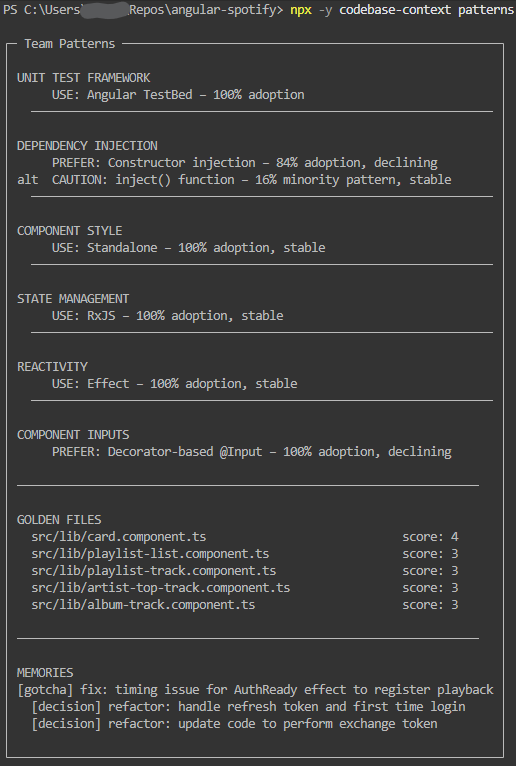
This is the part most tools miss: what the team is doing now, what it is moving away from, and which files are the strongest examples to follow.
Before editing: preflight and impact
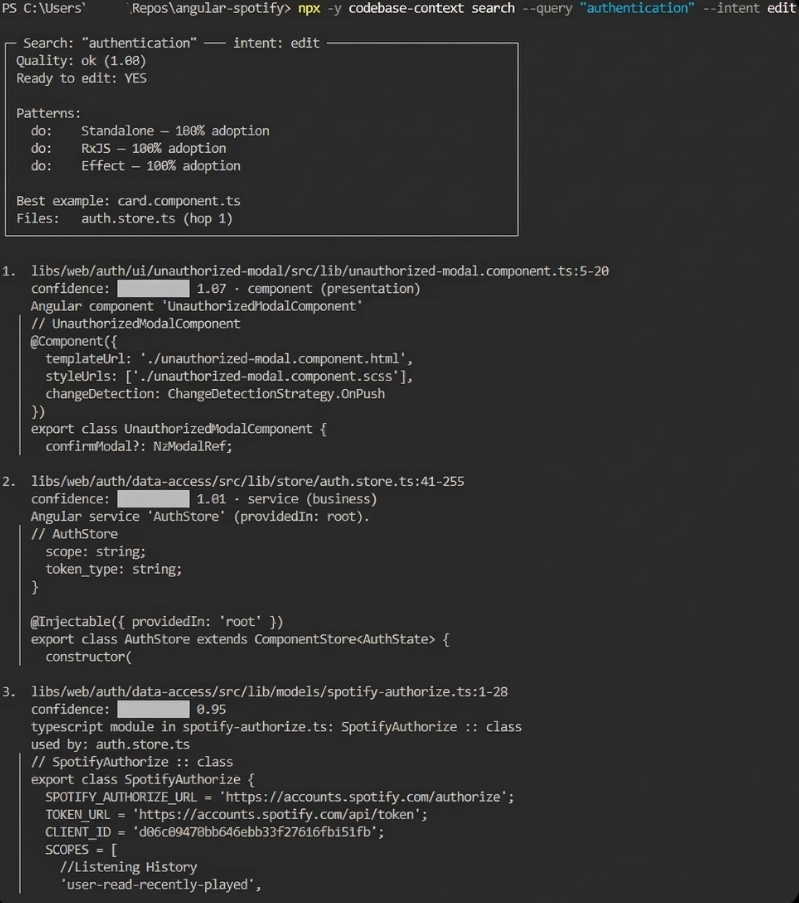
When the agent searches with edit intent, it gets a compact decision card: confidence, whether it's safe to proceed, which patterns apply, the best example, and which files are likely to be affected.
More CLI examples in docs/cli.md. Full walkthrough: demo.md on GitHub.
Quick Start
claude mcp add codebase-context -- npx -y codebase-contextThe server runs in two modes. Use stdio unless you need multiple clients connected at once:
| Mode | How it runs | When to use |
| ------------------- | ------------------------------------------------ | ------------------------------------------ |
| stdio (default) | Process spawned by the client | One AI client talking to one or more repos |
| HTTP | Long-lived server at http://127.0.0.1:3100/mcp | Multiple clients sharing one server |
Client support at a glance:
| Client | stdio | HTTP |
| ----------------- | ----- | -------------------------------------------- |
| Claude Code | Yes | No (stdio only) |
| Claude Desktop | Yes | No |
| Cursor | Yes | Yes — .cursor/mcp.json with type: "http" |
| Windsurf | Yes | Not yet |
| Codex | Yes | Yes — --mcp-config flag |
| VS Code (Copilot) | Yes | No |
| OpenCode | Yes | Not documented yet |
Copy-pasteable templates: templates/mcp/stdio/.mcp.json and templates/mcp/http/.mcp.json.
Full per-client setup, HTTP server instructions, and local build testing: docs/client-setup.md.
First Use
Get a conventions map of your codebase before exploring or editing:
# See your codebase conventions — architecture layers, patterns, golden files
npx -y codebase-context map

# Then search for what you need
npx -y codebase-context search --query "auth middleware"
Your AI agent uses the same map via the codebase://context MCP resource on first call.
Common First Commands
Three commands to understand a repo before you edit it:
# What are the main conventions and best examples?
npx -y codebase-context map

# Then search for the local example you need
npx -y codebase-context search --query "auth middleware"

# What patterns is the team actually using right now?
npx -y codebase-context patterns
This is also what your AI agent consumes automatically via MCP tools; the CLI is the human-readable version of the same map-plus-search flow.
What it does
The Search Tool (search_codebase)
One call returns ranked results with file, summary, score, compact type (componentType:layer), pattern trend signals, relationship hints, related team memories, a search quality assessment, and a preflight decision card when intent="edit". The decision card shows ready (boolean), nextAction when not ready, patterns (do/avoid), bestExample, impact coverage ("3/5 callers in results"), and whatWouldHelp.
Default output is lean — if the agent wants code, it calls read_file. Add includeSnippets: true for inline code with scope headers (e.g. // AuthService.getToken()).
See docs/capabilities.md for the full field reference.
Patterns & Conventions (get_team_patterns)
Detects what your team actually does by analyzing the codebase: adoption percentages for DI, state management, testing, and library patterns; trend direction (Rising / Stable / Declining) from git recency; golden files ranked by modern pattern density; conflicts when two approaches both exceed 20%.
Team Memory (remember + get_memory)
Record a decision once. It surfaces automatically in search results and preflight cards from then on. Conventional commits (refactor:, migrate:, fix:, revert:) from the last 90 days auto-extract into memory during indexing — no setup required.
Memory types: convention, decision, gotcha, failure. Confidence decay: conventions never decay, decisions 180-day half-life, gotchas/failures 90-day. Stale memories get flagged instead of blindly trusted.
Tools
| Tool | What it does |
| ------------------------------ | ----------------------------------------------------- |
| search_codebase | Hybrid search + decision card when intent="edit" |
| get_team_patterns | Pattern frequencies, golden files, conflict detection |
| get_symbol_references | Concrete references to a symbol (count + snippets) |
| remember | Record a convention, decision, gotcha, or failure |
| get_memory | Query team memory with confidence decay scoring |
| get_codebase_metadata | Project structure, frameworks, dependencies |
| get_style_guide | Style guide rules for the current project |
| detect_circular_dependencies | Import cycles between files |
| refresh_index | Full or incremental re-index + git memory extraction |
| get_indexing_status | Progress and stats for the current index |
Multi-project
One server, multiple repos. Three cases:
| Case | What happens |
| --------------------------------------------- | --------------------------------------------------- |
| One project | Routing is automatic |
| Multiple projects, active project already set | Routes to the active project |
| Multiple projects, ambiguous | Returns selection_required — retry with project |
project accepts a project root path, file path, file:// URI, or relative subproject path (e.g. apps/dashboard).
{
  "name": "search_codebase",
  "arguments": {
    "query": "auth interceptor",
    "project": "apps/dashboard"
  }
}
If you get selection_required, retry with one of the paths from availableProjects. Full routing details and response shapes in docs/capabilities.md.
Language Support
10 languages with full symbol extraction via Tree-sitter: TypeScript, JavaScript, Python, Java, Kotlin, C, C++, C#, Go, Rust. 30+ languages with indexing and retrieval coverage, including PHP, Ruby, Swift, Scala, Shell, and config formats. Angular, React, and Next.js have dedicated analyzers; everything else uses the Generic analyzer with AST-aligned chunking when a grammar is available.
Configuration
| Variable | Default | Description |
| ------------------------------ | --------------------------------- | ------------------------------------------------------------------- |
| EMBEDDING_PROVIDER | transformers | openai (fast, cloud) or transformers (local, private) |
| OPENAI_API_KEY | — | Required only if using openai provider |
| CODEBASE_ROOT | — | Bootstrap root for CLI and single-project MCP clients |
| CODEBASE_CONTEXT_DEBUG | — | Set to 1 for verbose logging |
| EMBEDDING_MODEL | Xenova/bge-small-en-v1.5 | Local embedding model override |
| CODEBASE_CONTEXT_HTTP | — | Set to 1 to start in HTTP mode (same as --http flag) |
| CODEBASE_CONTEXT_PORT | 3100 | HTTP server port override (same as --port; ignored in stdio mode) |
| CODEBASE_CONTEXT_CONFIG_PATH | ~/.codebase-context/config.json | Override the server config file path |
Performance
- First indexing: 2-5 minutes for ~30k files (embedding computation).
- Subsequent queries: milliseconds from cache.
- Incremental updates:
refresh_indexwithincrementalOnly: trueprocesses only changed files (SHA-256 manifest diffing).
File Structure
.codebase-context/
  memory.json         # Team knowledge (should be persisted in git)
  index-meta.json     # Index metadata and version (generated)
  intelligence.json   # Pattern analysis (generated)
  relationships.json  # File/symbol relationships (generated)
  index.json          # Keyword index (generated)
  index/              # Vector database (generated)
Recommended .gitignore:
# Codebase Context - ignore generated files, keep memory
.codebase-context/*
!.codebase-context/memory.json
What to add to your CLAUDE.md / AGENTS.md
Paste this into .cursorrules, CLAUDE.md, AGENTS.md, or wherever your AI reads project instructions:
## Codebase Context (MCP)

**Start of every task:** Call `get_memory` to load team conventions before writing any code.

**Before editing existing code:** Call `search_codebase` with `intent: "edit"`. If the preflight card says `ready: false`, read the listed files before touching anything.

**Before writing new code:** Call `get_team_patterns` to check how the team handles DI, state, testing, and library wrappers — don't introduce a new pattern if one already exists.

**When asked to "remember" or "record" something:** Call `remember` immediately, before doing anything else.

**When adding imports that cross module boundaries:** Call `detect_circular_dependencies` with the relevant scope after adding the import.
These are the behaviors that make the most difference day-to-day. Copy, trim what doesn't apply to your stack, and add it once.
Links
- Benchmark — current discovery suite results and gate truth
- Demo — real CLI walkthrough
- Client Setup — per-client config, HTTP setup, local build testing
- Capabilities Reference — tool API, retrieval pipeline, decision card schema
- CLI Gallery — formatted command output examples
- Motivation — research and design rationale
- Contributing — dev setup and eval harness
- Changelog
License
Elastic-2.0