
codebase-onboarder
v1.0.4
Published
Drop a path. Get a map. A zero-dependency codebase visualizer with a CLI onboarding wizard, a web UI, and an optional key-gated self-hosted mode.

Maintainers
 its.amit
Readme
Onboarder 🧭





Drop a path. Get a map.
A lightweight, zero-dependency codebase visualizer and architectural map generator that runs entirely on your local machine.
Onboarder reads a software repository the way a senior engineer would: starting at the front door, tracing import graphs, mapping architectural layers, computing risk/health metrics, discovering dead exports and dependency drift, and charting Git hotspots — rendering everything as interactive, zoomable diagrams.
Local analysis: Repository maps and the offline explorer run on your machine without an account. Optional AI chat sends task context and requested source to your configured model provider.
What's new in 1.0.4
- Find commands quickly. Ctrl-P opens a searchable command palette. Choose a command, add any arguments, then run it. Your unfinished question and cursor position are kept.
- Explore files from chat. Ctrl-O or
/open [query]finds indexed code files and offers source, inspection, connections, graph, change-impact, and local-explanation actions. Browsing works offline and follows the active workspace. - Resume without copying IDs. Ctrl-R or
/resumesearches conversations saved for the current repository and keeps your current permissions. - Clearer terminal conversations. Separate You, Onboarder, and Result blocks have borders that resize with the terminal. A shaded model/status bar, labeled input, grouped help, and clear completion labels make the chat easier to follow. History stays in place while new output arrives; Ctrl-End returns to the latest output.
Included from 1.0.3
- Easier tree navigation. Click a folder to expand or collapse it. Open all folders or collapse them from the toolbar; expansion keeps your zoom and position so large maps stay readable. Fit remains available when you want to see the whole map.
- Choose where a canvas file opens. Pick Deep Dive, Code, or Docs after clicking a file on the map. The sidebar file list opens files directly.
- Trace and lock connections. Hover or focus a node to highlight its connections and gently fade and blur the surrounding map. Use Lock thread, the Tree pin, or Shift-click to keep the highlight while panning and zooming. Escape unlocks it. Connection tracing works across all nine Explore views and the Graph tab.
- Stronger supply-chain checks. npm installation runs no install hooks. Optional analyzer packages use exact versions; Hermes bootstrap scripts and Gitleaks downloads are checked against pinned hashes before execution. Browser assets have an integrity inventory, and CI audits both development tools and vendored libraries.
One low-severity upstream KaTeX advisory remains in the official Mermaid bundle. Strict rendering and SVG sanitization mitigate the application path; the security guide records the remaining risk and review deadline.
Showcase film
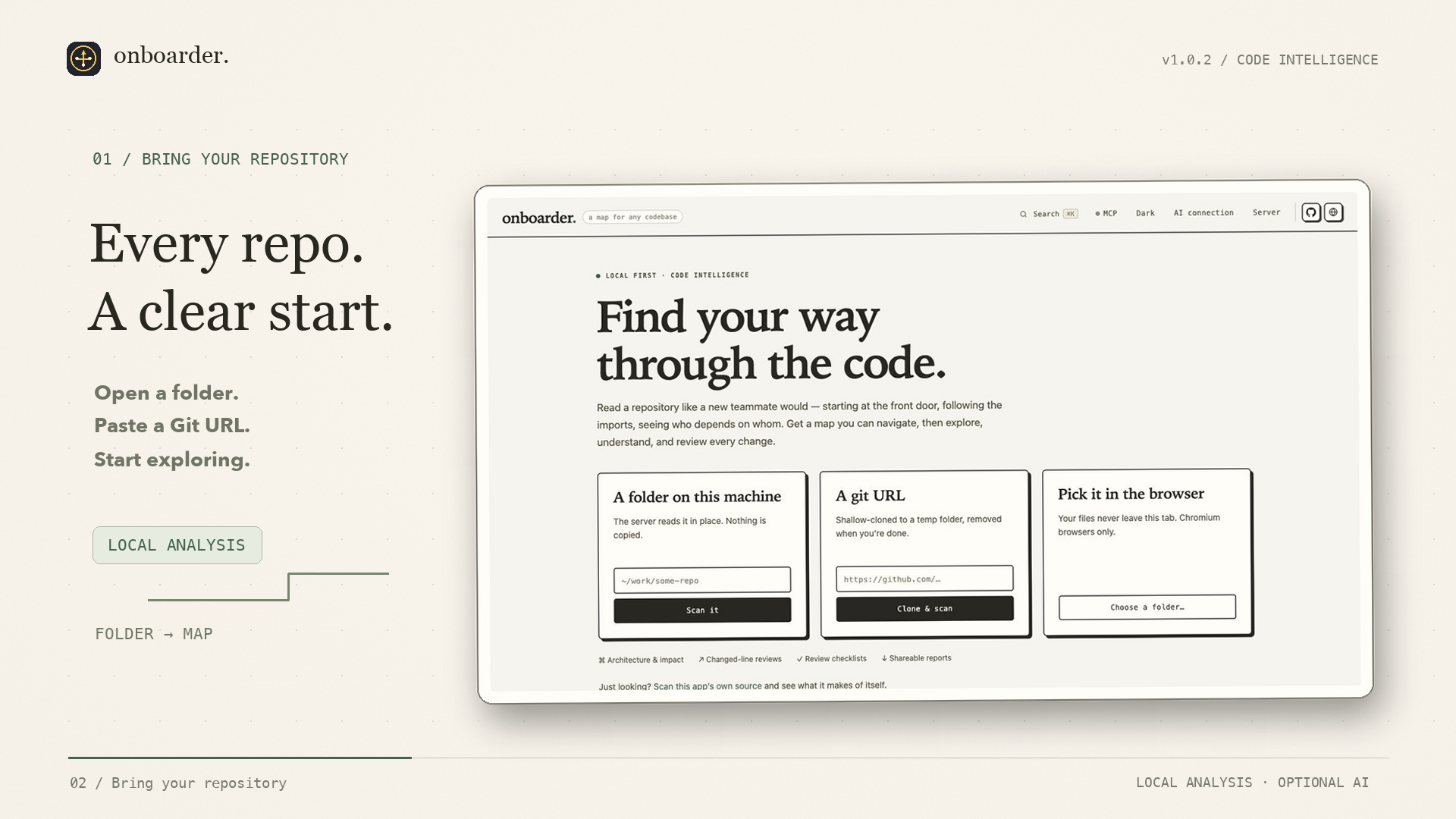
Watch or download the video — 40 seconds, 1080p, with slow camera moves, animated connections, web and terminal scenes, and original ambient music.
Storyboard and editable assets.
Product previews
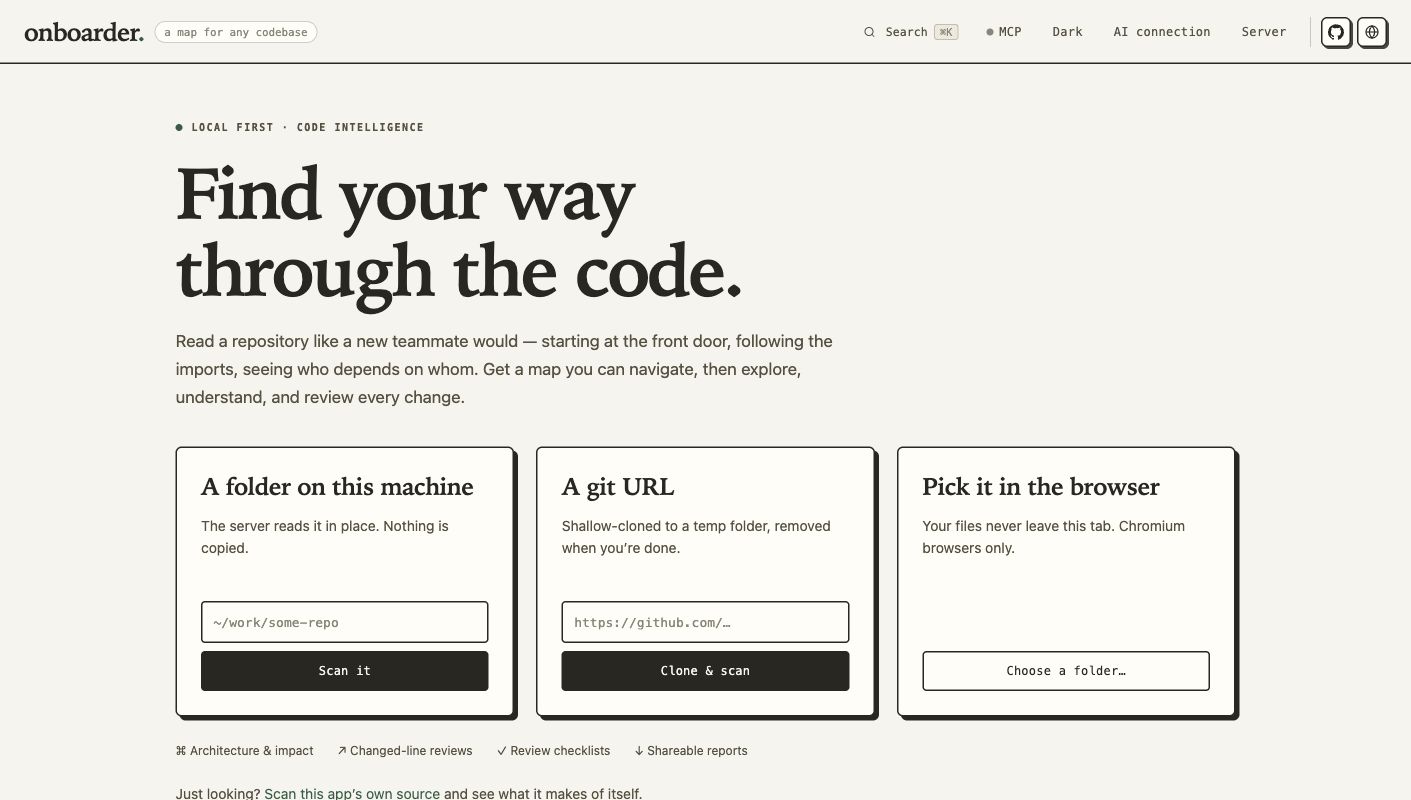
Web UI — load a local folder, a Git URL, or a browser folder.
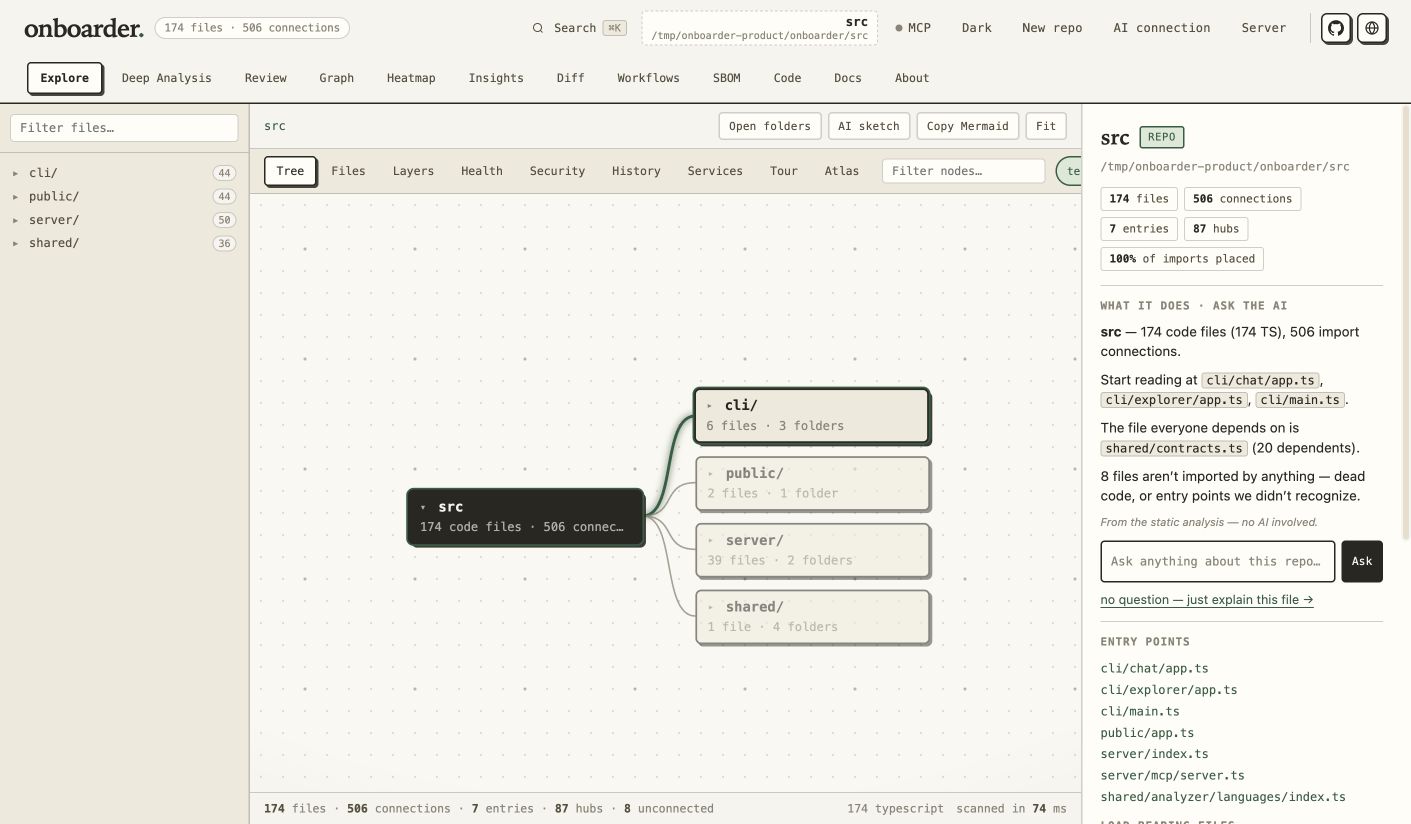
Explore — navigate the source map, entry points, and import connections.
Terminal chat — repository tools, workflow skills, and a pinned composer.
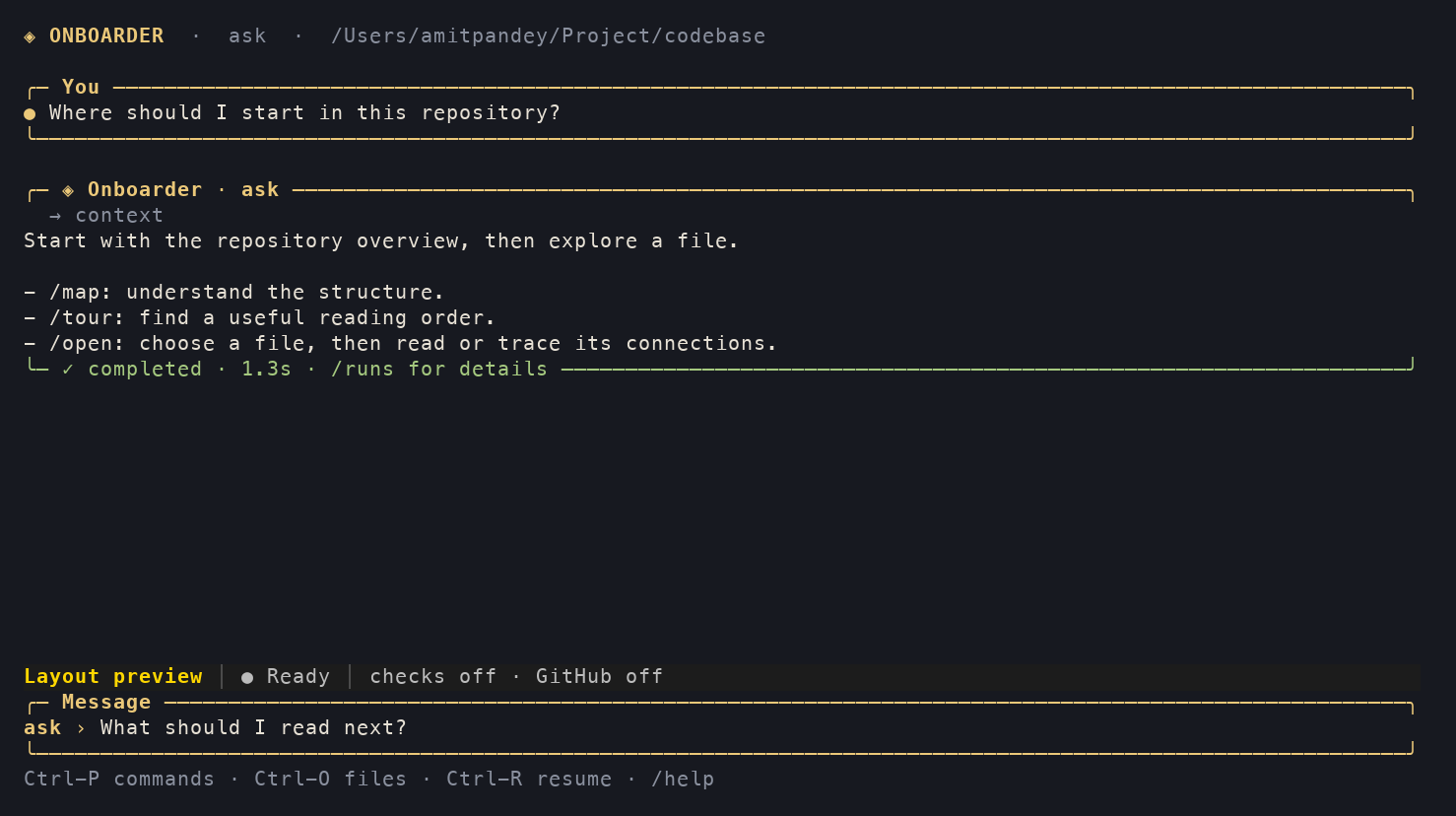
The web images show the 1.0.2 interface and its published source. The terminal image is captured from a real 1.0.4 terminal session using a controlled sample reply and the clearly labeled Layout preview model. AI model configuration is optional for repository browsing.
⚡ Quickstart
# Install from npm (Node 20+, zero runtime dependencies)
npm install -g codebase-onboarder

# Update an existing installation to this release
npm install -g [email protected]

# Open the repository chat harness in your terminal
onboarder

# Browse offline, including folders and Git URLs
onboarder explore

# …or start the web UI instead
onboarder start
Or from source:
git clone https://github.com/Amitpandey88/onboarder.git
cd onboarder
npm ci --ignore-scripts
npm run build
npm start
Open http://localhost:4310 in your browser (the CLI opens it for you).
- Chat, explorer, and web UI.
onboarderopens the Hermes chat harness;onboarder exploreopens offline browsing;onboarder startopens the web UI. Repository analysis uses the same engine in all three. - Ready to run from npm: Compiled JavaScript is included in the package. Application source lives in
src/as TypeScript. Runnpm run buildafter editing it, or usenpm run devfor automatic rebuilds and server restarts. - Zero runtime dependencies: Powered by Node.js built-ins (
node:http,node:fs,node:crypto). - Offline ready: Vendored Mermaid.js and Monaco Editor builds are included in
public/vendor/.
🖥️ The terminal app
Type onboarder to open the Hermes-powered chat interface for the current repository, or onboarder chat ~/work/some-repo to open another local checkout. An amber welcome screen shows the actual configured model, repository, permissions, six workflow skills, and 39 registered tools. The composer has a session status bar with recorded token usage, elapsed run time, and live tool activity. It keeps terminal scrollback and loads the browsing engine only when requested.
Navigate without memorizing commands
| Shortcut or command | What it does |
|---|---|
| Ctrl-P | Search the command palette by name or topic. Enter inserts the command; a second Enter runs it. Escape returns to your draft. |
| Ctrl-O or /open [query] | Search indexed code files, then choose Read source, Inspect, Trace connections, Graph, Change impact, or Explain locally. These actions work offline. |
| Ctrl-R or /resume | Search saved conversations for the current repository. Your current permissions are retained. /resume <ID> still works. |
| PgUp / PgDn | Read earlier output while keeping your input intact. New output is counted without moving your reading position. |
| Ctrl-End | Jump back to the latest output. |
| /help or /help <command> | Open a guide grouped by task, or see usage for one command. /help all prints the complete reference. |
Menus keep unfinished input. If you choose a palette command while drafting a question, submitting the command restores the question and its cursor position. File navigation follows the active implementation workspace. Indexing happens when you browse; switching repositories hides completions from the previous repository until the new one is indexed.
Chat uses separate You, Onboarder, and Result blocks with amber borders that resize with your terminal. Tool activity stays muted; completed, cancelled, and failed replies close with a clear status and elapsed time. A shaded status bar separates the conversation from the Message input, with the model, current activity, and permissions visible when space allows. Code indentation and pasted text are preserved.
onboarder chat
onboarder chat ~/work/some-repo --mode review
onboarder chat https://github.com/owner/repo
onboarder chat --resume <conversation-id>
Inside the chat:
codebase ask › /model configure
codebase ask › /repo https://github.com/owner/repo
codebase ask › Explain how authentication works
codebase ask › Where are those permissions checked?
codebase ask › /review 42 Focus on correctness and security
codebase review › /triage 12
codebase triage › /permissions checks on
codebase triage › /implement Fix the bug described in issue 12
codebase implement › /diff
codebase implement › Add a regression test for that fix
codebase implement › /history
| Commands | Purpose |
| --- | --- |
| /ask, /review, /triage, /implement, /pr, /github | Start a workflow; following messages continue it |
| /mode, /model, /permissions, /limits | Control the workflow, provider, allowed actions, timeout, and turn budget |
| /map, /tree, /find, /show, /diff, /health, /rescan | Browse and analyze offline; inspect the active implementation workspace |
| /tour, /explain, /deps, /inspect, /graph, /blast, /symbols | Follow the reading order, inspect modules, and trace dependencies |
| /hubs, /layers, /patterns, /stats, /security, /stack, /entry, /externals, /coupling, /clusters, /risks | Explore repository structure, health, and risks |
| /log, /hotspots, /blame, /diagram, /layers-diagram, /atlas, /docs, /workflows, /sbom | Inspect Git history, diagrams, documentation, CI, and licenses |
| /engines, /deep, /web, /about | Discover and run optional analyzers, start the web interface, and inspect repository details |
| /new, /history, /resume, /repo, /status | Manage saved conversations, repository context, and workspaces |
| /clone <GitHub URL>, /pull | Clone a GitHub repository and refresh a clean saved checkout |
| /paste, /send, /discard | Compose or discard multiline prompts and code |
| /setup, /doctor, /help, /clear, /cancel, /exit | Set up Hermes, check readiness, and control the terminal session |
| /tools, /skills, /runs, /run, /export | Inspect actual capabilities, saved runs, and export this chat as Markdown |
Typing / immediately opens a searchable command menu with descriptions. Keep typing to filter, use ↑/↓ to choose, and press Tab or Enter to fill the command without starting a task. A fully typed command executes on Enter. Esc dismisses the menu and restores normal history navigation. Tab also completes settings and indexed file paths. Alt-Enter adds a newline; bracketed paste keeps multiline code together and waits for Enter before sending. Ctrl-A/E move to the start/end, Ctrl-U clears the draft, and Ctrl-C cancels an active task. Ctrl-D cancels, saves, and exits when the draft is empty.
Chat opens in a full-screen terminal interface with the composer pinned to the bottom. The welcome, conversation and menus automatically reflow when the terminal window changes size. Page Up / Page Down scroll the conversation without editing your draft; new output preserves your reading position until you return to the latest messages. Narrow or short windows use compact layouts, and the original Onboarder code-compass logo appears in full or compact terminal art. Its reusable vector image is public/assets/onboarder-mark.svg.
The screen paints only changed rows and batches streamed output. Drafts survive resizes and model-wizard handoffs, and leaving chat restores the original shell screen. The in-memory viewport retains up to 4,000 logical lines or 2 MiB; conversation storage and /export remain available separately. Follow-ups reuse the saved Hermes session and its isolated implementation workspace. Changing the workflow, PR/issue target, model, or permissions starts a new session. /clear clears the screen while keeping context; /new resets the conversation. Checks and GitHub writes default to off. /deep runs the same external analyzers as the web UI and requires checks permission. /pr prepares changes locally unless GitHub writes are enabled; publishing must also be requested in the task. /export saves a private Markdown transcript under the agent home's exports folder.
/model opens a Hermes-style provider/model picker below the input. Type to filter, use ↑/↓ to select, and press Enter to choose. Available providers and models come from the installed Hermes catalog; selection uses Hermes' own credential resolution and saves the model to the dedicated Onboarder profile. Escape keeps your current model and conversation. Choose Configure provider / authentication, or run /model configure, for the full official Hermes configuration, including custom endpoints and provider login. Older Hermes installations can use this full wizard when the quick picker is unavailable. No model names or provider credentials are hardcoded into the picker.
At startup, if Hermes is missing, chat shows Hermes is not installed with a verified official installer pinned to a reviewed upstream commit. Press Enter to download and verify it before installation, then configure a provider and model, or choose Continue offline. /model and /model configure offer the same install prompt when Hermes is missing. With Hermes installed, an unconfigured profile offers Choose a provider and model or Continue offline; configured profiles start directly in chat. Offline commands work without Hermes. Conversation summaries are stored privately in ~/.config/onboarder/agent/chats, alongside agent runs, and known environment credentials are redacted. /resume requires a conversation for the current repository and preserves your current permission choices. onboarder chat --resume takes a conversation ID; onboarder agent … --resume takes an agent run ID.
To ask about a GitHub repository, launch onboarder chat https://github.com/owner/repo, use /repo <URL> or /clone <URL>, or simply paste the URL into chat. You can also paste <URL> Explain this repository to clone and ask in one message. HTTPS and GitHub SSH URLs work; private repositories use your existing Git credentials. Cloning shows progress and can be cancelled with Ctrl-C.
Chat checkouts are saved under ~/.config/onboarder/agent/repositories and remain after exit, so conversations and isolated implementation workspaces can resume. Reopening the same URL reuses its checkout. /pull fetches current changes with a fast-forward-only pull and refuses local changes; use /new first if an implementation workspace is active. A successful pull resets AI context so the next question reads the updated source. To resume later, reopen the same URL and use /history, then /resume <conversation-id>.
The original explorer remains available for its full browsing, source picker, diagrams, and optional analyzer commands:
onboarder explore         # choose a source; Enter uses the current directory
onboarder explore ~/work/some-repo
onboarder report .        # one-shot summary, no interactive terminal needed
onboarder report . --json # stable JSON for scripts and CI
onboarder --server        # force the web UI
The explorer lands on a map of the repo, then waits:
  codebase > tour
  codebase > hotspots
  codebase > find resolveImport
  codebase > deps logger.js
  codebase > inspect logger.js      # one file’s links, exports, and findings
  codebase > blast pathUtil.js      # what breaks if this breaks
  codebase > github                # what GitHub says about this repo
  codebase > workflows             # CI triggers, jobs, and steps
  codebase > sbom express           # dependency and license inventory
  codebase > diff HEAD~1 HEAD      # changes and dependent-file impact
  codebase > engines               # optional deep analyzers on this machine
  codebase > deep gitleaks          # run one analyzer when requested
  codebase > ask Where should I start? # optional AI answer with scan context
  codebase > pick                  # choose another local folder or Git URL
  codebase > !git log --oneline -3  # shell, without leaving
  codebase > exit
| | |
|---|---|
| map · tour · explain | What this is, the reading order for a new teammate, and a file or folder explained in prose |
| tree · find · show · inspect · deps | Browse, search, read, inspect, and trace files |
| graph · blast · symbols | The dependency tree as arrows, the transitive blast radius, and a file's outline |
| health · hubs · layers · patterns | The analysis, in the same words the site uses |
| coupling · clusters · risks | Folder traffic as a heat grid, module groups, and everything wrong in one list |
| log · hotspots · blame | Git history, the files that are complex and often changed, and who wrote a line |
| diagram · atlas · docs | Mermaid source, a diagram index, and prose you can print or write to ONBOARDER.md |
| workflows · sbom · diff | CI pipelines, dependency/license inventory, and changed files with blast radius |
| engines · deep | See optional analyzers, then run one (deep semgrep) or all (deep all) |
| ask | Ask an OpenAI-compatible model a question using the current repository scan |
| pick · cd · rescan · web | Browse device folders, switch repo, reload from disk, or start the web UI |
| github | Stars, forks, watchers, license and topics from GitHub, for the repo you have loaded |
| Tab · !cmd | Completes commands then file paths; runs a shell command inline |
report reads a local folder or Git URL once, prints file counts, import resolution,
entry points, health, security, and test reachability, then exits. Its JSON output
has schemaVersion: 1 and contains no source text.
All application modules are authored in TypeScript under src/: the server,
MCP tools, analyzer, diagrams, CLI, and browser views. Builds emit JavaScript,
declarations, and source maps into the existing runtime folders, so the npm CLI
and Node 20+ keep their existing entry points. Edit src/, rather than generated
files in cli/, server/, shared/, or public/js/.
npm ci --ignore-scripts
npm run dev        # rebuild on changes; restart after a successful compilation
npm run build      # typecheck and generate the distributable files
npm run check      # typecheck, tests, generated output, and supply-chain guard
npm run security:audit  # audit development tools and vendored browser libraries
tsconfig.json checks the whole application. The new portable contracts, scan
controls, request validator, browser adapter, editor wrapper, and terminal layout
also pass the strict checks in tsconfig.strict.json. Older view and orchestration
code still uses permissive types; converting every legacy callback and data bag
to strict types is follow-up work. No application file disables type checking.
Scans accept validated limits and bounded read concurrency. The browser offers a
Cancel scan button, browser-folder scans report progress, and disconnected
server requests stop scanning. File limits measure UTF-8 bytes, including
non-ASCII source. TypeScript configs support comments, trailing commas, slash
aliases, and mapping generated JavaScript imports back to TypeScript source. CLI limits work with report and persist across explore rescans and repository changes:
onboarder report . --max-files 10000 --max-file-size 524288 --read-concurrency 4The HTTP equivalent is { "path": "/repo", "options": { "maxFiles": 10000,
"maxFileSize": 524288, "readConcurrency": 4 } }. Defaults are 4,000 files,
200 KiB per file, and 8 concurrent reads. Maximums are 100,000 files, 10 MiB,
and 32 reads. Scan cache keys include every file and its imports, exports, and
findings, so changes beyond the first hundred files also invalidate the cache.
The explorer's ask command is optional. Set ONBOARDER_AI_BASE_URL and ONBOARDER_AI_MODEL, plus
ONBOARDER_AI_API_KEY when the endpoint requires a key. The CLI also accepts
OPENAI_BASE_URL, OPENAI_MODEL, and OPENAI_API_KEY. It sends the question
and a limited scan summary only when you run ask; the key stays in the
process environment and is not saved in Onboarder's config.
Deep analysis in terminal chat
The terminal uses the web UI's Semgrep, Gitleaks, Knip, Vulture and Depcheck engines, settings and finding parsers. /engines shows installed binaries, available runners, and installation instructions without scanning the repository. /deep opens a searchable engine picker; you can also run an engine, several engines, all engines, or a purpose group directly.
/permissions checks on
/deep
/deep security
/deep semgrep gitleaks
/deep options semgrep
/deep semgrep config=p/security-audit severity=ERROR
/deep gitleaks history=true
/deep knip include=files,exports
/deep vulture minConfidence=90
/deep results high
/deep explain Which findings should I fix first?
/deep export
Each engine reports progress and its outcome. Missing or failed tools remain distinct from a successful clean pass. Ctrl-C or /cancel stops running analyzers and their process trees; a cancelled run keeps the previous report. Checks permission is required because analyzer runners may fetch packages and repository analyzer configuration can execute code. Engine installation is explicit; /engines lists the commands to use. Typed settings are restricted to the same schema as the web forms.
Reports are private snapshots stored under ~/.config/onboarder/agent/analysis, keyed by the exact workspace. /deep results can filter by severity or engine, works without an AI login, and restores the report after reopening chat. /deep export saves the full normalized report as private JSON. Reports identify when and where they ran; rerun them after edits. /deep explain sends bounded findings and all engine coverage to Hermes, then normal chat follow-ups continue that conversation. Implementation scans use the active isolated worktree. Reports from another workspace are never substituted.
Hermes can also discover and run these engines when you ask in ordinary chat, such as “Run security deep analysis and explain the highest-priority findings.” Its tools expose availability/settings and enforce the current task root and checks permission; they cannot override the repository path or run arbitrary commands. Model tool responses limit the findings and disclose truncation.
Hermes repository and GitHub agent
onboarder agent adds multi-step repository work through Nous Research's Hermes Agent. Hermes is an optional, separately installed Python runtime; Onboarder's npm package still has no runtime dependencies. The TypeScript harness supplies 39 scoped MCP tools built around Onboarder's existing analysis and GitHub's API.
onboarder agent setup
onboarder agent model                 # choose a provider/model in the dedicated profile
onboarder agent doctor
onboarder agent ask . --task "Explain the authentication flow"
onboarder agent review . --pr 42 --task "Review correctness and security"
onboarder agent triage . --issue 12 --task "Investigate the cause and propose labels"
onboarder agent implement . --issue 12 --task "Fix this issue" --allow-checks
onboarder agent pr . --task "Implement the fix and open a draft PR" --allow-checks --allow-github-writes
onboarder agent github . --task "Explain why the latest CI run failed"
onboarder agent runs
onboarder agent show <run-id>
The same commands work inside the explorer: agent review --pr 42 uses the loaded repository. Implementation and PR work require a persistent local checkout; the explorer's temporary URL clones are removed on exit. agent help lists setup and workflow options. Use --dry-run --json to inspect a plan without creating a workspace or calling a model. Use --json for one machine-readable result; progress stays on stderr.
| Workflow | Result |
| --- | --- |
| ask | Repository Q&A grounded in scan, architecture, search and source tools |
| review | Local-change or GitHub PR findings, patch coverage, discussion and checks at the PR head SHA |
| triage | Issue investigation, duplicate candidates, priority, labels and a proposed implementation plan |
| implement | Edits in a separate Git worktree, diff inspection and optional npm checks |
| pr | Implementation plus a proposed PR; publishes a draft when GitHub writes are enabled |
| github | Repository, issues, PR discussions, labels, CI runs/jobs, comments and review tasks |
GitHub access uses the local checkout's github.com origin and GITHUB_TOKEN or GH_TOKEN. Public reads can work without a token; private reads and writes need a token with access to the requested resources. Git transport uses your existing Git credentials. Publishing a review requires the freshly read PR head SHA and refuses a changed head.
Source editing is available only in implement/pr worktrees created at committed HEAD on a codex/agent-… branch. Uncommitted changes in your source checkout are excluded. File tools refuse symlinks, credential files, traversal and files larger than 128 KiB; edits require the hash of a fresh read. Workspaces remain available after completion or failure for inspection. Publishing commits workspace changes, pushes that task branch and creates a draft PR; it does not merge. The PR target defaults to the cached origin/HEAD branch, falling back to the current branch; choose another with --base. Repeated identical successful writes are deduplicated within one running tool server.
--allow-checks allows lockfile dependency installation with lifecycle scripts disabled, plus npm test, npm run typecheck and npm run build. Test/build scripts can execute repository code and may write files. --allow-github-writes enables issue updates, comments, PR reviews and draft PR publishing. Both permissions are enforced by the tools and default to off. Onboarder supplies only its dedicated MCP toolset to Hermes.
Runs have a default 24-turn, 300-second limit; adjust with --max-turns and --timeout. Ctrl-C cancels an active agent in both the CLI and explorer. --resume <run-id> continues a saved Hermes session in its original workspace; repeat any enabled permission flags. Resume cannot expand the original permissions. Timeouts, missing completion frames and nonzero process exits are recorded as failures.
Run metadata, final answers and operation audits live under ~/.config/onboarder/agent (override with ONBOARDER_AGENT_HOME). Hermes configuration and transcripts use a dedicated named profile under the installation's profiles folder; agent setup prints its path. Audit records contain operation names, outcome and timing; Hermes session transcripts can contain prompts and source. Repository/tool content is sent to the configured model during agent tasks. Known environment credentials are redacted from Onboarder diagnostics and final answers. API keys supplied through the environment are not written by Onboarder.
For an existing compatible endpoint, set ONBOARDER_AI_BASE_URL, ONBOARDER_AI_MODEL and optionally ONBOARDER_AI_API_KEY before the first agent setup. Standard OPENAI_BASE_URL, OPENAI_MODEL, OPENAI_API_KEY aliases also work. Later, agent model updates the dedicated profile without changing your normal Hermes profile. Use ONBOARDER_HERMES_BIN to select a Hermes executable. For a nonstandard source installation, preserve its HERMES_HOME/HERMES_RUNTIME_DIR environment so the harness can locate its shared Python packages.
onboarder agent source fetches the official MIT-licensed source at the researched revision into the agent source cache. This does not install Python dependencies or vendor Hermes into the npm package. The source review and integration decisions are documented in Hermes research. Developers can run node scripts/hermes-smoke.mjs after building to verify a real installed Hermes runtime against a local model fixture, without external inference or GitHub writes.
It also takes a GitHub URL, the way the site does. Point it at one and it clones, scans and opens that repo:
  onboarder explore https://github.com/expressjs/express
  codebase > cd https://github.com/sindresorhus/is.git
The clone is blobless and single-branch — the full history, none of the file contents — because history is half of what this tool has to say (churn × complexity) and the blobs are not. It lands in the OS temp dir and is removed when you cd away or leave, so nothing is left behind and nothing you already had open gets deleted. A folder you cd to is never touched, whatever it happens to be called.
github asks GitHub about whatever is loaded: the URL if this session cloned it, otherwise git remote get-url origin, so it works in a checkout you were already standing in. It sends GITHUB_TOKEN or GH_TOKEN when you have one, which turns GitHub's 60-requests-an-hour guest allowance into 5,000 — a browser has nowhere to keep a secret, so this is the one thing the terminal does strictly better than the site. It also separates "GitHub said no" into rate-limited, private-or-gone, and throttled, because those need three different responses.
It is the website's engine, not a reimplementation. onboarder explore runs the same modules in the same order as POST /api/scan — scanRepo → detectManifest → computeFacts → buildSearchIndex — and the same projections the browser's views are projections of. A second implementation would drift, and a drifted map is worse than no map.
Where the site draws a canvas, the terminal draws its own idiom from the same numbers: the coupling heat grid becomes block characters (which survive being piped to a file or read in black and white), and the force-directed graph becomes an arrow tree (→ imports, ← imported by) that shows the part that answers what breaks if I break this.
Details worth knowing:
- Forgiving paths.
show logger.jsfindsserver/logger.js. A genuinely ambiguous name (index.js) lists the candidates instead of guessing — silently picking the wrong file is how a map loses your trust. - The site's search language.
find ext:rs -test,find "exact phrase",find /regex/all work because it is the same query parser the web palette uses. - Fits your terminal. Every line is fitted to the current width and re-fits on resize; prose wraps instead of running off the edge.
NO_COLORandCOLUMNSare honored. - It refuses to hang. Without a TTY,
onboarder exploreexplains itself and exits rather than waiting for input that will never come. Scripts and CI keep working. - Bridges to the web.
webstarts the UI in the background and prints the URL, without ending your session. - Interactive source picker.
pickor a barecdlists device folders, supports parent/home navigation and paging, and accepts pasted paths or Git URLs. A failed load leaves the current repository open.
🚀 Ways to Load a Repository
- Local Directory — Enter any absolute path (
/Users/you/projects/repoor~/work/repo). Analyzed in-place without copying files. - Git URL — Paste any public Git URL (
https://github.com/org/repo). Cloned shallowly (--depth 1) into temp storage and automatically deleted on session close. - In-Browser Folder Picker — Open any local folder using the File System Access API (Chrome/Edge). The entire analyzer runs directly inside the browser tab.
- Self-Scan — Click "Scan this app's own source" on the landing page for an instant interactive demo.
🔍 Features & Views
Change Review — a local review workbench
After opening a repository by its local path, the Review tab is the first workspace. Choose working-tree changes (including untracked files), staged changes, or a branch/commit range, then select Run review.
- Security and quality patterns are flagged on added lines, with file and line references, severity, and suggested next steps. Credential excerpts are redacted from reports, including other findings on the same credential line.
- A risk-sorted walkthrough groups source, tests, documentation, dependencies, and configuration changes. Dependency impact uses the last repository scan; rescan after structural edits and treat branch-range impact as an estimate.
- The checklist reports high-severity patterns, conflict markers, test-file changes, change size, and skipped files. Tests are not executed and test-file changes do not establish coverage.
- Filter findings, acknowledge them locally, and export Markdown or JSON. Acknowledgements belong to an exact comparison fingerprint; editing the change starts a fresh review. Exports always include all detected findings.
- An optional reviewer's brief sends the report to your configured AI provider for a summary and testing plan. It does not send the raw diff. Core reviews work offline without an API key.
The same review is available to scripts:
onboarder review .
onboarder review . --staged --json
onboarder review . --base main --head feature/my-change
onboarder review . --profile focused --fail-on high
--fail-on exits with status 1 for findings at or above the selected severity.
Conflict markers also return 1. Invalid comparisons return a failure instead
of falling back to a different diff. Reviews use the Git repository root;
subfolder scans cannot read changes outside the scanned folder.
Optional .onboarder-review.json in the repository root:
{
  "profile": "balanced",
  "exclude": ["dist/**", "**/*.generated.ts"],
  "instructions": [
    { "path": "src/auth/**", "instruction": "Check permission boundaries and failure handling." }
  ]
}
Profiles: focused includes medium/above, balanced low/above, and thorough
all patterns. Exclusions use *, **, and ? path globs. Guidelines are shown
for human review and included in the optional AI brief; the pattern engine
does not claim to enforce natural-language guidelines. Configuration always
comes from the current working tree, including for staged and branch reviews.
This project's configuration excludes generated JavaScript and vendored files
so changes are reviewed in their canonical TypeScript source.
Git commands have a 15-second timeout and a 5 MB output limit. Working reviews include at most 200 untracked files, each at most 1 MB; oversized inputs fail explicitly. Binary content, deleted files, metadata-only changes, exclusions, and untracked symlinks have visible skip reasons. Reviews can be canceled.
Inspired by CodeRabbit's change summaries, path guidelines, and pre-merge checks, this is a local pattern review workflow. It does not install a GitHub App, automatically post PR comments, apply fixes, execute repository scripts, or replace a human/security review.
1. Explore (One Canvas, 9 Views)
- Tree: Hierarchical expandable cell map of directories, files, hubs, and entry points with ghost connection cells.
- Files: Intra-folder dependency graphs with deep-dive call inspections.
- Layers: Stratified architecture layout from entry points down to foundation leaf files, highlighting circular dependency loops and unreachable code.
- Health: Risk heat-map scoring every file (0–100) using PageRank centrality, blast radius (SCC condensation), cyclomatic complexity, and cycle participation.
- Security: Built-in vulnerability scanner detecting hardcoded secrets, injection sinks (SQL, command, eval), XSS, insecure crypto, and quality smells across JS/TS, Python, Go, Java, and C/C++.
- History: Git churn and recent activity connected to the source map.
- Services: Automatic detection for
docker-compose.yml,Procfile, and monorepo workspaces. - Tour: Curated step-by-step walkthrough of key architectural waypoints.
- Atlas: Grid gallery of every pre-generated diagram across folders and components.
Search: Click Search or press Cmd/Ctrl+K to find files, symbols, and file
contents. Arrow keys select results; Enter opens them and Cmd/Ctrl+Enter
opens the source. Alt+Left/Right switches result kinds. Tab moves between
dialog controls; Escape clears the query, then closes. Filters such as
path:src ext:ts render can be removed using their chips.
Search reuses the scan's symbol index, combines rapid keystrokes, and displays bounded previews with exact local match counts. Graph animation pauses outside the Graph tab, while search is open, and when the browser tab is hidden. Review filters update the findings without rebuilding the surrounding workspace.
1b. Deep Analysis — plug in the best engines (Optional, self-hosted)
Onboarder is the frontend; the sharpest open-source analyzers are the backend. The built-in scanner above is a fast, zero-dependency first pass — extend it with real engines, and their findings merge straight into the security grade and finding list.
| Engine | Finds | Install |
|---|---|---|
| Semgrep (or Opengrep) | SAST: injection, auth, crypto across 30+ languages | pip install semgrep==1.180.0 |
| Gitleaks | Committed secrets, keys, tokens | brew install gitleaks |
| Knip | Dead JS/TS files, exports, dependencies | npm i -g [email protected] --ignore-scripts |
| Vulture | Dead Python code | pip install vulture==2.16 |
| Depcheck | Unused npm dependencies | npm i -g [email protected] --ignore-scripts |
Nothing is required. With no engines installed, the panel lists each one,
says it is missing, and offers an Install button — the built-in scanner is
the floor that never goes away. If you have uvx (from uv)
or npx, Semgrep, Vulture, Knip and Depcheck run through exact-version fallbacks without a separate global install. These runners may download packages; Semgrep registry rules also require network access. Knip 6.41.0 requires Node 20.19+ or 22.12+.
In the Security view, click Run deep analysis.
1c. The Deep Analysis tab — the full report, with AI
Next to Explorer in the top nav. One page with everything:
- Engines — what is installed, how it was found, what each one cost, and a Run button per engine (plus Run all / Security only / Dead code only). Missing engines get a one-click Install: a console streams the package manager's output live and ends in a plain verdict. Each engine also has a Configure disclosure — per-engine options (Semgrep config, Gitleaks redaction, Knip production mode, Vulture confidence, Depcheck skips) edited in a form and sent with the next run. Install plans are per-platform, so the same flow works on Windows, macOS and Linux.
- Findings — every finding from every engine, merged and worst-first, with severity, engine and text filters. Each row's file is a link: clicking it opens the Code tab at that exact line.
- What this means — the AI reads the report: "Explain this analysis" for a prioritised read, or ask about a specific finding ("is the eval finding reachable?"). It is told which engines did not run, so it will not claim coverage it does not have. Needs a Hermes connection or an AI endpoint; without one the report is still fully readable and the button offers the AI connection drawer.
Rules that keep this safe to self-host:
- Detect by default, install only on click. Onboarder probes
PATHand never installs anything behind a scan. When you do click Install, the server runs a validated, per-platform plan from the tool registry — the request body picks a plan, it never reaches a command line — and streams the output back over SSE. You decide what is on the box, and you watch it happen. - Run, never eval. Every engine is spawned with an argument array, never a shell, with a hard timeout and a capped buffer. A crafted filename is an argument; a hung analyzer is one failed pass.
- Local analysis with explicit network boundaries. Engines run against the scanned root. Package runners and registry rules may use the network; optional AI explanations send the requested report to your configured provider. Gitleaks reports are redacted before findings reach the UI.
2. Code Preview with Monaco Editor
- Full read-only VS Code editor experience with native syntax highlighting for 70+ languages.
- Breadcrumbs, line counts, byte sizes, and bidirectional dependency navigation chips ("Pulls in" & "Leaning on").
- Instant jump from code view to graph deep-dives.
3. Git History & Hotspots
- Git log analysis cross-referencing commit churn with file complexity ($churn \times complexity$).
- Identifies sole-author bottlenecks, top co-change file pairs, and recent repository activity without external tools.
4. Advanced Graph Analysis
- TypeScript Path Aliases: Automatically resolves
tsconfig.json/jsconfig.jsonpaths (@/*$\rightarrow$src/*). - Symbol-Level Dead Exports: Identifies functions, classes, and variables exported by modules that are never imported anywhere in the codebase.
- Dependency Drift: Compares
package.json,requirements.txt,go.mod, andCargo.tomlagainst source imports to uncover unused dependencies and undeclared imports. - Test-to-Source Mapping: Traces test reachability and highlights untested load-bearing hubs (
fanIn >= 3). - Weight & Documentation Ratios: LOC, comment-to-code ratios, blank lines, and folder-level README coverage.
5. AI Notes & Explainers (Optional)
- Works 100% offline out-of-the-box.
- In AI connection, choose Hermes · use my configured login to reuse the Onboarder CLI's Hermes provider and model. No API key is needed in the browser. The drawer shows the current model/provider; use Test connection, then Save. Install Hermes on the computer running the server and run
onboarder agent modelto sign in or change models, then refresh the configuration in the drawer. - Connect any OpenAI-compatible LLM endpoint (OpenAI, Azure OpenAI, Groq, OpenRouter, Ollama, LM Studio) to generate streaming explanations and repository documentation.
- Hermes powers questions, explanations, diagrams, documentation, analysis summaries and review briefs using their supplied repository context. Web explanations have no machine tools. Each request starts a fresh conversation, with a two-minute runtime budget and at most two concurrent requests; closing or cancelling an answer stops its Hermes process. Runtime startup can add a few seconds to the first response.
- AI sketch draws the current map, folder, file or architecture view using that connection. Sketches are checked with Mermaid before they are cached and displayed. Static returns to the original map; AI sketch ✓ restores the cached sketch. Generated diagrams support Copy Mermaid, Save SVG, pan/zoom and file links. Cancel sketch, changing views, or opening another repository cancels an unfinished request. Hermes diagram requests use low reasoning without changing the saved chat configuration.
- Hermes owns its login and may save prompts/source in its session transcripts. Context is sent to the configured provider under its normal account usage limits. Existing API endpoint settings still work; API-mode keys are saved in browser
localStorageand never logged or written to the server's disk. Hermes requests do not forward these browser keys. - Developers can run
node scripts/hermes-web-smoke.mjsafter building to verify the HTTP integration against a real installed Hermes runtime and a local model fixture without external inference.
6. MCP Server — let any AI agent onboard itself
Press MCP in the top bar and the whole analysis becomes callable by any agent or harness that speaks the Model Context Protocol — Claude Code, Cursor, Cline, Windsurf, or your own.
The server speaks stdio (the transport every major harness supports) and exposes 16 tools over the same analyzers the UI uses, so a number an agent reports is the same number you see on screen.
| | |
|---|---|
| Find your way in | onboarder_scan · onboarder_overview · onboarder_tour |
| Understand the shape | onboarder_architecture · onboarder_explain_file · onboarder_explain_folder |
| Get the source | onboarder_read_file · onboarder_search · onboarder_list_files |
| Judge the code | onboarder_health · onboarder_security · onboarder_history · onboarder_dependencies |
| Go deeper | onboarder_deep_analysis · onboarder_analyzer_status |
Start it from the panel, then paste the JSON or TOML config it shows into your harness. Or run it directly — it works without the web UI:
npm run mcpClaude Code / Cursor / most MCP clients:
{
  "mcpServers": {
    "onboarder": {
      "command": "node",
      "args": ["/absolute/path/to/onboarder/server/mcp/standalone.js"]
    }
  }
}
Claude Desktop (claude_desktop_config.json) uses the same shape under
mcpServers. Cline uses "mcpServers" in its settings file. Windsurf
uses "mcpServers" in ~/.codeium/windsurf/mcp_config.json.
The repository is read-only. No tool writes, moves, or deletes anything, and
file paths are resolved against the repository root — ../ and absolute paths
outside it are refused.
Start and stop are real. Stopping closes the child's stdin and lets it drain rather than killing it mid-answer, and a Ctrl-C in the terminal takes the child with it instead of orphaning a process holding the scan cache.
⚙️ Setup, Modes & Self-Hosting
Onboarder has two modes, one config file, and three ways to edit it — the CLI wizard, CLI flags, and the web UI's Server drawer all write the same validated config.json (~/.config/onboarder/config.json, mode 0600).
- Local (default) — binds to loopback only, asks for no credentials. The safe default.
- Self-hosted — a fresh setup binds
0.0.0.0for direct LAN/VPS access. Any IP-literal address is accepted, while arbitrary Host names are not. Remote browsers get a themed access-key login page and exchange the key for a 7-day signedHttpOnly,SameSite=Strictsession cookie; true localhost requests skip login. API clients can continue usingAuthorization: Bearer <access-key>. Rotate the key withonboarder config key rotate; the old key and every old browser session die on the next request.
onboarder setup                          # interactive wizard
onboarder setup --mode self-hosted \
  --domain map.example.com --https --start
onboarder config show                    # current settings (key masked)
onboarder config set host 0.0.0.0        # direct VPS/LAN access (domain optional)
onboarder config set port 4311           # move away from a busy port
onboarder config key rotate              # mint a new access key
onboarder start                          # foreground; Ctrl-C stops it
onboarder start background               # detached; keeps running after you close the terminal
onboarder logs                           # last 40 log lines  (-n <count>, -f to follow)
onboarder start startup install          # also start automatically at every login
onboarder start startup status           # is a login item installed, and is it live?
onboarder start startup remove           # take the login item back out
onboarder status                         # running PID, mode, uptime, stopped, or unmanaged port owner
onboarder stop                           # stop a PID-file-managed instance
onboarder restart                        # graceful stop, then start
onboarder tunnel cloudflare              # expose via a Cloudflare quick tunnel
onboarder tunnel tailscale               # expose privately over the tailnet
onboarder https check                    # DNS, ports 80/443, and Caddy readiness
onboarder https setup                    # write/validate Caddyfile, obtain TLS, reload/start Caddy
onboarder https status                   # domain, URL, Caddyfile, and Caddy state
onboarder doctor                         # config, access key, ports, DNS, TLS, and tunnels
Running it in the background
onboarder start runs in the foreground on purpose: it is a normal command, and Ctrl-C stops it. When you want the server to outlive the terminal, use start background. It re-launches the same CLI as a detached process with its output going to onboarder.log beside your config, then waits for the server to actually answer /api/health before reporting success. A port conflict comes back as a failure with the log tail attached, not as a cheerful green light that dies a second later.
onboarder start background   # returns once it is serving
onboarder logs -f            # watch it, Ctrl-C to stop watching (not the server)
onboarder stop               # stop it
Log lines are column-aligned — a fixed-width local timestamp, a fixed-width level, then the message — so a wall of requests stays scannable:
16:09:38  INFO   GET /api/scan 200 (1.2s)
16:09:46  INFO   POST /api/auth/login 200 (2ms)
16:10:03  WARN   could not write the run record error=EACCES
What gets logged (and what does not)
A single page load pulls ~90 ES modules, a stylesheet, and two vendored libraries. Logging each one buries every real event — a scan, a login, a 500 — under a hundred lines that describe nobody doing anything, repeated on every reload. So requests are classified:
| Request | Logged? |
|---|---|
| GET /api/… (a scan, a login, a settings save) | yes — this is a person doing something |
| Any POST/PUT/DELETE | yes, whatever the path |
| Any 4xx or 5xx | yes — a missing asset is a broken build, a 500 is a bug |
| GET /api/health (uptime poll) | no — it is not an event |
| GET /app.js, /js/tree.js, /styles.css, /vendor/… | counted, not printed |
Suppressed assets are not thrown away. Every 40 of them, one dim footnote is printed, so an idle terminal still says what it served rather than looking dead:
16:09:38 served 40 static files in 1.9sLOG_LEVEL=debug (or ONBOARDER_LOG_VERBOSE=1) turns every request back on for when you are debugging the server rather than watching it. ONBOARDER_LOG=json switches the format to one JSON object per line for anything parsing the log.
Terminal width
Every panel and log line is fitted to the terminal it is printed into, and a foreground onboarder start redraws its panel on SIGWINCH — resize the window and the border stays on screen instead of hanging off the edge. Long values are elided in the middle (the tail of a path is the part that identifies it), and below 52 columns the level column is dropped to make room for the message.
Starting at login
onboarder start startup install registers Onboarder with whatever your OS uses for login items, and never asks for sudo:
| Platform | What it writes | How it loads |
|---|---|---|
| macOS | ~/Library/LaunchAgents/com.onboarder.server.plist | launchctl bootstrap gui/$UID |
| Linux | ~/.config/systemd/user/onboarder.service | systemctl --user enable --now |
| Windows | %APPDATA%\...\Startup\Onboarder.cmd | the file is the registration |
All three run the same onboarder start --config <your config>, so a login-started server is indistinguishable from a hand-started one — same config, same pid file, same onboarder stop. The generated unit uses Restart=on-failure (and launchd's KeepAlive/SuccessfulExit=false), so a crash is restarted but a deliberate onboarder stop stays stopped. onboarder start startup remove unloads and deletes it; a running server is left alone. On a platform with no known mechanism, the command says so instead of pretending.
A fresh self-hosted setup uses 0.0.0.0, so a VPS is reachable at http://<server-ip>:<port> without a reverse proxy. The server accepts IPv4 and IPv6 IP literals, including a public address that reaches the host through provider NAT, but still rejects arbitrary DNS Host headers. A domain is optional for direct-IP access. If a domain is entered, setup asks whether to enable automatic HTTPS.
When a remote browser opens the URL, Onboarder shows its themed sign-in page. The access key is sent in a POST body—not in the URL—and the browser stores only the signed session cookie. Opening the same server through http://localhost:<port> on that machine skips the page. Caddy and tunnel connections remain authenticated because their public Host is not loopback.
For trusted HTTPS, DNS must already point the domain to the VPS and inbound TCP 80 and 443 must be allowed in both the cloud security group/NSG and the host firewall. On Ubuntu:
sudo apt update
sudo apt install caddy
sudo ufw allow 80/tcp
sudo ufw allow 443/tcp
onboarder https check
onboarder https setup
Onboarder writes a private Caddyfile beside config.json, validates it, and asks Caddy to obtain and renew the certificate. It never runs sudo or installs packages silently. Caddy proxies https://map.example.com to http://127.0.0.1:4310; Onboarder recognizes the connection as remote and shows the access-key login page. A bare public IP cannot use a normal trusted domain certificate.
If startup reports EADDRINUSE, run onboarder status first. If it identifies an Onboarder PID, use onboarder stop or onboarder restart; otherwise inspect the unrelated listener with ss -ltnp or lsof -i :4310, or choose another port. The error names these recovery commands instead of printing only the raw Node error.
Cloudflare quick tunnels and Tailscale remain supported. They terminate TLS and dial 127.0.0.1, so an existing loopback setup is preserved. ONBOARDER_CONFIG=/path/config.json overrides the config location for tests and containers.
🛠️ Architecture
codebase-onboarder/
├── src/                  # Canonical TypeScript application source
│   ├── cli/              # Wizard, lifecycle commands, terminal explorer, reports
│   ├── server/           # HTTP server, auth, settings, clone sessions, MCP, tools
│   ├── shared/           # Portable contracts and the isomorphic analysis engine
│   │   ├── contracts.ts  # FileSource, scan options/progress, settings, analysis types
│   │   ├── analyzer/     # Language parsers, graph analytics, scan controls, metrics
│   │   ├── diagram/      # Mermaid and AI diagram generation
│   │   └── search/       # Shared query language
│   └── public/           # Browser application, views, components, integration types
├── bin/                  # npm entry-point trampoline and source build helper
├── cli/                  # Generated terminal runtime and declarations
├── server/               # Generated server/MCP runtime and declarations
├── shared/               # Generated shared engine, served at /shared/
├── public/
│   ├── app.js & js/      # Generated browser ES modules
│   ├── vendor/           # Offline Mermaid and Monaco builds
│   ├── index.html        # App shell and scan controls
│   ├── login.html        # Self-hosted access-key sign-in
│   └── styles.css        # Existing paper-and-ink design
├── scripts/              # Development watcher and build consistency verification
├── tsconfig.json         # Whole-application compilation
├── tsconfig.strict.json  # Strict core checks
└── tests/                # Native node:test regression suite
🧪 Testing
Onboarder includes a comprehensive automated test suite built with Node's native test runner:
# Run all checks (also exercised in CI on Node 20, 22, and 24)
npm run check

# Run the regression suite
npm test
Test suites cover:
- Parser edge cases across all supported languages (JavaScript, TypeScript, Python, Go, C/C++, Java, Rust, Ruby, PHP).
- Graph algorithms (Tarjan SCC, PageRank, topological layering, transitive test reach).
- Security rules, health scoring, and sanitization boundaries.
- HTTP security guards, path-traversal prevention, and session lifecycle.
- The settings layer end to end: schema validation, atomic config writes, the Bearer auth gate, key rotation, DNS-rebinding protection, and the wizard's branching/flag logic.
- Scan cancellation, bounded concurrent reads, UTF-8 limits, and request validation.
- Deep Analysis tooling: engine detection across Windows/macOS/Linux, install-plan validation, output parsing, and report shaping.
📄 License
This project is licensed under the MIT License — see the LICENSE file for details.
Supply-chain security
The published package has no installation hooks and no runtime npm dependencies. Development dependencies use exact versions and lockfile integrity. Optional Hermes scripts and Gitleaks archives are verified before execution; analyzer installs use private working directories and an isolated environment. Vendored Mermaid and Monaco assets are checked against a versioned hash inventory, with separate advisory coverage.
Run npm run security:check for offline integrity and package checks, and npm run security:audit for current advisory checks. The audit explicitly reports the known low-severity KaTeX advisory and rejects new findings or an expired exception. See the supply-chain security guide for trust boundaries and release verification. Report vulnerabilities using SECURITY.md.