
codebuddy-stats
v1.5.1
Published
CodeBuddy AI usage statistics with terminal UI

Maintainers
 ataw
atawReadme
CodeBuddy Stats
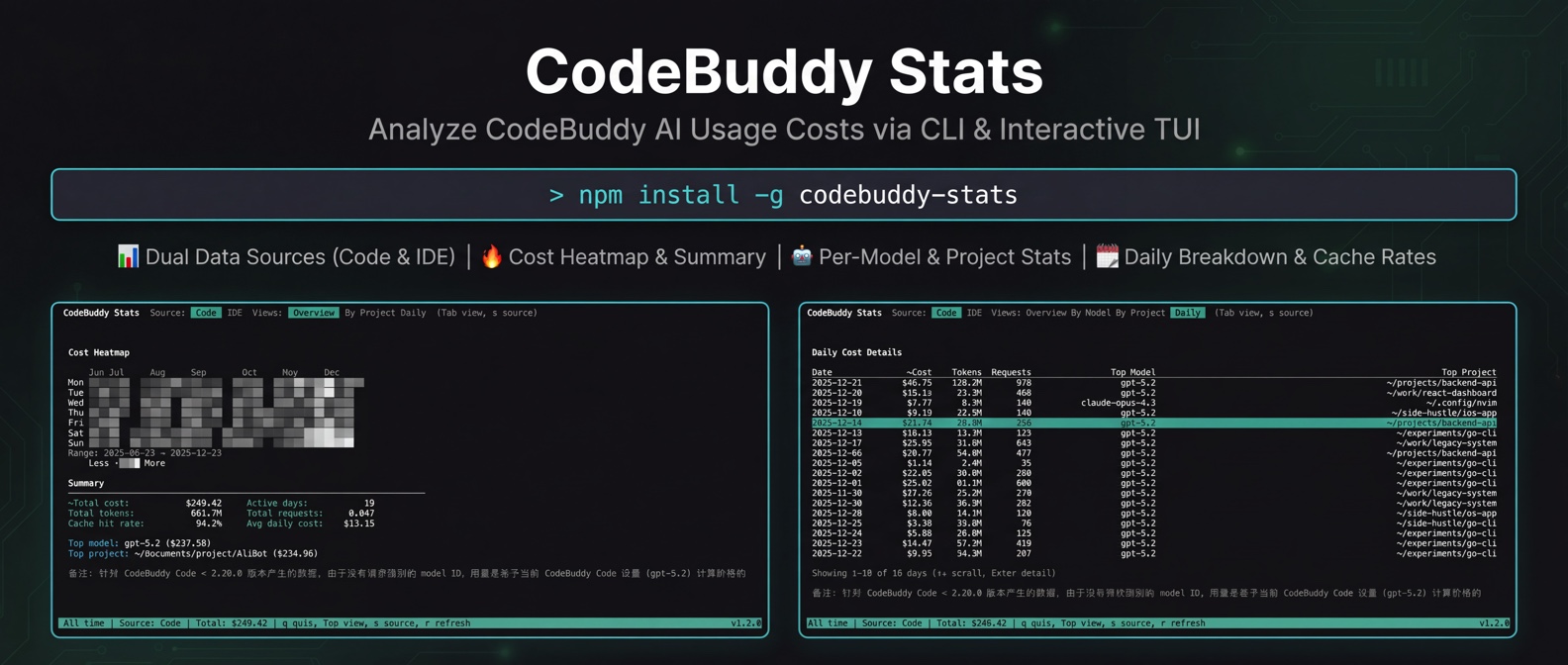
一个用于分析 CodeBuddy 系列产品使用成本的命令行工具,支持交互式 TUI 界面和纯文本输出。
功能特性
- 双数据源支持 - 同时支持 CodeBuddy Code 和 CodeBuddy IDE
- 成本热力图 - 可视化每日 AI 使用成本分布
- 模型统计 - 按模型分类的费用、请求数、Token 用量
- 项目统计 - 按项目分类的费用汇总
- 每日明细 - 查看每日详细使用情况
- 缓存命中率 - 显示 prompt cache 命中率(Code 模式)
- 多模型定价 - 支持 GPT-5.2、Claude 4.5、Gemini 等模型
安装
npm install -g codebuddy-stats使用方法
# 启动交互式 TUI 界面
cbs

# 或使用完整命令名
codebuddy-stats

# 纯文本输出模式
cbs --no-tui

# 只显示最近 7 天的数据
cbs --days 7

# 显示帮助
cbs --help
TUI 界面操作
| 按键 | 功能 |
| ----------- | ------------------------ |
| Tab | 切换到下一个视图 |
| Shift+Tab | 切换到上一个视图 |
| s | 切换数据源(Code / IDE) |
| ↑ / k | 向上滚动 (Daily 视图) |
| ↓ / j | 向下滚动 (Daily 视图) |
| r | 刷新数据 |
| q | 退出 |
视图说明
Overview
显示成本热力图和汇总统计,包括:
- 总费用、总 Token 数、总请求数
- 活跃天数、缓存命中率、日均费用
- 使用最多的模型和项目
By Model
按 AI 模型分类的详细统计表格,包含每个模型的费用、请求数、Token 数和平均每次请求费用。
By Project
按项目分类的费用统计,方便了解不同项目的 AI 使用成本。
工具会自动将项目标识解析为可读路径:
- Code 模式: 将
Users-foo-Documents-project-xxx还原为~/Documents/project/xxx - IDE 模式: 将 MD5 hash 映射为实际工作区路径
Daily
每日使用明细,显示日期、费用、请求数以及当天使用最多的模型和项目。
支持的模型
| 模型 | 输入价格 | 输出价格 | | --------------- | -------- | -------- | | GPT-5.2 | $1.75/M | $14.00/M | | GPT-5.1 / GPT-5 | $1.25/M | $10.00/M | | GPT-5-mini | $0.25/M | $2.00/M | | GPT-5-nano | $0.05/M | $0.40/M | | Claude Opus 4.5 | $5.00/M | $25.00/M | | Claude 4.5 | $3.00/M | $15.00/M | | Gemini 3 Pro | $2.00/M | $12.00/M | | Gemini 2.5 Pro | $1.25/M | $10.00/M |
价格单位:USD / 1M tokens,部分模型支持分层定价
数据来源
工具支持两种数据源,可在 TUI 界面中按 s 键切换:
CodeBuddy Code(CLI 版本)
- macOS:
~/.codebuddy/projects/ - Windows:
%APPDATA%/CodeBuddy/projects/ - Linux:
$XDG_CONFIG_HOME/codebuddy/projects/或~/.codebuddy/projects/
特点:包含完整的缓存命中/写入 token 数据,可计算缓存命中率和精确成本。
CodeBuddy IDE
- macOS:
~/Library/Application Support/CodeBuddyExtension/Data/ - Windows:
%APPDATA%/CodeBuddyExtension/Data/ - Linux:
$XDG_CONFIG_HOME/CodeBuddyExtension/Data/或~/.config/CodeBuddyExtension/Data/
特点:基于 input/output tokens 估算成本,不包含缓存相关数据。
系统要求
- Node.js >= 18
- 终端支持 Unicode 字符(用于热力图显示)
License
ISC