
codemeld
v2.5.0
Published
Bidirectional HTML to React converter — Convert HTML/CSS/JS to React, Vue, Svelte, Angular, Next.js and back. Migrate legacy websites to modern frameworks with one command. AI-powered code conversion CLI.

Maintainers
 pipilot-dev
Keywords
Readme
CodeMeld
Bidirectional converter between HTML/CSS/JS and modern frameworks (React, Next.js, Vue, Svelte, Angular).
Demo — Real Conversion Result
Original HTML site served locally:
.png)
After running codemeld convert — the same site running as a Vite + React + TypeScript app:
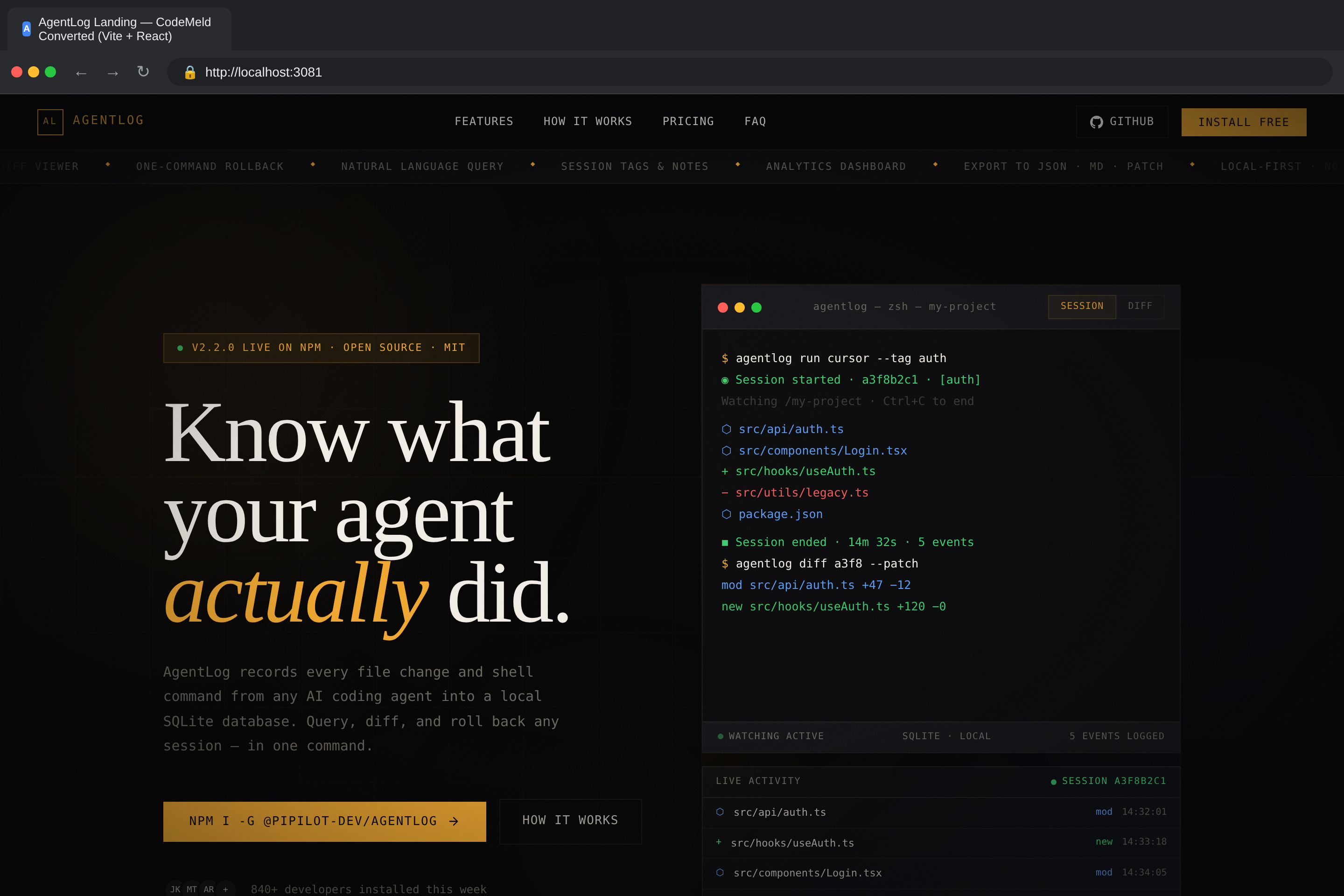
Both screenshots captured with Playwright. The converted React app is pixel-perfect compared to the original HTML — layout, styles, animations, and interactive elements all preserved.
Features
- Bidirectional Conversion — Convert HTML/CSS/JS to React and reverse-convert React/Vue/Svelte/Angular back to static HTML
- HTML Parsing — Extracts structure, inline styles, inline scripts, linked resources using Cheerio
- HTML to JSX Conversion — Converts
classtoclassName,fortohtmlFor, self-closes void elements, converts inline styles to object syntax, escapes literal braces in text content - CSS Processing — Supports global CSS and CSS Modules mode, rewrites asset URLs, merges stylesheets
- JavaScript Analysis — Detects mutable variables to
useState, DOM event listeners to event handlers,DOMContentLoadedtouseEffect, form handlers with proper event typing, DOM mutations to React state - Smart Component Extraction — Automatically splits large HTML files into smaller, reusable React components based on semantic sections (
<nav>,<header>,<section>,<footer>, etc.) - Custom React Hooks — Generates
useFetch,useLocalStorage,useInterval,useTimeouthooks when patterns are detected - Tailwind CSS Detection — Automatically detects and configures Tailwind CSS (or force/disable with flags)
- Multi-Framework Support — Target React, Next.js, Vue, Svelte, or Angular
- Project Scaffolding — Generates complete Vite + React + TypeScript project with proper config files
- Multi-page Support — Converts multiple HTML pages into separate React components with React Router
- Hash-based Routing — Automatically detects and preserves hash-based SPA routing
- Asset Handling — Discovers and copies images, fonts, and other assets to the correct directories
- Build Verification — Optional
--verifyflag installs deps and runsvite buildto validate output - AI-Powered Refinement — Optional
--aiflag uses Claude to fix build errors, enhance components, and improve code quality - Visual Comparison — Optional
--visual-compareflag takes Playwright screenshots of original vs converted sites - Interactive AI Chat — Claude Code-style TUI for iterating on your project with AI assistance
- SEO Generation — Sitemap, robots.txt, web manifest, and meta tag components
- Accessibility Enhancement — ARIA labels, semantic HTML, skip navigation
- Performance Optimizations — React.memo, lazy loading, code splitting
- Interactive Pattern Detection — Auto-detects scroll animations, tabs, accordions, hamburger menus and generates vanilla JS for deconverted output
Installation
npm install -g codemeldOr use directly with npx:
npx codemeld <input-dir> <output-dir>Or clone and build from source:
git clone https://github.com/hansade2005/html-to-vite-react.git
cd html-to-vite-react
npm install
npm run build
Then run with:
node dist/cli.js convert <input-dir> <output-dir>Quick Start
1. Convert a single-page HTML site
codemeld ./my-website ./my-react-appThis reads all .html, .css, and .js files from ./my-website, converts them into React components, and outputs a complete Vite project in ./my-react-app.
2. Reverse-convert a React app back to HTML
codemeld deconvert ./my-react-app ./my-html-site3. Install dependencies and run
cd my-react-app
npm install
npm run dev
Your converted site is now running as a React app at http://localhost:5173.
4. Build for production
npm run buildCLI Reference
convert (default command)
codemeld convert <input> <output> [options]Since convert is the default command, you can omit it:
codemeld ./site ./appArguments:
| Argument | Description |
|----------|-------------|
| <input> | Path to the HTML/CSS/JS source directory |
| <output> | Path for the generated Vite + React project |
Options:
| Option | Description | Default |
|--------|-------------|---------|
| -n, --name <name> | Project/component name | Directory name |
| -m, --css-modules | Use CSS Modules instead of global CSS | false |
| -p, --preserve-structure | Preserve original file/folder structure | false |
| -f, --framework <fw> | Target framework: react, nextjs, vue, svelte, angular | react |
| --verify | Run npm install && vite build after conversion to verify output | false |
| --no-verify | Skip build verification | — |
| --no-extract | Disable smart component extraction (keep everything in one component) | — |
| --no-prettier | Disable Prettier formatting on generated code | — |
| --tailwind <mode> | Tailwind CSS handling: auto, force, disable | auto |
| --ai | Enable AI-powered refinement after conversion (requires API key) | false |
| --ai-max-steps <n> | Maximum AI agent iterations | 50 |
| --ai-mode <mode> | AI mode: full, build-fix, enhance, visual | full |
| --ai-verbose | Show AI agent reasoning in real-time | false |
| --visual-compare | Take screenshots comparing original vs converted (requires Playwright) | false |
| --tests | Generate Vitest test files for components | false |
| --deploy | Generate deployment configs (Docker, CI/CD, Vercel, Netlify) | false |
| --seo | Generate SEO files (sitemap, robots.txt, manifest, meta tags) | false |
| --seo-url <url> | Base URL for SEO files | https://example.com |
| --a11y | Enhance accessibility (ARIA labels, semantic HTML, skip nav) | false |
| --perf | Add performance optimizations (React.memo, lazy loading, code splitting) | false |
| --forms | Generate form handling with validation | false |
| --types | Generate TypeScript type definitions | false |
| --all-extras | Enable all extras: --tests --deploy --seo --a11y --perf --forms --types | false |
deconvert
Reverse-convert a framework project back to static HTML/CSS/JS:
codemeld deconvert <input> <output> [options]| Option | Description |
|--------|-------------|
| -f, --framework <fw> | Force framework detection: react, nextjs, vue, svelte, angular |
| --no-prettier | Disable Prettier formatting |
chat
Start an interactive AI chat session for your project:
codemeld chat [directory]This opens a Claude Code-style terminal UI where you can ask the AI to read files, edit code, run commands, and fix build errors interactively.
| Argument | Description | Default |
|----------|-------------|---------|
| [directory] | Project directory to work in | Current directory |
Usage Examples
Basic conversion
codemeld ./my-html-site ./my-react-appConvert with CSS Modules
codemeld ./site ./app --css-modulesEach component gets its own .module.css file with scoped class names.
Convert with build verification
codemeld ./site ./app --verifyAfter conversion, automatically runs npm install and vite build to confirm the output compiles without errors.
Convert with AI refinement
codemeld ./site ./app --ai --verifyAfter the initial conversion, an AI agent analyzes build errors and TypeScript issues, then iteratively fixes them. Modes:
full— Fix build errors, then enhance component qualitybuild-fix— Only fix build/TypeScript errorsenhance— Only improve code quality (assumes it already builds)visual— Focus on visual fidelity with the original
# Only fix build errors, up to 20 iterations
codemeld ./site ./app --ai --ai-mode build-fix --ai-max-steps 20

# Full refinement with verbose logging
codemeld ./site ./app --ai --ai-verbose
Convert and compare visually
codemeld ./site ./app --verify --visual-compareTakes Playwright screenshots of the original HTML site and the converted Vite app side by side.
Keep everything in one component
codemeld ./site ./app --no-extractDisables smart component extraction — the entire page is kept as a single React component.
Custom project name
codemeld ./site ./app --name "My Dashboard"Target a different framework
codemeld ./site ./app --framework vue
codemeld ./site ./app --framework nextjs
codemeld ./site ./app --framework svelte
codemeld ./site ./app --framework angular
Disable Tailwind detection
codemeld ./site ./app --tailwind disableConvert a multi-page site
If your input directory contains multiple .html files:
my-site/
├── index.html
├── about.html
├── contact.html
├── styles.css
└── script.js
codemeld ./my-site ./my-appEach HTML file becomes a React component, and React Router is configured automatically:
index.html→/about.html→/aboutcontact.html→/contact
Enable all extras
codemeld ./site ./app --all-extras --verifyGenerates tests, deployment configs, SEO files, accessibility enhancements, performance optimizations, form handling, and TypeScript types.
What Gets Converted
HTML to React Components
| HTML | React/JSX |
|------|-----------|
| class="foo" | className="foo" |
| for="input" | htmlFor="input" |
| tabindex="0" | tabIndex="0" |
| readonly | readOnly |
| <img src="x"> | <img src="x" /> |
| <br> | <br /> |
| style="color: red; font-size: 14px" | style={{color: 'red', fontSize: '14px'}} |
| onclick="fn()" | onClick={() => { fn() }} |
| onsubmit="handleSubmit(event)" | onSubmit={(e) => { handleSubmit(e) }} |
| <!-- comment --> | {/* comment */} |
| checked (boolean) | defaultChecked |
| <option selected> | <select defaultValue="..."> |
| Text with { braces } | Text with { braces } |
JavaScript to React Patterns
| Vanilla JS | React |
|-----------|-------|
| let count = 0; count = 1; | const [count, setCount] = useState(0) |
| DOMContentLoaded handler | useEffect(() => {...}, []) |
| addEventListener('click', ...) | onClick={handler} |
| element.classList.toggle('active') | const [isActive, setIsActive] = useState(false) |
| element.style.display = 'none' | State-driven conditional rendering |
| element.textContent = 'Hello' | State-driven text content |
| document.getElementById('x').value | new FormData(e.currentTarget).get('x') |
| this.reset() | (e.target as HTMLFormElement).reset() |
| setInterval(fn, 1000) | useInterval(fn, 1000) custom hook |
| setTimeout(fn, 500) | useTimeout(fn, 500) custom hook |
| fetch('/api/data') | useFetch('/api/data') custom hook |
| localStorage.getItem('key') | useLocalStorage('key', default) custom hook |
SVG Attributes
All hyphenated SVG attributes are converted to their camelCase JSX equivalents:
stroke-width → strokeWidth, fill-opacity → fillOpacity, clip-path → clipPath, etc.
Event Handler Types
Generated handlers include proper TypeScript event types:
| Event | Type |
|-------|------|
| onSubmit | React.FormEvent<HTMLFormElement> |
| onChange | React.ChangeEvent<HTMLInputElement> |
| onClick | React.MouseEvent<HTMLElement> |
| onKeyDown | React.KeyboardEvent<HTMLElement> |
| onFocus | React.FocusEvent<HTMLElement> |
| onBlur | React.FocusEvent<HTMLElement> |
| onInput | React.FormEvent<HTMLInputElement> |
Output Project Structure
Single-page site
output/
├── index.html
├── package.json
├── tsconfig.json
├── tsconfig.node.json
├── vite.config.ts
├── .gitignore
├── public/
│   └── (fonts, other assets)
└── src/
    ├── main.tsx
    ├── App.tsx
    ├── vite-env.d.ts
    ├── assets/
    │   └── (images)
    ├── components/
    │   ├── index.tsx          # Main page component
    │   ├── index.css          # Page styles
    │   ├── nav.tsx            # Extracted <nav> component
    │   ├── footer.tsx         # Extracted <footer> component
    │   ├── hero-section.tsx   # Extracted <section> components
    │   └── ...
    ├── hooks/
    │   ├── useInterval.ts     # Generated if setInterval detected
    │   ├── useTimeout.ts      # Generated if setTimeout detected
    │   ├── useFetch.ts        # Generated if fetch() detected
    │   └── useLocalStorage.ts # Generated if localStorage detected
    └── styles/
        └── global.css
Multi-page site
output/
└── src/
    ├── main.tsx
    ├── App.tsx               # React Router setup
    └── components/
        ├── index.tsx         # Home page (/)
        ├── index.css
        ├── about.tsx         # About page (/about)
        ├── about.css
        ├── contact.tsx       # Contact page (/contact)
        └── contact.css
Requirements
- Node.js >= 18.0.0
- For
--visual-compare: Playwright (npx playwright install chromium) - For
--ai: API key configured for AI refinement
License
MIT