
codespine
v0.1.18
Published
Parse TypeScript source into a knowledge graph for autonomous code optimization


Readme
codespine
Parse TypeScript source code into a knowledge graph, then use that graph as the substrate for an autonomous AI agent that finds and applies code optimizations.




Live demo
See it in your browser — no install required. Every sample project is published as an interactive graph, with community detection and runtime hotspots baked in:
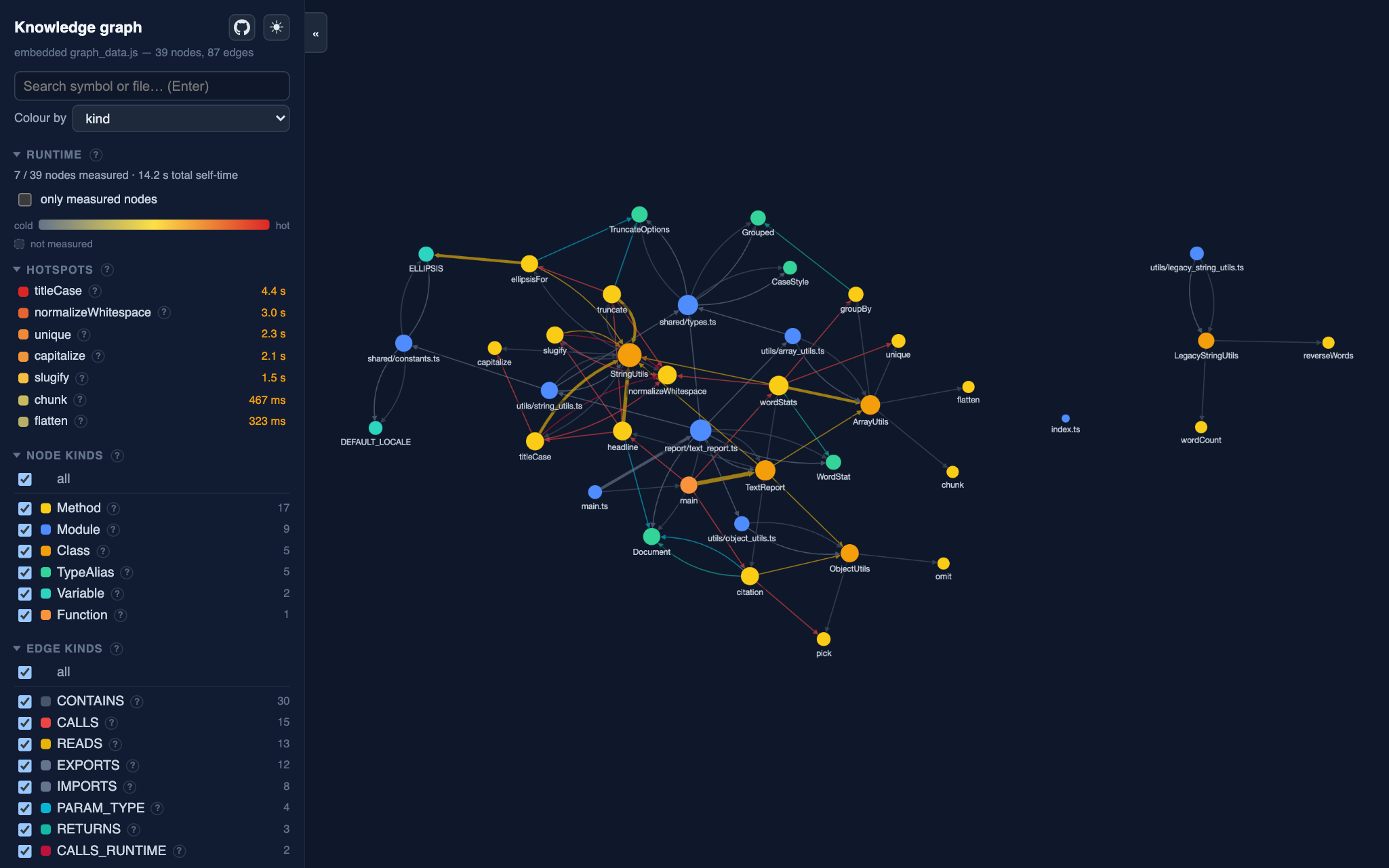
Open a demo: text-kit · calc · api-brief · shop-sqlite
Documentation
Full documentation lives in ./docs. The
documentation index describes every guide and command — start
there, or jump straight to Getting Started.
Why a graph
An optimization agent constantly needs to reason about blast radius:
- If I rewrite this function, who calls it and what breaks? —
CALLSedges - Is this export dead code I can delete? — cross-file reference resolution
- What is affected if I change this type? —
USES_TYPE/ type-checker edges
These questions require semantic parsing (symbol + type resolution), which is
why the extractor is built on ts-morph (the TypeScript
Compiler API) rather than a syntax-only parser.
Graph model
Nodes — Module, Class, Interface, TypeAlias, Enum, Function,
Method, Property, Parameter, Variable, ExternalModule, and the
system-level ConfigFlag (environment variables), ExternalAPI (outbound HTTP
hosts), and Endpoint (HTTP routes).
Edges
| Layer | Edges |
| --- | --- |
| Structural | CONTAINS, IMPORTS, EXPORTS |
| Type | EXTENDS, IMPLEMENTS, USES_TYPE, RETURNS, PARAM_TYPE |
| Behavioral | CALLS, INSTANTIATES, OVERRIDES, READS, WRITES |
| System-level | READS_CONFIG, CALLS_EXTERNAL, HANDLES |
| Runtime | CALLS_RUNTIME |
The structural layer — plus the always-on config and outbound-HTTP surfaces
(ConfigFlag / READS_CONFIG, ExternalAPI / CALLS_EXTERNAL) — is cheap and
needs no symbol resolution. The type, behavioral, and endpoint (Endpoint /
HANDLES) layers require symbol resolution and are emitted with --semantic. The
runtime layer (CALLS_RUNTIME) is reconstructed from a CPU profile's call tree by
enrich, not parsed from source — the calls that
actually fired, dynamic dispatch included.
ConfigFlag nodes come from process.env.X reads; ExternalAPI nodes from
fetch(...) call sites (one per host); Endpoint nodes from route registrations
like app.get('/users', handler), each with a HANDLES edge to the handler
function. These are the system-level kinds tracked in
#31.
Usage
npm install

# structural graph only (fast)
npm run extract -- <path-to-project>

# full graph with heritage + CALLS edges
npm run extract -- <path-to-project> --semantic
Output is two JSONL files — .codespine/graph/nodes.jsonl and
.codespine/graph/edges.jsonl (override the base folder with -o, --output-folder)
— one record per line, easy to inspect, diff, and load into any store.
Querying the graph
Load the JSONL into an embedded Kùzu database, then run the query tools:
npm run dev -- load        # reads ./.codespine/graph, writes ./.codespine/graph.kuzu

npm run dev -- find <name>                 # resolve a name to node ids
npm run dev -- who-calls <id>              # direct callers of a symbol
npm run dev -- calls <id>                  # what a symbol calls
npm run dev -- blast-radius <id> --depth 10  # transitive callers (impact set)
npm run dev -- references <id>             # everything that references a symbol/type
npm run dev -- dead-exports                # exported symbols with no inbound refs
npm run dev -- neighbors <id>              # one-hop neighbourhood (in + out)
npm run dev -- hotspots --by self-time     # rank nodes by optimization leverage
npm run dev -- cost                        # inclusive cost + share-of-total (causal)
npm run dev -- cost <id>                    # where one node's cost goes / who causes it
npm run dev -- cluster                      # detect code communities (Leiden) -> metadata.community
npm run dev -- campaign                     # ranked optimization worklist (safe removals + hotspots)
Every query command accepts --json to emit machine-readable output — this is
the shape the optimization agent consumes. Node ids come from find or another
query's results; do not hand-write them.
The query methods on GraphQuery (whoCalls, blastRadius, deadExports,
hotspots, costRanking, costAttribution, neighborhood, …) are designed to
map one-to-one onto agent tools: JSON in, JSON out.
For a task-oriented walk-through of these commands — using them by hand to answer impact, dead-code, and dependency questions — see the Static Analysis guide.
dead-exportsaccuracy: it is member-aware (a class/interface counts as live when any contained member is referenced) and considersCALLS,EXTENDS,IMPLEMENTS,USES_TYPE,RETURNS,PARAM_TYPE,INSTANTIATES, andREADS(value-identifier) edges. On this repository it reports exactly the two genuinely-unused type aliases — no false positives.
Web visualisation
Serve the database as an interactive graph — pan/zoom, kind filters, symbol search, per-node edge listing (see contribs/webview):
npm run webview            # reads ./.codespine/graph.kuzu, serves http://localhost:4173
npm run webview -- -o ./.codespine --port 8080
The optimization agent
The end goal: an agent that uses the graph to find and apply optimizations,
verifying each one before keeping it. It ships as a Claude Code
slash command, /codespine-optimize, defined in
dotclaude_folder/commands/codespine-optimize.md
— so the agent runtime is your Claude Code subscription, with no API key or
provider configuration to set up.
/codespine-optimize
/codespine-optimize Inline the single-use helper X
With no argument the command runs its default mission: find one genuinely dead exported symbol, confirm it has zero inbound references, and remove it safely.
The command drives a find → confirm → edit → verify loop. It queries the graph
through this CLI (dead-exports, references, who-calls, blast-radius) to
gather context and confirm blast radius, makes exactly one edit, then runs
codespine verify — the type-check and
the test suite as a single gate. If verify passes the edit stands; if it fails
the edit is reverted with git restore and the change is abandoned or retried.
On a project with no test script verify degrades to type-check-only and the agent
says so, rather than implying the change was behaviourally verified. Run it on a
clean git tree so you can review (and git checkout) what it kept.
A companion command, /codespine-interview
(codespine-interview.md),
is read-only: it interviews you to scope a measurable optimization target and
grounds each candidate in the graph, producing tasks you can then hand to
/codespine-optimize. Both commands, plus the codespine-query skill, live
under dotclaude_folder/ and are mirrored into .claude/.
To install all of them into another project, run
install from inside that project's .claude/
directory — it copies every bundled command and skill straight into it:
# run from inside the target .claude directory (or pass its path)
npx codespine install
npx codespine install --force    # overwrite previously installed copies
Architecture
src/
  schema/                    Zod schemas for nodes, edges, and manifests (the wire format)
  extract/
    project_loader.ts        load a ts-morph Project from tsconfig
    node_id.ts               deterministic, position-stable node ids
    structural_extractor.ts  modules, declarations, imports, containment
    semantic_extractor.ts    heritage, CALLS, INSTANTIATES, type edges
    config_extractor.ts      ConfigFlag nodes (process.env) + READS_CONFIG
    api_extractor.ts         ExternalAPI nodes (fetch hosts) + CALLS_EXTERNAL
    endpoint_extractor.ts    Endpoint nodes (routes) + HANDLES
    graph_builder.ts         orchestrates extraction, dedupes by id
  store/
    jsonl_store.ts           serialize the graph to JSONL
    jsonl_reader.ts          read + Zod-validate the JSONL back in
    kuzu_store.ts            load the graph into embedded Kùzu, run Cypher
  query/
    graph_query.ts           the agent's query tools (who-calls, blast-radius…)
    campaign_planner.ts      rank safe removals + hotspots into a worklist (campaign)
  enrich/                    runtime layer from a V8 CPU profile (the enrich command)
    cpu_profile.ts           parse a V8 .cpuprofile
    runtime_join.ts          join profile frames to nodes by enclosing range
    runtime_enricher.ts      attach measured self-time / sample counts onto nodes
  cluster/                   Leiden community detection (the cluster command)
    cluster_weights.ts       per-edge-kind coupling weights
    community_detector.ts    Leiden (CPM) over the weighted coupling graph
    graph_clusterer.ts       orchestrate clustering, write metadata.community
  benchmark/                 measured before/after runtime delta (the benchmark command)
    node_benchmark.ts        the benchmark gate (profile → enrich → cost)
    benchmark_stats.ts       median + spread, so noise is reported honestly
  verify/
    project_verifier.ts      run typecheck + tests as one keep/revert gate (verify)
  report/                    CODEBASE_BRIEF generation (the report command)
    report_data.ts           gather the report data from the graph
    graph_report.ts          render markdown / json (and the visual HTML)
    pdf_renderer.ts          optional HTML-to-PDF, degrades to HTML when absent
  commands/                  one file per CLI command (extract, load, enrich, cluster,
                             find, …, verify, benchmark, report, webview, install)
  cli.ts                     wires the commands into the codespine CLI
The optimization agent is not part of this src/ tree — it is the
/codespine-optimize Claude Code command under
dotclaude_folder/commands/, which drives the same
queries through the CLI.
Node ids are derived purely from the declaration (kind:relPath#name@line), so
any extractor computes the same id for the same symbol without a shared
registry — that is what lets the semantic layer link a call site to the exact
declaration node the structural layer emitted.
Roadmap
- [x] Embedded query layer — load into Kùzu (embedded,
Cypher) with traversal tools:
who-calls,calls,blast-radius,dead-exports,neighbors,find. - [x] Type edges —
USES_TYPE,RETURNS,PARAM_TYPE(plusINSTANTIATES) resolved through import aliases. - [x] Member-aware reference counting — a class/interface is live when any contained member is referenced.
- [x] Value-reference (
READS) edges — value-identifier usage, so exportedconsts (e.g. schemas) are no longer false-positive dead exports. - [x] Runtime enrichment — the
enrichcommand ingests a V8 CPU profile and attaches measured self time / sample count onto nodes asmetadata.runtime, joining frames to nodes by enclosing range. - [x] Hotspot / leverage ranking — the
hotspotscommand ranks nodes by optimization value (runtime self-time, fan-in, call-count, or transitive blast radius), defaulting to measured self time when enriched and degrading gracefully to static fan-in when not. - [x] Optimization agent — the
/codespine-optimizeClaude Code command, which proposes one edit and keeps it only ifverify(type-check and tests) passes (otherwise reverts withgit restore). - [x] Test verification — the
verifycommand runs the project'stypecheckandtestscripts as one keep/revert gate, so behavior-changing edits are caught, not just type errors. A project with no test script degrades to type-check-only, reported honestly (behaviorVerified: false). - [x] Benchmark verification — the
benchmarkcommand measures a target node's runtime metric (profile → enrich → cost) over N runs and reports the median + spread, with an advisory baseline→after delta — so an optimization is reported by its measured impact (e.g. −57% self-time ontitleCase) rather than a guess. Advisory by design, distinct from the hardverifygate. - [x] Community detection — the
clustercommand runs the Leiden algorithm (CPM) over the weighted coupling graph and attaches a module index onto nodes asmetadata.community, with the internal-connectedness guarantee Louvain lacks. - [ ] Vector index — embed per-node summaries for hybrid graph + semantic retrieval, so the agent can find candidates by meaning, not just by name.