
codesqueuml
v0.1.12
Published
CodesqueUML is a TypeScript library packaged for npm which converts scribbly bits of pseudocode into extremely ugly PlantUML source code, then into lovely SVG diagrams.


Readme
CodesqueUML
CodesqueUML is a TypeScript library packaged for npm which converts scribbly bits of pseudocode into extremely ugly PlantUML source code, then into lovely SVG diagrams.
"What is CodesqueUML?" you must be wondering.
Let's not go over THAT again.
Now you're asking "WHY?" Well, because I have to read a lot of complicated code and, when I do, I like to make notes about the classes and methods called and add bits of information to help me understand what everything is doing. Then at some point I end up wanting a diagram for reference or to share with others, but by the time I'm done taking notes, I really want to move on to other things.
Features
- Scribbly code
- Generates PlantUML from scribbly code
- Generates SVG and PNG diagrams from PlantUML
- Hyperlinks in SVG so you can "surf your diagrams"
- COMING SOON: A build script which parses all code files in one directory and outputs SVG diagrams to another directory, automatically generating hyperlinks between them
Example
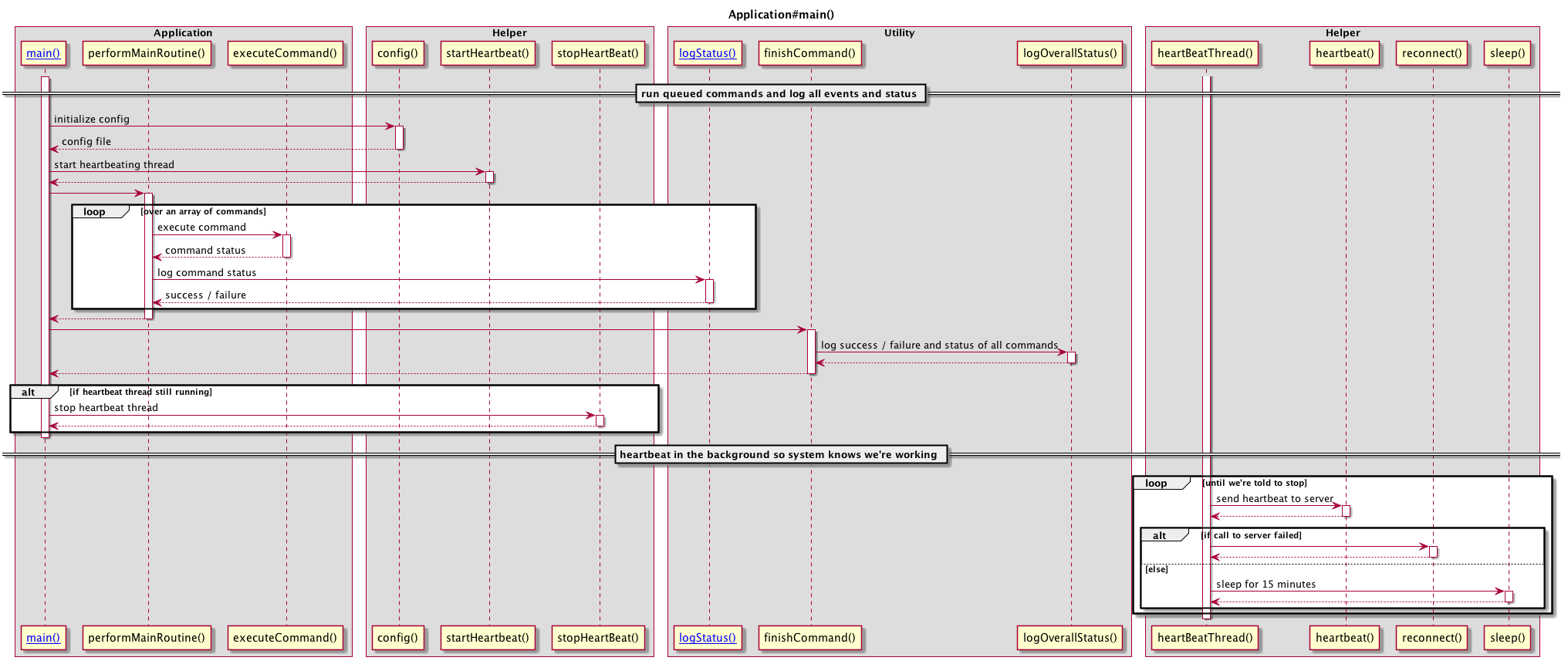
See the scribbly code first, then see the lovely sequence diagram after.
Scribbly Code
Application#main(): run queued commands and log all events and status
  Helper#config(): initialize config < config file

  Helper#startHeartbeat() : start heartbeating thread

  performMainRoutine()

    loop over an array of commands

      executeCommand() : execute command < command status
      Utility#logStatus() : log command status < success / failure

  Utility#finishCommand()
    logOverallStatus() : log success / failure and status of all commands

  if heartbeat thread still running
    Helper#stopHeartBeat() : stop heartbeat thread

Helper#heartBeatThread() : heartbeat in the background so system knows we're working
  loop until we're told to stop
    heartbeat() : send heartbeat to server

    if call to server failed
      reconnect()
    else
      sleep() : sleep for 15 minutes
Lovely Sequence Diagram
Tutorial
Import
import * as codesqueuml from 'codesqueuml';Render PlantUML
Create a parser and give it a smidgen of code to parse:
let parser = new codesqueulm.Parser(`
ClassOne#functionOne(): start functionOne process
  ClassTwo#functionTwo(): call functionTwo < returns void
`);
Parse into one or more top-level calls:
let rootNodes = parser.parse();Generate PlantUML and print to the screen:
if (rootNodes) {
  let plantUML = codesqueulm.renderPlantUML(rootNodes);
  console.log(plantUML);
}
Simplify things a bit and generate an SVG file:
let firstCodeNodes = new codesqueulm.Parser(`
ClassOne#functionOne(): start functionOne process
  ClassTwo#functionTwo(): call functionTwo < returns void
`).parse();

if (!firstCodeNodes) throw new Error("Darn.");

let firstPlantUML = codesqueulm.renderPlantUML(firstCodeNodes);
codesqueulm.renderPlantUMLDiagram(firstPlantUML, "first.svg", codesqueulm.Format.SVG);
Now a big fancy example that creates two SVG files, both of which link to each other:
let firstCodeNodes = new codesqueulm.Parser(`
ClassOne#functionOne(): start functionOne process
  ClassTwo#functionTwo(): call functionTwo < returns void
`).parse();

let secondCodeNodes = new codesqueulm.Parser(`
ClassTwo#functionTwo(): start functionTwo process
  ClassOne#functionOne(): call functionOne < returns void
`).parse();

if (!firstCodeNodes || !secondCodeNodes) throw new Error("Darn.");

let codeNodeIdMap = new Map<string, string>([
  ["ClassOne#functionOne", "first.svg"],
  ["ClassTwo#functionTwo", "second.svg"]]);

let firstPlantUML = codesqueulm.renderPlantUML(firstCodeNodes, codeNodeIdMap);
codesqueulm.renderPlantUMLDiagram(firstPlantUML, "first.svg", codesqueulm.Format.SVG);

let secondPlantUML = codesqueulm.renderPlantUML(secondCodeNodes, codeNodeIdMap);
codesqueulm.renderPlantUMLDiagram(secondPlantUML, "second.svg", codesqueulm.Format.SVG);
Go open first.svg in a browser. Now.