
codex-security
v0.0.2
Published
Not the Codex Security CLI — use @openai/codex-security. Unaffiliated notice CLI with default-on, opt-out usage analytics.

Maintainers
 naveenyagati
Readme
codex-security
You probably want @openai/codex-security:
npx @openai/codex-securityThis package is not affiliated with OpenAI and performs no security scan.
Why this exists
This package was created to reserve the unscoped codex-security name and warn
people who run it while intending to use @openai/codex-security. It prints a
notice pointing to the scoped package and exits with status 1.
The first release, 0.0.1, was published on July 29, 2026, with this warning
already in place. The notice did its job: a community report reproduced it in
issue #68, and the resulting
PR #69 corrected the documentation
to use the scoped package. The fix was merged that same day.
Downloads since launch
1,390 downloads from July 29 through September 18, 2026: 1,024 on launch day and 366 afterward.
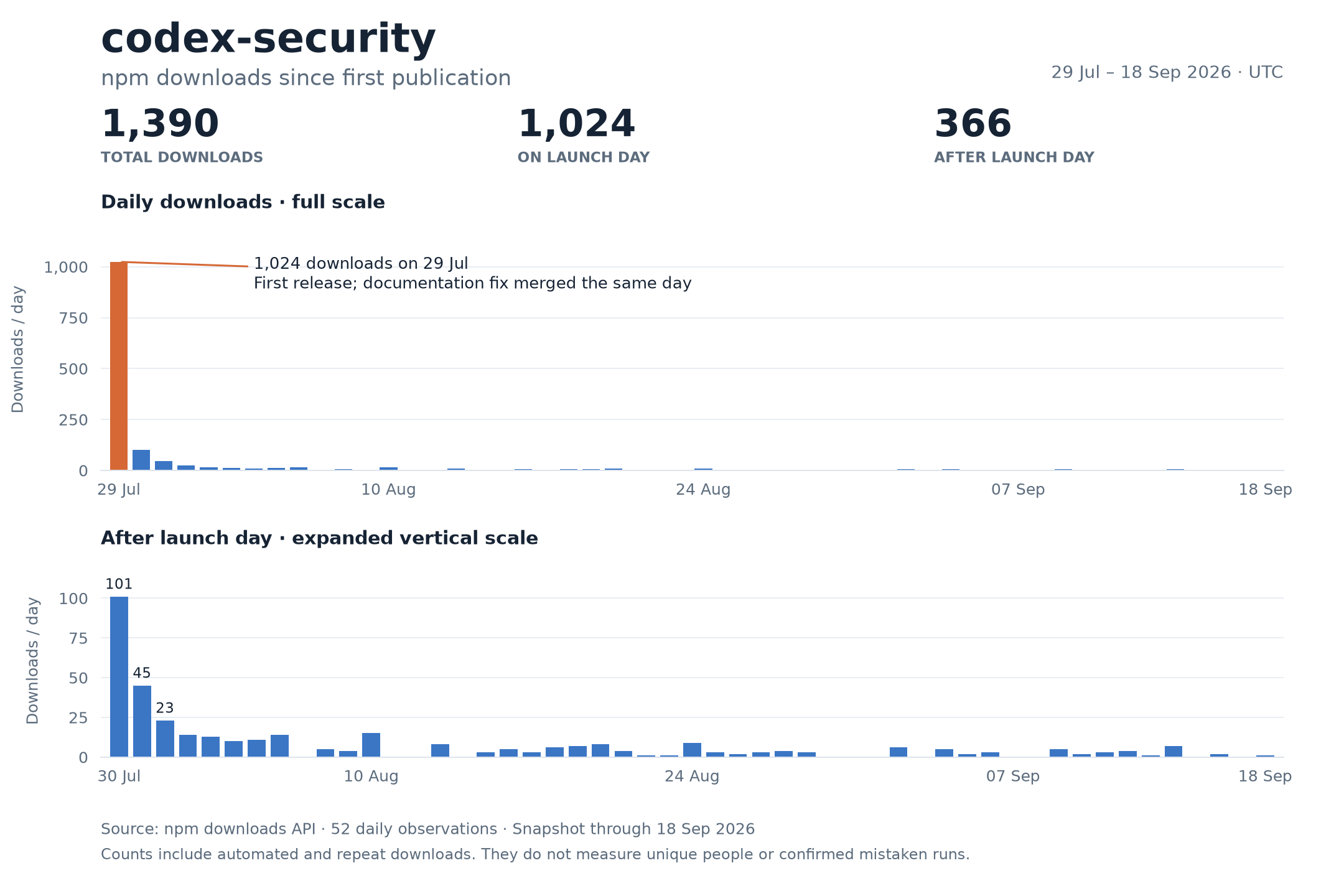
Source: npm's daily download counts. These include automated and repeat downloads, not unique people or confirmed mistaken runs.
Analytics
Usage analytics are on by default to help the maintainer understand how often this notice is encountered. Each ordinary run attempts to send one event to PostHog US containing the timestamp, package version, OS, architecture, Node.js major version, CI/terminal flags, and a fresh random ID for that run. PostHog also receives your public IP and may retain it and derive approximate location, depending on project settings.
No file contents, command arguments, usernames, or credentials are sent.
Disable analytics for one run:
npx codex-security --no-telemetryDisable analytics for future runs on the same OS account:
npx codex-security telemetry disableYou can also set CODEX_SECURITY_TELEMETRY_DISABLED=1 or DO_NOT_TRACK=1 before
running. Opt out before execution to prevent the first event. Telemetry commands,
--help, and --version send no analytics. Disabling does not delete past events.
License
MIT