
codex-session-insights
v0.4.0
Published
Generate a report analyzing your Codex sessions.

Maintainers
 cosineformula
Readme
codex-session-insights
Generate a report analyzing your Codex sessions.
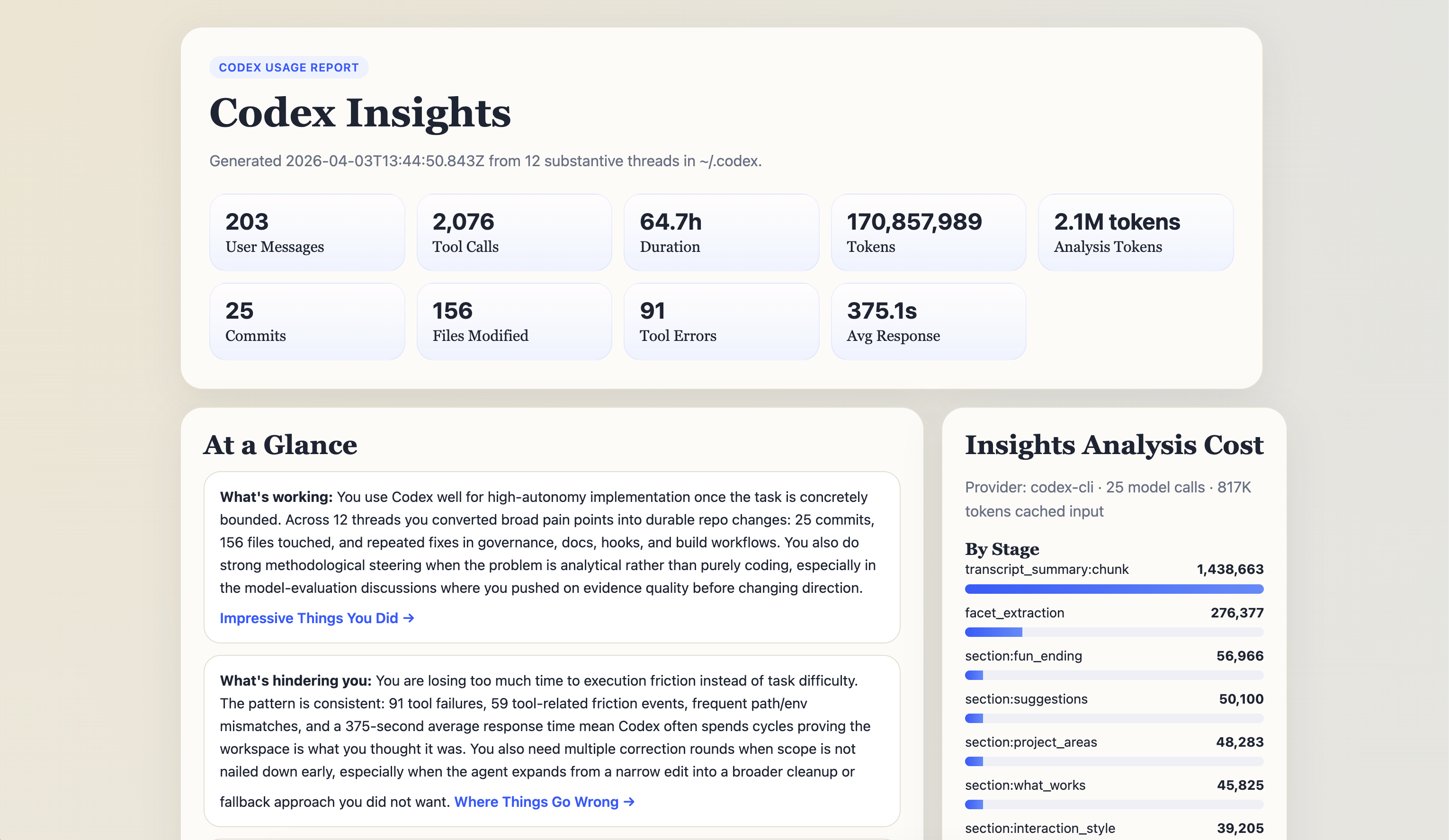
codex-session-insights reads your local Codex history, extracts recurring patterns from your sessions, and renders a narrative report as both HTML and JSON.
Quick Start
Run it directly:
npx codex-session-insightsThe default flow is:
- Read your local Codex thread index
- Estimate likely analysis token usage
- Let you confirm the plan in an interactive terminal
- Generate
report.htmlandreport.json - Try to open the HTML report in your browser
If you only want the estimate first:
npx codex-session-insights --estimate-onlyIf you already know what you want and do not want the confirmation flow:
npx codex-session-insights --yesWhat You Get
By default the tool writes:
~/.codex/usage-data/report.html~/.codex/usage-data/report.json
The HTML report includes these sections:
At a GlanceWhat You Work OnHow You Use CodexImpressive Things You DidWhere Things Go WrongOpen Loops(sessions that ended without confirmed completion)Features to TryOn the HorizonOne More Thing
How the headline numbers are defined
Active Timesums the gaps between consecutive rollout events, skipping any gap longer than 30 minutes. The raw first-to-last span of each thread is shown separately asThread span (wall clock)in the appendix.Median Turnis the time from a user message to the assistant's final answer for that turn. It includes tool, build, and sub-agent run time, so it describes how long turns take, not how responsive the model is.Tool Errorscounts non-zero command exits plus failed tool calls. Probe misses such asrg,grep, ortestexiting 1 with nothing found are excluded and reported separately.Failure Hotspots (by command)groups failures by the program that actually ran (git push,cmake,npm test), not by the Codexparsed_cmdtype, which labels most compound commandsunknown.Failure Causesis a heuristic classification from exit code and output text (test_failed,build_failed,git_error,command_not_found,interrupted, and so on).unclassifiedmeans the cause could not be determined.Session TypesandOutcomesonly cover threads that received an LLM label. Each panel states its coverage (for example "12 of 124 labeled threads"), and the narrative sections are instructed not to extrapolate beyond it. Re-running the tool extends coverage because labels are cached.
Typical Usage
Default run:
npx codex-session-insightsLite local run for prompt and layout testing:
npx codex-session-insights --preset liteEstimate first, then decide:
npx codex-session-insights --days 7 --limit 20 --facet-limit 8 --estimate-onlyUse a custom output directory:
npx codex-session-insights --out-dir ./insights-outputEmit JSON to stdout instead of a terminal summary:
npx codex-session-insights --stdout-jsonInclude archived threads:
npx codex-session-insights --include-archivedInclude sub-agent threads as well as main threads:
npx codex-session-insights --include-subagentsChoose the report language explicitly:
npx codex-session-insights --lang zh-CN
npx codex-session-insights --lang en
Use the OpenAI API instead of your local Codex CLI login:
npx codex-session-insights --provider openai --api-key $OPENAI_API_KEYDefaults
Current default analysis plan:
days:30limit:200facet-limit:50provider:codex-clifacet-model:gpt-5.6-lunafast-section-model:gpt-5.6-lunainsight-model:gpt-6-astrafacet-effort:lowfast-section-effort:lowinsight-effort:high
Important behavior defaults:
--preset litemaps todays=7,limit=20,facet-limit=8,preview=10limitmeans the target number of substantive threads to include in the report, not just the first 50 indexed threadsfacet-limitmeans the max number of uncached per-thread facet analyses to run in a single report- Report language follows a best-effort system locale check
- Main-thread analysis is the default; sub-agent threads are excluded unless you pass
--include-subagents - The CLI shows an estimate before running in interactive terminals
- The CLI tries to open the generated HTML report in your browser after generation
What It Reads
~/.codex/state_*.sqlitefor the thread index~/.codex/sessions/YYYY/MM/DD/rollout-*.jsonlfor rollout events
Requirements
- Node.js
>=20.17 sqlite3available on your systemPATH- Codex CLI installed if you use the default
codex-cliprovider
Supported platform status:
- macOS: expected to work
- Linux: expected to work if
sqlite3andcodexare installed - Windows: not yet verified
Privacy
The tool reads local Codex data from your machine.
- With
provider=codex-cli, analysis is performed through your local Codex CLI session - With
provider=openai, prompts are sent through the OpenAI Responses API - To avoid suggesting rules you already have, the tool reads
AGENTS.mdfrom~/.codexand from your most active project directories (up to 6,000 characters each) and includes those excerpts in the suggestion prompts. Pass--no-repo-instructionsto skip this - Generated reports may contain project paths, thread titles, summaries, and other local development context
Review report.html and report.json before sharing them.
Limitations
- Rollout event schemas may drift across Codex versions. Version 0.3.0 and later read both the legacy
user_message/exec_command_endevents and theitem_completedevents written by Codex CLI 0.15x+ - Model names are those exposed to ChatGPT-backed Codex accounts as of September 2026; if a default model is retired, the tool falls back to the closest available model automatically
- Token estimates are conservative, not billing-accurate
- Failure causes are classified by pattern matching on exit codes and command output; unusual toolchains may land in
unclassified - Turn timing and active time are derived from rollout event timestamps, so they cannot separate time spent waiting on a sub-agent from time spent by the main agent
- The tool is designed around Codex local storage layout and is not a generic agent log analyzer
- Windows support is not yet verified
Advanced Overrides
If you want to override the default model split manually:
npx codex-session-insights \
  --facet-model gpt-5.6-luna \
  --fast-section-model gpt-5.6-luna \
  --insight-model gpt-6-astra \
  --facet-effort low \
  --fast-section-effort low \
  --insight-effort high
To suppress browser opening:
npx codex-session-insights --no-openTo force browser opening:
npx codex-session-insights --openFor Contributors
Useful local commands:
npm install
npm test
npm run check
npm run report:lite
npm run generate:test-report
npm run report:lite runs a smaller local analysis preset for testing prompt and layout changes without paying the full 200/50 default cost.
npm run generate:test-report writes a deterministic sample report page to test-artifacts/sample-report/.
Releasing
Publishing is automated by .github/workflows/release.yml and uses npm Trusted Publishing, so no npm token is stored in GitHub.
- Bump
versioninpackage.jsonand commit. - Tag the commit with the same version and push the tag:
git tag v0.4.0
git push origin main --tags
The workflow runs npm run check and npm test, verifies the tag matches package.json, publishes to npm, installs the published package as a smoke test, and creates a GitHub Release with generated notes.
One-time setup on npmjs.com: open the package settings, add a trusted publisher for GitHub Actions with repository cosformula/codex-session-insights and workflow release.yml.