
codex2claudecode
v0.4.2
Published
Bun-powered Claude-compatible local API for Codex, Kiro, and Copilot credentials.
Downloads
475

Maintainers
 alvin0
Readme
codex2claudecode


Run OpenAI Codex/ChatGPT and Amazon Kiro account credentials behind a local Claude-compatible API for Claude Code.
| Codex Mode | Kiro Mode |
|---|---|
| 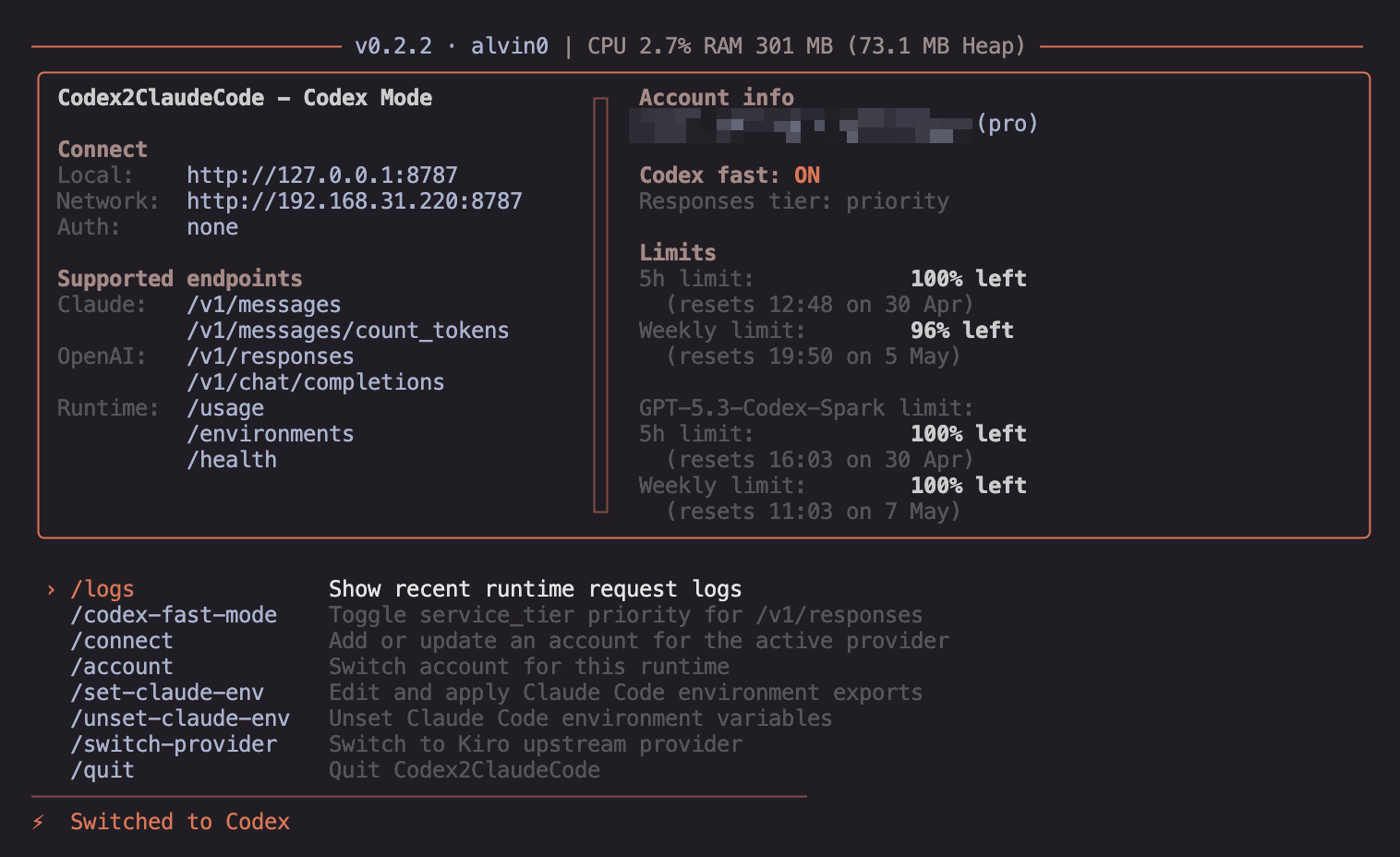 |
| 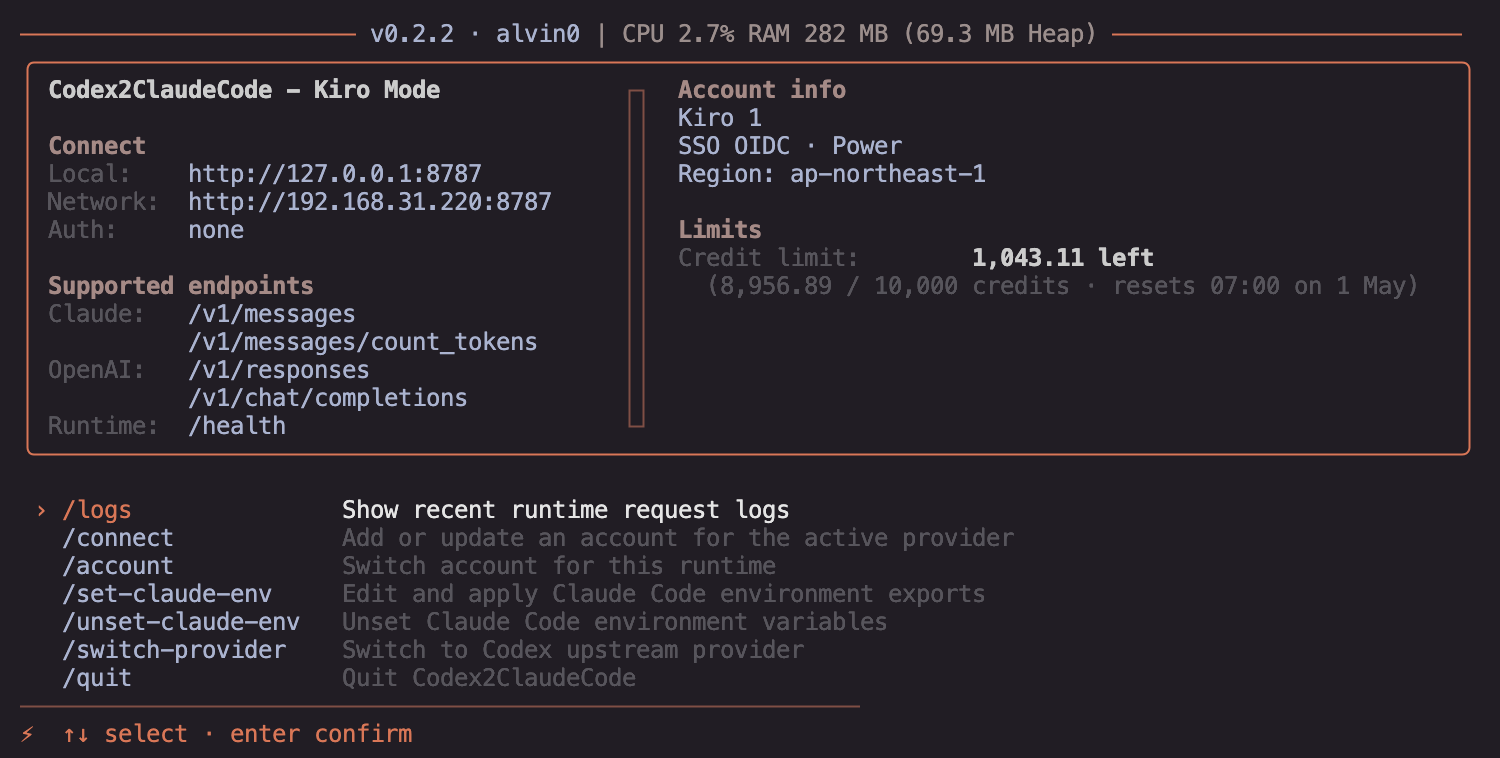 |
|
codex2claudecode supports two upstream providers:
- Codex — uses OpenAI Codex/ChatGPT credentials (GPT-5 models)
- Kiro — uses Amazon Kiro credentials (Kiro models)
Switch between providers at any time using the UI command:
/switch-providerThe active provider is shown in the terminal UI title bar. Each provider has its own account, model list, and usage tracking. Switching providers restarts the runtime with the new provider's credentials — active Claude Code sessions will reconnect automatically.
Quick Start (Standalone Binary — No Runtime Required)
Pre-built standalone binaries are available for every release. They embed the entire runtime, so you do not need to install Bun, Node.js, npm, or any other dependency.
macOS (Apple Silicon)
curl -fsSL https://github.com/alvin0/codex2claudecode/releases/latest/download/codex2claudecode-darwin-arm64.tar.gz | tar xz
chmod +x codex2claudecode-darwin-arm64
./codex2claudecode-darwin-arm64
macOS (Intel)
curl -fsSL https://github.com/alvin0/codex2claudecode/releases/latest/download/codex2claudecode-darwin-x64.tar.gz | tar xz
chmod +x codex2claudecode-darwin-x64
./codex2claudecode-darwin-x64
Linux (x64)
curl -fsSL https://github.com/alvin0/codex2claudecode/releases/latest/download/codex2claudecode-linux-x64.tar.gz | tar xz
chmod +x codex2claudecode-linux-x64
./codex2claudecode-linux-x64
Linux (ARM64)
curl -fsSL https://github.com/alvin0/codex2claudecode/releases/latest/download/codex2claudecode-linux-arm64.tar.gz | tar xz
chmod +x codex2claudecode-linux-arm64
./codex2claudecode-linux-arm64
Windows (x64, PowerShell)
Invoke-WebRequest -Uri "https://github.com/alvin0/codex2claudecode/releases/latest/download/codex2claudecode-windows-x64.exe.zip" -OutFile codex2claudecode.zip
Expand-Archive codex2claudecode.zip -DestinationPath .
.\codex2claudecode-windows-x64.exe
One-liner install to PATH (Linux/macOS)
This command auto-detects your OS and architecture:
curl -fsSL https://github.com/alvin0/codex2claudecode/releases/latest/download/codex2claudecode-$(uname -s | tr '[:upper:]' '[:lower:]')-$(uname -m | sed 's/aarch64/arm64/;s/x86_64/x64/').tar.gz | sudo tar xz -C /usr/local/binAfter installing, run from anywhere:
codex2claudecode-darwin-arm64 --port 8787Or rename the binary for convenience:
sudo mv /usr/local/bin/codex2claudecode-* /usr/local/bin/codex2claudecode
codex2claudecode --port 8787
All CLI flags work the same as the npm version (--port, --password, etc.).
Quick Start (npm — Requires Bun)
If you prefer npm, codex2claudecode runs on Bun. Install Bun first:
curl -fsSL https://bun.sh/install | bashWindows PowerShell:
powershell -c "irm bun.sh/install.ps1 | iex"Run with npm:
npx codex2claudecodenpx uses a small Node launcher that checks for Bun and prints install
instructions if Bun is missing. If Bun is not installed locally, the launcher
will try the npm-published Bun package (npx --yes bun@latest) and run the app
through that cached binary. It does not install Bun globally. Set
CODEX2CLAUDECODE_DISABLE_NPX_BUN=1 to disable this fallback, or set
BUN_BINARY=/path/to/bun to force a specific Bun executable.
Run with Bun:
bunx codex2claudecodeUse a custom port:
npx codex2claudecode --port 8786
bunx codex2claudecode -p 8786
Protect the API with a password:
bunx codex2claudecode --password mysecretOr via environment variable:
API_PASSWORD=mysecret bunx codex2claudecodeWhen a password is set, all API endpoints except /, /health, /test-connection, and OPTIONS requests require authentication via X-Api-Key or Authorization: Bearer header.
Runtime Requirement
codex2claudecode requires Bun >=1.3.0. The npx entry point is a compatibility
launcher that falls back to the npm-published Bun package when possible and prints
installation instructions if no usable Bun is available. Alternatively, use the
standalone binary which
has no runtime requirement at all.
Connect an Account
Open the UI and run:
/connectThe command uses the active provider. For Codex, you can choose:
Add from ~/.codex/auth.json
Manual
Add from ~/.codex/auth.json imports ChatGPT auth from the Codex CLI auth file. Expected shape:
{
  "auth_mode": "chatgpt",
  "tokens": {
    "access_token": "...",
    "refresh_token": "...",
    "account_id": "..."
  }
}
Manual asks for:
accountId
accessToken
refreshToken
Manual mode uses the refresh token to fetch a fresh access token before saving.
Before refreshing a Codex account imported from ~/.codex/auth.json,
codex2claudecode first checks the original Codex CLI auth file. If the Codex CLI
already changed its token fields, the managed account is updated from that
source before any refresh-token request is attempted. When codex2claudecode
performs the refresh itself, it writes the updated access_token,
refresh_token, and account_id fields back to the original Codex CLI auth
file as well.
For Kiro, switch to Kiro mode first, then run:
/connectYou can choose:
Add from Kiro IDE auth
Manual
Add from Kiro IDE auth imports from the Kiro auth token caches:
~/.aws/sso/cache/kiro-auth-token.json
~/.aws/sso/cache/kiro-auth-token-cli.json
Both files are imported when present (the desktop cache takes priority), or a
single file is read from KIRO_AUTH_FILE when that environment variable is set.
Manual mode asks for:
label
accessToken
refreshToken
region
profileArn
label and profileArn are optional. Managed Kiro accounts are stored in:
~/.codex2claudecode/kiro-state.jsonBefore refreshing an imported Kiro account, codex2claudecode first checks the
original Kiro auth file. If Kiro IDE already changed its token fields, the
managed account is updated from that source before any refresh-token request is
attempted. When codex2claudecode performs the refresh itself, it writes the
updated accessToken, refreshToken, expiresAt, and profileArn fields back
to the original Kiro auth file as well.
Claude Code
After the server is running, point Claude Code at it:
macOS/Linux:
export ANTHROPIC_BASE_URL="http://127.0.0.1:8787"
export ANTHROPIC_API_KEY="codex2claudecode"
export ANTHROPIC_AUTH_TOKEN="codex2claudecode"
export ANTHROPIC_MODEL="gpt-5.6-sol"
export ANTHROPIC_DEFAULT_OPUS_MODEL="gpt-5.6-sol"
export ANTHROPIC_DEFAULT_SONNET_MODEL="gpt-5.6-terra"
export ANTHROPIC_DEFAULT_HAIKU_MODEL="gpt-5.6-luna"
PowerShell:
$env:ANTHROPIC_BASE_URL="http://127.0.0.1:8787"
$env:ANTHROPIC_API_KEY="codex2claudecode"
$env:ANTHROPIC_AUTH_TOKEN="codex2claudecode"
$env:ANTHROPIC_MODEL="gpt-5.6-sol"
$env:ANTHROPIC_DEFAULT_OPUS_MODEL="gpt-5.6-sol"
$env:ANTHROPIC_DEFAULT_SONNET_MODEL="gpt-5.6-terra"
$env:ANTHROPIC_DEFAULT_HAIKU_MODEL="gpt-5.6-luna"
When --password is set, ANTHROPIC_API_KEY and ANTHROPIC_AUTH_TOKEN are
automatically set to the password value by /set-claude-env. Without a password,
they default to a placeholder token.
Recommended Claude Code tier mappings:
| Provider mode | Opus / default | Sonnet | Haiku |
| --- | --- | --- | --- |
| Codex | gpt-5.6-sol | gpt-5.6-terra | gpt-5.6-luna |
| Kiro | claude-opus-5 | claude-sonnet-5 | claude-haiku-4.5 |
The UI command:
/set-claude-envlets you edit the four default model values and preview what will be written into
~/.claude/settings.json under the env object. ANTHROPIC_BASE_URL is always
generated from the active host/port.
The local Claude environment config is stored next to the auth file as
.claude-env.json. Besides the model keys, it supports:
{
  "extraEnv": {
    "CUSTOM_ENV": "custom-value"
  },
  "unsetEnv": ["HTTP_PROXY"]
}
extraEnv adds or updates more keys inside ~/.claude/settings.json -> env.
unsetEnv removes the listed keys from that same env object during
/set-claude-env, and both lists are also included in /unset-claude-env.
Other top-level settings in ~/.claude/settings.json are preserved.
UI Commands
/connect           Add or update an account for the active provider
/switch-provider   Switch between Codex and Kiro providers
/account           Switch active provider account
/limits            Show active provider account limits
/logs              Show recent runtime request logs
/set-claude-env    Edit Claude Code environment exports
/unset-claude-env  Remove Claude Code environment variables
/quit              Quit codex2claudecode
/set-claude-env writes the managed keys into ~/.claude/settings.json under
the env object, updating existing values and preserving all unrelated content.
/unset-claude-env asks for confirmation, then removes only the managed keys
from that env object.
Local API
Default server:
http://127.0.0.1:8787Supported endpoints:
GET  /                          Server info and config
POST /v1/messages               Claude Messages API
POST /v1/messages/count_tokens  Token counting
POST /v1/responses              OpenAI Responses API
POST /v1/chat/completions       OpenAI Chat Completions API
GET  /v1/models                 Model listing
GET  /usage                     Usage statistics
GET  /environments              Environment info
GET  /health                    Health check
GET  /test-connection            Connection test
Both Claude and OpenAI-compatible endpoints support streaming (stream: true)
and non-streaming (stream: false) requests. Non-streaming requests accumulate
the full response before returning a single JSON body.
API Password Protection
Start the server with --password or API_PASSWORD to require authentication:
bunx codex2claudecode --password mysecret
# or
API_PASSWORD=mysecret bunx codex2claudecode
Protected endpoints require one of:
X-Api-Key: mysecret
Authorization: Bearer mysecret
Unprotected endpoints (no auth required):
GET  /               Server info (includes password_protected: true/false)
GET  /health         Health check
GET  /test-connection Connection test
OPTIONS *            CORS preflight
Password comparison uses constant-time comparison to prevent timing attacks.
Examples
Check server info:
curl http://127.0.0.1:8787/Health check:
curl http://127.0.0.1:8787/healthSend a Claude Messages request (streaming):
curl http://127.0.0.1:8787/v1/messages \
  -H "Content-Type: application/json" \
  -H "X-Api-Key: mysecret" \
  -d '{
    "model": "gpt-5.4",
    "max_tokens": 1024,
    "stream": true,
    "messages": [{"role": "user", "content": "Hello"}]
  }'
Send a Claude Messages request (non-streaming):
curl http://127.0.0.1:8787/v1/messages \
  -H "Content-Type: application/json" \
  -H "X-Api-Key: mysecret" \
  -d '{
    "model": "gpt-5.4",
    "max_tokens": 1024,
    "stream": false,
    "messages": [{"role": "user", "content": "Hello"}]
  }'
Send an OpenAI Chat Completions request:
curl http://127.0.0.1:8787/v1/chat/completions \
  -H "Content-Type: application/json" \
  -H "Authorization: Bearer mysecret" \
  -d '{
    "model": "gpt-5.4",
    "stream": true,
    "messages": [{"role": "user", "content": "Hello"}]
  }'
Send an OpenAI Responses request:
curl http://127.0.0.1:8787/v1/responses \
  -H "Content-Type: application/json" \
  -H "Authorization: Bearer mysecret" \
  -d '{
    "model": "gpt-5.4",
    "input": "Hello"
  }'
List available models:
curl http://127.0.0.1:8787/v1/models \
  -H "X-Api-Key: mysecret"
View usage statistics:
curl http://127.0.0.1:8787/usage \
  -H "X-Api-Key: mysecret"
Without password protection, omit the -H "X-Api-Key: ..." or -H "Authorization: Bearer ..." headers.
In Kiro mode, /v1/responses and /v1/chat/completions are supported.
/v1/responses expects Responses-style input and text.format; /v1/chat/completions
expects Chat Completions-style messages and response_format. Codex mode keeps its
existing OpenAI-compatible passthrough routes.
Usage Accounting
When Codex/OpenAI Responses or Chat/Completions streams return usage metadata,
codex2claudecode preserves input, output, cached-input, and reasoning-output
token counts through the canonical response layer. Claude /v1/messages
responses split cached input into cache_read_input_tokens and keep uncached
input in input_tokens, matching Claude's usage shape.
Kiro streaming responses usually do not expose the same cache breakdown. For
Kiro, codex2claudecode uses Kiro's session usage event for output tokens and
forwards input, cache, and server-tool usage fields when Kiro includes them in
an object-shaped usage event. If Kiro does not return concrete input tokens,
contextUsagePercentage is used as the session input estimate when available.
Codex Browser Login
/connect → Login with browser signs in to ChatGPT from the gateway itself:
it runs the same OAuth PKCE flow codex login uses, listens on the callback
Codex registered (http://localhost:1455/auth/callback), and writes the tokens
into this gateway's own auth file. ~/.codex/auth.json is never read or written,
so this is a login for codex2claudecode, not a Codex CLI setup.
The URL is printed as well as opened, so a machine without a browser can finish the sign-in from another device. Port 1455 is fixed because the OAuth client only accepts that redirect, so the login fails with a clear message if something else already holds it.
Device-code login (codex login --device-auth) is not offered: it runs against
https://auth.api.openai.org/deviceauth/*, which answers 403 from anything but
the Rust client.
Account Rotation
Rotation is a mode you turn on from /rotation in the UI. It is off by default
because it spends other accounts' quota. The toggle applies to the running gateway
immediately and is remembered for the next start; with only one account connected
it stays on but idle until you add another.
While it is on, a request that fails for an account-level reason is retried on the next account instead of being returned to the client:
401 / 403          auth is dead          rests 30 min
402 / 429          quota exhausted       rests until the provider's reset time
5xx                upstream is broken    rests 1 min
Anything else — a malformed request, a 404 — is returned as-is; rotating would only waste another account's quota on the same failure.
The account that answers becomes the active one and is persisted, so later
requests skip the failed account entirely. A resting account records why it
failed, and quota failures are re-probed every 5 minutes through the provider's
own usage endpoint, because providers sometimes refill before the reset they
reported. Cooldowns live in provider-cache.json, never with the credentials.
The dashboard always carries the rotation state, so turning it on is visible even before a second account exists:
Rotation: ON · 1 account
Idle until a second account is connected
Once there are two or more accounts, rotation replaces the single-account info and limits panels with the whole pool — the active account alone no longer describes what the gateway is doing. Each account's quota comes from that account's own usage endpoint, refreshed every 5 minutes:
Rotation ON · 3 accounts · 1 resting
› [email protected]     active
  55% used · resets 03:02 PM
  [email protected] resting
  quota (429) · resets 03:32 PM · 100% used
  [email protected]      ready
  12% used
The /rotation screen shows the same pool next to the on/off choice:
Account rotation
Current: on · active [email protected]

>  on      Retry on the next account when one fails
   off     Fail the request on the active account

── Accounts ──
  [email protected]       active    55% used · resets 03:02 PM
  [email protected]   resting   quota (429) · resets 03:32 PM · 100% used
  [email protected]        ready     12% used
Rotation only covers failures that arrive before the response body does; once a
stream has started, its errors belong to the client. To drive it without the UI,
ACCOUNT_ROTATION overrides the stored toggle:
ACCOUNT_ROTATION=1                    # force on
ACCOUNT_ROTATION=0                    # force off
ACCOUNT_ROTATION_COOLDOWN_MINUTES=30  # default quota cooldown
Codex CLI / Codex IDE Mode
Codex CLI and the Codex IDE speak the OpenAI Responses wire, so they can run on
Kiro, Copilot, or Codex credentials through the gateway's /v1/responses
endpoint. /set-codex-cli in the UI points Codex at the gateway. The same thing
without the UI:
codex2claudecode --setup-codex-cliThat appends one marked [model_providers.codex2claude] block to
~/.codex/config.toml without changing which provider Codex uses. Everything else
in the file is left alone, the original is copied to
config.toml.codex2claudecode.bak first, and a second run replaces the block
instead of stacking it. Then:
export CODEX2CLAUDECODE_API_KEY=codex2claudecode
codex                                  # unchanged: the real Codex models
codex -c model_provider=codex2claude   # this gateway: codex2claude-<model>
Plain codex is deliberately left alone. Codex binds one provider per session —
model_provider_id lives on the thread, not on a catalog entry — so the stock
model names and the codex2claude- ones cannot share a picker; you pick the
provider when you start the session. To undo, delete the codex2claudecode block
or restore the backup.
No model is pinned. Codex fetches the catalog itself at
GET <base_url>/models?client_version=… and offers those names in its own picker,
prefixed with codex2claude- so it is obvious which traffic goes through the
gateway:
codex2claude-gpt-5.6-sol
codex2claude-gpt-5.6-terra
codex2claude-claude-opus-5
That request gets Codex's own catalog shape ({"models":[{"slug":…}]}), not the
OpenAI {"object":"list"} shape — Codex drops a catalog it cannot deserialize and
silently falls back to the list bundled in its binary, which is what makes the
picker show the stock model names. When the upstream already serves that catalog,
it is passed through with only the slugs renamed, so every field Codex depends on
survives.
Codex replaces its bundled catalog with the one a provider serves rather than
merging them, and it binds one provider per session, so which models appear is
decided entirely by this gateway. CODEX_MODEL_PREFIX chooses how they are named:
CODEX_MODEL_PREFIX=1      # default — codex2claude-gpt-5.6-sol
CODEX_MODEL_PREFIX=0      # the upstream's own names — gpt-5.6-sol
CODEX_MODEL_PREFIX=both   # every model listed twice, under both names
both is presentation only. Codex reaches the upstream through this gateway for
every entry in that picker, so an unprefixed name there is not a direct route to
the provider — for that, start the session on the provider itself (codex).
Codex caches the catalog in a single ~/.codex/models_cache.json per CODEX_HOME —
one file for every provider, not one per provider. While it is fresh, Codex serves
the picker from it and never asks the gateway, so a catalog fetched for one
provider is what you see under the other. The setup deletes that file so the next
session refetches; delete it by hand after switching back and forth.
The OpenAI routes are served twice: under /v1 and under /codex/v1. On /v1
they share GET /v1/models with the Anthropic listing and are told apart by the
originator header Codex always sends, so a browser or a plain OpenAI client hits
the Anthropic shape there. /codex/v1 has no such collision, which is why the
setup writes that base URL.
Reasoning effort stays with Codex — it sends its own reasoning.effort on every
request. A _<effort> suffix on a codex2claude- model is still honoured and
overrides that, for anyone who prefers to pin it in the model name.
GET /v1/models serves the OpenAI-shaped list when the request carries the
originator header that Codex always sends, and the Anthropic-shaped list
otherwise, so Claude Code and Codex can share the port.
Codex WebSocket Transport
Codex also serves the Responses API over
wss://chatgpt.com/backend-api/codex/responses. The frames are the same events
the SSE endpoint emits, so the only difference is that the connection stays open
and is reused between turns, which removes the TLS handshake from every request.
The transport is off by default because the endpoint is still beta. Enable it with:
CODEX_WIRE_API=responses_websocketOnly streaming requests use the WebSocket. Non-streaming requests, and any turn where the handshake or the socket fails, use the regular HTTPS endpoint.
Kiro Payload Limit
Kiro requests are preflight-checked before sending upstream. The default body
limit is 1_200_000 bytes, matching the observed safe range before Kiro starts
returning opaque 400 Improperly formed request errors. When a request exceeds
the limit, the gateway removes the oldest conversation history until the payload
fits and emits a visible warning in the response for non-Claude clients.
If a Claude Code request exceeds Kiro's byte limit, the gateway returns a Claude-style context-window error instead of trimming the history itself, allowing Claude Code to run its own recovery compact.
You can override the limit with either:
KIRO_PAYLOAD_SIZE_LIMIT_BYTES=900000
KIRO_MAX_PAYLOAD_SIZE_MB=1.2
Models and Reasoning
For Kiro, model names are fetched from Kiro's ListAvailableModels endpoint and
cached briefly. If that endpoint is unavailable, codex2claudecode falls back to a
small known-supported list so Claude Code still has selectable models.
GPT-5 models can include a suffix for reasoning effort:
gpt-5.4
gpt-5.4_high
gpt-5.4_xhigh
gpt-5.4-mini_low
gpt-5.6-sol_max
gpt-5.6-sol_ultra
Suffixes are mapped to the OpenAI Responses reasoning.effort field:
none, low, medium (default), high, xhigh, max, ultraIf no suffix is supplied for a GPT-5 model, medium is used.
ultra is accepted as a Claude Code compatibility level and is sent to the
OpenAI API as max; automatic task delegation remains the responsibility of
the calling agent runtime.
Development
bun install
bun run start
bun run start -- --port 8786
bun run check
bun run test
bun run coverage
bun run typecheck runs the strict source config first, then a test config that
relaxes noImplicitAny for terse test doubles such as inline fetch mocks.
bun run coverage uses Vitest + Istanbul to report line, branch, function, and
statement coverage.
Live smoke test using auth-codex.json:
bun run test:liveLicense
MIT. See LICENSE.
Notes
auth-codex.jsonandkiro-state.jsoncontain secrets. Do not commit them..account-info.jsonand.claude-env.jsondo not contain OAuth tokens but may contain email/account metadata.
Author
alvin0 [email protected]