
collabmd
v0.1.49
Published
Collaborative markdown vault — like Obsidian, but online. Serve any directory of markdown files for realtime collaborative editing.

Maintainers
 andes90
Readme
CollabMD
Realtime collaboration for Markdown folders, diagrams, and git-backed docs, without migrating your files.

CollabMD turns a local Markdown folder, Obsidian-style vault, or docs repo into a collaborative workspace you can open in the browser.
Throughout this guide, vault simply means a regular folder on your computer that contains Markdown, diagram, and attachment files.
- No migration: your files stay on disk
- Your filesystem stays the source of truth: CollabMD does not move, rename, or delete files unless you explicitly do that in the app
- Realtime editing with Yjs
- External filesystem edits sync back into the app and connected browsers
- Mermaid, PlantUML, Structurizr DSL, Excalidraw, and draw.io support
- Source-anchored comments, chat, and presence
- Works with plain folders, Obsidian-style vaults, and git-backed docs
Requirements for the fastest first run:
- Node.js 26 for
npxand source installs - ripgrep for global text search (
rg; included in the Docker image) - Homebrew only if you want the
brew installpath
Quick start
# Run locally first, no Cloudflare tunnel required
npx collabmd@latest ~/my-vault --no-tunnel
Open http://localhost:1234.
Expected startup output:
CollabMD v0.x.y
Vault:  /path/to/your-vault
Local:  http://localhost:1234
Tunnel: disabled
Ready for collaboration. Press Ctrl+C to stop.
Prefer Homebrew or source install? Jump to Installation options.
See it in action
See CollabMD editing the same workspace from two browsers in realtime:
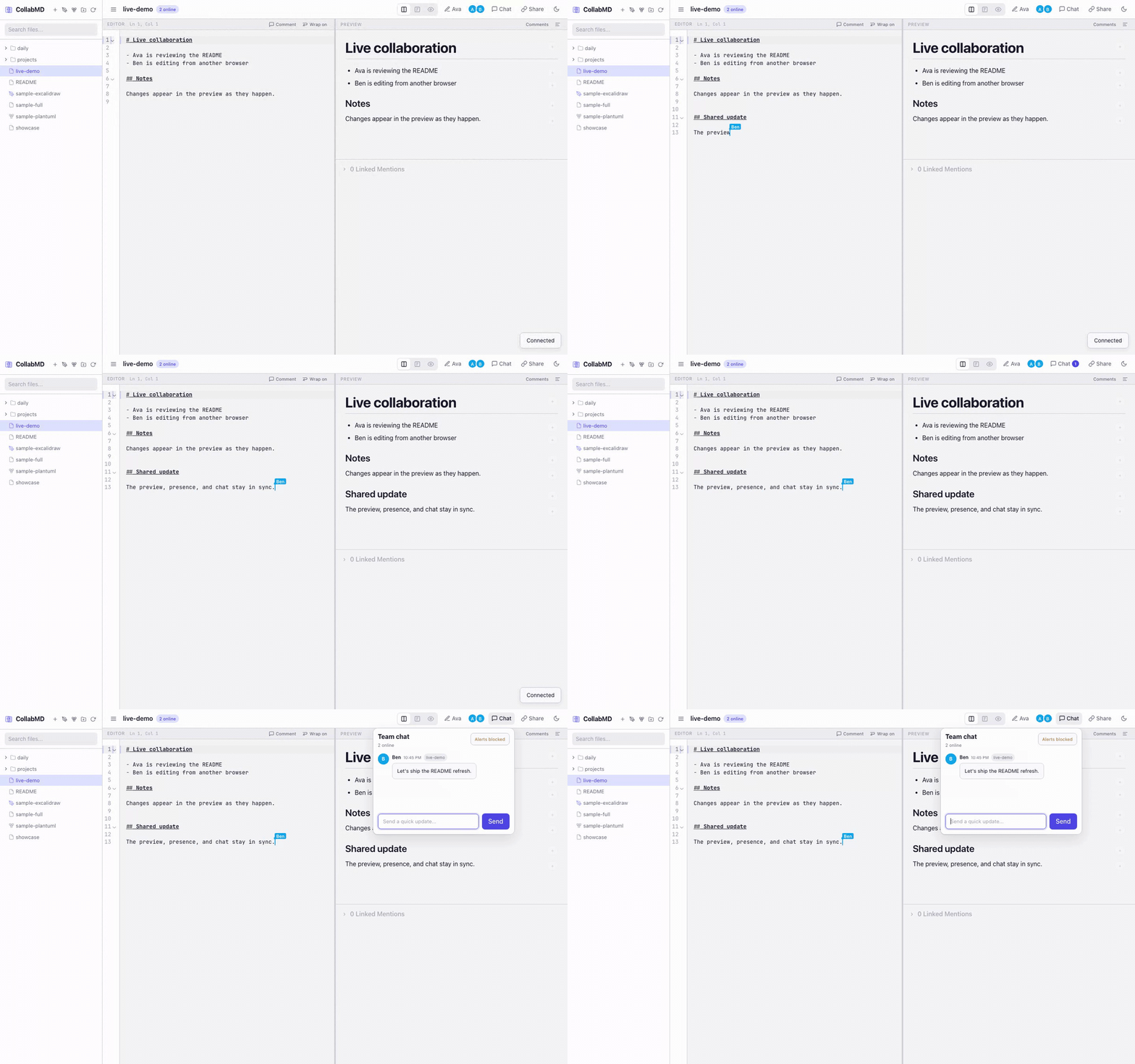
Prefer video? Open the WebM demo.
Features
- No migration — point CollabMD at an existing markdown folder, diagram workspace, Obsidian-style vault, or git-backed docs repo
- Local-files-first — your filesystem remains the source of truth
- Realtime collaboration — multiple people can edit the same file at the same time via Yjs
- External edit sync — changes made from tools like Obsidian or direct file writes are reflected back into open documents and the file explorer
- Git review — review an open file's changes, include them in the next commit, and commit with a message from the browser
- Experimental WebMCP workspace access — supported browser agents can use the same Vault search, read, exact-edit, document-creation, syntax, and Excalidraw tools as remote MCP while acting as the logged-in collaborator
- Remote AI agent access — connect any Streamable HTTP MCP client to search, cite, edit, and create supported Vault Content; protected workspaces use scoped, revocable Agent Connections
- File upload — import multiple supported Markdown, HTML, Base, diagram, image, and PDF files into the vault from the file explorer
- Markdown with context — live preview, wiki-links, backlinks, outline, quick switcher, and scroll sync
- Global text search — search text across supported vault files with ripgrep-backed results grouped by file
- Source-anchored comments — comment on lines or selected text with inline markers and preview bubbles, or pin threads to Excalidraw elements
- Collaboration built in — collaborator presence, follow mode, and team chat
- Diagram-friendly — Mermaid fences and standalone
.mmd/.mermaid, PlantUML.puml/.plantuml, Structurizr.dslC4 workspaces,.excalidraw,.drawio, readonly PDF previews, and public video embeds in Markdown - Easy browser access — optional Cloudflare Tunnel support makes a running session easy to share
Best fit for
- Collaborating on an existing Obsidian-style vault without migrating files
- Reviewing RFCs, product docs, architecture notes, and runbooks in real time
- Reviewing drafts and diagrams with anchored comment threads instead of side-channel feedback
- Sharing markdown-heavy knowledge bases with remote teammates
- Editing notes and diagrams together while keeping everything as plain files on disk
- Giving browser access to collaborators who do not use your local markdown setup
Installation options
Requirements
- macOS, Linux, or Windows (via WSL2)
- Node.js 26 for
npxand source installs - ripgrep for global text search. Install with
brew install ripgrepon macOS,apk add ripgrepon Alpine, orapt install ripgrepon Debian/Ubuntu. Docker images already include it.
Run via npx (Node.js)
If you have Node.js installed, you can run CollabMD directly without installing it globally:
npx collabmd@latest ~/my-vault --no-tunnelOpen http://localhost:1234.
Install with Homebrew
brew tap andes90/tap
brew install collabmd
collabmd ~/my-vault --no-tunnel
Or in a single command:
brew install andes90/tap/collabmd
collabmd ~/my-vault --no-tunnel
Open http://localhost:1234.
Install from source
git clone https://github.com/andes90/collabmd.git
cd collabmd
npm install
npm run build
npm link       # optional: makes `collabmd` available globally
collabmd ~/my-vault --no-tunnel
Open http://localhost:1234.
For a safer first run, start local-only:
collabmd ~/my-vault --no-tunnelIf you want to share the session over the internet, protect it first:
collabmd ~/my-vault --auth passwordIf cloudflared is installed, CollabMD starts a quick tunnel by default unless you pass --no-tunnel.
Share with a collaborator
If you want to share the workspace over the internet, start with password auth:
collabmd ~/my-vault --auth passwordThen share the printed URL and password with your collaborator. If cloudflared is installed, CollabMD will start a quick tunnel automatically unless you pass --no-tunnel.
Safety first
- Treat the URL as write access to the vault unless you enable auth
--auth passwordprotects/api/*and/ws/*with a host password and signed session cookie--auth oidcsigns users in with Google and uses the verified Google name/email as the in-app identity and git commit author- Hosted workspace mode requires Google OIDC plus active team membership; Google sign-in alone does not grant hosted workspace access
- Set
AUTH_SESSION_MAX_AGE_MSif you want auth sessions to stay valid longer and survive browser restarts until that expiry - If
cloudflaredis installed, CollabMD may expose the app through a Cloudflare Quick Tunnel unless you pass--no-tunnel --auth oidcrequires a stablePUBLIC_BASE_URL; Quick Tunnel URLs are not supported for OIDC
Connect an AI agent
Enable MCP Streamable HTTP access:
COLLABMD_AGENT_ACCESS_ENABLED=true collabmd --no-tunnelCollabMD exposes /mcp, or <BASE_PATH>/mcp when a base path is configured, with these tools:
list_documents,list_workspace_entries,search_vault, andread_documentinspect_document_referencesfor resolved and missing wiki-links, embeds, public video embeds, and backlinksvalidate_documentfor missing Markdown references and unsupported public video embedsrender_diagramfor standalone or fenced PlantUML through remote MCP and Mermaid or PlantUML through WebMCPapply_text_editswith exact replacements and revision conflict protectioncreate_documentcreate_excalidrawandedit_excalidrawfor canonical element creation, updates, relationship-aware translation, standalone text auto-resizing, same-ID replacement, explicit paint-order changes, deletion, and optional same-revision verificationinspect_excalidrawfor paint order, bounds, bindings, text layout properties, distant bound endpoints, connector/component intersections, unintended overlaps, occlusion, clipping, and validity warningsrender_excalidrawfor PNG or SVG verification previews with renderer and parity metadataverify_excalidrawto inspect and render one exact revision with compact inspection; useinspect_excalidrawfor per-element summariesget_collabmd_syntax
search_vault uses the server's ripgrep installation. Install rg on source or npm deployments; the Docker image already includes it.
Agent text writes support Markdown, HTML, Mermaid, PlantUML, and Structurizr. Excalidraw writes use the dedicated element tools. Base, draw.io, PDF, images, delete, rename, Git, and publish are not writable through Agent Access.
Remote MCP renders PlantUML through the configured PlantUML service; Mermaid rendering requires WebMCP because Mermaid needs a browser layout engine. Remote MCP Excalidraw rendering uses the basic element types supported by the agent tools. The collabmd-basic-svg renderer is intended for layout verification rather than pixel-identical Excalidraw reproduction and returns preview-not-pixel-identical. WebMCP replaces these previews with Excalidraw's official browser renderer.
With password or OIDC auth, open More actions → Connect AI Agent after signing in. Create a named connection, choose read/edit scope, and copy the token shown once. Tokens expire after 30 days by default and can be revoked from the same dialog. OIDC connections retain Collaborator attribution; shared-password connections are workspace-level because password sessions have no individual identity.
Use these connection details with any Streamable HTTP MCP client:
URL: https://notes.example.com/mcp
Transport: Streamable HTTP
Authorization: Bearer <token>
For protected workspaces, configure the generated token as a bearer credential in the MCP client. For AUTH_STRATEGY=none, omit the bearer token; MCP uses the same anonymous access policy as the web app, so anyone who can reach /mcp can read, edit, and create supported Vault Content.
CollabMD uses preconfigured bearer credentials rather than MCP OAuth enrollment.
The Authorization header is required for password and OIDC workspaces. Omit it for AUTH_STRATEGY=none.
Remote endpoints should use HTTPS. COLLABMD_AGENT_ALLOWED_HOSTS adds comma-separated MCP hostnames accepted for password/OIDC requests and browser-origin requests. OIDC automatically allows the hostname from PUBLIC_BASE_URL; localhost is always allowed. Native no-auth MCP clients normally omit Origin and remain anonymous; browser-origin MCP requests must use an allowed hostname to prevent DNS rebinding.
Vault text returned to an agent is untrusted input. Never paste managed Agent Access tokens into agent prompts or chat history. Treat every no-auth workspace URL as anonymous automated write access to the Vault.
Current limitations
- Single-instance deployment only: collaboration room state is kept in-process and is not shared across replicas
oidccurrently supports Google only- Hosted workspace mode currently provides the backend/API surface; Team Settings UI, invitation email delivery, GitHub callback redirect polish, and GitHub App checkout/publish wiring are still pending
- Text-anchored comments support markdown, Mermaid, PlantUML, and Structurizr DSL files. Excalidraw supports element-anchored threads; draw.io comments are not supported
- WebMCP requires experimental browser support and an active CollabMD tab; for local Chrome testing, enable
chrome://flags/#enable-webmcp-testing. It uses the browser session rather than an Agent Connection and does not provide remote access, per-agent scopes, delete, rename, attachments, Git, commit, or publish tools - Windows use is supported via WSL2 rather than native Windows execution
How it works
collabmd ~/my-vault --no-tunnelCollabMD starts a local server, scans the vault, and opens a browser-based editor with:
- File explorer sidebar — upload, browse, create, rename, and delete
.md,.markdown,.mdx,.html,.htm,.base,.mmd,.mermaid,.puml,.plantuml,.dsl,.excalidraw,.drawio,.pdf, and supported image files plus folders - Live preview — rendered as you type, with sandboxed static HTML, syntax-highlighted code blocks, public video embeds, plus Mermaid, PlantUML, and Structurizr diagrams
- Anchored comments and diagram links — add comments from the editor or selected Excalidraw elements, reopen threads in context, and link Excalidraw elements to other vault diagrams with focused navigation
[[wiki-links]]+ backlinks — jump between notes and inspect linked mentions- Room chat — discuss changes without leaving the workspace
- Presence + follow mode — see who is online and follow another collaborator's active cursor
- Quick switcher, global text search, and outline — move around large vaults and long documents faster
- Document export — download individual Markdown notes as self-contained HTML or DOCX, print/save notes or whole folders as PDF, export folders as one offline HTML document, or download their source files and assets as ZIP
- Standalone diagram files — open
.mmd/.mermaid,.puml/.plantuml, or.dslfiles in side-by-side editor + preview; Structurizr workspaces provide context → container → component navigation;.excalidrawfiles support frame-based presentations with arrow-key navigation andEscapeto exit,.drawiofiles use an embedded diagrams.net editor/viewer, and.pdffiles use a readonly browser preview
Text comment threads are source-anchored for markdown, Mermaid, PlantUML, and Structurizr DSL files. You can comment on a whole line or a text selection, then reopen the thread from either the editor marker or preview bubble. Excalidraw threads attach to selected canvas elements and also appear in the workspace overview. Draw.io comments are not supported.
Draw.io files use the diagrams.net embed/runtime. Opening a .drawio file directly mounts an interactive editor in the preview pane. Markdown embeds such as ![[architecture.drawio]] use the diagrams.net viewer for a lighter inline preview and include an Open action to jump into the full file view.
Draw.io collaboration is intentionally conservative in this release: one connected client holds the edit lease for a .drawio file, while other viewers open it read-only and refresh after saves land. This avoids silent overwrite races without claiming true realtime canvas co-editing.
HTML files open in preview mode by default, with split view still available from the view toggle and a preview-header action for maximizing the iframe. Scripts are disabled until each viewer explicitly runs the current version; any content change resets that consent. Enabled scripts run inside an opaque-origin sandbox without same-origin access, while a restrictive CSP blocks API connections, forms, workers, nested frames, external subresources, popups, and top-level navigation. Inline CSS, fragment links, and self-contained data:/blob: images, fonts, and media remain supported.
Markdown video embeds are opt-in and use standard image syntax such as  or . The preview currently supports public YouTube URLs plus direct public https video files ending in .mp4, .webm, or .ogg. The editor toolbar also includes a Video action that inserts the same Markdown syntax for you.
Your filesystem is the source of truth. CollabMD reads files from disk, uses Yjs for realtime collaboration, and continuously writes plain text back to disk as you type. External changes from tools like Obsidian, direct file writes, or git-driven file updates are watched and reconciled back into live rooms and the explorer. The file explorer can import multiple supported vault files at once; uploads preserve their names and bytes, reject duplicates, and include PDF files for readonly preview.
Usage
collabmd [directory] [options]Arguments
| Argument | Description |
|----------|-------------|
| directory | Path to the vault directory (default: current directory) |
Options
| Option | Description | Default |
|--------|-------------|---------|
| -p, --port | Port to listen on | 1234 |
| --host | Host to bind to | 127.0.0.1 |
| --auth | Auth strategy: none, password, oidc | none |
| --auth-password | Password for --auth password | generated per run |
| --local-plantuml | Start the bundled local docker-compose PlantUML service | off |
| --local-structurizr | Start the bundled local Structurizr renderer | off |
| --no-tunnel | Don't start Cloudflare Tunnel | tunnel on |
| -v, --version | Show version | |
| -h, --help | Show help | |
Examples
# Serve the current directory locally
collabmd --no-tunnel

# Serve a specific vault locally
collabmd ~/my-vault --no-tunnel

# Use a custom port, no tunnel
collabmd --port 3000 --no-tunnel

# Share with collaborators using a generated password
collabmd --auth password

# Require an explicit password
collabmd --auth password --auth-password "shared-secret"

# Use Google OIDC on a stable public domain
PUBLIC_BASE_URL=https://notes.example.com \
AUTH_OIDC_CLIENT_ID=your-google-client-id \
AUTH_OIDC_CLIENT_SECRET=your-google-client-secret \
collabmd --auth oidc --no-tunnel

# Use the local docker-compose PlantUML service
collabmd --local-plantuml

# Use the local Structurizr renderer for .dsl workspaces
collabmd --local-structurizr

# Serve an Obsidian vault
collabmd ~/Documents/Obsidian/MyVault
Public access
CollabMD can optionally expose the session using a Cloudflare Quick Tunnel. Since the editor uses same-origin WebSocket routing (/ws/:file), the tunnel works for both HTTP and collaboration traffic.
If you are exposing the session publicly, collabmd --auth password is the intended first-line protection. When you do not pass --auth-password, CollabMD generates a password for that host run and prints it in the terminal. Restarting the app rotates that password and the signed session secret.
To share safely:
collabmd ~/my-vault --auth passwordcloudflared is optional. Install it only if you want public tunnel access:
- macOS:
brew install cloudflared - Linux/Windows: official installer
To disable the tunnel:
collabmd --no-tunnelGoogle OIDC setup
--auth oidc uses Google OpenID Connect with the authorization code + PKCE flow.
For the full Google Cloud Console walkthrough, including where to create the OAuth client and copy the client ID/client secret, see docs/google-oidc-setup.md.
Required environment variables:
PUBLIC_BASE_URL=https://notes.example.com
AUTH_OIDC_CLIENT_ID=your-google-client-id
AUTH_OIDC_CLIENT_SECRET=your-google-client-secret
In Google Cloud Console, create a Web application OAuth client and register this redirect URI:
https://notes.example.com/api/auth/oidc/callbackIf you mount the app under a subpath with BASE_PATH=/collabmd, the redirect URI becomes:
https://notes.example.com/collabmd/api/auth/oidc/callbackNotes:
- OIDC requires a stable public URL and is not compatible with ephemeral Cloudflare Quick Tunnel URLs
- After sign-in, the verified Google name/email become the displayed app identity and the default in-app git commit author
- Set
AUTH_SESSION_MAX_AGE_MSto keep the signed-in session valid longer than the default token lifetime - You can restrict sign-in to exact users with
AUTH_OIDC_ALLOWED_EMAILSor entire domains withAUTH_OIDC_ALLOWED_DOMAINS - The CLI disables the tunnel automatically when
--auth oidcis active
Single-tenant hosted workspace mode
Hosted workspace mode is for manually provisioned, single-tenant deployments: one CollabMD app replica for one team, one workspace, one vault source, and one hosted metadata store. It is not a shared multi-tenant account system.
Hosted mode requires Google OIDC:
AUTH_STRATEGY=oidc
PUBLIC_BASE_URL=https://notes.example.com
AUTH_OIDC_CLIENT_ID=your-google-client-id
AUTH_OIDC_CLIENT_SECRET=your-google-client-secret
COLLABMD_HOSTED_ENABLED=true
The first Team Admin is created through an email-bound workspace claim. Set the intended admin email and a one-time claim token when provisioning the deployment:
[email protected]
COLLABMD_HOSTED_CLAIM_TOKEN=generated-one-time-secret
The claim is seeded into hosted metadata and expires after 7 days. The claimant must sign in with the matching verified Google email. After claim, Team Admins can manage active memberships, pending invitations, roles, and the access audit trail through the hosted API. The first roles are:
admin— can manage team access and configure initial workspace setupcollaborator— can access, edit, and publish changes after setup is complete
Hosted metadata is stored in SQLite and defaults to .collabmd/hosted.sqlite inside the vault directory. Override it when the metadata store should live on a separate persistent volume:
COLLABMD_HOSTED_METADATA_DB_PATH=/data/.collabmd/hosted.sqliteHosted vault-source setup is GitHub-only in the first version and uses a GitHub App installation flow. Configure the GitHub App credentials on the server:
COLLABMD_GITHUB_APP_ID=123456
COLLABMD_GITHUB_APP_SLUG=collabmd
COLLABMD_GITHUB_APP_PRIVATE_KEY_FILE=/run/secrets/collabmd_github_app_private_key.pem
COLLABMD_GITHUB_APP_PRIVATE_KEY is also supported for environments that inject the private key directly. The Team Admin starts setup, installs the GitHub App, and selects exactly one repository. CollabMD resolves the installation and repository from GitHub, captures the selected repository's default branch as the configured branch, and stores that vault-source metadata in SQLite. The browser does not directly submit trusted repository or installation metadata.
Current backend endpoints include:
GET /api/hosted/statusPOST /api/hosted/claimPOST /api/hosted/vault-source/github/setupGET /api/hosted/vault-source/github/callbackGET /api/hosted/membershipsPOST /api/hosted/invitationsPOST /api/hosted/invitations/acceptGET /api/hosted/audit
Until the Team Settings UI and invitation email delivery are added, these are backend integration points rather than a complete hosted onboarding screen.
Draw.io setup
CollabMD uses diagrams.net for .drawio rendering and editing. By default it points at the hosted embed runtime:
COLLABMD_DRAWIO_BASE_URL=https://embed.diagrams.netYou can also point it at a self-hosted diagrams.net deployment:
COLLABMD_DRAWIO_BASE_URL=https://drawio.example.comIf the draw.io runtime is unavailable, direct .drawio file opens fall back to plain XML editing instead of leaving the file inaccessible.
You can also configure the tunnel via environment variables:
TUNNEL_TARGET_PORT=4000 collabmd
TUNNEL_TARGET_URL=http://127.0.0.1:4000 collabmd
CLOUDFLARED_EXTRA_ARGS="--loglevel info" collabmd
For the full runtime env var reference, see the Environment variables details block in the Development section below.
Docker / Coolify deployment
Published image: ghcr.io/andes90/collabmd:latest
From the vault directory:
docker run --rm -p 1234:1234 -v "$PWD:/data" ghcr.io/andes90/collabmd:latestOpen http://localhost:1234. The published Docker image includes ripgrep, so global text search works without installing extra packages in the container.
The container listens on 0.0.0.0:1234 and stores vault files at /data.
Kubernetes / Helm
CollabMD now includes a Helm chart at packaging/helm/collabmd.
Use it when you want a Kubernetes-native deployment with:
- one supported application replica
- a persistent volume mounted at
/data - optional ingress
- optional bundled PlantUML
- secret-backed auth and private git bootstrap settings
Quick start:
helm install collabmd ./packaging/helm/collabmdFor examples covering ingress, OIDC, PlantUML, and private git bootstrap, see packaging/helm/collabmd/README.md.
To bootstrap /data from a private git repository instead, pass the repo URL plus SSH credentials:
docker run \
  -p 1234:1234 \
  -v /path/to/persistent/vault:/data \
  -e [email protected]:your-org/your-private-vault.git \
  -e COLLABMD_GIT_SSH_PRIVATE_KEY_B64="$(base64 < ~/.ssh/id_ed25519 | tr -d '\n')" \
  -e COLLABMD_GIT_USER_NAME="CollabMD Bot" \
  -e COLLABMD_GIT_USER_EMAIL="[email protected]" \
  ghcr.io/andes90/collabmd:latest
For a full local and Docker test walkthrough, including key generation and deploy-key setup, see docs/private-git-deployment.md.
When COLLABMD_GIT_REPO_URL is set, CollabMD clones into COLLABMD_VAULT_DIR on first boot, then reuses that checkout on later starts. If the checkout already exists, startup validates that origin matches. Clean checkouts are fast-forwarded to the remote default branch; dirty checkouts are reused as-is and startup skips the sync.
On every startup, CollabMD adds .collabmd/ to the vault's local git exclude file at .git/info/exclude so runtime metadata stays out of git status and bulk staging without modifying the repository's tracked .gitignore.
File-based secrets are also supported and take precedence over base64 input:
docker run \
  -p 1234:1234 \
  -v /path/to/persistent/vault:/data \
  -v ~/.ssh/id_ed25519:/run/secrets/collabmd_git_key:ro \
  -v ~/.ssh/known_hosts:/run/secrets/collabmd_known_hosts:ro \
  -e [email protected]:your-org/your-private-vault.git \
  -e COLLABMD_GIT_SSH_PRIVATE_KEY_FILE=/run/secrets/collabmd_git_key \
  -e COLLABMD_GIT_SSH_KNOWN_HOSTS_FILE=/run/secrets/collabmd_known_hosts \
  -e COLLABMD_GIT_USER_NAME="CollabMD Bot" \
  -e COLLABMD_GIT_USER_EMAIL="[email protected]" \
  ghcr.io/andes90/collabmd:latest
Local docker-compose with private diagram renderers
The included docker-compose.yml runs a prebuilt CollabMD image together with local PlantUML and Structurizr containers. PlantUML SVG rendering and Structurizr workspace.dsl previews stay on the private Docker network automatically.
mkdir -p data/vault
docker compose up
Open http://localhost:1234.
To test Google OIDC locally with the included compose setup, register this redirect URI in Google Cloud Console:
http://localhost:1234/api/auth/oidc/callbackThen start compose with the OIDC env vars:
AUTH_STRATEGY=oidc \
PUBLIC_BASE_URL=http://localhost:1234 \
AUTH_OIDC_CLIENT_ID=your-google-client-id \
AUTH_OIDC_CLIENT_SECRET=your-google-client-secret \
docker compose up
If you change COLLABMD_HOST_PORT, update PUBLIC_BASE_URL and the Google redirect URI to match that host port.
By default, compose uses COLLABMD_IMAGE=ghcr.io/andes90/collabmd:latest. If you want to test a local image while developing instead:
docker build -t collabmd:local .
COLLABMD_IMAGE=collabmd:local docker compose up
The PlantUML container is published on loopback by default at http://127.0.0.1:18080, and Structurizr is published at http://127.0.0.1:19090 for host-based CLI use:
npm run start:local-plantuml

# Start CollabMD with Structurizr DSL support
npm run start:local-structurizr -- --no-tunnel
To use an existing vault on your machine instead of ./data/vault:
HOST_VAULT_DIR=/absolute/path/to/vault docker compose upHOST_VAULT_DIR controls the host-side bind mount source. The app uses COLLABMD_VAULT_DIR for the in-container vault path and defaults that to /data in Docker.
To bootstrap the compose-managed vault from a private repo, set the git env vars in .env and keep HOST_VAULT_DIR on a persistent host path. For file-based SSH auth, point COLLABMD_GIT_SSH_PRIVATE_KEY_FILE and COLLABMD_GIT_SSH_KNOWN_HOSTS_FILE at mounted secret paths; for simpler setups, set COLLABMD_GIT_SSH_PRIVATE_KEY_B64 instead.
If you want the in-app Git commit action to work inside the container without OIDC, also set COLLABMD_GIT_USER_NAME and COLLABMD_GIT_USER_EMAIL so CollabMD can configure the checkout identity automatically. With AUTH_STRATEGY=oidc, CollabMD uses the signed-in Google identity for each commit instead.
To change the host port:
COLLABMD_HOST_PORT=3000 docker compose upTo change the local PlantUML host port used by both docker compose and --local-plantuml:
PLANTUML_HOST_PORT=18081 npm run start:local-plantumlRecommended Coolify setup:
- Use the included
Dockerfile. - Expose port
1234. - Mount a persistent volume to
/datafor the vault checkout and runtime files. It can be pre-populated with markdown files or start empty whenCOLLABMD_GIT_REPO_URLis enabled. - Add
COLLABMD_GIT_REPO_URLplus eitherCOLLABMD_GIT_SSH_PRIVATE_KEY_FILEorCOLLABMD_GIT_SSH_PRIVATE_KEY_B64if the vault should be cloned from a private repo. - Mount
known_hostsand setCOLLABMD_GIT_SSH_KNOWN_HOSTS_FILEif you want strict host verification. - Add a health check for
GET /healthwith enough startup grace for the initial clone. - Run a single replica only because room state is in-process and not shared across instances.
- Set
BASE_PATHif the app is mounted under a subpath such as/collabmd. - Set
PUBLIC_WS_BASE_URLonly if your WebSocket endpoint differs from the app origin.
For a standard Coolify reverse-proxy setup, the default same-origin WebSocket routing works as-is and you should not need PUBLIC_WS_BASE_URL.
Health check: GET /health
Troubleshooting
npx collabmd@latestfails immediately: confirm you are running Node.js 26, which is the supported runtime for source and npm usage- The app is reachable only from localhost: pass
--host 0.0.0.0or setHOST=0.0.0.0when you intend to expose it on your network - Port
1234is already in use: pass--port 3000or setPORTto another free port - Tunnel did not start: install
cloudflared, or pass--no-tunnelto stay local-only --auth oidcfails on startup: setPUBLIC_BASE_URL,AUTH_OIDC_CLIENT_ID, andAUTH_OIDC_CLIENT_SECRET, and make sure the Google redirect URI matches/api/auth/oidc/callback- Google login loops back to the auth screen: verify the configured
PUBLIC_BASE_URLmatches the browser URL and that your reverse proxy forwards HTTPS correctly --local-plantumlfails: make sure Docker is installed and running, or pointPLANTUML_SERVER_URLat another PlantUML server- Global text search is disabled: install
ripgrepon the server host and restart CollabMD. Docker images already includeripgrep. - Private git bootstrap fails on startup: verify
COLLABMD_GIT_REPO_URLplus eitherCOLLABMD_GIT_SSH_PRIVATE_KEY_FILEorCOLLABMD_GIT_SSH_PRIVATE_KEY_B64 - WSL2 path issues: run CollabMD against a directory inside your Linux filesystem when possible rather than a mounted Windows path
Development
Install dependencies:
npm installBuild and run:
npm startOpen http://localhost:1234.
Useful commands:
npm run build                 # Build the Vite client into dist/client
npm run check                 # Syntax check all entry points
npm run dev:client            # Start the Vite dev server with API/WebSocket proxying
npm run dev:server            # Start only the backend server for local frontend development
npm run start                 # Build + start server
npm run start:local-plantuml  # Build + start server with local docker-compose PlantUML
npm run start:local-structurizr # Build + start server with local Structurizr
npm run start:prod            # Start server (expects previous build)
npm run test                  # Run unit + e2e tests
npm run test:unit             # Fast Node-based unit tests
npm run test:e2e              # Playwright browser tests
npm run tunnel                # Start only the Cloudflare tunnel
npm run plantuml:up           # Start only the local docker-compose PlantUML service
npm run plantuml:down         # Stop only the local docker-compose PlantUML service
npm run structurizr:up        # Start only the local Structurizr renderer
npm run structurizr:down      # Stop only the local Structurizr renderer
npm run capture:readme-assets # Regenerate the README screenshot and demo assets
Testing
Unit tests
npm run test:unitCovers the vault file store, HTTP endpoints, collaboration room behavior, WebSocket integration, and supporting domain logic.
End-to-end tests
npx playwright install chromium    # first time only
npm run test:e2e
Playwright boots the full app against the test-vault/ directory and verifies the file explorer, editor, preview, collaboration, chat, outline, and scroll sync flows.
All tests
npm run testbin/
collabmd.js CLI entry point
src/
client/
app/ Vite-owned HTML entries and browser entry modules
application/ app orchestration, preview rendering, workspace coordination
bootstrap/ app-shell composition and startup wiring
domain/ markdown editing, wiki-link, room, and vault helpers
infrastructure/ runtime config, auth bootstrap, browser ports, collaborative editor session
presentation/ file explorer, backlinks, quick switcher, outline, scroll sync, theme, layout
static/ Vite passthrough assets copied into the built client
styles/ app CSS
domain/ shared wiki-link helpers
server/
auth/ strategy selection and cookie-backed auth sessions
config/ environment loading
domain/ collaboration room model, registry, backlink index, server-side abstractions
infrastructure/ HTTP handlers, git service, vault file store, PlantUML, WebSocket gateway
startup/ preflight vault bootstrap, including remote git checkout setup
dist/
client/ built client served by the backend and packaged for release
scripts/
cloudflare-tunnel.mjs Cloudflare quick tunnel helper
local-plantuml-compose.mjs
capture-readme-assets.mjs
vite.config.mjs Vite multi-page build and dev-server proxy config| Variable | Description | Default |
|----------|-------------|---------|
| HOST | Bind host | 127.0.0.1 (dev), 0.0.0.0 (prod) |
| PORT | HTTP + WebSocket port | 1234 |
| AUTH_STRATEGY | Auth strategy: none, password, oidc | none |
| AUTH_PASSWORD | Shared password for AUTH_STRATEGY=password | generated per run |
| AUTH_SESSION_COOKIE_NAME | Session cookie name | collabmd_auth |
| AUTH_SESSION_SECRET | Cookie signing secret | generated per run |
| AUTH_SESSION_MAX_AGE_MS | Optional auth session lifetime in milliseconds; when set, cookies persist until that expiry | |
| PUBLIC_BASE_URL | Stable public app origin required for AUTH_STRATEGY=oidc | |
| AUTH_OIDC_CLIENT_ID | Google OAuth client ID used for AUTH_STRATEGY=oidc | |
| AUTH_OIDC_CLIENT_SECRET | Google OAuth client secret used for AUTH_STRATEGY=oidc | |
| AUTH_OIDC_ALLOWED_EMAILS | Comma-separated exact email allowlist for AUTH_STRATEGY=oidc | |
| AUTH_OIDC_ALLOWED_DOMAINS | Comma-separated email domain allowlist for AUTH_STRATEGY=oidc | |
| COLLABMD_AGENT_ACCESS_ENABLED | Enable scoped MCP Agent Access | false |
| COLLABMD_AGENT_ALLOWED_HOSTS | Extra comma-separated MCP hostnames accepted for password/OIDC and browser-origin requests | |
| COLLABMD_AGENT_REQUESTS_PER_MINUTE | Maximum MCP tool calls per managed connection or anonymous client address each minute | 120 |
| COLLABMD_AGENT_CONNECTION_TTL_MS | Managed Agent Connection lifetime in milliseconds | 2592000000 |
| COLLABMD_AGENT_METADATA_DB_PATH | SQLite path for managed Agent Connections | <vault>/.collabmd/agent-access.sqlite |
| BASE_PATH | URL path prefix for subpath deployments | |
| COLLABMD_HOSTED_ENABLED | Enable single-tenant hosted workspace mode; requires AUTH_STRATEGY=oidc | false |
| COLLABMD_HOSTED_METADATA_DB_PATH | SQLite database path for hosted workspace metadata | <vault>/.collabmd/hosted.sqlite |
| COLLABMD_HOSTED_CLAIM_EMAIL | Verified Google email allowed to claim the first Team Admin role | |
| COLLABMD_HOSTED_CLAIM_TOKEN | One-time token required for the first workspace claim | |
| COLLABMD_GITHUB_APP_ID | GitHub App ID used for hosted vault-source setup | |
| COLLABMD_GITHUB_APP_SLUG | GitHub App slug used to build the installation setup URL | |
| COLLABMD_GITHUB_APP_PRIVATE_KEY | GitHub App private key; \n escapes are converted to newlines | |
| COLLABMD_GITHUB_APP_PRIVATE_KEY_FILE | File path for the GitHub App private key; used when direct key input is not set | |
| COLLABMD_GITHUB_API_BASE_URL | GitHub API base URL for hosted vault-source setup | https://api.github.com |
| COLLABMD_GITHUB_HTML_BASE_URL | GitHub web base URL for installation setup | https://github.com |
| COLLABMD_GITHUB_SETUP_FLOW_COOKIE_NAME | Signed cookie name for the GitHub App setup callback flow | collabmd_github_setup_flow |
| PLANTUML_SERVER_URL | Upstream PlantUML server base URL used for server-side SVG rendering | https://www.plantuml.com/plantuml |
| STRUCTURIZR_SERVER_URL | Structurizr Local-compatible sidecar base URL used for .dsl previews | disabled |
| COLLABMD_STRUCTURIZR_MIRROR_DIR | Writable disposable mirror directory passed to Structurizr | <vault>/.collabmd/structurizr |
| COLLABMD_STRUCTURIZR_TRUSTED_EXECUTABLE_DSL | Allow Structurizr !script and !plugin directives; keep false for untrusted vaults | false |
| COLLABMD_DRAWIO_BASE_URL | diagrams.net base URL used for .drawio viewing and editing | https://embed.diagrams.net |
| COLLABMD_WIKI_LINK_AUTO_CREATE | Create missing markdown files when clicking unresolved wiki-links; set to false to disable | true |
| COLLABMD_SEARCH_MAX_FILE_SIZE | Maximum size of each file considered by global text search; supports bytes or K, M, and G suffixes | 1M |
| COLLABMD_SEARCH_MAX_BUFFER_BYTES | Maximum ripgrep output buffer for one global text search | 2097152 |
| COLLABMD_MAX_PDF_UPLOAD_BYTES | Maximum size of a PDF upload in bytes; other uploads remain limited to the default 8 MiB request-body limit | 52428800 |
| COLLABMD_VAULT_DIR | Vault directory path | CLI: current directory, server entrypoint: data/vault, Docker: /data |
| COLLABMD_GIT_ENABLED | Enable or disable git integration in the UI and API | true |
| COLLABMD_GIT_REPO_URL | Remote git repository used to bootstrap the vault checkout | |
| COLLABMD_GIT_SSH_PRIVATE_KEY_FILE | SSH private key file path for remote git auth; preferred over base64 input | |
| COLLABMD_GIT_SSH_PRIVATE_KEY_B64 | Base64-encoded SSH private key used when no key file path is provided | |
| COLLABMD_GIT_SSH_KNOWN_HOSTS_FILE | Optional known_hosts file path for strict SSH host verification | |
| COLLABMD_GIT_USER_NAME | Fallback git author/committer name for in-app commits when OIDC is not active | |
| COLLABMD_GIT_USER_EMAIL | Fallback git author/committer email for in-app commits when OIDC is not active | |
| WS_BASE_PATH | WebSocket base path | /ws |
| PUBLIC_WS_BASE_URL | Public WebSocket URL override for reverse proxies | |
| HTTP_KEEP_ALIVE_TIMEOUT_MS | Keep-alive timeout | 5000 |
| HTTP_HEADERS_TIMEOUT_MS | Header read timeout | 60000 |
| HTTP_REQUEST_TIMEOUT_MS | Request timeout | 30000 |
| WS_HEARTBEAT_INTERVAL_MS | Heartbeat interval for evicting dead clients | 30000 |
| WS_ROOM_IDLE_GRACE_MS | Delay before closing empty collaboration rooms to disk | 15000 |
| WS_MAX_BUFFERED_AMOUNT_BYTES | Max outbound buffer per WebSocket | 16777216 |
| WS_MAX_PAYLOAD_BYTES | Max inbound WebSocket frame | 16777216 |
| CLOUDFLARED_BIN | cloudflared binary path | cloudflared |
| TUNNEL_TARGET_HOST | Tunnel target host | 127.0.0.1 |
| TUNNEL_TARGET_PORT | Tunnel target port | 1234 |
| TUNNEL_TARGET_URL | Full tunnel target URL override | |
| CLOUDFLARED_EXTRA_ARGS | Extra cloudflared flags | |
Copy the example file:
cp .env.example .envNotes
- The filesystem is the source of truth; Yjs provides the collaboration layer.
- When
COLLABMD_GIT_REPO_URLis set, startup clones the configured repo intoCOLLABMD_VAULT_DIRon first boot and reuses an existing same-origin checkout on later starts. - If
COLLABMD_GIT_SSH_KNOWN_HOSTS_FILEis not set, SSH falls back toStrictHostKeyChecking=accept-new. - External filesystem edits are reconciled back into active rooms and the explorer. Ambiguous watcher bursts still fall back to batched workspace reconciliation.
.obsidian,.git,.trash, andnode_modulesdirectories are ignored.- Markdown, HTML, Base, Mermaid, PlantUML, Structurizr DSL, draw.io, Excalidraw, PDF, and image files are tracked by the vault tree; global text search indexes supported text formats.
- PlantUML preview rendering is server-side and uses
PLANTUML_SERVER_URL; point it at a self-hosted renderer if you do not want to use the public PlantUML service. - Structurizr previews use a read-only official Local sidecar and a disposable
.collabmd/structurizrmirror; the authoritative vault is never mounted into the renderer as its data directory. docker compose upuses the included local PlantUML and Structurizr services and avoids public diagram renderers by default. The initial git clone may also require a longer health-check grace period than a purely local vault.collabmd --local-plantumlandnpm run start:local-plantumlstart the local PlantUML compose service.collabmd --local-structurizrstarts Structurizr Local againsthttp://127.0.0.1:${STRUCTURIZR_HOST_PORT:-19090}.
License
MIT