
com.avmedvedskiy.reactiveproperty
v0.2.0
Published
Reactive Property and MVVM binding view

Maintainers
 avmedvedskiy
Readme

ReactiveProperty
Introduction
Custom realization of Reactive Property to implement MVVM patterns Using zero reflection in runtime, use prebaked generation code for get properties
Examples
ViewModel
Monobehaviour ViewModel with Reactive Propertoes.
- ReactiveProperty will be updated when value are changed
- ReactiveEvent updated every time, even values are equals
public ReactiveEvent dummyEvent;
public ReactiveEvent<bool> boolEvent;

public ReactiveProperty<bool> boolProperty;
public ReactiveProperty<int> intProperty { get; } = new();

public readonly ReactiveProperty<string> stringProperty;

public ReactiveProperty<CurrencyEnumNew> enumProperty;
View
Default View, will be subscribed when OnEnable
public class TestView : View<int>
{
    protected override void UpdateView(int value)
    {
        Debug.Log(value);
    }
}
Custom Views
Custom Views with many sync properties, need manual subscribe to properties
public class TestEditorView : MonoBehaviour
{
    [Serializable]
    public class SubSerializeClass
    {
        public SyncReactiveProperty<string> stringSyncProp;
        public int someFields;
    }

    [SerializeField] private SyncReactiveProperty<string> syncStringProperty;

    [SerializeField] private SyncReactiveProperty<CurrencyEnumNew> syncCurrencyProperty;
    [SerializeField] private SyncReactiveProperty<float> syncFloatProperty;

    [SerializeField] private SubSerializeClass testSerializationClass;
}
Inspector Drawer
In inspector use dropdown list for select property
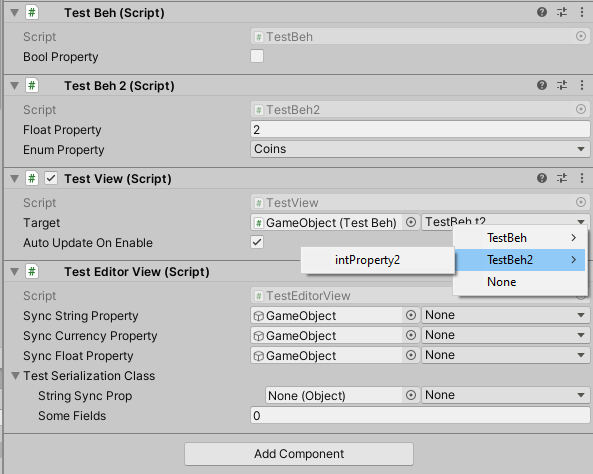
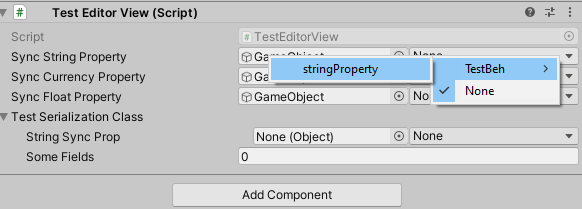
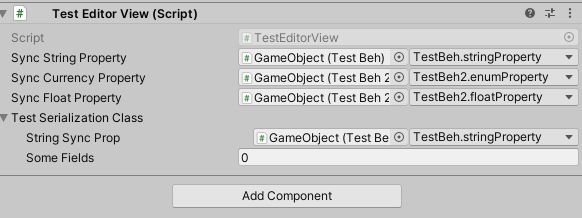
Video Example
https://user-images.githubusercontent.com/17832838/185593616-2fe9a97f-a6e2-4ffb-84ab-c753d45cb417.mp4
Reactive Collection
For list in view models use ReactiveList this will enable create views for all items in list
public ReactiveList<T> _models { get; } = new();For view create a nested class ListView, own Model class and own View(nested ModelView). ListView and View is a monobehaviour;
//example
public class DaysView : ListView<DayView, DayModel>
{
}

[Serializable]
public class DayModel
{
    public int index;
    public bool received;
    public object rewards;
}

public class DayView : ModelView<DayModel>
{
    public ReactiveProperty<int> index;
    public ReactiveProperty<bool> received;
    [NonSerialized] public ReactiveProperty<object> rewards = new();

    public override void SetModel(DayModel model)
    {
        index.Value = model.index;
        received.Value = model.received;
        rewards.Value = model.rewards;
    }
}
You can override all events from reactive list
public abstract void OnAdd(T item);
public abstract void OnClear();
public abstract void OnInsert(int index, T item);
public abstract void OnRemoveAt(int index);
public abstract void OnReplace(int index, T item);
public abstract void OnValueChanged(int index, T item);
public abstract void OnInitialize(IReadOnlyList<T> values);
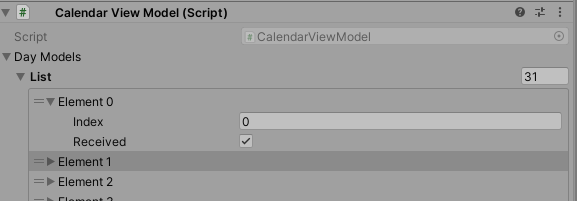
List Example
Screens from Unity to show how its look in editor
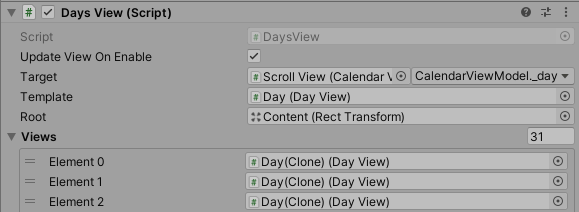
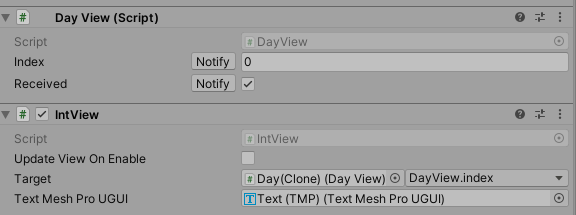
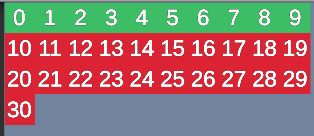
Views Inspector
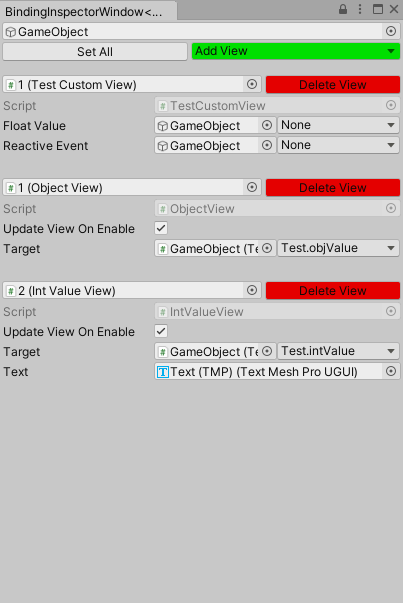
Custom window to manage all views on GameObject(include childs). Add new View Component, remove exists, change values
Generated Code
For all classes contained ReactiveProperty will be generated Dictionary map with string key and property value
public class Resolver_SettingsWindow : IResolver
{
    public IReactiveProperty Map(UnityEngine.Object target, string name)
    {
        var t = (SettingsWindow)target;
        return name switch
        {
            "UserID" => t.UserID,
            "Version" => t.Version,
            _ => throw new ArgumentOutOfRangeException(nameof(name), name, $"Not Found Reactive {name}")
        };
    }
}

public static class BindersLoader
{
    [RuntimeInitializeOnLoadMethod(RuntimeInitializeLoadType.SubsystemRegistration)]
    private static void InitResolvers()
    {
        Binders.AddResolvers(new()
        {
            { typeof(SettingsWindow), new Resolver_SettingsWindow() },
        });
    }
}