
com.elevatix.unity.dialog
v2.6.16
Published
Unity Dialog for Elevatix
Downloads
23


Readme
Elevatix Dialog
!!! Important note: Dialog is not supported for SDK version SDK v2.0.0
Elevatix Dialog is package that provides basic customizable dialog UI as reaction to recommendations from SDK
Preconditions
Install Elevatix SDK
See SDK documentation about steps how to do it: https://www.npmjs.com/package/com.elevatix.unity.sdk
Initialize Elevatix
SDK could be initialized without recommendations handler - 'AnalyticsClient.OnRecommendationReady'.
All this package is about - handle SDK recommendation for the game
Setup
Install Elevatix Dialog
Open Unity editor
Navigate to Window -> Package Manager
Select Elevatix Dialog and hit install
Assumption: scoped registry is configured during SDK installation.
If scoped registry isn't configured follow SDK docs to configure
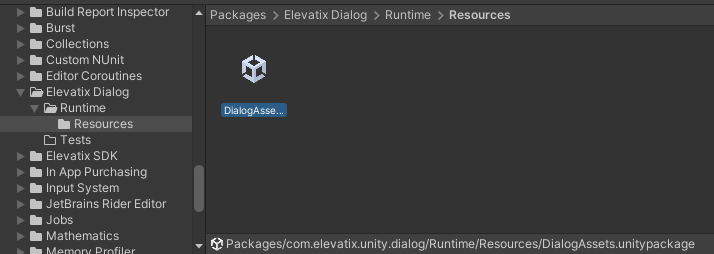
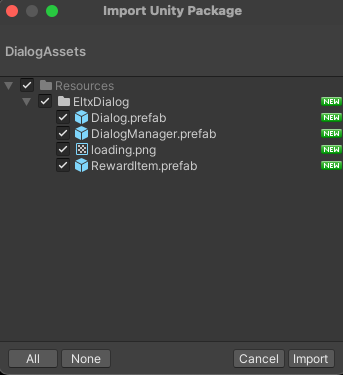
Extract DialogAssets
Displaying Offers
To display an offer, call the method EltxDialogTracker.GetPopupOffersControllersAsync(string eventName). This method asynchronously returns all triggered offers as an array of EltxPopupOfferController objects, which enable interaction with the offer pop-ups."
var offerControllers = await EltxDialogTracker.GetPopupOffersControllersAsync("event");

foreach (var controller in offerControllers)
{
    var offerProductId = controller.OfferProductId;
    // Retrieve OfferProductId to determine the localized offer price using your purchasing service.
    var localizedOfferPrice = GetLocalizedOfferPrice(offerProductId);

    try
    {
        var offerCompletionSource = await controller.ShowPopupOffer(localizedOfferPrice);
        await offerCompletionSource.Task; // Waiting for user action

        // Handle the purchase (insert your code here)

        var purchasedOffer = controller.Offer;
        var purchasedProducts = controller.Products;

        // Close the popup after a successful purchase
        controller.ClosePopup();
    }
    catch (TaskCanceledException)
    {
        // Handle user action cancellation
    }
    catch (Exception ex)
    {
        // Handle errors during offer loading
    }
}
⚠️ Currently, Elevatix Dialog supports displaying only SingleOffer.