
comark-annotate
v0.9.1
Published
Hand-drawn marks, numbered notes, and arrows on screenshots, written in Markdown. A Comark plugin.

Maintainers
 onmax_
Readme
comark-annotate



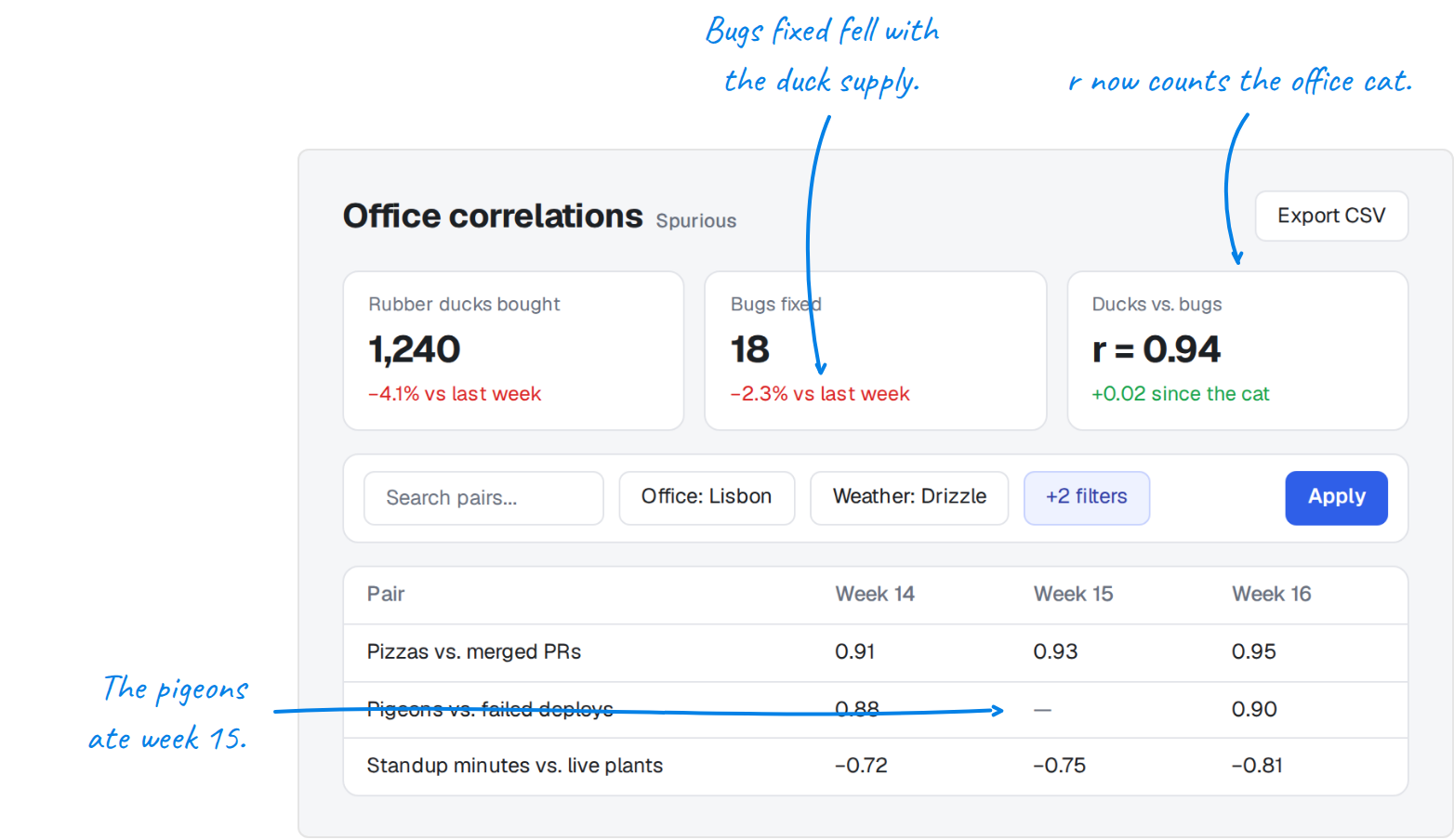
Hand-drawn marks, numbered notes, and arrows on screenshots, written in Markdown. A Comark plugin that renders static HTML.
pnpm add comark @comark/html comark-annotateimport { createHtmlRenderer } from "@comark/html";
import annotate, { components } from "comark-annotate/html";
const render = createHtmlRenderer({ plugins: [annotate()], components });::compare
:::screenshot{src="before.png" alt="Filter toolbar wrapping" viewport="900x360"}
::::annotation{x=3.6 y=20.6 w=92.9 h=31.4 color="red"}
Moon phase and vibes don't fit, so the toolbar wraps onto a second row.
::::
:::
:::screenshot{src="after.png" alt="Filter toolbar on one row" viewport="900x360"}
::::annotation{x=87.6 y=24.2 w=7.4 h=9.9 mark="check" color="green"}
**Apply** lines up with the chips.
::::
:::
::Coordinates are percentages of the image, written as numbers without %. Marks are box, circle, underline, line, highlight, bracket, cross, and check. Colors are blue (default), red, amber, green, gray, or a 3- or 6-digit hex. Add side="left", side="right", or side="top" to put a note beside or above the image with a hand-drawn arrow, and mark="none" to let the arrow do the pointing. ::compare{mode="slider"} lays the two screenshots over each other with a divider the reader drags.
A screenshot's Copy button, or Ctrl+C or ⌘C while it's focused, copies it as a PNG with its marks and notes. An image from another origin needs CORS headers for that, and an iframe needs allow="clipboard-write". Side notes and labels are handwritten in Caveat, inlined with the styles. Set --ca-note-font: inherit for the page font.
The plugin adds every problem to meta.issues, one sentence each naming the block and the fix, so a host can reject a document before publishing it.
A strict CSP needs style-src 'unsafe-inline'. Notes are ordinary Markdown, so raw HTML in them renders like anywhere else in the document. For untrusted input, add Comark's security plugin and list the tags to drop, such as security({ blockedTags: ["script", "style", "iframe"] }). It cleans notes too.
The styles follow shadcn/ui: they read its CSS variables, such as --background and --border, when the page has them, and use its neutral theme otherwise. Set --comark-background, --comark-foreground, --comark-muted, --comark-border, --comark-accent, --comark-ring, --comark-radius, or --comark-font to theme zoom, carousel, and annotate at once. Any plain rule of your own wins. See Theming for the Nuxt UI mapping. Override the mark colors with a plain rule such as .ca { --ca-color: #0070f3; --ca-solid: #0070f3; --ca-ink: #fff }, which sets the marks, the stamps, and the stamp numbers. See the annotations' Theming page.
Screenshots reserve their authored viewport, or their dimensions read from a data URI. annotate({ size: true }) also measures remote screenshots at render time; enable it only for trusted documents, since requests follow redirects and can reach private networks. annotate({ size: false }) disables measurement and still uses authored viewports.
Agents
The comark-ui agent skill knows the syntax, how to measure marks from the page, and how to check the result. vp dlx skills add onmax/comark-ui installs it, and an app that serves skills to its own agents can bundle it from comark-ui/skills/comark-ui/, which always matches the renderers it installed.
Install comark-annotate directly in the package where you run the CLI, at the version of your Comark UI packages. The docs show how. Then check and preview documents:
vp exec comark-annotate check report.md other.md        # one line per problem, exit 1 if any
vp exec comark-annotate render report.md -o report.html # standalone page to screenshot
vp comes with the global Vite+ CLI. Without it, use pnpm dlx for vp dlx and pnpm exec for vp exec.
Development
pnpm install
pnpm ready       # format, lint, typecheck, build, test, doctor
pnpm docs:build  # render docs/index.md into docs/dist
Credits
comark-annotate is MIT licensed. The hand-drawn marks come from AnnotationKit, and it is built on Comark, which does the parsing and rendering. It is an independent project, not part of Comark.