
comfyui-connect-gateway
v0.0.1
Published
Configurable gateway for ComfyUI Connect instances
Downloads
9


Readme
⚡ Comfy Connect Gateway
Create a cluster of your ComfyUI Connect instances.
WIP Warning heavy development and not fully battle-tested, this package may contain bugs, please do not use in production for now.
Key features :
- ✨ Plug and play - Simply call the
POST /api/connect/workflows/*endpoint of the gateway instead of your ComfyUI Connect - 🔌 Works behind NAT - Your ComfyUI instances don't need to be directly accessible with IP, they connects directly to the gateway using websocket.
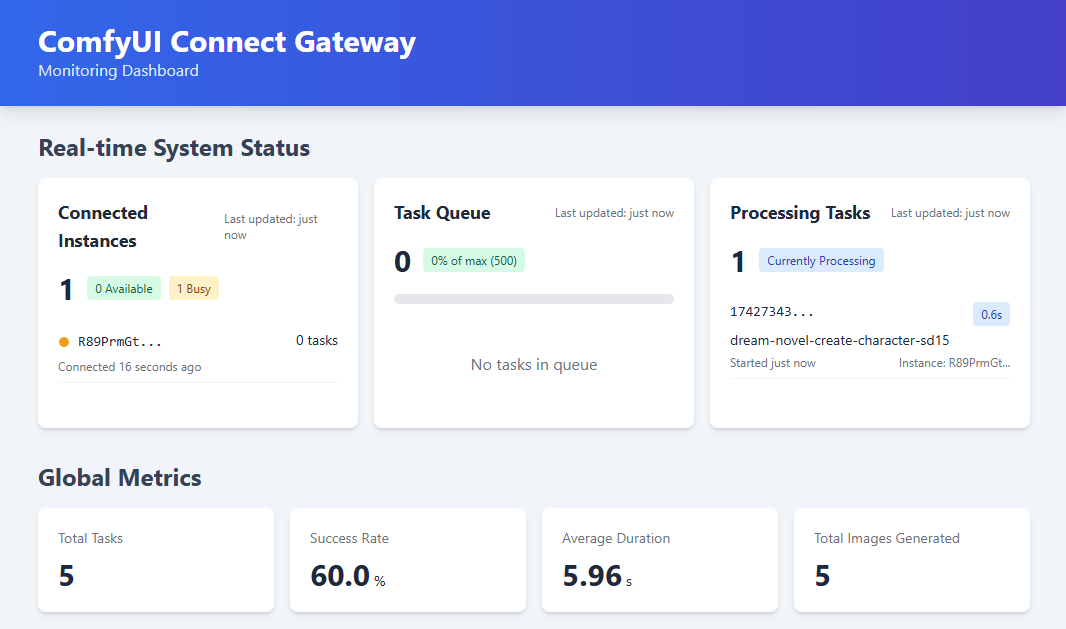
- 🚀 Dashboard - Follow the load of your ComfyUI instances in the integrated dashboard
- 📈 Prometeus Metrics - Connect your prometeus to
/metricsand gather load metrics
Usage as a package
You can use the ComfyUI Connect Gateway as a package in your own Node.js project:
// Using CommonJS
const { Gateway } = require('comfyui-connect-gateway');

// Using ES Modules
import { Gateway } from 'comfyui-connect-gateway';

// Create a gateway with configuration options
const gateway = new Gateway({
  port: 8189,
  metricsInterval: 10000, // Update metrics every 10 seconds
  script: {} // Custom script configuration
});

// Start the gateway
gateway.start();

// Access the underlying components if needed
const cluster = gateway.getCluster();
const queue = gateway.getQueue();
const dispatcher = gateway.getDispatcher();

// Later, when you want to stop the gateway
gateway.stop();
Configuration Options
| Option | Type | Default | Description |
|--------|------|---------|-------------|
| port | number | 8189 | The port on which the gateway server will listen |
| metricsInterval | number | 5000 | Interval in milliseconds for updating metrics |
| script | object | {} | Custom script configuration |
Available Scripts
The package includes the following scripts that you can run:
| Script | Description |
|--------|-------------|
| npm run build | Compiles the TypeScript code to JavaScript |
| npm run prepublishOnly | Runs the build script before publishing |
| npm run start | Starts the Comfy Connect Gateway |
| npm run dev | Runs the gateway in development mode with auto-reload |
| npm run test | Placeholder for tests |
Auto Scaler
The gateway includes an Auto Scaler feature that can dynamically adjust the number of ComfyUI instances based on workload.
Auto Scaler Features
- Dynamic Scaling: Automatically scales instances up or down based on queue size
- Configurable Thresholds: Set your preferred queue-to-instance ratios
- Cooldown Periods: Prevents rapid scaling up and down
- Min/Max Constraints: Set boundaries for scaling operations