
commit-g
v1.0.1
Published
Generate concise, meaningful Git commit messages with AI assistance powered by Gemini.

Maintainers
 spyshiv
Readme
Commit-G 🤖✨


📘 See Docs | 📦 NPM Package
AI-powered Git commit messages using Google’s Gemini – Never write a boring commit message again!
Features 🌟
- ✨ Smart Commit Messages – Generates meaningful messages with Gemini AI
- 🚀 Conventional Commits – Follows widely accepted commit message conventions
- 🔍 Context-Aware – Analyzes actual code changes to craft relevant messages
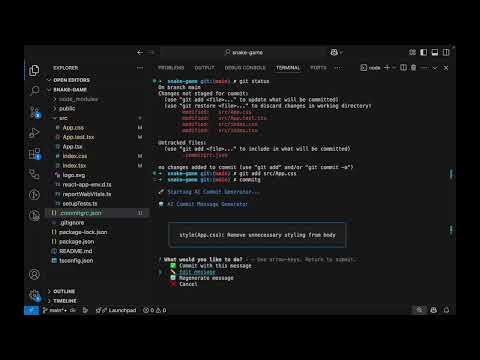
- 💡 Interactive UI – Choose, edit, or regenerate commit messages seamlessly
- ⚡ Fast & Efficient – Commit in seconds with minimal effort
- 🔧 Highly Configurable – Adaptable to your project’s workflow
- 🏷️ Prefix Support – Automatically prepend JIRA IDs or custom tags
- 🎉 Emoji Support – Add expressive emojis to your commit messages
Installation 📦
Install globally:
npm install -g commit-gOr as a development dependency:
npm install --save-dev commit-gUsage 🛠️
- Stage your changes:
git add .- Run Commit-G:
commitg- Follow the interactive prompts to:
- ✅ Accept the suggested message
- ✏️ Edit the message
- 🔄 Regenerate a new suggestion
- ❌ Cancel the commit
Configuration ⚙️
Commit-G supports flexible configuration methods:
1. Environment Variables
export GEMINI_API_KEY="your_api_key_here"
export GEMINI_MODEL="gemini-1.5-flash"
2. Configuration File
Create a .commitgrc.json in your project root:
{
  "apiKey": "your_api_key_here",
  "model": "gemini-1.5-flash",
  "maxDiffLength": 10000,
  "emoji": true
}
3. Command-Line Arguments
commitg --api-key your_key --model gemini-1.5-flash --emoji --prefix JIRA-123Advanced Options 🔧
| Option | Description | Default |
| ------------------- | --------------------------------- | ------------------ |
| --api-key | Gemini API key | From env/config |
| --model | Gemini model to use | gemini-1.5-flash |
| --emoji | Enable or disable emojis | false |
| --prefix | Add a prefix (e.g., JIRA-123) | false |
| --max-diff-length | Max length of git diff to analyze | 10000 |
FAQ ❓
Q: How do I obtain a Gemini API key?
A: You can generate a key from Google AI Studio.
Q: Is my code sent to Google?
A: Yes, the staged code diff is securely sent to the Gemini API to generate commit messages. Make sure this complies with your organization’s privacy policies.
Q: Can I use Commit-G in CI/CD pipelines?
A: Absolutely! You can set the GEMINI_API_KEY as an environment variable in your CI/CD pipeline configuration. Optionally, configure other parameters using environment variables or CLI flags.
Q: How do I add a JIRA ID or custom prefix to the commit message?
A: Use the --prefix option in the CLI, or configure it in .commitgrc.json.
Example CLI usage (recommended):
commitg --prefix JIRA-123Example in .commitgrc.json:
{
  "prefix": "JIRA-123"
}
Q: How do I enable or disable emoji in commit messages?
A: Use the --emoji flag to enable, or omit it to disable.
Example CLI usage:
commitg --emojiOr in .commitgrc.json:
{
  "emoji": true
}
Q: Does it work with monorepos or large diffs?
A: Yes. To manage performance, use the --max-diff-length option or configure it in .commitgrc.json.
Q: What if I want to use a different Gemini model?
A: You can specify the desired model via the --model flag or in your config file.
Contributing 🤝
Pull requests are welcome! If you have ideas, feature requests, or improvements, feel free to open an issue or submit a Pull Request.
License 📄
MIT License © Shiv Baran Singh
🚀 Stop wasting time on commit messages. Let Commit-G do the heavy lifting for you!