
commitmind
v1.1.2
Published
AI-powered Git commit CLI using Ollama


Readme
CommitMind



CommitMind is an AI-powered Git CLI that automatically generates clean, meaningful commit messages using local LLMs via Ollama.
Stop wasting time writing commit messages. Let AI handle it — fast, private, and fully local.
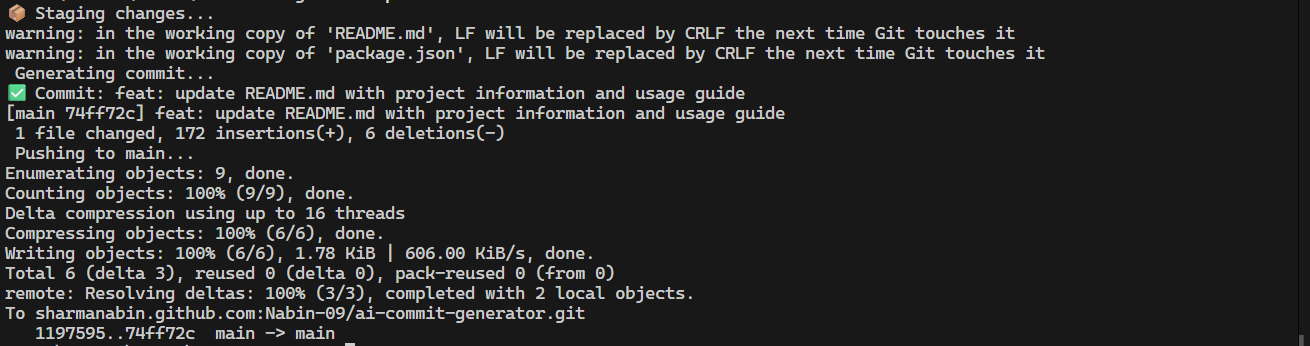
Demo
Features
- AI-generated semantic commit messages
- Fast and local (no cloud, no API keys)
- Privacy-first — your code never leaves your machine
- Auto stage, commit, and push
- Conventional commit format
- Works in any Git project
- Cross-platform (Windows, Mac, Linux)
Installation
Install globally:
npm install -g commitmindOr with Bun:
bun add -g commitmindRequirements
CommitMind uses Ollama to run AI locally.
Install Ollama
Download from: 👉 https://ollama.com
Start Ollama
ollama servePull the model
ollama pull llama3Usage
Auto generate commit message
aic autoThis will:
- Stage all changes
- Generate an AI commit message
- Commit automatically
Commit and push
aic push mainThis will:
- Stage changes
- Generate commit
- Commit
- Push to branch
Model Configuration
CommitMind allows you to choose and persist your preferred local AI model.
First-time setup
On the first run, CommitMind will automatically prompt you to select an installed Ollama model.
Your choice will be saved and used for future commits.
Change model anytime
aic model set

##  Example Workflow

```bash
git checkout -b feature-auth
# make changes
aic auto
aic push main
View current model
aic model getOverride model (optional)
You can also specify a model directly:
aic auto --model mistralWhy CommitMind?
Writing commit messages is repetitive and often ignored. CommitMind helps maintain:
- Clean project history
- Semantic commits
- Faster workflow
- Better collaboration
All while keeping your data private.
Privacy First
CommitMind runs entirely on your machine using local models. Your source code is never sent to external servers.
Tech Stack
- Node.js CLI
- TypeScript
- Ollama (Local LLM)
- Conventional commits
Roadmap
- Interactive commit preview
- Smart commit type detection
- Git hooks integration
- VS Code extension
- Multi-model support
- Config file
- Streaming AI output
Contributing
Contributions are welcome!
- Fork the repo
- Create a feature branch
- Submit a pull request
Support
If you like this project:
- Star it on GitHub
- Share with your friends
- Give feedback
License
MIT © Nabin Sharma
Links
- GitHub: https://github.com/Nabin-09/ai-commit-generator
- Issues: https://github.com/Nabin-09/ai-commit-generator/issues
Made with ❤️ for developers.