
config-studio
v1.0.36
Published
A beautiful web-based UI for managing configuration files (.env, .properties) - Config Studio

Maintainers
 boqiang.liang
Readme
Config Studio



The simplest way to manage configurations.
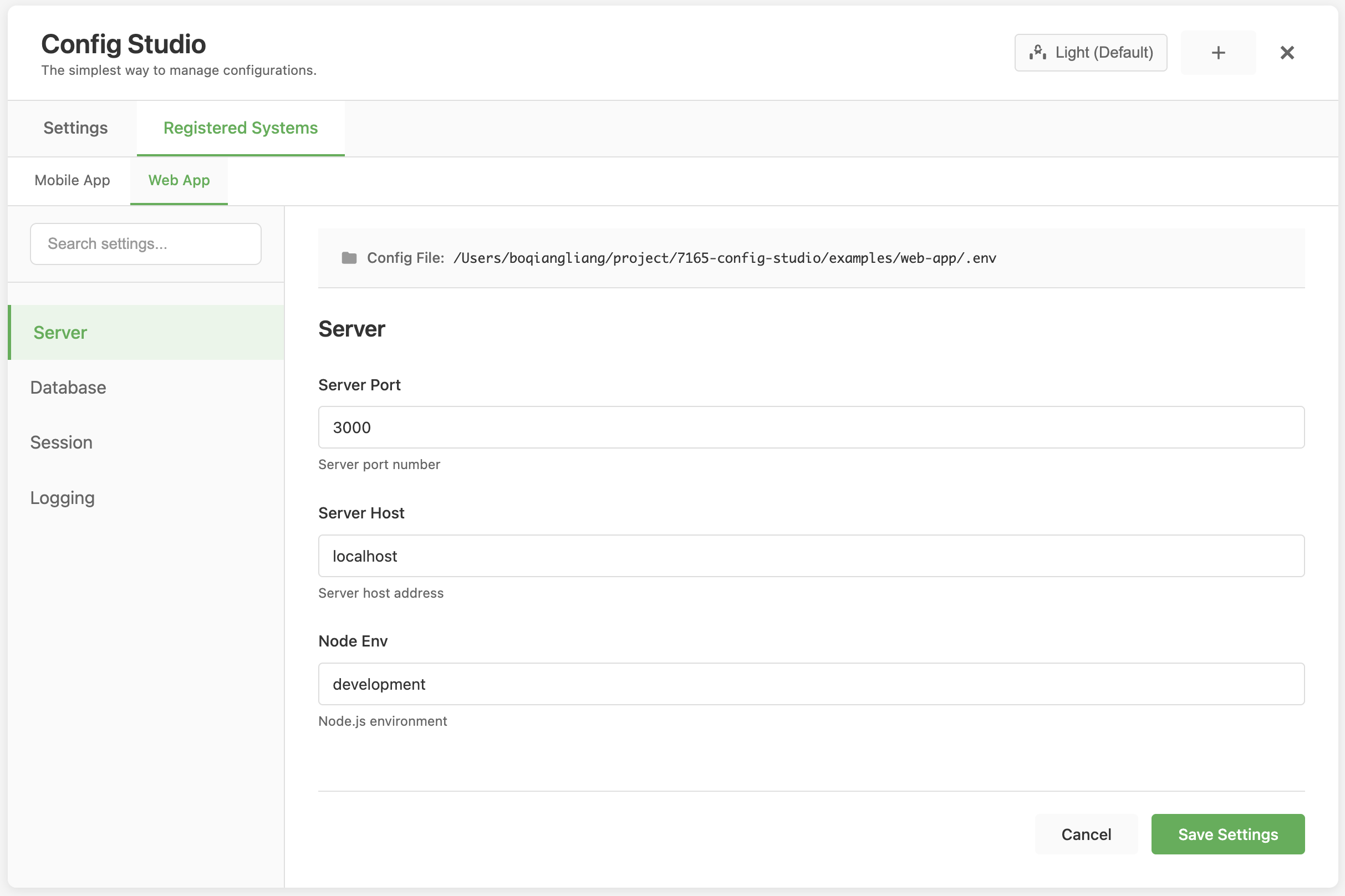
Config Studio is a modern, web-based configuration management tool that provides an intuitive interface for editing and managing configuration files across multiple systems and formats.
Quick Start
| Step | Command |
|------|---------|
| 1. Install | npm install -g config-studio |
| 2. Navigate | cd /path/to/your/project |
| 3. Start | config-studio |
| 4. Open | http://localhost:8880 |
That's it! Your configuration files will appear in the browser.
Examples
| Scenario | Command |
|---------|---------|
| Basic usage | npm install -g config-studiocd ~/my-projectconfig-studio |
| Custom port | config-studio --port 3000 |
| Local install | npm install config-studionpx config-studio |
| Environment port | CONFIG_STUDIO_PORT=8080 config-studio |
How It Works
Organize into Tabs
Separate sections with empty lines in your .env:
# Server
PORT=3000
HOST=localhost

# Database
DB_HOST=localhost
DB_PORT=5432
Each section becomes a tab.
Add Help Text
Put comments above settings:
# Port number for the server
PORT=3000
Add Validation
Add rules in parentheses:
# Server port (required, type:number, min:1, max:65535)
PORT=3000

# API URL (required, type:url)
API_URL=https://api.example.com

# Environment (enum:dev|staging|prod)
ENV=dev
Validation Rules
| Rule | Syntax | Example |
|------|--------|---------|
| Required | required | # API Key (required) |
| Number type | type:number | # Port (type:number) |
| URL type | type:url | # URL (type:url) |
| Email type | type:email | # Email (type:email) |
| Min/Max | min:1, max:100 | # Count (min:1, max:100) |
| Pattern | pattern:^[A-Z]+$ | # Code (pattern:^[A-Z]+$) |
| Enum | enum:dev\|staging\|prod | # Env (enum:dev\|staging\|prod) |
Features
| Feature | Description |
|---------|-------------|
| Auto Tabs | Organizes settings into tabs by empty lines |
| Search | Find any setting instantly |
| Validation | Validates inputs with custom rules |
| Backup | Creates backup before saving |
| Live Updates | Automatically reloads when .env changes |
| Multiple Configs | Manage multiple .env and .properties files for different systems |
Multiple Config Files
Config Studio supports managing multiple config files for different systems. Each system can have its own .env or .properties file.
Registering a System
- Click the "+" button next to the system selector in the header
- Enter a system name (e.g., "Production Server", "Development")
- Enter the config file path (e.g.,
/path/to/production.envorconfig.properties) - Click "Save"
The config file path can be:
- Absolute path:
/absolute/path/to/config.env - Relative path:
config.env(resolved from project root)
Supported Formats:
- Currently only properties-based formats are supported:
.env,.properties - Future support planned for: YAML, XML, JSON, and other configuration formats
- The system uses an extensible format handler architecture, making it easy to add new formats
Managing Systems
- Switch systems: Use the dropdown selector in the header
- Edit system: Click "Manage Systems" → Click "Edit" on a system
- Delete system: Click "Manage Systems" → Click "Delete" on a system
Note: Deleting a system from the registry does not delete the actual config file.
Default System
Config Studio automatically registers itself on startup, pointing to the default .env file in the project root. This system is named "Config Studio" and will appear in the system selector.
When no system is selected in the UI, Config Studio uses the default .env file in the project root.
Common Tasks
| Task | How To |
|------|--------|
| View settings | Start UI → Open browser → Browse tabs |
| Edit settings | Click field → Change value → Click "Save Settings" |
| Search settings | Type in search box (top left) → Results filter instantly |
| Add new setting | Edit .env file directly |
| Register system | Click "+" button → Enter name and path → Save |
| Switch systems | Use dropdown selector in header |
Configuration
Port Options
| Method | Command | Port |
|--------|---------|------|
| Default | config-studio | 8880 |
| Command-line | config-studio --port 8080 | 8080 |
| Environment | CONFIG_STUDIO_PORT=8080 config-studio | 8080 |
Startup Config Registration
You can register a config file automatically when starting the server:
| Method | Command | Description |
|--------|---------|-------------|
| Environment | CONFIG_STUDIO_CONFIG_PATH=/path/to/config.env config-studio | Register config file on startup |
| With name | CONFIG_STUDIO_CONFIG_PATH=/path/to/config.env CONFIG_STUDIO_SYSTEM_NAME="My System" config-studio | Register with custom name |
| Command line | config-studio --config /path/to/config.env | Register via command line |
| Command line with name | config-studio --config /path/to/config.env --name "My System" | Register with custom name |
Note: All config file paths are automatically converted to absolute paths. If a system with the same path already exists, it won't be registered again.
Data Directory
The systems registry is stored in a data folder by default. You can configure a custom location:
| Method | Command | Location |
|--------|---------|----------|
| Default | config-studio | ./data/systems-registry.json |
| Environment (relative) | CONFIG_STUDIO_DATA_DIR=custom-data config-studio | ./custom-data/systems-registry.json |
| Environment (absolute) | CONFIG_STUDIO_DATA_DIR=/var/lib/config-studio config-studio | /var/lib/config-studio/systems-registry.json |
The data directory is automatically created if it doesn't exist.
Working Directory
| Location | Result |
|----------|--------|
| Correct | Run from project directory → Finds .env |
| Wrong | Run from different directory → Won't find .env |
Example:
# Correct
cd ~/my-project
config-studio

# Wrong
cd ~
config-studio  # Won't find .env in ~/my-project
Troubleshooting
| Problem | Solution |
|---------|----------|
| Command not found | Run npm install -g config-studio |
| Port already in use | Use config-studio --port 8080 |
| Can't find .env | Make sure you're in the project directory |
| Settings not saving | Check .env file permissions |
| Tabs not showing | Add empty lines between sections in .env |
Security
⚠️ No authentication by default. If you expose this to a network, add authentication.
| Option | Description |
|--------|-------------|
| nginx | Use nginx with basic auth (recommended) |
| Basic Auth | Add express-basic-auth middleware |
| Local only | Only run on localhost (default) |
Example .env File
# Server
# Port number (required, type:number, min:1, max:65535)
PORT=3000
# Hostname
HOST=localhost

# Database
# Database URL (required, type:url)
DATABASE_URL=postgresql://user:pass@localhost/db
# Pool size (type:number, min:1, max:100)
DB_POOL_SIZE=10

# API
# API Key (required, pattern:^[A-Z0-9_]+$)
API_KEY=MY_SECRET_KEY
# Environment (enum:dev|staging|prod)
ENVIRONMENT=dev
Installation Options
| Method | Command | Use Case |
|--------|---------|----------|
| Global | npm install -g config-studioconfig-studio | Use from anywhere |
| Local | npm install config-studionpx config-studio | Project-specific |
| Source | git clone ...npm installnpm start | Development |
Process Management Scripts
For easier process management, use the provided shell scripts:
Start Script (start.sh)
Starts Config Studio and manages the process:
./start.sh [options]Features:
- Automatically kills any existing
config-studioprocesses - Sets process name to "config-studio" for easy identification
- Uses process name to find and manage processes (no PID file needed)
- Supports all command-line options (e.g.,
./start.sh --port 8080)
Example:
./start.sh --port 3000Stop Script (stop.sh)
Stops all Config Studio processes:
./stop.shFeatures:
- Finds and stops all processes named "config-studio"
- Graceful shutdown (SIGTERM) followed by force kill if needed
- Uses process name to find processes (no PID file needed)
Example:
./stop.shProcess Name
All processes are named "config-studio" for easy identification:
- View processes:
ps aux | grep config-studio - Check if running:
pgrep -f config-studio
Maintainer
Boqiang Liang
Email: [email protected]
License
MIT