
consentbar
v1.2.0
Published
Consent banner and preferences panel for India's DPDP Act and GDPR-style consent. Consent per purpose, easy withdrawal, English and the 22 Indian languages. No dependencies.

Maintainers
 ckgiri
Readme
consentbar
A consent banner for websites in India. Users choose what you may use their data for, and can change their mind at any time. 23 languages.



Live demo: try the banner, switch between 23 languages and watch the events.
consentbar adds two things to your website:
- A banner that asks the user for consent.
- A preferences panel where the user turns each purpose on or off.
It is made for India's data protection law: the Digital Personal Data Protection (DPDP) Act, 2023 and the DPDP Rules, 2025. It also works for European-style (GDPR) cookie consent.
Important: consentbar helps you follow the DPDP consent rules. It does not make your website legally compliant on its own. This page is not legal advice.
Screenshots
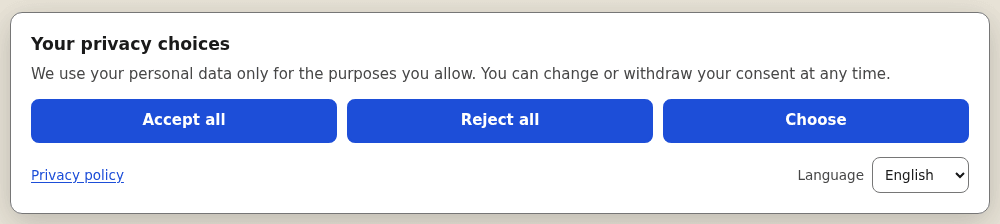
The banner. "Accept all", "Reject all" and "Choose" are the same size, so saying no is as easy as saying yes:
The preferences panel. Each purpose has its own switch. The panel also shows your company name and contact details:
On a phone, in Hindi, and in Urdu with the dark theme. Urdu, Kashmiri and Sindhi are shown right to left:
Features
- One switch per purpose. A purpose is one reason you use personal data, such as "Analytics" or "Marketing". All switches start off.
- Saying no is easy. "Accept all", "Reject all" and "Choose" look the same.
- Users can change their mind. A small "Privacy choices" button stays on the page. One click opens the panel again.
- Your contact details. The panel shows your company name, privacy policy, a contact for complaints, and a link to the Data Protection Board.
- 23 languages. English and the 22 languages of the Eighth Schedule of the Constitution. Users pick their language from a list.
- Asks again when needed. When you change your notice, add a purpose, or after one year.
- Keeps a record of every choice. You can send each record to your server as proof.
- Blocks tracking scripts (like Google Analytics) until the user agrees.
- Accessible. Works with a keyboard and screen readers. Good colour contrast in light and dark mode. Works on small phones.
- Your site's CSS cannot break it. It is drawn in its own separate area of the page.
- Works everywhere. Plain HTML, WordPress, React, Next.js and Vue. No other packages needed. About 19 KB (compressed) with all languages, or about 9 KB with English only.
Installation
If your project uses npm:
npm install consentbarOr with another package manager:
pnpm add consentbar
yarn add consentbar
bun add consentbar
No build tools? Add one <script> tag instead (see Use it with WordPress or plain HTML):
<script src="https://cdn.jsdelivr.net/npm/consentbar@1/dist/consentbar.global.js"></script>
<!-- or -->
<script src="https://unpkg.com/consentbar@1/dist/consentbar.global.js"></script>
Quick start
Set it up in 4 steps
Step 1. List your purposes. Write down each reason you use personal data. Mark the ones your site cannot work without as required.
Step 2. Add your contact details. Your company name, privacy policy link and a contact email for complaints.
Step 3. Create the bar.
import { createConsentBar } from 'consentbar'

const bar = createConsentBar({
  purposes: [
    { id: 'essential', title: 'Essential', description: 'Keeps you signed in and protects your account.', required: true },
    { id: 'analytics', title: 'Analytics', description: 'Counts visits so we can improve the site.', dataItems: ['Pages visited', 'Device type'] },
  ],
  notice: {
    fiduciaryName: 'Example Pvt Ltd',
    privacyPolicyUrl: 'https://example.in/privacy',
    contactEmail: '[email protected]',
    boardComplaintUrl: 'https://www.dpb.gov.in/',
  },
})

bar.hasConsent('analytics')   // => false until the user agrees
bar.on('change', ({ consent }) => console.log(consent.purposes))
Step 4. Block your tracking scripts until the user agrees. Change type to text/plain and add data-consent with the purpose id:
<script type="text/plain" data-consent="analytics" src="https://www.googletagmanager.com/gtag/js?id=G-XXXX" async></script>That's it. The banner shows the first time someone visits. After they choose, it hides and the small "Privacy choices" button appears.
Without a build tool
<script src="https://cdn.jsdelivr.net/npm/consentbar@1/dist/consentbar.global.js"></script>
<script>
  const bar = ConsentBar.init({
    purposes: [
      { id: 'essential', title: 'Essential', description: 'Keeps you signed in.', required: true },
      { id: 'analytics', title: 'Analytics', description: 'Counts visits.' },
    ],
    notice: {
      fiduciaryName: 'Example Pvt Ltd',
      privacyPolicyUrl: '/privacy',
      contactEmail: '[email protected]',
    },
  })
</script>
Table of contents
- Usage
- Define your purposes
- Show your notice details
- Choose languages
- Load scripts only after consent
- Let users withdraw consent
- Ask again when your notice changes
- Save consent records on your server
- React to changes
- Use it with React or Next.js
- Read consent on the server
- Use it with WordPress or plain HTML
- Change the look
- Use it with crumbjar
- API
- DPDP checklist
- Comparison
- Migrating from vanilla-cookieconsent
- Notes and limitations
- Requirements
- Related packages
- License
Usage
Define your purposes
A purpose is one reason you use personal data. Ask for consent for each purpose, not for each cookie.
const bar = createConsentBar({
  purposes: [
    {
      id: 'essential',
      title: 'Essential',
      description: 'Keeps you signed in and protects your account.',
      required: true,               // always on, cannot be switched off
      dataItems: ['Session ID'],
    },
    {
      id: 'analytics',
      title: { en: 'Analytics', hi: 'विश्लेषण' },
      description: { en: 'Counts visits so we can improve the site.', hi: 'विज़िट गिनता है ताकि हम साइट को बेहतर बना सकें।' },
      dataItems: { en: ['Pages visited', 'Device type'], hi: ['देखे गए पेज', 'डिवाइस का प्रकार'] },
    },
    { id: 'marketing', title: 'Marketing', description: 'Shows offers based on what you looked at.' },
  ],
  notice: { fiduciaryName: 'Example Pvt Ltd', privacyPolicyUrl: '/privacy', contactEmail: '[email protected]' },
})
What each field means:
id: a short name you use in your code, for example inhasConsent('analytics'). Use only letters, numbers,_and-.titleanddescription: what the user reads. Write one text, or one text per language (like{ en: '...', hi: '...' }). If a language is missing, English is used.dataItems: the kinds of personal data this purpose uses, like "Email address".required: true: for things your site cannot work without, such as login. The user sees "Always on" and cannot switch it off. Ask your legal adviser which purposes can be required.
Purposes that are not required stay off until the user turns them on.
Show your notice details
The DPDP Act says users must know how to withdraw consent, who to contact with a complaint, and how to complain to the Data Protection Board. Add these details in notice. They appear in the panel under "About this notice":
notice: {
  fiduciaryName: 'Example Pvt Ltd',              // your company name
  privacyPolicyUrl: 'https://example.in/privacy',
  contactEmail: '[email protected]',          // who handles complaints (or a link to a form)
  boardComplaintUrl: 'https://www.dpb.gov.in/',  // optional
}
"Fiduciary" is the word the law uses for the company that collects the data. That is you.
Choose languages
All 23 languages are included. consentbar picks the first language in this order:
- The language the user chose before.
- The
languageyou set. - The browser's language. For example,
hi-INbecomes Hindi. - English.
To show only some languages in the list:
createConsentBar({ ...config, languages: ['en', 'hi', 'ta', 'ur'] })| Code | Language | Name shown | Code | Language | Name shown |
|---|---|---|---|---|---|
| en | English | English | ml | Malayalam | മലയാളം |
| as | Assamese | অসমীয়া | mni | Manipuri | মৈতৈলোন্ |
| bn | Bengali | বাংলা | mr | Marathi | मराठी |
| brx | Bodo | बड़ो | ne | Nepali | नेपाली |
| doi | Dogri | डोगरी | or | Odia | ଓଡ଼ିଆ |
| gu | Gujarati | ગુજરાતી | pa | Punjabi | ਪੰਜਾਬੀ |
| hi | Hindi | हिन्दी | sa | Sanskrit | संस्कृतम् |
| kn | Kannada | ಕನ್ನಡ | sat | Santali | ᱥᱟᱱᱛᱟᱲᱤ |
| ks | Kashmiri (right to left) | کٲشُر | sd | Sindhi (right to left) | سنڌي |
| kok | Konkani | कोंकणी | ta | Tamil | தமிழ் |
| mai | Maithili | मैथिली | te | Telugu | తెలుగు |
| | | | ur | Urdu (right to left) | اردو |
For Urdu, Kashmiri and Sindhi, the whole layout flips to read right to left.
Make it smaller. If you only need a few languages, import from consentbar/core. It has English only, and you add the languages you want. This cuts the size about in half:
import { createConsentBar } from 'consentbar/core'
import { hi } from 'consentbar/languages/hi'
import { ta } from 'consentbar/languages/ta'

createConsentBar({ ...config, languages: ['en', hi, ta] })
Change any text. Use texts and a language code. Texts you don't change stay the same:
createConsentBar({
  ...config,
  texts: {
    en: { acceptAll: 'Allow all', bannerTitle: 'Your data, your choice' },
    hi: { acceptAll: 'सभी की अनुमति दें' },
  },
})
Add another language. Missing texts use English:
createConsentBar({
  ...config,
  languages: ['en', { code: 'fr', name: 'Français', texts: { acceptAll: 'Tout accepter', rejectAll: 'Tout refuser' } }],
})
All text names are listed in Languages and texts.
Load scripts only after consent
Tracking scripts should not run until the user agrees. To block one:
- Change
typetotext/plain. The browser will not run it. - Add
data-consentwith the purpose id.
consentbar runs the script as soon as the user agrees to that purpose.
<!-- Script from another site -->
<script type="text/plain" data-consent="analytics" src="https://www.googletagmanager.com/gtag/js?id=G-XXXX" async></script>

<!-- Script written in the page -->
<script type="text/plain" data-consent="analytics">
  window.dataLayer = window.dataLayer || []
  function gtag() { dataLayer.push(arguments) }
  gtag('js', new Date())
  gtag('config', 'G-XXXX')
</script>

<!-- A module script: put the real type in data-type -->
<script type="text/plain" data-type="module" data-consent="marketing" src="/js/offers.js"></script>

<!-- Needs consent for two purposes -->
<script type="text/plain" data-consent="analytics marketing" src="/js/ads.js"></script>

<!-- Embedded video or map: use data-src instead of src -->
<iframe data-consent="marketing" data-src="https://www.youtube-nocookie.com/embed/VIDEO_ID" title="Video"></iframe>
Other attributes, like id, async and nonce, are kept. Each script runs only once. To turn this feature off, set gateScripts: false.
Note: once a script has run, it cannot be stopped. If the user later says no, reload the page:
bar.on('withdraw', ({ purposes }) => {
  if (purposes.includes('analytics')) location.reload()
})
Let users withdraw consent
To withdraw consent means to take back a "yes". The law says this must be as easy as saying yes. consentbar gives users three ways:
The "Privacy choices" button stays in the corner of the page. One click opens the panel. "Reject all" takes back everything.
Your own link, for example in your footer:
<a href="#" onclick="bar.openPreferences(); return false">Privacy choices</a>From your code, for example on an account settings page:
bar.withdraw('marketing')   // one purpose
bar.withdraw()              // every purpose that is not required
Each withdrawal is saved as a record and fires the withdraw event. To move the button to the right, set floatingButton: 'right'. To hide it, set floatingButton: false, but then show your own link on every page.
Ask again when your notice changes
Give your notice a version. When you change the version, everyone sees the banner again:
createConsentBar({ ...config, version: '2026-11' })Users are also asked again:
- after one year (change this with
expiresAfterDays), - when you add a new purpose that is not required.
Until they choose again, hasConsent() returns false for purposes that are not required.
Save consent records on your server
Each time a user makes a choice, consentbar creates a record:
{
  recordId: '3b1f8c9e-6a2d-4c1e-9b7a-2f0e5d4c3b2a',
  timestamp: '2026-11-27T10:15:00.000Z',
  action: 'given',              // 'given' | 'withdrawn' | 'updated' | 'rejected'
  purposes: { essential: true, analytics: true, marketing: false },
  noticeVersion: '2026-11',
  language: 'hi',
  // userAgent: '...'           // only with recordUserAgent: true
}
The browser keeps the last 50 records. You can read them with getRecords(), or as JSON text with exportRecords().
The browser copy is not enough as proof, because users can delete it. To keep proof, set recordEndpoint to a URL on your server. consentbar sends each record there:
createConsentBar({ ...config, recordEndpoint: '/api/consent-records' })Example server code with Express:
app.post('/api/consent-records', express.json(), async (req, res) => {
  const { recordId, timestamp, action, purposes, noticeVersion, language } = req.body
  await db.consentRecords.insert({ recordId, timestamp, action, purposes, noticeVersion, language, receivedAt: new Date() })
  res.sendStatus(204)
})
Records do not include a user id. If you want to link a record to a signed-in user, do it on your server using their session. If your server is on another domain, allow it with CORS.
React to changes
bar.on('consent', ({ consent, record }) => {
  // runs after every saved choice
})
bar.on('change', ({ consent, changed }) => {
  if (changed.includes('analytics') && consent.purposes.analytics) startAnalytics()
})
const off = bar.on('withdraw', ({ purposes }) => console.log('withdrawn:', purposes))
off()   // stop listening
Code that cannot import consentbar can listen on document:
document.addEventListener('consentbar:change', (event) => {
  console.log(event.detail.consent.purposes)
})
Use it with React or Next.js
Use the ready-made packages. They are built on consentbar, so you get everything on this page, plus React hooks and components:
| Package | Use it for |
|---|---|
| react-consent-bar | React apps (Vite, Create React App and others). useConsent(), useHasConsent(), <ConsentGate>, <PrivacyChoicesButton>. |
| next-consent-bar | Next.js. Everything in react-consent-bar, plus <ConsentScript> (load scripts only after consent) and reading consent on the server, so there is no banner flash. |
npm install react-consent-bar   # React
npm install next-consent-bar    # Next.js
import { useHasConsent } from 'react-consent-bar'
function AnalyticsStatus() {
const allowed = useHasConsent('analytics')
return <p>Analytics is {allowed ? 'on' : 'off'}.</p>
}Each package's page shows the full setup.
Vue, Svelte or another framework? Call createConsentBar() once in the browser, for example in onMounted() in Vue. You can import consentbar in server code, but calling createConsentBar() on the server throws an error.
Read consent on the server
Your server can check the user's choice before it sends the page. For example, it can leave out a tracking script, or show a video only when it is allowed. Import readConsent from consentbar/server. It has no browser code, so it works in Node.js, Express, Next.js, Remix, Astro, Nuxt and edge runtimes:
import { readConsent, hasConsent } from 'consentbar/server'

// Express
app.get('/', (req, res) => {
  const consent = readConsent(req, { purposes: config.purposes })
  if (hasConsent(consent, 'analytics')) {
    // add the analytics script to the page
  }
})
readConsent() accepts a Cookie header string, a Request, a Headers object, a Node.js or Express request, or the result of Next.js await cookies().
It uses the same rules as the banner. A choice counts only when its notice version matches and it is not older than expiresAfterDays. If you added a purpose after the user chose, the choice does not count until they choose again. Pass the same version, expiresAfterDays, cookieName and purposes as in your banner config.
The result is plain data, so you can also send it to the browser:
{
  decided: true,                     // the user has made a choice that still counts
  purposes: { essential: true, analytics: true, marketing: false },
  noticeVersion: '1',
  timestamp: '2026-11-28T10:15:00.000Z',
  recordId: '3b1f8c9e-6a2d-4c1e-9b7a-2f0e5d4c3b2a',
  language: 'hi',
}
Note: this reads the cookie. If you set storage: 'localStorage', the choice stays in the browser and the server cannot read it.
Use it with WordPress or plain HTML
Add this to the <head> of your site. In WordPress, put it in your theme's header.php, or use a plugin that adds code to the header:
<script src="https://cdn.jsdelivr.net/npm/consentbar@1/dist/consentbar.global.js"></script>
<script>
  window.consentBar = ConsentBar.init({
    purposes: [
      { id: 'essential', title: 'Essential', description: 'Keeps you signed in.', required: true },
      { id: 'analytics', title: 'Analytics', description: 'Counts visits.' },
    ],
    notice: {
      fiduciaryName: 'Example Pvt Ltd',
      privacyPolicyUrl: '/privacy-policy/',
      contactEmail: '[email protected]',
    },
  })
</script>
Then block your tracking scripts as shown in Load scripts only after consent.
Tip: on a live site, use an exact version in the link, like [email protected], so updates never surprise you.
window.ConsentBar has init(), createConsentBar(), consentChecker() and allLanguages.
Change the look
createConsentBar({
  ...config,
  position: 'bottom',    // 'bottom' | 'top' | 'center'
  theme: 'auto',         // 'light' | 'dark' | 'auto' (follows the user's device)
  cssVars: {
    '--consentbar-accent': '#0f766e',
    '--consentbar-radius': '6px',
    '--consentbar-font': 'Inter, system-ui, sans-serif',
  },
})
You can also set the same values in your own CSS file:
#consentbar { --consentbar-accent: #0f766e; }
@media (prefers-color-scheme: dark) {
  #consentbar { --consentbar-accent: #5eead4; --consentbar-accent-text: #042f2e; }
}
| Variable | Light default | Dark default | Used for |
|---|---|---|---|
| --consentbar-bg | #ffffff | #1c1c1f | Background |
| --consentbar-text | #1a1a1a | #f2f2f2 | Text |
| --consentbar-muted | #474747 | #c8c8cc | Descriptions and labels |
| --consentbar-accent | #1d4ed8 | #8ab4ff | Buttons, switches that are on |
| --consentbar-accent-text | #ffffff | #0b1a33 | Text on buttons |
| --consentbar-link | #1d4ed8 | #8ab4ff | Links, the "Privacy choices" icon |
| --consentbar-border | #767676 | #8e8e93 | Borders |
| --consentbar-divider | #d4d4d8 | #3a3a40 | Lines between sections |
| --consentbar-surface | #f5f5f7 | #26262b | Purpose boxes |
| --consentbar-switch-off | #6b6b70 | #8e8e93 | Switches that are off |
| --consentbar-focus | #1a1a1a | #f2f2f2 | Keyboard focus outline |
| --consentbar-radius | 12px | 12px | Rounded corners |
| --consentbar-font | system fonts | system fonts | Font |
| --consentbar-font-size | 15px | 15px | Text size |
| --consentbar-z-index | 2147483000 | 2147483000 | Keeps the bar on top of other content |
The default colours are easy to read for everyone. If you change them, check that text is still easy to read. A value you set applies to both light and dark mode.
Use it with crumbjar
crumbjar is a cookie library that can refuse to save a cookie until the user agrees. Connect the two like this:
import { createConsentBar, consentChecker } from 'consentbar'
import { setConsentChecker, setCookie } from 'crumbjar'

const bar = createConsentBar(config)
setConsentChecker(consentChecker(bar))

setCookie('_ga', 'GA1.1.123', { purpose: 'analytics' })   // => false until the user agrees
consentChecker(bar) gives you a function that answers "is this purpose allowed?" with true or false. Any library that accepts such a function works the same way.
API
createConsentBar(config)
function createConsentBar(config: ConsentBarConfig): ConsentBarControllerAdds the banner and panel to the page and returns a controller (an object with methods, listed below). It throws an error if the config is wrong, or if you call it on the server. consentbar/core has the same function with English only.
| Option | Type | Default | What it does |
|---|---|---|---|
| purposes | Purpose[] | required | Your purposes. See Purpose. |
| notice | NoticeDetails | required | Your company and contact details. See NoticeDetails. |
| version | string \| number | '1' | Your notice version. Change it to ask everyone again. |
| expiresAfterDays | number | 365 | Days before users are asked again. |
| language | string | browser language, then 'en' | The first language to show. A language the user picked earlier comes first. |
| languages | (string \| ConsentBarLanguage \| ConsentBarLanguageInput)[] | all 23 | Languages in the list. The list is hidden if there is only one. |
| texts | Record<string, Partial<ConsentBarTexts>> | none | Your own texts, per language code. |
| storage | 'cookie' \| 'localStorage' | 'cookie' | Where the user's choice is saved in the browser. |
| cookieName | string | 'consentbar' | Name used to save the choice. |
| cookieDomain | string | not set | Set this to share the choice with your subdomains, like .example.in. |
| position | 'bottom' \| 'top' \| 'center' | 'bottom' | Where the banner appears. |
| theme | 'light' \| 'dark' \| 'auto' | 'auto' | Colours. 'auto' follows the user's device. |
| cssVars | Record<string, string> | none | Colours, font and corners. See Change the look. |
| floatingButton | boolean \| 'left' \| 'right' | true (left) | The "Privacy choices" button. false hides it. |
| autoShow | boolean | true | Show the banner automatically when the user has not chosen yet. |
| gateScripts | boolean | true | Block data-consent scripts and iframes until consent. |
| recordEndpoint | string | not set | Your server URL. Each record is sent there. |
| recordUserAgent | boolean | false | Add the browser name and version to each record. |
| onConsent | (consent, record) => void | none | Runs after every saved choice. |
| mount | HTMLElement | document.body | Where on the page to add the bar. |
Purpose
| Field | Type | Default | What it does |
|---|---|---|---|
| id | string | required | Short name for your code. Letters, numbers, _ and -. |
| title | string \| Record<string, string> | required | Name the user sees. One text, or one per language. |
| description | string \| Record<string, string> | required | What you do with the data, and why. |
| required | boolean | false | Always on. The user cannot switch it off. |
| dataItems | string[] \| Record<string, string[]> | none | The kinds of personal data used. |
NoticeDetails
| Field | Type | Default | What it does |
|---|---|---|---|
| fiduciaryName | string | required | Your company name. |
| privacyPolicyUrl | string | required | Link to your privacy policy. |
| contactEmail | string | required | Email for complaints and questions. A link to a form also works. |
| boardComplaintUrl | string | not set | Link to the Data Protection Board complaint page. |
Controller
What you can do with the bar that createConsentBar() returns:
| Method | Returns | What it does |
|---|---|---|
| show() | nothing | Shows the banner. |
| hide() | nothing | Hides the banner and the panel. |
| openPreferences() | nothing | Opens the panel. |
| closePreferences() | nothing | Closes the panel without saving. |
| getConsent() | ConsentSnapshot | The current choices: { decided, purposes, noticeVersion, timestamp, recordId, language }. |
| hasConsent(purposeId) | boolean | true if the user allowed this purpose. Required purposes are always true. |
| acceptAll() | ConsentRecord | Turns every purpose on and saves. |
| rejectAll() | ConsentRecord | Turns off every purpose that is not required, and saves. |
| update(choices) | ConsentRecord | Changes some purposes and saves, like update({ analytics: true }). |
| withdraw(purposeId?) | ConsentRecord | Takes back consent for one purpose, or for all that are not required. |
| reset() | nothing | Forgets the user's choice and shows the banner again. Records are kept. |
| setLanguage(code) | nothing | Changes the language. |
| getLanguage() | string | The current language code. |
| on(event, listener) | function | Listens to an event. Call the returned function to stop listening. |
| getRecords() | ConsentRecord[] | Records saved in this browser, oldest first, at most 50. |
| exportRecords() | string | The same records as JSON text. |
| destroy() | nothing | Removes the bar from the page. The user's choice stays saved. |
The action saved in each record:
| What happened | Action |
|---|---|
| acceptAll() | 'given' |
| rejectAll() | 'rejected', or 'withdrawn' if something was allowed before |
| First choice with update() or "Save choices" | 'given' if anything is allowed, otherwise 'rejected' |
| Later change with update() or "Save choices" | 'withdrawn' if it only turns things off, otherwise 'updated' |
| withdraw() | 'withdrawn' |
Events
| Event | You receive | When |
|---|---|---|
| consent | { consent, record } | After every saved choice. |
| change | { consent, changed } | When a choice changes. changed lists the purpose ids that changed. Also sent as consentbar:change on document. |
| withdraw | { consent, purposes, record } | When the user takes back consent. |
| show | { view } | When the banner ('banner') or panel ('preferences') opens. |
| hide | { view } | When the banner or panel closes. |
| language | { language, dir } | When the language changes. |
consentChecker(controller)
function consentChecker(controller: ConsentBarController): (purpose: string) => booleanGives you a function that returns true when a purpose is allowed. See Use it with crumbjar.
readConsent(source, options?) (from consentbar/server)
import { readConsent, hasConsent } from 'consentbar/server'

function readConsent(source: ConsentSource, options?: ServerConsentOptions): ServerConsent
function hasConsent(consent: ServerConsent, purposeId: string): boolean
Reads the saved choice from the cookie, on the server. See Read consent on the server.
source can be a Cookie header string, a Request, a Headers object, a Node.js or Express request, or the result of Next.js await cookies(). null or undefined means "no cookie".
| Option | Type | Default | What it does |
|---|---|---|---|
| cookieName | string | 'consentbar' | Name of the cookie. Use the same value as in your banner config. |
| version | string \| number | '1' | Your notice version. A choice for another version does not count. |
| expiresAfterDays | number | 365 | Days before a choice no longer counts. |
| purposes | (string \| Purpose)[] | none | Your purposes. Pass config.purposes, or a list of required purpose ids. Required purposes are always true. |
The result (ServerConsent):
| Field | Type | What it is |
|---|---|---|
| decided | boolean | true when there is a choice that still counts. |
| purposes | Record<string, boolean> | true or false for each purpose. |
| noticeVersion | string | The version that was checked. |
| timestamp | string \| null | When the user chose. |
| recordId | string \| null | Id of the record of that choice. |
| language | string \| null | The language saved with the choice. |
hasConsent(consent, id) returns true when that purpose is allowed. Unknown ids return false.
Languages and texts
Each language can be imported by its code from consentbar, from consentbar/languages, or on its own from consentbar/languages/<code>. allLanguages lists all 23.
interface ConsentBarLanguage {
  code: string            // 'hi'
  name: string            // 'हिन्दी'
  englishName: string     // 'Hindi'
  dir: 'ltr' | 'rtl'
  texts: ConsentBarTexts
}
The text names you can change with texts (also listed in TEXT_KEYS): bannerTitle, bannerText, acceptAll, rejectAll, choose, preferencesTitle, preferencesText, save, close, alwaysOn, dataUsed, noticeTitle, fiduciary, privacyPolicy, withdrawHelp, grievance, board, language, privacyChoices.
Types
TypeScript types are included: ConsentBarConfig, ConsentBarController, ConsentBarEvent, ConsentBarEventMap, ConsentSnapshot, ConsentRecord, ConsentAction, Purpose, NoticeDetails, LocalizedText, LocalizedList, ConsentBarLanguage, ConsentBarLanguageInput, ConsentBarTexts, TextKey.
DPDP checklist
This table shows how consentbar can help with some of the consent rules in the DPDP Act, 2023 and the DPDP Rules, 2025. It is a starting point, not legal advice. Check your own duties with a lawyer.
| What the law asks | How consentbar helps |
|---|---|
| Tell users what data you use and why | Each purpose has a title, a description and a list of data. |
| Tell users how to withdraw consent, how to complain, and how to reach the Data Protection Board | The panel shows how to withdraw, your complaint contact, and the Board link. |
| Offer the notice in English or a language of the Eighth Schedule | All 23 languages are included, with a language list. |
| Consent must be clear and given by the user's own action | One switch per purpose, all off at the start. Nothing is allowed until the user acts. |
| Give a contact for questions | Your contactEmail is shown in the panel. |
| Withdrawing must be as easy as giving consent | "Reject all" looks the same as "Accept all". The "Privacy choices" button reopens the panel in one click. |
| Stop using the data after withdrawal | The withdraw and change events tell your code when to stop. |
| Be able to prove consent was given | A record for every choice, with time, notice version and language. recordEndpoint sends it to your server. |
What consentbar does not do:
- It does not make you legally compliant, and it does not decide which purposes need consent.
- It does not store records for you. Set
recordEndpointand save them on your server. - It does not handle consent from parents for children, or from guardians.
- It is not a "Consent Manager" registered with the Data Protection Board.
- It does not stop scripts that already ran, delete cookies that were already set, or handle other user rights such as seeing, correcting or deleting their data.
- Its translations have not been checked by lawyers or native speakers. See Notes and limitations.
Comparison
| | vanilla-cookieconsent | react-cookie-consent | consentbar | |---|---|---|---| | Works without React | Yes | No | Yes | | No other packages needed | Yes | No | Yes | | Choice per category or purpose | Yes | No | Yes | | Preferences panel | Yes | No | Yes | | Reject button | Yes | Yes | Yes | | Blocks scripts until consent | Yes | No | Yes | | Asks again when the notice changes | Yes | No | Yes | | Right-to-left layout | Yes | No | Yes | | Can save the choice in localStorage | Yes | No | Yes | | Works with one script tag | Yes | No | Yes | | TypeScript types | Yes | Yes | Yes | | Texts in Indian languages included | No | No | Yes | | DPDP notice fields (complaint contact, Board link) | No | No | Yes | | Built-in button to reopen choices | No | No | Yes | | Sends consent records to your server | No | No | Yes | | Site CSS cannot break it | No | No | Yes |
Checked against vanilla-cookieconsent 3.3.0 and react-cookie-consent 10.0.2. vanilla-cookieconsent lets you add your own translations, including right-to-left ones. With both, you can send records to a server by writing your own code.
Migrating from vanilla-cookieconsent
Before:
import * as CookieConsent from 'vanilla-cookieconsent'
import 'vanilla-cookieconsent/dist/cookieconsent.css'

CookieConsent.run({
  revision: 2,
  categories: {
    necessary: { enabled: true, readOnly: true },
    analytics: {},
  },
  language: {
    default: 'en',
    translations: {
      en: {
        consentModal: { title: 'We use cookies', description: '...', acceptAllBtn: 'Accept all', acceptNecessaryBtn: 'Reject all', showPreferencesBtn: 'Manage' },
        preferencesModal: { title: 'Preferences', acceptAllBtn: 'Accept all', acceptNecessaryBtn: 'Reject all', savePreferencesBtn: 'Save', sections: [ /* ... */ ] },
      },
    },
  },
  onChange: ({ changedCategories }) => console.log(changedCategories),
})

CookieConsent.acceptedCategory('analytics')
CookieConsent.showPreferences()
After:
import { createConsentBar } from 'consentbar'

const bar = createConsentBar({
  version: 2,
  purposes: [
    { id: 'necessary', title: 'Necessary', description: 'Needed for the site to work.', required: true },
    { id: 'analytics', title: 'Analytics', description: 'Counts visits.' },
  ],
  notice: { fiduciaryName: 'Example Pvt Ltd', privacyPolicyUrl: '/privacy', contactEmail: '[email protected]' },
  texts: { en: { bannerTitle: 'We use cookies', choose: 'Manage' } },
})
bar.on('change', ({ changed }) => console.log(changed))

bar.hasConsent('analytics')
bar.openPreferences()
| vanilla-cookieconsent | consentbar |
|---|---|
| run(config) | createConsentBar(config) |
| categories | purposes (a list, each with title and description) |
| readOnly: true | required: true |
| revision | version |
| language.translations | Included. Change texts with texts, pick languages with languages. |
| cookie.expiresAfterDays | expiresAfterDays |
| cookie.useLocalStorage: true | storage: 'localStorage' |
| cookie.name | cookieName |
| acceptedCategory(name) | hasConsent(id) |
| acceptCategory('all') | acceptAll() |
| acceptCategory([]) | rejectAll() |
| showPreferences() | openPreferences() |
| onConsent, onChange | on('consent'), on('change') |
| <script type="text/plain" data-category="analytics"> | <script type="text/plain" data-consent="analytics"> |
| data-cc="show-preferencesModal" | onclick="bar.openPreferences()" |
consentbar saves the choice under its own name, so users see the banner one more time after you switch. You don't need a CSS import.
Notes and limitations
- Translations need checking. No native speaker has reviewed the 22 Indian language texts yet. Bodo, Dogri, Kashmiri, Konkani, Maithili, Manipuri, Santali and Sanskrit are the least certain. Before going live, ask a native speaker to check each language you use, and fix any text with
texts. Corrections are welcome as issues or pull requests. - Scripts (writing systems). Manipuri uses the Bengali script, Santali uses Ol Chiki, and Kashmiri and Sindhi use the Perso-Arabic script. If your users expect a different script, give your own texts. Some phones have no font for Ol Chiki or Nastaliq and show a basic font instead.
- Your purpose texts are yours. consentbar translates its own buttons and labels. You write your purpose titles and descriptions, in each language you need.
- Not legal advice. consentbar helps with the DPDP consent rules. It does not make your site compliant on its own.
- Browser records are not proof. Users can delete them. Use
recordEndpointand keep records on your server. - Scripts that already ran keep running after a user withdraws consent. Reload the page if needed.
- Scripts added later. consentbar checks for
data-consentscripts when it starts, when the page finishes loading, and on every change. Scripts you add later run at the next change. - Use one bar per page. Two bars would show two banners.
- Server-side rendering. Importing on the server is fine. Calling
createConsentBar()on the server throws an error. - Browsers. Current Chrome, Edge, Firefox and Safari. In very old browsers your site's CSS may change how the bar looks.
Requirements
- A web browser to show the bar.
- Node.js 20 or newer if you import it in server code or build tools.
- Works with
import,requireand a plain<script>tag. - TypeScript types included. No other packages needed.
Related packages
consentbar comes in three packages. Install only the one that matches your project: react-consent-bar already includes consentbar, and next-consent-bar includes both.
| Package | Use it for |
|---|---|
| consentbar (this package) | Any website: plain HTML, WordPress, PHP, Vue, Svelte and more. The banner itself, plus consentbar/server to read consent on any server. |
| react-consent-bar | React apps (Vite, Create React App, Remix): hooks and components such as useConsent(), <ConsentGate> and <PrivacyChoicesButton>. |
| next-consent-bar | Next.js: everything in react-consent-bar, plus <ConsentScript> and reading consent on the server, so there is no banner flash. |
Also useful: crumbjar, typed cookies that can wait for consent before they are saved.
License
MIT