
contribution-bubbles
v0.1.0
Published
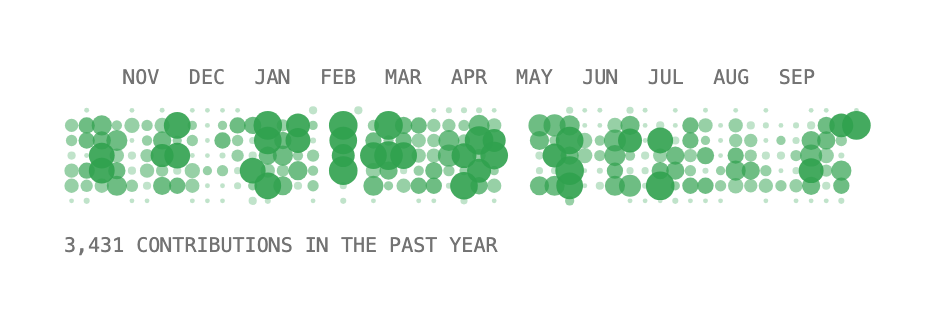
A GitHub contribution chart drawn as bubbles. One line of React, just a username.

Maintainers
 galzorigo
Readme
contribution-bubbles
Your GitHub contributions as bubbles. One line of React, just a username.
npm install contribution-bubblesimport { ContributionBubbles } from "contribution-bubbles";
<ContributionBubbles username="octocat" />That's it. It loads the past year from GitHub, fills its container and draws one column per week, one row per weekday. Busier days get bigger, stronger bubbles.
No API key, no login, no CSS to import. Works in any React 18+ app, including Next.js.
Size and color
<ContributionBubbles username="octocat" width={400} color="#30a14e" />Leave out width to fill the parent. The width decides how many weeks fit, about a year in 400px. To pick the number yourself, use weeks.
<ContributionBubbles username="octocat" weeks={26} />Next.js
The component works in server pages as is. For the best performance, load the data on the server and cache it, so visitors never wait on GitHub.
// app/page.tsx
import { ContributionBubbles } from "contribution-bubbles";
import { fetchContributions } from "contribution-bubbles/server";

export default async function Page() {
  const days = await fetchContributions("octocat", { next: { revalidate: 3600 } });
  return <ContributionBubbles data={days} />;
}
Loading and errors
While a username loads, the chart keeps its space so the page doesn't jump. If loading fails (a typo in the username, say), the chart shows nothing and logs why to the console.
<ContributionBubbles
  username="octocat"
  loading={<p>Loading activity…</p>}
  fallback={<p>No activity yet</p>}
  onError={(error) => report(error)}
/>
All props
Every prop is optional except one of username or data.
| Prop | Default | |
| --- | --- | --- |
| username | | GitHub username to load |
| data | | Your own days, [{ date: "2026-01-31", count: 4 }]. Wins over username |
| width | fills parent | Width in px |
| weeks | fits the width | Number of weeks to show |
| cellSize | 7.5 | Width of a week in px, when weeks isn't set |
| color | #30a14e | Dot color. Any CSS color or variable |
| opacity | [0.3, 0.9] | Opacity of the quietest and busiest days |
| steps | 4 | Opacity levels, like GitHub's. 0 for a smooth fade |
| minSize | 2.4 | Smallest dot, diameter in px |
| maxSize | 14.3 | Biggest dot, diameter in px |
| showMonths | true | Month names on top |
| showTotal | true | "1,234 contributions in the past year" below |
| font | system mono | Font for both labels, any CSS font-family |
| monthFont | font | Font for the month names |
| totalFont | font | Font for the total line |
| monthSize | 10 | Month name size in px |
| totalSize | monthSize | Total line size in px |
| uppercase | true | Labels in capitals |
| labelColor | inherits | Label color |
| monthGap | 2 | Space under the month names in px |
| totalAlign | "left" | "left", "center" or "right" |
| formatTotal | | Your own wording, (n) => \${n} commits`|
|locale|"en-US"| Language for month names and numbers |
|loading| empty space | Shown while a username loads |
|fallback| nothing | Shown on error or when there's no activity |
|onError| logs a warning | Called when loading fails |
|label| the total | What screen readers announce |
|className, style| | For the outer element |
|classNames, styles` | | Per part, see below |
Customize anything
Every part takes its own class name and inline style, so you can restyle it with your own CSS or Tailwind. The parts are root, months, month, chart and total.
<ContributionBubbles
  username="octocat"
  monthFont="'JetBrains Mono', monospace"
  totalFont="Inter, sans-serif"
  totalSize={13}
  totalAlign="center"
  formatTotal={(n) => `${n} commits this year`}
  classNames={{ total: "text-neutral-500" }}
  styles={{ months: { opacity: 0.6 } }}
/>
Custom fonts
The package doesn't ship fonts. It uses whatever your site loads. Load the font as usual, then pass it by name or CSS variable.
import { JetBrains_Mono } from "next/font/google";
const mono = JetBrains_Mono({ subsets: ["latin"], variable: "--font-mono" });

<ContributionBubbles username="octocat" font="var(--font-mono)" />
Dark mode
Pass a CSS variable and set it per theme.
<ContributionBubbles username="octocat" color="var(--dots)" />:root { --dots: #30a14e; }
.dark { --dots: #39d353; }Other languages
<ContributionBubbles username="octocat" locale="de" formatTotal={(n) => `${n} Beiträge im letzten Jahr`} />Your own data
Anything with a date and a count works, not just GitHub.
<ContributionBubbles
  data={[
    { date: "2026-10-01", count: 3 },
    { date: "2026-10-02", count: 7 },
  ]}
/>
Missing days count as zero. Rows with an invalid date or count are skipped.
Private contributions
Private repositories only count if Include private contributions on my profile is on in the user's GitHub profile settings.
Where the data comes from
GitHub doesn't let browsers read the contribution calendar directly, so username uses the free, open source GitHub Contributions API. Results are cached in memory for an hour. If you'd rather not depend on it, load the data your own way and pass it as data.
License
MIT