
convex-feedback
v0.2.0
Published
Type-safe Convex component for feedback, feature requests, bug reports, voting, comments, and duplicate search.


Readme





Vite demo • Expo demo • React Native demo
convex-feedback
A headless, fully typed Convex component for product feedback, feature requests, bug reports, entry upvotes, lazy nested comments, comment likes, full-text search, duplicate suggestions, and admin workflows.
Looking for a ready-made public interface?
[convex-feedback-ui](../convex-feedback-ui/README.md)provides optional React DOM and React Native screens and compound primitives. For internal triage, fork the Clerk admin panel.
Features
- Feedback, feature requests, and bug reports.
- Canny-style entry upvotes.
- Recursive comments loaded one level at a time.
- Comment likes.
- Indexed
top/newestentry ordering. - Indexed
top/newest/oldestcomment ordering. - Convex full-text search.
- Exact-title + full-text duplicate suggestions.
- Host-controlled authentication and admin permissions.
- Indexed actor-scoped activity for entries, comments, and reactions.
- Admin priority and roadmap workflows.
- Optional host-defined mutation rate limiting.
- Optional host-defined lifecycle callbacks for creation and reaction changes.
- Configurable limits and behavior
- Typed React hooks.
convex-testhelper entry point.
The component persists feedback domain data in entries, comments, reactions,
and roadmap. It also uses roadmapRebalances as internal bookkeeping while
large roadmap reorder operations complete; that state is not part of the public
feedback model.
Requirements
- An existing Convex application.
convexinstalled in the host project.- React is required only when using
convex-feedback/react.
Installation
npm install convex-feedback1. Install the component in Convex
Create or update your host application's convex/convex.config.ts:
import { defineApp } from "convex/server";
import feedback from "convex-feedback/convex.config.js";

const app = defineApp();
app.use(feedback);

export default app;
You can install multiple independent instances by giving them different component names using Convex's normal component configuration APIs.
Run Convex so the host application's component references are generated:
npx convex devAutomatic statusFilter upgrade migration
The component stores an indexed statusFilter bucket for board filtering:
closed entries map to closed, while every other workflow status maps to
open. Existing entries may not have this field when upgrading from an older
version.
On the first deployment of this migration, a crons.interval() job runs
immediately and backfills legacy entries in bounded batches. Each batch
schedules the next one until no entry with an undefined statusFilter remains.
The migration is idempotent and safe to retry.
The same job repeats every 30 days for now as a temporary, low-frequency self-healing safeguard for missed or legacy records. It should be removed in a future release after supported installations have had enough time to upgrade.
Legacy comment deletion migration
Older releases stored soft-deleted comments with an internal deletedAt
timestamp. The upgrade migration now drains those tombstones, their descendant
threads, comment reactions, and legacy orphan documents in bounded scheduled
batches. New comment deletion is permanent; deletedAt is retained only as an
optional internal compatibility field during this migration and is not exposed
by public types or UI. The migration's progress markers are internal as well.
After supported installations have migrated, a future release can remove these
compatibility fields from the schema.
2. Expose the component through your host API
A Convex component cannot make authorization decisions using your host application's authentication state directly. convex-feedback therefore exposes a host wrapper: your app resolves the current actor, and the wrapper passes the stable actor identity into the component.
Create a host module such as convex/feedback.ts:
import { exposeFeedbackApi } from "convex-feedback";

import { components } from "./_generated/api";

export const {
  listEntries,
  getEntry,
  searchEntries,
  findSimilarEntries,
  createEntry,
  updateEntry,
  deleteEntry,
  setEntryStatus,
  isAdmin,
  isAuthenticated,
  adminListEntries,
  adminGetEntry,
  adminSearchEntries,
  setEntryPriority,
  listUserEntries,
  setEntryUpvote,
  listComments,
  listUserComments,
  listUserReactions,
  createComment,
  updateComment,
  deleteComment,
  setCommentLike,
  listRoadmap,
  getRoadmapItem,
  searchRoadmap,
  createRoadmap,
  createRoadmapForEntry,
  updateRoadmap,
  deleteRoadmap,
  moveRoadmapItem,
  attachFeedbackToRoadmap,
  detachFeedbackFromRoadmap,
  listRoadmapFeedback,
} = exposeFeedbackApi(components.feedback, {
  actor: async (ctx) => {
    const identity = await ctx.auth.getUserIdentity();

    if (identity === null) return null;

    return {
      id: identity.tokenIdentifier,
      isAdmin: false,
    };
  },
});
Actor IDs
actor.id should be stable for the same user.
The component does not store a user/profile table. Keep display names, avatars, roles, and profile data in your application.
Admins
Return isAdmin: true for actors that may perform admin-only operations such as status changes. The deprecated isModerator actor field remains accepted for compatibility when isAdmin is omitted; if both are present, isAdmin takes precedence.
return {
  id: identity.tokenIdentifier,
  isAdmin: await isFeedbackAdmin(ctx, identity.tokenIdentifier),
};
3. Configure behavior
Configuration is optional static host code; the values shown are the default configuration.
export const feedbackApi = exposeFeedbackApi(components.feedback, {
  actor: resolveFeedbackActor,
  config: {
    entries: {
      enabledKinds: ["feedback", "feature_request", "bug_report"],
      defaultStatus: "open",
      defaultSort: "top",
      maxPageSize: 50,
      editableByAuthor: true,
    },
    comments: {
      maxDepth: 5,
      maxPageSize: 50,
      defaultSort: "top",
      editableByAuthor: true,
      deletableByAuthor: true,
    },
    search: {
      duplicateSuggestions: true,
      duplicateSuggestionLimit: 5,
      defaultLimit: 20,
      maxLimit: 50,
    },
    limits: {
      titleLength: 160,
      bodyLength: 10_000,
      commentLength: 5_000,
    },
  },
});
All configuration fields are documented in the exported TypeScript types and appear in editor IntelliSense.
Rate limiting
Pass optional limiter functions to protect related mutation groups. Each limiter receives the mutation context and the resolved actor.id. By default, limiters allow a request by returning undefined and reject it by throwing.
export const feedbackApi = exposeFeedbackApi(components.feedback, {
  actor: resolveFeedbackActor,
  rateLimiters: {
    createEntry: feedbackEntryRateLimiter,
    createComment: feedbackCommentRateLimiter,
    editContent: feedbackEditRateLimiter,
    reactions: feedbackReactionRateLimiter,
  },
});
The groups cover:
createEntry: entry creation;createComment: comments and replies;editContent: entry edits, status changes, comment edits, and comment deletion;reactions: entry upvotes and comment likes.
Admins bypass all limiters by default. Set limitAdmins: true to apply them to admins as well. The deprecated limitModerators option is accepted when limitAdmins is omitted, with limitAdmins taking precedence. Admin mutations always require an admin, regardless of rate-limit configuration.
To return a value to the client instead of throwing, use "return" behavior and provide its Convex validator. In this mode, undefined means the request is allowed; any defined value is returned immediately and the feedback mutation does not run. The validator is required by TypeScript and its inferred type is added to every mutation's result type.
A discriminated object validator is recommended so callers can reliably distinguish a rejection from each mutation's normal success value.
null is not allowed as a rejection because several feedback mutations already return null on success. Return undefined to allow a request or a non-null value matching returns to reject it.
import { v } from "convex/values";

const rateLimitRejection = v.object({
  kind: v.literal("rate_limited"),
  retryAt: v.number(),
});

export const feedbackApi = exposeFeedbackApi(components.feedback, {
  actor: resolveFeedbackActor,
  rateLimiters: {
    createEntry: async (ctx, key) => {
      const status = await rateLimiter.limit(ctx, "feedbackEntryCreation", {
        key,
      });
      if (status.ok) return undefined;
      return {
        kind: "rate_limited" as const,
        retryAt: Date.now() + (status.retryAfter ?? 0),
      };
    },
  },
  config: {
    rateLimiting: {
      behavior: "return",
      returns: rateLimitRejection,
      limitAdmins: false,
    },
  },
});
Lifecycle callbacks
Lifecycle callbacks are host-wrapper hooks for business logic around creation
and reaction changes. They are grouped by domain so entry, comment, and reaction
events stay discoverable and can evolve independently without a flat list of
unrelated callback names. Configure them at the top level of
exposeFeedbackApi; config remains for component behavior:
callbacks: {
  rejection,
  entries: {
    beforeCreate,
    afterCreate,
  },
  comments: {
    beforeCreate,
    afterCreate,
  },
  reactions: {
    afterChange,
  },
}
For entry and comment creation, the lifecycle is:
auth → rate limiting → beforeCreate → component mutation → afterCreateFor reactions, it is:
auth → rate limiting → component mutation → afterChange (only if state changed)beforeCreate executes inside the host mutation and receives the full host
mutation context, including db, auth, storage, scheduler, runQuery,
runMutation, and meta. It runs before the component mutation, so it can do
simple synchronous validation or business logic, query or mutate host data when
necessary, sanitize content, return a supported transform, or call reject().
Callbacks may also be async when the host needs a nested Convex call. A returned
patch is still passed through the component's normal validation; a callback
cannot bypass enabled-kind, length, nesting, or other component rules. Entry
callbacks may patch kind, title, body, and metadata. Comment callbacks
may patch only body; entryId and parentCommentId remain component-owned.
Callback inputs are readonly snapshots. The wrapper builds component arguments
from the original mutation arguments plus only the explicitly returned patch,
so mutating an event object cannot leak changes into component relationships.
For example, a host can sanitize profanity and reject content that becomes empty after sanitization:
import { v } from "convex/values";

const moderationRejection = v.object({
  kind: v.literal("content_rejected"),
  reason: v.string(),
});

export const feedbackApi = exposeFeedbackApi(components.feedback, {
  actor: resolveFeedbackActor,
  callbacks: {
    rejection: { behavior: "return", returns: moderationRejection },
    entries: {
      beforeCreate: (ctx, event, handlers) => {
        const title = removeProfanity(event.input.title);
        const body = removeProfanity(event.input.body);
        if (!title.trim() || !body.trim()) {
          return handlers.reject({
            kind: "content_rejected",
            reason: "Entry content is empty after sanitization",
          });
        }
        return { title, body };
      },
    },
    comments: {
      beforeCreate: (ctx, event, handlers) => {
        void ctx;
        const body = removeProfanity(event.input.body);
        if (!body.trim()) {
          return handlers.reject({
            kind: "content_rejected",
            reason: "Comment content is empty after sanitization",
          });
        }
        return { body };
      },
    },
  },
});
The default callback rejection behavior is
callbacks.rejection.behavior = "throw" (or omit rejection). It is equivalent
to:
callbacks: {
  rejection: { behavior: "throw" },
}
An explicit reject(value) becomes a ConvexError, and no component mutation
occurs after that rejection. To return a validated value instead, configure:
callbacks: {
  rejection: {
    behavior: "return",
    returns: moderationRejection,
  },
}
Only explicit reject() calls use this behavior. Normal exceptions thrown by a
callback still throw, including when return mode is enabled. Return mode changes
the TypeScript result union of the relevant create mutation:
createEntry and/or createComment become string | CallbackRejection (and
retain any rate-limit rejection type). If rate limiting also uses return mode,
the create mutation's union composes both the rate-limit and callback rejection
values. Other mutations receive only their configured rate-limit result.
After callbacks are awaited in the originating host mutation. There are three important failure models:
Throw or nested mutation failure. An uncaught
afterCreateorafterChangeerror, including a failed nestedctx.runMutation, runs in the same transaction and rolls back the originating host mutation and its component write.Scheduled action. Schedule external work from the callback when it must happen after commit:
await ctx.scheduler.runAfter(
  0,
  internal.notifications.sendNotificationToUser,
  args,
);
Scheduling is committed atomically with the mutation. The action runs after commit, so a later action failure cannot roll back persisted entries, comments, or reactions. Scheduled actions are at-most-once and are not automatically retried; use an app-owned outbox or durable workflow when stronger delivery guarantees are required.
Explicit catch. A callback can catch an error itself when the failure is intentionally non-blocking. There is no package-level option that silently ignores callback exceptions; swallowing an error is an application decision.
Reaction afterChange runs only when the actor's desired state actually changes.
It runs for both additions and removals. The event exposes
transition: "added" | "removed", previousCount, and count (the final
count), plus the reacting actor and the target author/context: entry for an
entry upvote, or comment for a comment like. Entry-upvote events also expose
entryId, while comment-like events expose commentId and entryId; these
top-level IDs always match the IDs in the nested target context. Comment-like
events include the comment author and entryId without reading or serializing
the parent entry.
Rich component callback context is requested only when the corresponding
afterCreate or afterChange callback is configured. With no after callback,
creation and reaction mutations keep their lean result path and avoid
callback-only reads and serialization.
afterChange: async (ctx, event) => {
  if (event.transition !== "added") return;

  const thresholds = [5, 10, 20];
  const crossed = thresholds.some(
    (threshold) => event.previousCount < threshold && event.count >= threshold,
  );
  if (!crossed) return;

  // event.count is authoritative; event.previousCount prevents duplicates
  // when a count changes without crossing a configured threshold.
};
For notifications, keep the provider and recipient policy in the host app.
This small example uses an app-owned sendNotificationToUser internal action;
the component does not know about email, push, or notification providers:
// convex/notifications.ts
import { internalAction } from "convex/server";
import { v } from "convex/values";

export const sendNotificationToUser = internalAction({
  args: {
    userId: v.string(),
    title: v.string(),
    body: v.string(),
  },
  handler: async (ctx, args) => {
    void ctx;
    // `notificationProvider` is an app-owned email/push integration.
    await notificationProvider.send(args);
  },
});
The host wrapper can then schedule admins, the entry author, the parent comment author, and threshold notifications:
// convex/feedback.ts
import { internal } from "./_generated/api";

const ADMIN_USER_IDS = ["admin-1", "admin-2"];
const REACTION_THRESHOLDS = [5, 10, 20];

export const { createEntry, createComment, setEntryUpvote, setCommentLike } =
  exposeFeedbackApi(components.feedback, {
    actor: resolveFeedbackActor,
    callbacks: {
      entries: {
        afterCreate: async (ctx, event) => {
          await Promise.all(
            ADMIN_USER_IDS.map((userId) =>
              ctx.scheduler.runAfter(
                0,
                internal.notifications.sendNotificationToUser,
                {
                  userId,
                  title: "New feedback",
                  body: event.entry.title,
                },
              ),
            ),
          );
        },
      },
      comments: {
        afterCreate: async (ctx, event) => {
          const userId = event.parentComment?.actorId ?? event.entry.actorId;
          await ctx.scheduler.runAfter(
            0,
            internal.notifications.sendNotificationToUser,
            {
              userId,
              title: event.parentComment ? "New reply" : "New comment",
              body: event.comment.body,
            },
          );
        },
      },
      reactions: {
        afterChange: async (ctx, event) => {
          if (event.transition !== "added") return;
          const crossed = REACTION_THRESHOLDS.some(
            (threshold) =>
              event.previousCount < threshold && event.count >= threshold,
          );
          if (!crossed) return;

          const userId =
            event.type === "entry_upvote"
              ? event.entry.actorId
              : event.comment.actorId;
          await ctx.scheduler.runAfter(
            0,
            internal.notifications.sendNotificationToUser,
            {
              userId,
              title: "Your feedback is getting attention",
              body: `Reaction count: ${event.count}`,
            },
          );
        },
      },
    },
  });
4. Create typed React hooks
If your client uses React or React Native, bind the generated host API once. Calling createFeedbackHooks() without an API argument defaults to anyApi.feedback; pass the generated namespace explicitly when the component is exposed elsewhere:
// src/feedback.ts
import { createFeedbackHooks } from "convex-feedback/react";

import { api } from "../convex/_generated/api";

export const feedbackHooks = createFeedbackHooks(api.feedback, {
  entryPageSize: 20,
  commentPageSize: 20,
  replyPageSize: 10,
});
Then use the hooks directly or pass feedbackHooks to convex-feedback-ui.
const entries = feedbackHooks.useEntries({
  kinds: ["feature_request", "bug_report"],
  statusFilter: "open",
  sort: "top",
});

const createEntry = feedbackHooks.useCreateEntry();

await createEntry({
  kind: "bug_report",
  title: "Checkout freezes",
  body: "The confirmation screen stops responding.",
  metadata: {
    standard: { platform: "web", appVersion: "2.4.0" },
    additional: { releaseChannel: "production" },
  },
});
Entry metadata is optional, creation-only, and contains flat string, number, or boolean values grouped into standard and additional sections. It is never attached to comments. The server accepts at most 32 keys per section, 64 characters per key, 1,024 characters per string value, and 16 KiB total.
Reserved keys are rejected with a field-specific error.
Metadata is intentionally absent from entry lists, searches, and duplicate suggestions. getEntry includes it only when the host's server-side actor resolver returns isAdmin: true; ordinary and anonymous callers receive no metadata property.
Public entry results include viewerIsAuthor when returned by the current wrapper deployment. It is computed from the server-resolved actor and the stored entry author; clients should use it only to present author-only UI such as an Edit action. updateEntry still rechecks ownership in the component
mutation, so a caller that is not the entry author is rejected. Admins retain their existing permission to edit entries through the admin workflow.
Actor-scoped activity
The host wrapper also exposes cursor-paginated activity queries for the authenticated actor:
const userEntries = await listUserEntries({
  paginationOpts: { cursor: null, numItems: 20 },
});
const userComments = await listUserComments({
  paginationOpts: { cursor: null, numItems: 20 },
});
const userReactions = await listUserReactions({
  paginationOpts: { cursor: null, numItems: 20 },
});
A trusted Convex function can compose these wrappers through the generated host API. ctx.runQuery keeps the caller's authentication context, so the configured actor callback still selects the actor and no actorId is passed:
import { api } from "./_generated/api";
import { query } from "./_generated/server";

export const getMyActivity = query({
  args: {},
  handler: async (ctx) => {
    const entryQuery = api.feedback.listUserEntries;
    const commentQuery = api.feedback.listUserComments;
    const reactionQuery = api.feedback.listUserReactions;
    const opts = { cursor: null, numItems: 20 };
    const entries = await ctx.runQuery(entryQuery, { paginationOpts: opts });
    const comments = await ctx.runQuery(commentQuery, { paginationOpts: opts });
    const reactions = await ctx.runQuery(reactionQuery, {
      paginationOpts: opts,
    });
    return { entries, comments, reactions };
  },
});
These wrappers do not accept an actorId; they always use the actor returned by the configured host callback. Entries include their own content, status, timestamps, and counts. Comments include their body, parentCommentId, and the parent entry title without loading a parent-comment body. Pending deletions are hidden immediately.
Reaction results are discriminated by type ("entry_upvote" or "comment_like") and include reaction creation time plus resolved live target context. Permanent entry and comment deletion remove dependent reactions in scheduled cleanup batches, so completed deletions do not leave activity records or orphan targets behind.
Trusted server consumers can call the component-level actor query directly with a known actorId. entries.listByActor additionally accepts includeAdminContext: true when an export or other server-side workflow needs retained metadata, priority, or roadmap context; the normal listUserEntries wrapper always strips those private fields.
For example, an internal Convex function can query all three activity feeds for a known actor without requiring request authentication:
import { components } from "./_generated/api";
import { internalQuery } from "./_generated/server";
import { v } from "convex/values";

export const getActorActivity = internalQuery({
  args: { actorId: v.string() },
  handler: async (ctx, args) => {
    const opts = { cursor: null, numItems: 100 };
    const entries = await ctx.runQuery(
      components.feedback.entries.listByActor,
      {
        actorId: args.actorId,
        paginationOpts: opts,
        includeAdminContext: true,
      },
    );

    const comments = await ctx.runQuery(
      components.feedback.comments.listByActor,
      {
        actorId: args.actorId,
        paginationOpts: opts,
      },
    );

    const reactions = await ctx.runQuery(
      components.feedback.reactions.listByActor,
      {
        actorId: args.actorId,
        paginationOpts: opts,
      },
    );

    return { entries, comments, reactions };
  },
});
Admin panel
The standalone Vite and Expo Clerk admin apps provide an inbox, entry detail workflow, and a stage-based roadmap. They are reference applications to fork and deploy, not reusable UI exports.
The host actor is the authorization boundary. With Clerk, expose a trusted session claim (for example, one derived from Clerk public metadata) and map it in the host only:
actor: async (ctx) => {
  const identity = await ctx.auth.getUserIdentity();
  if (identity === null) return null;

  return {
    id: identity.tokenIdentifier,
    isAdmin: identity.isAdmin === true,
  };
},
Set the claim and Convex Clerk provider using Clerk's current integration instructions, then export the complete wrapper API shown above as convex/feedback.ts. Both reference apps use anyApi.feedback by default and reactively check isAdmin at their root, offering retry when the access check fails; every admin query and mutation still rechecks the actor on the server.
Admin entries may have an optional low, medium, or high priority and one roadmap relation. Deleting a roadmap item detaches all related feedback. Permanent entry deletion first hides the entry, detaches its roadmap relation, and schedules bounded cleanup of reactions and comments before hard deletion. Public entry queries and the existing public UI do not expose priority, while roadmap reads are public.
Entry kinds and statuses
Kinds
type EntryKind = "feedback" | "feature_request" | "bug_report";Statuses
type EntryStatus =
  "open" | "under_review" | "planned" | "in_progress" | "completed" | "closed";
The values are intentionally fixed for type safety. UI labels and presentation can be localized/customized in convex-feedback-ui.
Search
Full-text search is backed by Convex search indexes:
const results = feedbackHooks.useSearchEntries({
  searchQuery: "dark mode",
  kinds: ["feature_request"],
  limit: 10,
});
Admin full-text search keeps the search index for relevance-ranked results,
but uses component-safe custom pagination. Convex's native .paginate() is
not supported inside component queries, so the component reads search results
with .take() and returns an opaque offset cursor instead. This works with
usePaginatedQuery from convex-helpers/react, but later pages may reread
earlier matches and can shift if matching documents change between requests.
See Convex's component pagination documentation
for the native pagination limitation.
Duplicate suggestions
const result = feedbackHooks.useSimilarEntries({
  title,
  body,
  kind: "feature_request",
  limit: 3,
});
The result has two groups:
{
  exact: FeedbackEntry[];
  similar: FeedbackEntry[];
}
limit is the maximum combined number of suggestions. Exact normalized-title matches consume the limit first; only remaining slots are filled by relevance-ranked full-text matches.
For limit: 3:
- 3 exact matches → 3 exact, 0 similar;
- 2 exact matches → 2 exact, at most 1 similar;
- 0 exact matches → at most 3 similar.
Exact matches are never duplicated in similar.
This is lexical/full-text duplicate detection.
Comments and replies
Comments are recursive but deliberately lazy.
// Top-level comments
const comments = feedbackHooks.useComments({
  entryId,
  sort: "top",
});

// Direct replies to one comment
const replies = feedbackHooks.useComments({
  entryId,
  parentCommentId: comment.id,
  sort: "top",
});
A comment query returns exactly one direct-child level. Opening a reply branch should mount another query for that child's direct replies.
replyCount is the number of direct children. entry.commentCount is the total number of comments/replies belonging to the entry.
Deleting a comment permanently removes it, all descendants, and their reactions in bounded scheduled batches. The comment and its descendants are hidden as soon as deletion starts; replyCount and entry.commentCount are updated as documents are removed.
Upvotes and likes
Entry upvotes and comment likes have separate public APIs even though the component stores both efficiently in one reactions table.
Both state mutations are idempotent and accept a desired final state:
await setEntryUpvote({
  entryId,
  desiredState: true,
});

await setCommentLike({
  commentId,
  desiredState: false,
});
The mutation result uses active to report the authoritative final state returned by the server.
Host API
The wrapper exposes:
| Function | Type | Purpose |
| ----------------------- | -------- | ---------------------------------------------------- |
| listEntries | query | Paginated entry list with server-side filters/sort |
| getEntry | query | Fetch one entry |
| searchEntries | query | Full-text search |
| findSimilarEntries | query | Exact + similar duplicate suggestions |
| isAuthenticated | query | Whether the current request has an actor |
| createEntry | mutation | Create feedback |
| updateEntry | mutation | Edit feedback; admins may also change its kind |
| deleteEntry | mutation | Permanently delete feedback; admins only |
| setEntryStatus | mutation | Admin workflow status change |
| setEntryUpvote | mutation | Idempotently set entry upvote state |
| listUserEntries | query | Entries created by the authenticated actor |
| listComments | query | One paginated direct-child comment level |
| listUserComments | query | Comments created by the authenticated actor |
| listUserReactions | query | Entry upvotes and comment likes by the actor |
| createComment | mutation | Create comment or reply |
| updateComment | mutation | Edit a comment |
| deleteComment | mutation | Permanently delete a comment subtree |
| setCommentLike | mutation | Idempotently set comment like state |
| createRoadmapForEntry | mutation | Create a roadmap item and attach an entry atomically |
The same wrapper exposes isAdmin, cursor-paginated admin list/search queries, admin detail, priority updates, cursor-paginated public roadmap lists, roadmap search/reordering functions, and feedback-to-roadmap attachment functions. Roadmap reads and attached public entries are unauthenticated; roadmap mutations and admin operations resolve the host actor. isAdmin and isAuthenticated return booleans instead of rejecting a caller. Bounded limits remain on suggestion-style full-text searches such as the roadmap selector.
Every public argument/result type is exported and documented for editor IntelliSense.
Package entry points
// Host wrapper, configuration, public model/API types
import { exposeFeedbackApi } from "convex-feedback";

// React / React Native hooks
import { createFeedbackHooks } from "convex-feedback/react";

// Convex component definition
import feedback from "convex-feedback/convex.config.js";

// ComponentApi type generated by Convex
import type { ComponentApi } from "convex-feedback/_generated/component";

// convex-test helper
import feedbackTest from "convex-feedback/test";
Testing host integrations
The package exposes a /test entry point for convex-test.
import { convexTest } from "convex-test";
import feedbackTest from "convex-feedback/test";

import schema from "./convex/schema";

const modules = import.meta.glob("./convex/**/*.ts");
const t = convexTest(schema, modules);

feedbackTest.register(t, "feedback");
Use host-level tests when you need to verify your authentication wrapper and public host API in the same shape your client will consume.
UI package
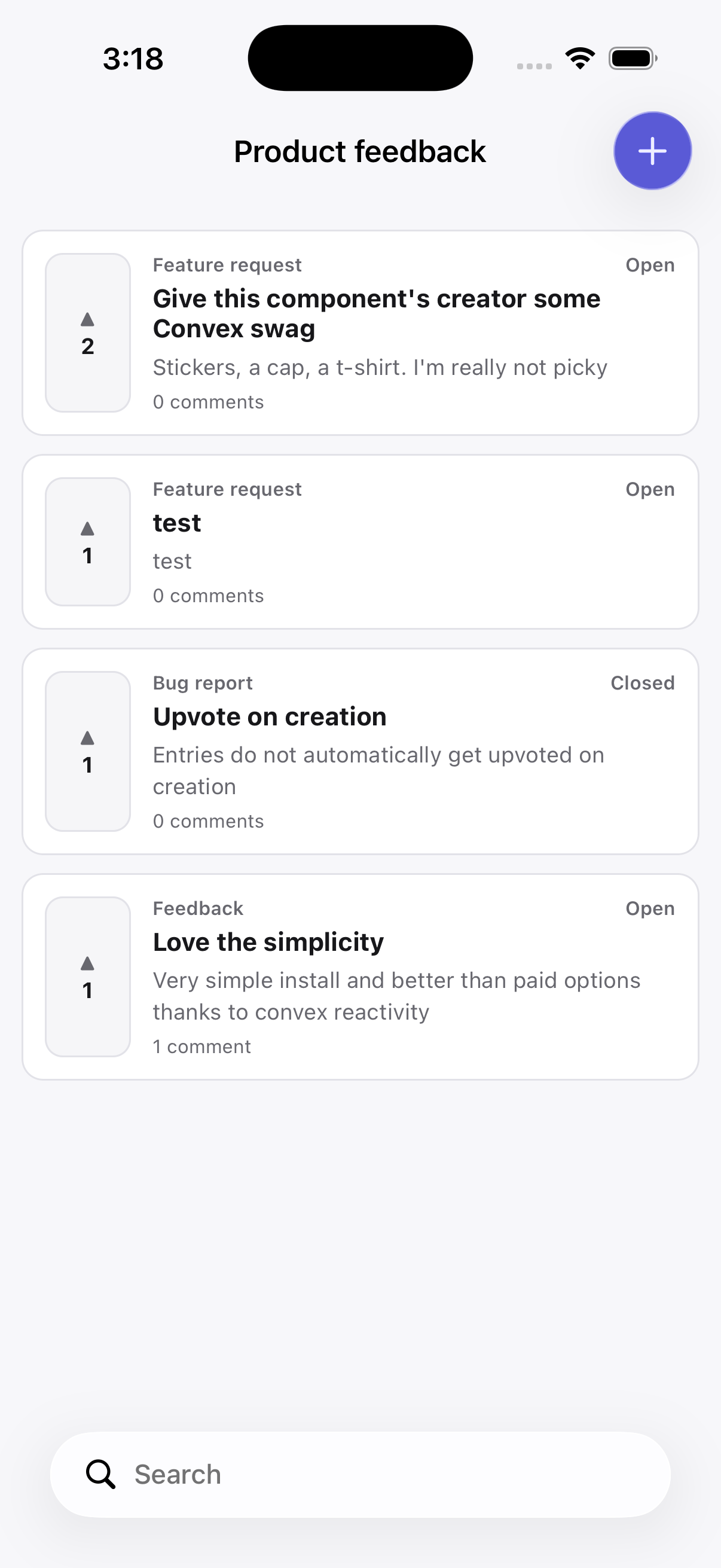
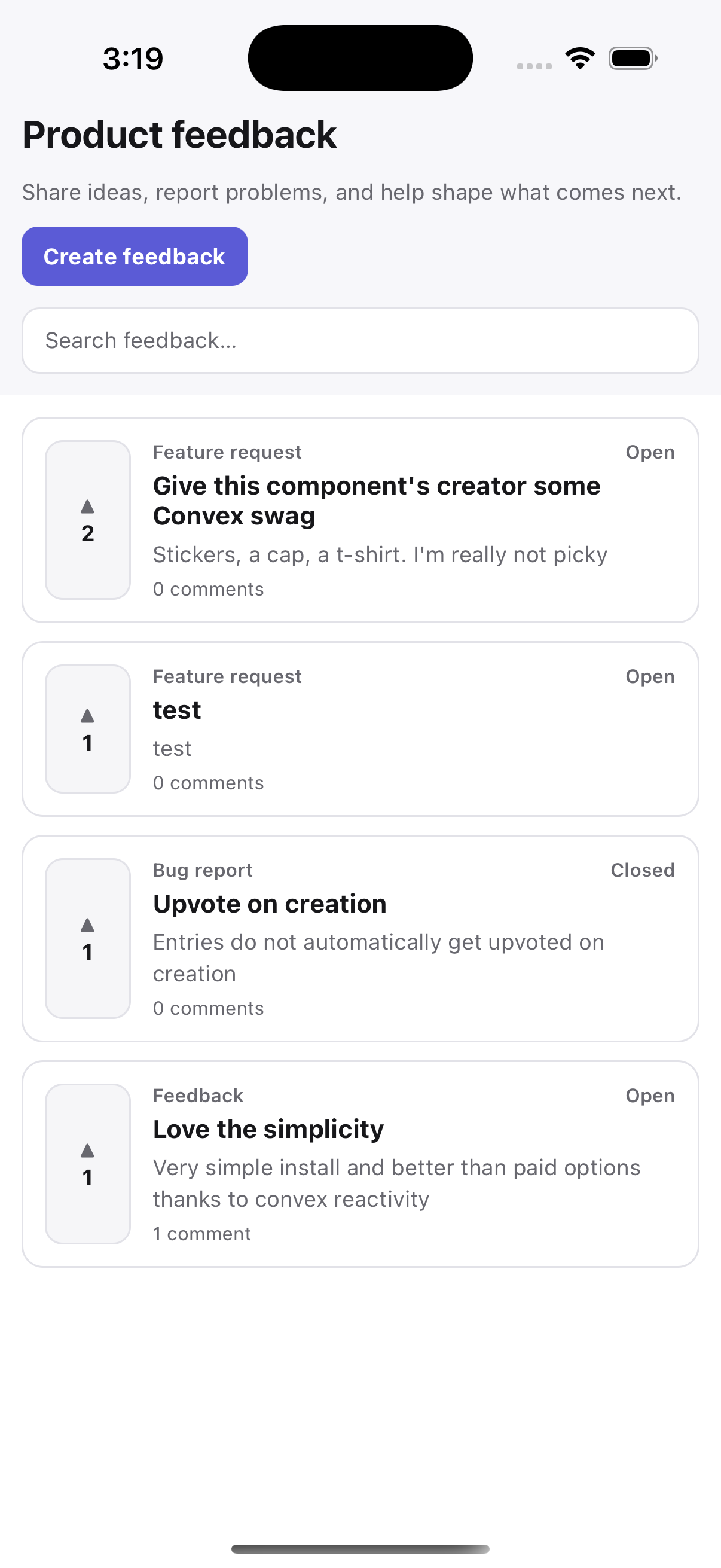
| Expo | React Native |
| --------------------------------------------------------------------------------------------------- | ------------------------------------------------------------------------------------------------------------- |
|  |
|  |
|
convex-feedback is intentionally headless. For a complete board or customizable primitives, install:
npm install convex-feedback-uiThen read [convex-feedback-ui](../convex-feedback-ui/README.md).
Development in this repository
From the monorepo root:
npm install
npm run codegen
npm run test:all
When changing the component's schema or functions, regenerate component code before committing generated output.
License
Apache-2.0