
copilot-proxy-web
v1.0.0
Published
Proxy GitHub Copilot CLI through a PTY with a Web UI, WebSocket streaming, and an HTTP API.

Maintainers
 changyy
Readme
Copilot Proxy
NPM package: copilot-proxy-web.
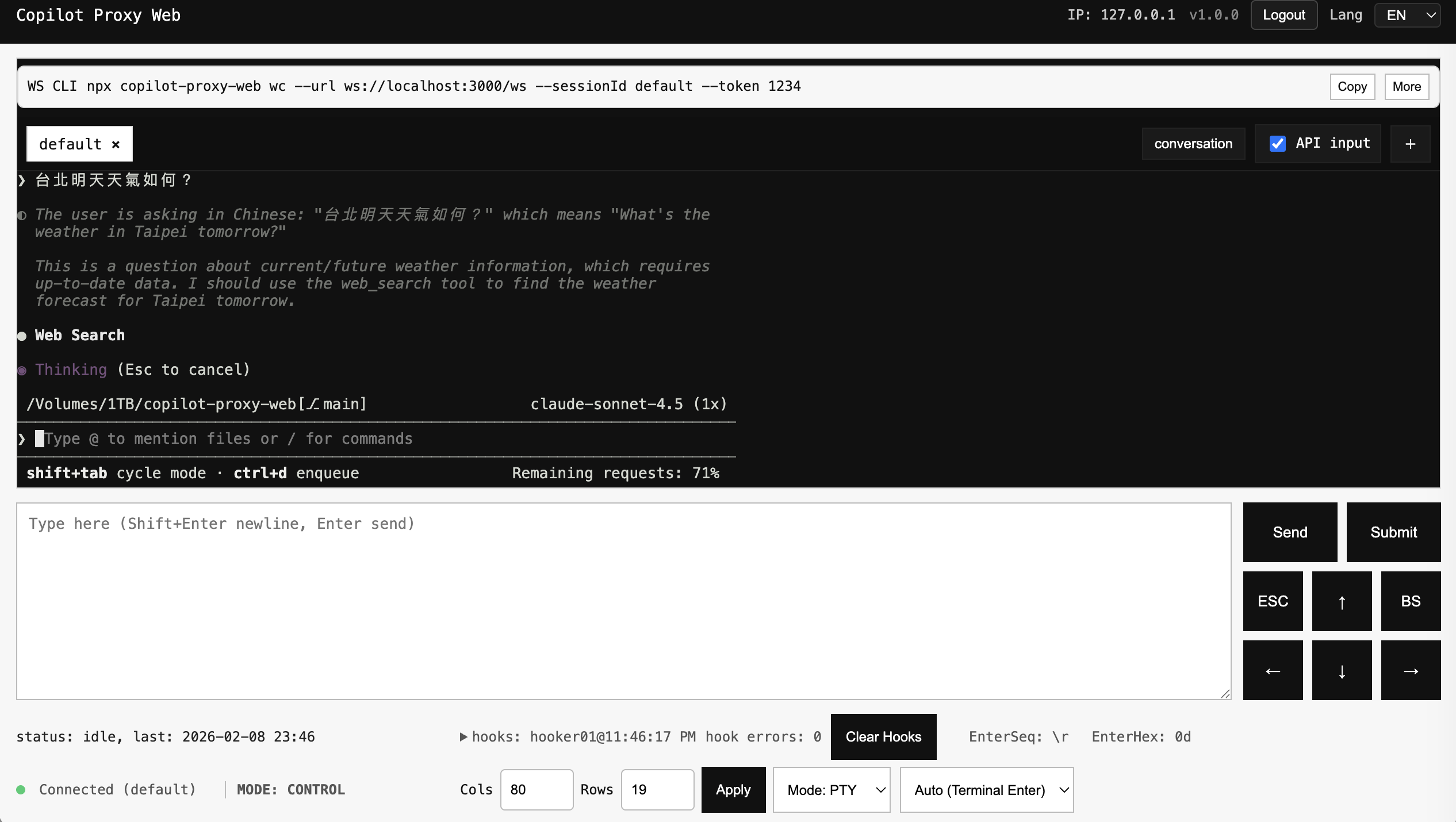
Proxy GitHub Copilot CLI through a PTY with a Web UI, WebSocket streaming, and an HTTP API, plus an idle-based output hook pipeline.
Screenshots
Quickstart
Install:
npm i -g copilot-proxy-webRun Web UI + API:
npx copilot-proxy-web runRecommended run modes:
# Local/default (do not trust proxy headers)
npx copilot-proxy-web run --web --auth-token YOUR_TOKEN

# Behind a trusted reverse proxy (Cloudflare, etc.)
npx copilot-proxy-web run --web --auth-token YOUR_TOKEN --use-x-forwarded-for
For local development:
npm installBackground mode:
npx copilot-proxy-web start
npx copilot-proxy-web status
npx copilot-proxy-web check
npx copilot-proxy-web stop
Trusted reverse proxy mode:
npx copilot-proxy-web start --auth-token YOUR_TOKEN --use-x-forwarded-forOpen Web UI:
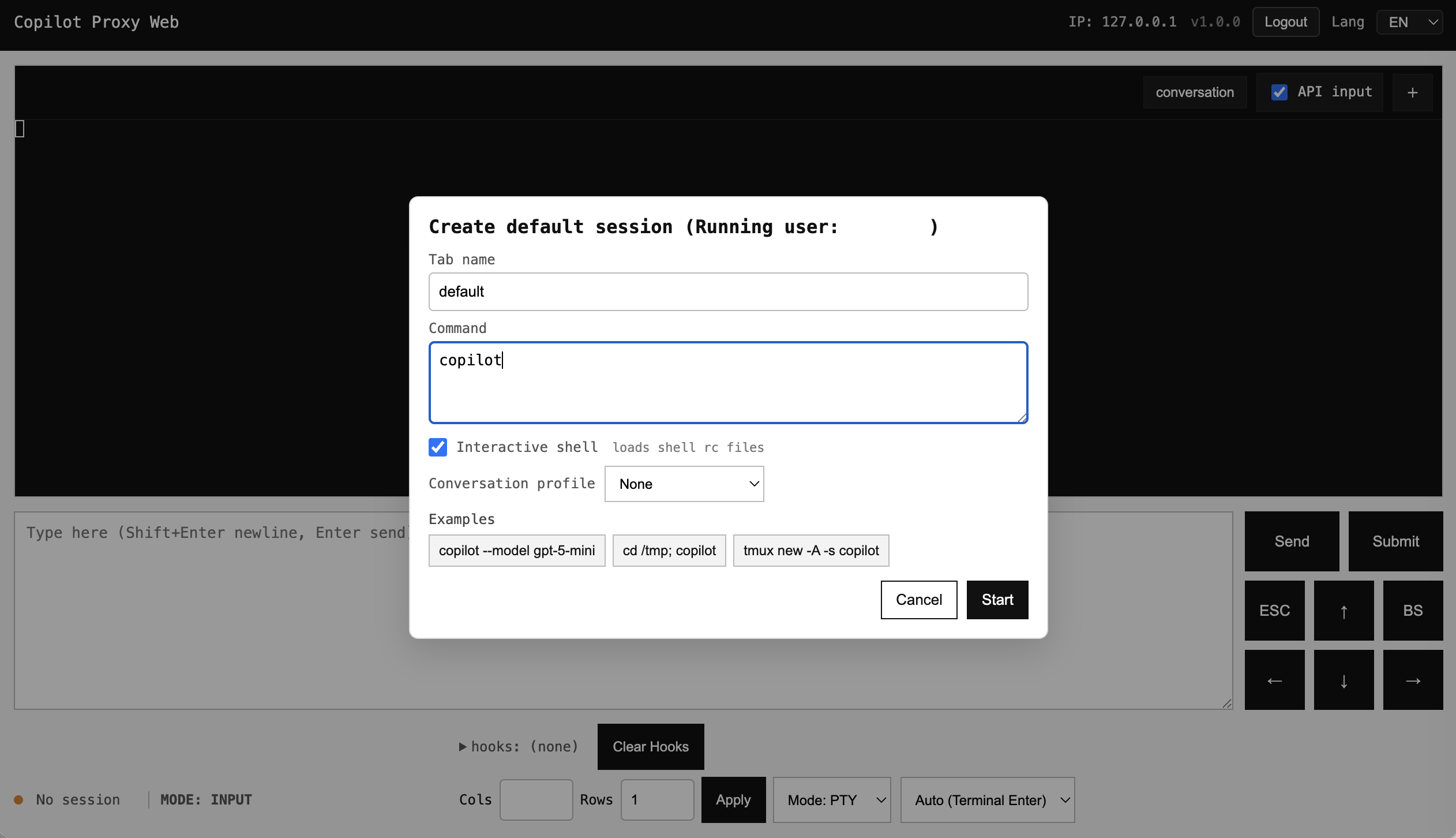
http://localhost:3000Create a session in the Web UI and set the command to run, for example:
copilot --model gpt-5-miniThe session modal includes an "Interactive shell" toggle (default on). When enabled, commands run via a login+interactive shell (-lic).
CLI
Primary commands:
npx copilot-proxy-web run
npx copilot-proxy-web start
npx copilot-proxy-web stop
npx copilot-proxy-web status
npx copilot-proxy-web check
npx copilot-proxy-web wc --url ws://127.0.0.1:3000/ws --sessionId default
npx copilot-proxy-web cloudflare setup --hostname proxy.example.com
WebSocket client (wc)
Basic:
npx copilot-proxy-web wc --url ws://127.0.0.1:3000/ws --sessionId defaultWith AUTH_TOKEN:
AUTH_TOKEN=YOUR_TOKEN npx copilot-proxy-web wc --url wss://proxy.example.com/ws --sessionId defaultWith Cloudflare Access (Service Token):
npx copilot-proxy-web wc \
  --url wss://proxy.example.com/ws \
  --sessionId default \
  --token YOUR_TOKEN \
  --cf-access-id YOUR_ACCESS_ID \
  --cf-access-secret YOUR_ACCESS_SECRET
Custom headers / Origin:
npx copilot-proxy-web wc --url wss://ws.ptt.cc:443/bbs \
  --origin https://term.ptt.cc \
  --header "User-Agent: my-client/1.0"
Cloudflare Zero Trust (Tunnel)
Setup (DNS route is created by cloudflared):
npx copilot-proxy-web cloudflare setup --hostname proxy.example.comDuring setup, the CLI prints a preflight report (DNS route, tunnel, credentials/token).
Optional overrides:
npx copilot-proxy-web cloudflare setup \
  --hostname proxy.example.com \
  --domain example.com \
  --tunnel-name copilot-proxy-web \
  --port 3000 \
  --service http
--domain is optional but recommended. It prevents mismatched zones and allows short hostnames. If omitted, it is auto-inferred from the last two labels of --hostname (e.g. a.b.c.d -> c.d):
npx copilot-proxy-web cloudflare setup --hostname office --domain ainfo.meYou can also pin a longer zone explicitly:
npx copilot-proxy-web cloudflare setup --hostname a.b.c.d --domain b.c.dOr set a full service target (including path):
npx copilot-proxy-web cloudflare setup \
  --hostname proxy.example.com \
  --service-url https://127.0.0.1:3000/
Match a path on the public hostname:
npx copilot-proxy-web cloudflare setup \
  --hostname proxy.example.com \
  --path /path01 \
  --service-url http://127.0.0.1:3000/path02
This maps https://proxy.example.com/path01 to http://127.0.0.1:3000/path02.
Start/stop/status/check:
npx copilot-proxy-web cloudflare start
npx copilot-proxy-web cloudflare status
npx copilot-proxy-web cloudflare check
npx copilot-proxy-web cloudflare diagnose
npx copilot-proxy-web cloudflare stop
Token mode (optional):
npx copilot-proxy-web cloudflare token set --token <TOKEN>
npx copilot-proxy-web cloudflare token get
npx copilot-proxy-web cloudflare token clear
API
Status:
curl http://localhost:3000/api/statusSend text:
curl -X POST http://localhost:3000/api/send \
  -H 'Content-Type: application/json' \
  -d '{"text":"hello", "submit": true}'
Sessions:
curl -X POST http://localhost:3000/api/sessions \
  -H 'Content-Type: application/json' \
  -d '{"id":"s1", "autoStart": false}'

curl -X POST http://localhost:3000/api/sessions/s1/start \
  -H 'Content-Type: application/json' \
  -d '{"command":"copilot --model gpt-5-mini"}'

curl http://localhost:3000/api/sessions
Conversation (JSON):
curl http://localhost:3000/api/sessions/s1/conversationConversation rendering (server-side):
CONVERSATION_CONTEXT(default: 1) adds surrounding lines when emitting terminal deltas.CONVERSATION_PROFILE(default: none) enables optional profile-specific filtering.--conversation-profile copilot|noneoverrides profile per session start.
Web UI deep link:
http://localhost:3000/?sessionId=tab1#conversationopens directly in Conversation view.
Auth (Token)
Enable auth by providing a token (CLI or env). API requests must include:
Authorization: Bearer YOUR_TOKENCLI:
node copilot-proxy.js --auth-token YOUR_TOKEN --web --port 3000 --shell -- copilotWebSocket auth uses Sec-WebSocket-Protocol:
auth.<base64url(token)>Security notes
- Always set
AUTH_TOKENwhen binding to a non-loopback host. X-Forwarded-Foris ignored by default. Enable--use-x-forwarded-for(orUSE_X_FORWARDED_FOR=1) only when running behind a trusted reverse proxy.- Web UI stores the token in
sessionStorage; avoid logging in on shared or untrusted devices. - PTY input/output logs and idle hooks may contain sensitive content; protect or disable logging if needed.
- Cloudflare tunnel credentials and tokens are stored under
~/.cloudflaredand~/.copilot-proxy-web/cloudflare. Treat them as secrets.
TODO
- Conversation: reduce duplicate terminal output in conversation view.
Logs
- Runtime output log follows
--log(default:run.log). - Access ledger is written to
access.logunder the same log directory. - Access entries are JSON lines and include
type,ip,path,status,auth, and timestamp. ACCESS_LOG_MODEcontrols verbosity:auth(default): only auth failures/blocks on/api/*(plus HTTP 5xx).all: log all API/WS access events.off: disableaccess.log.
Web UI notes
- When
--no-default-sessionis used, Web UI starts with no tabs and prompts to create a session. - Session tabs show running/stopped and allow start for stopped sessions.
Tests
npm test
npm run test:ui
npx playwright install
Code layout
copilot-proxy.jsmain runtimebin/run-web.jsCLI entrypublic/Web UIlib/shared helperstest/unit tests