
copilot-reverse
v0.18.0
Published
Interactive terminal app that exposes your GitHub Copilot subscription as local OpenAI- and Anthropic-compatible endpoints, with a self-healing daemon and a built-in assistant.

Maintainers
 wangcansun
Readme
Use the GitHub Copilot subscription you already pay for as a local Claude Code / Codex backend. No new API keys. No per-token bills. One terminal app — and Claude Code feels exactly like the real thing.
Disclaimer: The GitHub Copilot integration uses community-documented, unofficial endpoints, for use with your own Copilot subscription only. It may break if GitHub changes these endpoints.
60-second start
npx copilot-reverse- It asks you to log in to GitHub (device code — paste a code in your browser). One time only.
- The terminal app launches. You'll see a prompt and a status bar.
- In the app, type:
Pick a model (e.g. claude-opus-4.8 (1M)), choose global, done./setup-claude - Open a new terminal and run
claude. It's now talking to Copilot through copilot-reverse. 🎉
That's it. Codex users: run /setup-codex instead.
Here's the app itself — a prompt, a live status bar, and slash-command autocomplete:
 ✳ copilot-reverse                                                       worker: ready

 Type a message to chat with the assistant, or /help for commands.
╭─────────────────────────────────────────────────────────────────────────────────────╮
│ › /setup                                                                              │
╰─────────────────────────────────────────────────────────────────────────────────────╯
  ❯ /setup-claude   print Claude Code config
    /setup-codex    print Codex/OpenAI config
    /setup-status   show configured endpoints
    ↑↓ navigate · tab complete · enter run
 model claude-opus-4.8  ·  daemon ready  ·  claude u:✓ p:○  codex u:✓ p:○  ·  /help
What can I do in the app?
Just talk to it — it understands plain English and will do the work for you:
"list models" → shows every model + its context window "set up claude" → asks scope (global/project) + model, then configures Claude Code "is the worker healthy?" → runs a health check "why did my last request fail?" → shows the error (incl. cut-short stream runaways)
Prefer commands? Type / to see them all. The essentials:
| Command | What it does |
|---|---|
| /setup-claude · /setup-codex | Point Claude Code / Codex at copilot-reverse |
| /model | Switch the chat model (1M-context models marked) |
| /network | Choose access mode: localhost (private) or LAN (shared, key required) |
| /status · /doctor | Is everything healthy? (/status shows each client's scope + model) |
| /logs · /metrics | What ran, what failed, and why |
| /dashboard | Open a live web dashboard in your browser |
| /report | File a pre-filled bug report (diagnostics only — no prompts) |
| /reset-claude · /reset-codex | Undo setup, restore original config |
| /login · /logout | Sign in to GitHub (device-code) · sign out (remove token) |
| /help · /quit | List commands · exit |
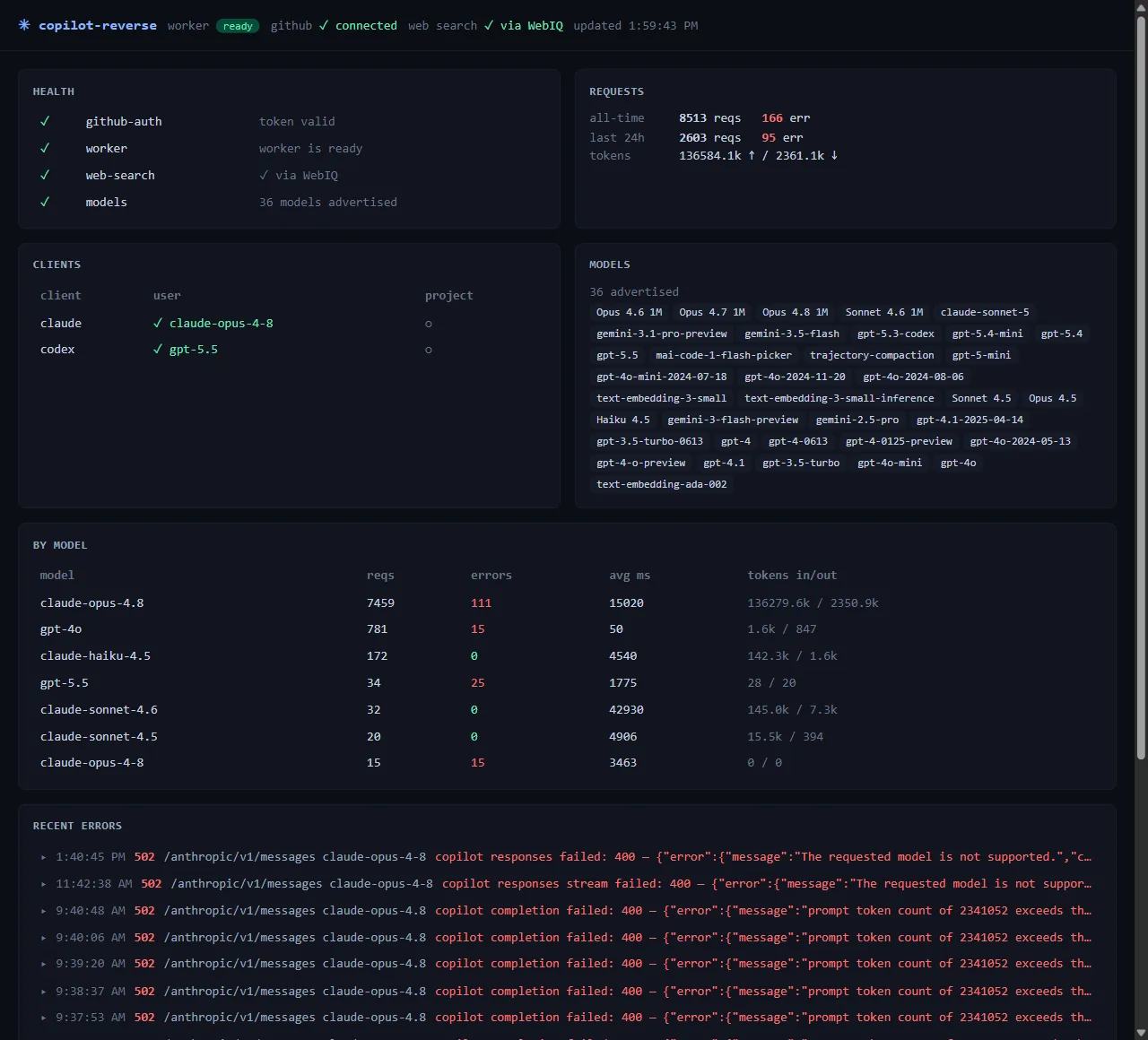
The live dashboard
/dashboard opens a self-refreshing web view of everything happening through the proxy — worker
health, request volume, and (most useful) recent errors with their real messages:
Native experience — it really is Claude Code
The whole point: through copilot-reverse, Claude Code (and Codex) behave like a direct connection to the real thing. We translate the full protocol both ways and pass through the features that matter — so you don't trade fidelity for a free backend.
- 🧠 Extended thinking, rendered natively. Ask a hard question and Claude's reasoning streams into
the same collapsible thinking panel you'd see on a direct API connection — a real
thinkingblock (with its signed continuation token) ahead of the answer, frame-for-frame the Anthropic wire shape. The reasoning context is preserved across tool calls, just like native. - 🎚 Reasoning effort that actually works.
/effort low|medium|high|xhigh|max, thethink/think harder/ultrathinkkeywords,CLAUDE_EFFORT— the effort you pick is read from the realoutput_config.effortwire and forwarded upstream, so dialing reasoning up or down genuinely changes how hard the model thinks. (curl -iand you'll see the applied effort echoed back in anx-copilot-reverse-effortheader.) - 🪟 True 1M-context models. 1M-window models show up in Claude Code's native picker with the right badge, and copilot-reverse writes the correct context-window hint so the client sizes its context bar and auto-compaction to the real window — no more "context 100%" at 15%.
- 🛠 Tool use, vision, web search — both directions. Function/tool calls translate faithfully each
way (even models that emit tool calls as inline XML are recovered), images round-trip, and
web_searchruns server-side through the gateway and comes back as a grounded answer — no tool leaks to the client. - 📊 Accurate usage. Real prompt/completion token counts, with cached tokens split out, so Claude Code's context bar and cost reflect what actually happened.
- 🛡 It never freezes. If a model degenerates (loops on one token, never stops), the proxy cuts the
stream cleanly as
max_tokensinstead of hanging your session — native Claude self-stops, and so does this.
Stability and accuracy are the north star: using Claude through the proxy must feel exactly like native Claude. Every feature above is covered by a live, real-Copilot end-to-end test.
Connect your own tools
Already have something that speaks OpenAI or Anthropic? Point it here:
- OpenAI-compatible:
http://127.0.0.1:7891/openai - Anthropic-compatible:
http://127.0.0.1:7891/anthropic
Any API key value works locally (it's your machine). Example:
export ANTHROPIC_BASE_URL=http://127.0.0.1:7891/anthropic
export ANTHROPIC_API_KEY=local
claude
Share it on your network (LAN mode)
By default the proxy is localhost — bound to 127.0.0.1, reachable only from this machine. To let
another device (a second laptop, a phone, a teammate) use it, run /network and switch to LAN:
- The worker rebinds to all interfaces and the panel shows your LAN URL (e.g.
http://192.168.1.5:7891) and a generated access key. - Your own machine keeps working with no key. The key is required only for requests coming from other machines — anything from this host over
127.0.0.1is served as before. So your local Claude Code / Codex need no change when you flip to LAN. - On the other machine, point your tool at that URL plus the protocol path —
…:7891/anthropicfor Claude Code,…:7891/openaifor Codex/OpenAI — and send the key:Authorization: Bearer <key>(OpenAI/Codex) orx-api-key: <key>(Anthropic/Claude Code). A remote request without a valid key is rejected (401).
# On the remote machine — Claude Code against the shared proxy:
export ANTHROPIC_BASE_URL=http://192.168.1.5:7891/anthropic
export ANTHROPIC_API_KEY=<the key from /network>
claude
For Codex on the remote machine, set the base URL (with the /openai path) and the key in
~/.codex/config.toml — the key goes in the experimental_bearer_token field:
# ~/.codex/config.toml on the remote machine
[model_providers.copilot-reverse]
base_url = "http://192.168.1.5:7891/openai"
experimental_bearer_token = "<the key from /network>"- LAN is fail-closed: you can't enable it without a key, and the proxy refuses to serve if a key ever goes missing — it's never an open relay. Rotate the key anytime from the same panel (remote clients then re-paste the new key). Switch back to localhost to make it private again.
- Firewall: on Windows/macOS, the first time the worker binds all interfaces your OS may prompt to allow it — or you may need to add an inbound allow for port
7891. If a second machine can't connect while the panel shows⚠ LAN, the host firewall is the usual cause.
The supervisor/control plane (dashboard, restart) always stays on localhost — only the model proxy is ever exposed, and only behind the key.
The status bar, decoded
The bottom line of the app tells you everything at a glance:
model claude-opus-4.8 · daemon ready · claude u:✓ p:○ codex u:○ p:○ · /help- worker / daemon — green
readymeans the proxy is up and self-healing. - claude u:✓ p:○ — Claude Code is configured at the user (global) level, not in this project. Read live from your real config files.
- net — your access mode:
localhost(private) or a highlighted⚠ LANwhen the proxy is shared on the network (run/networkto change).
Troubleshooting
"context 100%" or /compact fails in Claude Code
Re-run /setup-claude and pick a 1M model (e.g. claude-opus-4.8 (1M)). copilot-reverse writes
the right context-window hint so the client stops assuming a small window. Then restart Claude Code.
"GitHub login expired" Your Copilot session lapsed. You don't need to restart anything — when a chat fails, copilot-reverse detects it and tells you right there:
assistant error: 401 authentication_error: GitHub login expired
  ↳ your GitHub login looks expired — run /login to sign in again
Just type /login, complete the device-code prompt, and you're back — the worker reloads the new
token automatically. (Switching accounts? /logout first, then /login.)
A request failed and I don't know why
Type /logs (or ask "why did that fail?"). Every failure is captured with its real upstream
message. Still stuck? /report opens a pre-filled GitHub issue with diagnostics — never your
prompt content.
Want to undo everything
/reset-claude and /reset-codex remove exactly the keys copilot-reverse added and leave the rest
of your config untouched.
Good to know
- Your data stays local. The app proxies between your editor and Copilot on
127.0.0.1. Your GitHub token lives only in~/.copilot-reverse/creds.jsonon your own disk. - It heals itself. If the proxy crashes, the supervisor restarts it with backoff and records why.
- A cut-short stream is flagged, not hidden. When the runaway guard ends a degenerate stream early,
it's tagged in
/logsand/reportfiles a prefilled issue — so the rare bad turn is easy to surface. - Tunable.
~/.copilot-reverseconfig covers ports, restart backoff, and the GitHub-token heartbeat interval; defaults are sensible, override only if needed. - Unofficial endpoints. This uses community-documented Copilot endpoints with your own subscription. It may break if GitHub changes them — that's the trade-off for not needing extra keys.
Architecture
Three processes, one terminal app:
- TUI (Ink) — the
copilot-reverseprocess: REPL + slash commands + a claude-agent-sdk assistant (which dogfoods copilot-reverse's own Anthropic endpoint). - Supervisor (:7890) — control API + SQLite + self-healing worker supervision.
- Worker (:7891) — OpenAI
/openai/chat/completions+ Anthropic/anthropic/v1/messages→ Copilot, with tool-use translation both ways. Each protocol also serves a…/modelsdiscovery endpoint.
Development
Requires Node >=20.
npm install && npm test && npm run buildEnd-to-end tests
The e2e/ folder holds cross-module end-to-end scenarios (real worker + supervisor +
TUI wiring, fake Copilot provider). The case catalog is e2e/cases.md and the
latest run is e2e/RESULTS.md.
Every code change must keep the full e2e suite green. npm test runs it (the suite is
included in the default vitest run); npm run test:e2e runs only the e2e cases. After a change,
re-run and update e2e/RESULTS.md.
Test notes
- TUI input tests (
tests/tui/app.test.tsx): the test waits ~30 ms afterrender()before writing tostdin. This is not flakiness padding — Ink'suseInputsubscribes to stdin asynchronously after mount, so writes issued in the same tick asrender()are dropped. The delay lets the subscription attach; assertions are otherwise unchanged.
Questions or bugs? Use /report from inside the app, or open an issue on
GitHub. Happy hacking. 🚀