
cordova-plugin-custom-back-navigation
v1.0.0
Published
Provide custom back navigation for Android 14+

Maintainers
 ollm
ollmReadme
cordova-plugin-custom-back-navigation
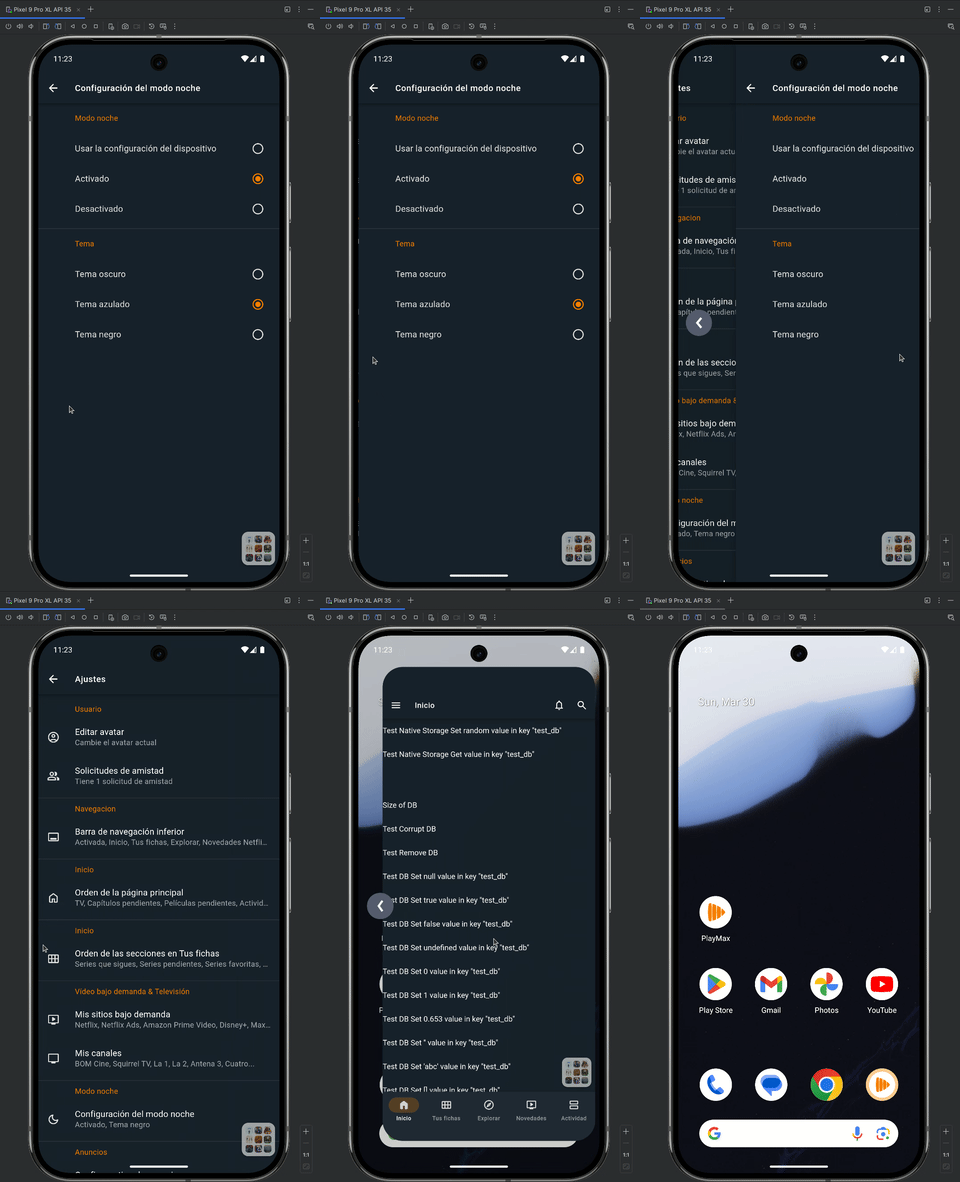
The
CustomBackNavigationobject offers a set of functions to manage and enhance the new custom back navigation introduced in Android 14+. It provides a greater control over back navigation behavior, facilitating smoother transitions, improved gesture handling, and better user experience.
Table of Contents
Installation
cordova plugin add cordova-plugin-custom-back-navigation
Methods
This plugin defines global CustomBackNavigation object.
Although in the global scope, it is not available until after the deviceready event.
document.addEventListener('deviceready', onDeviceReady, false);

function onDeviceReady()
{
    console.log(CustomBackNavigation);
}
Simple example of plugin usage
document.addEventListener('deviceready', onDeviceReady, false);

function onDeviceReady()
{
	CustomBackNavigation.useTouchend();
	CustomBackNavigation.register(true, function(backEvent) {

		switch(backEvent.type)
		{
			case 'started': // Only in Android 14+

				backEvent = {
					type: 'started',
					swipeEdge: 'left', // 'left', 'right' or 'none'
					progress: 0.0,
					touchX: 0.0,
					touchY: 0.0,
					touchInPixelsX: 0.0,
					touchInPixelsY: 0.0,
				}

				CustomBackNavigation.pointerEvents(false);
				CustomBackNavigation.simulateTouchend();

				// Started stuff

				break;
			case 'progress': // Only in Android 14+

				backEvent = {
					type: 'progress',
					swipeEdge: 'left', // 'left', 'right' or 'none'
					progress: 0.0,
					touchX: 0.0,
					touchY: 0.0,
					touchInPixelsX: 0.0,
					touchInPixelsY: 0.0,
				}

				// Progress Stuff

				break;
			case 'cancelled': // Only in Android 14+

				backEvent = {
					type: 'cancelled',
				}

				CustomBackNavigation.pointerEvents(true, 50);

				// Cancelled stuff

				break;
			case 'pressed': // Only in Android 13+

				backEvent = {
					type: 'pressed',
				}

				CustomBackNavigation.pointerEvents(true, 300);

				// Pressed stuff

				break;
		}

	});

}
CustomBackNavigation.register
Registers a callback to detect when a backEvent is fired.
	CustomBackNavigation.register(Boolean nextClosesApp = true, function(backEvent) {

		switch(backEvent.type)
		{
			case 'started': // Only in Android 14+

				backEvent = {
					type: 'started',
					swipeEdge: 'left', // 'left', 'right' or 'none'
					progress: 0.0,
					touchX: 0.0,
					touchY: 0.0,
					touchInPixelsX: 0.0,
					touchInPixelsY: 0.0,
				}

				break;
			case 'progress': // Only in Android 14+

				backEvent = {
					type: 'progress',
					swipeEdge: 'left', // 'left', 'right' or 'none'
					progress: 0.0,
					touchX: 0.0,
					touchY: 0.0,
					touchInPixelsX: 0.0,
					touchInPixelsY: 0.0,
				}

				break;
			case 'cancelled': // Only in Android 14+

				backEvent = {
					type: 'cancelled',
				}

				break;
			case 'pressed': // Only in Android 13+

				backEvent = {
					type: 'pressed',
				}

				break;
		}

});- nextClosesApp Sets if the next go back event closes the app or not. This is necessary to make the back-to-home animation.
CustomBackNavigation.nextClosesApp
Sets if the next go back event closes the app or not. This is necessary to make the back-to-home animation.
CustomBackNavigation.nextClosesApp(Boolean close = true);- close Sets if the next go back event closes the app or not.
CustomBackNavigation.pointerEvents
Sometimes, performing the back gesture can accidentally trigger clicks in the WebView. To prevent this, this applies pointer-events: none to the body tag.
CustomBackNavigation.pointerEvents(Boolean events = true, Int delay = 0);- events Sets if the pointer events are enabled or not.
- delay Sets the delay in milliseconds to enable again the pointer events. This can be used to prevent clicks while an animation/transition is in progress.
CustomBackNavigation.useTouchend
This is necessary to use CustomBackNavigation.simulateTouchend. To simulate a touchend event, data from the previous touchstart event is required. This function registers a touchstart event to capture that data.
CustomBackNavigation.useTouchend();CustomBackNavigation.simulateTouchend
This simulates a touchend event. In some cases, a touchstart event may be fired before the backEvent, but Android/WebView will not send a touchend event once the backEvent has started. As a result, if you are listening for touch events, it may seem like the finger is still touching the screen.
First you have to use CustomBackNavigation.useTouchend()
CustomBackNavigation.simulateTouchend();