
cortico-world-homeassistant
v0.1.0
Published
Home Assistant World for Cortico: read states, control allowlisted devices, trigger scenes and scripts, read history, fetch camera snapshots and push state changes

Maintainers
 zhangyc27
Readme
cortico-world-homeassistant
给 Cortico / Coopanion 用的 World 扩展:让 Coo 接入局域网里的 Home Assistant。
提供六个工具、两类连接事件,以及在状态变化时主动告诉 Coo 的能力。摄像头画面作为工具回执的图片附件返回。
源码仓库:https://github.com/zyc0327/cortico-world-homeassistant
能做什么
| 工具 | 作用 |
|---|---|
| ha_states | 按区域(房间)、域或名称筛选实体,列出当前状态并标注区域;可控设备排在按钮/事件之前 |
| ha_areas | 列出 HA 里已知的房间与各自实体数量,把「书房」这类说法对上区域 |
| ha_get | 读一批实体的完整状态、属性与所在区域 |
| ha_service | 调 HA 服务控制设备(light.turn_on、switch.turn_off、scene.turn_on 等),必须给 entity_id |
| ha_history | 读一个实体最近最多 7 天的状态变化 |
| ha_camera | 从 camera.* 实体抓一张当前画面,作为图片附件 |
区域信息不在 REST 的 /api/states 里:扩展在 WebSocket 连上后用 config/area_registry/list、config/device_registry/list、config/entity_registry/list 读一次,内存里建索引,重连时刷新。
事件:
homeassistant.state_changed:监听列表里的实体状态变化(默认debounce,同实体有冷却)homeassistant.connected/homeassistant.disconnected:WebSocket 连接状态
使用场景
下面是作者家里的真实使用截图。
一句话开关灯
打开卧室灯
Coo 先用 ha_areas / ha_states 把「卧室」对上区域,找到对应的灯或开关实体,再调 ha_service。回执里带区域和实际状态,它只在这之后说「开了」。
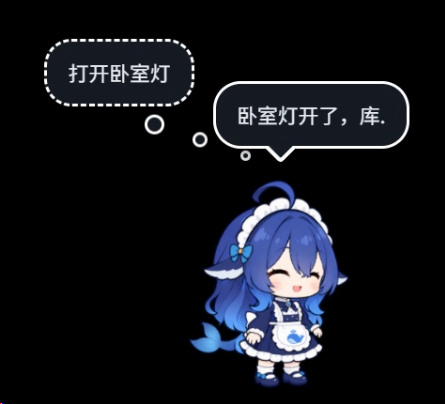
有些集成会把顶灯、墙开关暴露成 switch.*,light 域里可能只有指示灯;扩展的提示词会要求它按名称和区域找到真正可控的实体,而不是控制指示灯。
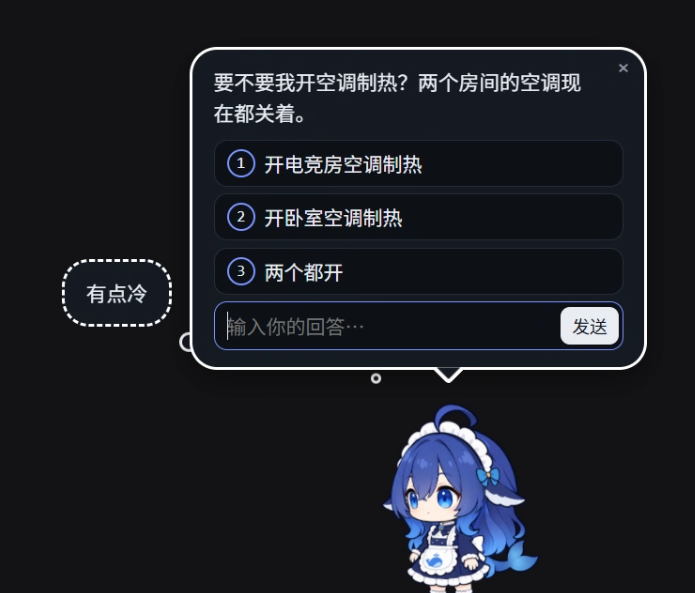
需求模糊时先问
有点冷
Coo 查到两个房间的空调都关着,会把候选列出来让你选,而不是自己猜一间。
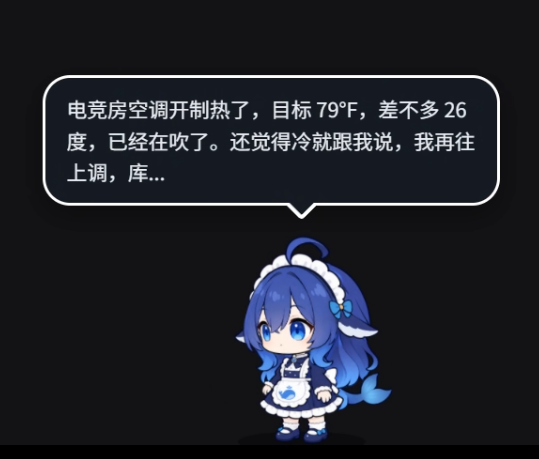
执行后报告实际状态
选了「电竞房空调制热」后,Coo 调 climate.turn_on / climate.set_temperature,再用回执里的目标温度和当前状态回复,而不是只说「已打开」。
更多用法
- 「客厅现在多少度?」→
ha_states按区域和sensor域查。 - 「卧室灯今天什么时候开过?」→
ha_history。 - 「门口有人吗?」→
ha_camera返回一张快照(模型支持图片时)。 - 「灯亮了告诉我」→ 把实体填进
watchEntities,状态变化会作为事件推给 Coo。
安装
扩展不发布到 npm,用本机目录安装:
- 在 Coopanion 的「扩展」页选「手动安装」,填写这个目录的绝对路径(例如
<你的扩展目录>\cortico-world-homeassistant)。 - 重启 Coopanion 进程。
- 在「World 总览」里启用 Home Assistant,按下面的说明配好地址与令牌。
改代码后重启进程即可生效(本机目录以 link 方式装入)。
配置
配置写在部署的 config.json 的 worlds.homeassistant 段,也可以在 World 页里改:
| 键 | 默认 | 说明 |
|---|---|---|
| enabled | false | 是否挂载;由 bot 声明或部署配置启用 |
| baseUrl | http://homeassistant.local:8123 | HA 地址,不带末尾斜杠;改完重启 World 生效 |
| timeoutMs | 10000 | 单次请求与抓图超时,立即生效 |
| allowedDomains | light, switch, scene, script, climate, cover, fan | 逗号分隔;ha_service 允许的域,立即生效 |
| watchEntities | 空 | 逗号分隔;要主动推送的实体,支持 light.living_room 与 light.*;空 = 不推送 |
| eventCooldownSeconds | 30 | 同一实体两次推送的最小间隔 |
shell_command、python_script、hassio、homeassistant、recorder、logger、system_log 这几个域即使写进 allowedDomains 也会被拒绝。
令牌
在 Home Assistant 里创建长期访问令牌:HA 网页 → 左下角用户名 → 「安全」→「长期访问令牌」→ 创建。
在 Coo 的 World 页「令牌」面板里粘贴,点「保存并连接」即可。这是唯一的配置方式,不读环境变量,也不用重启进程:
- 保存的令牌写进部署目录的
.env,变量名是HOME_ASSISTANT_PANEL_TOKEN; - 不写进
config.json,接口不回显令牌;保存后输入框保留内容,密码框显示为星号,刷新页面后显示为星号占位; - 「测试连接」只读地请求
/api/;「清除」删除面板令牌并断开连接; - 旧的
HOME_ASSISTANT_TOKEN(进程环境或.env)已完全不再读取,留着也不会生效,可以删掉。
令牌只用于 Authorization: Bearer,不会写日志。建议给 Coo 单独建一个令牌,需要时可以只撤这一个。
网络与文件
只访问 baseUrl 指向的那台 HA:
GET  {baseUrl}/api/
GET  {baseUrl}/api/states
GET  {baseUrl}/api/states/<entity_id>
POST {baseUrl}/api/services/<domain>/<service>
GET  {baseUrl}/api/history/period/<start>
GET  {baseUrl}/api/camera_proxy/<entity_id>
WS   ws(s)://<同一主机>/api/websocket
     ├─ subscribe_events (state_changed)
     ├─ config/area_registry/list
     ├─ config/device_registry/list
     └─ config/entity_registry/list
不访问 npm、GitHub、遥测或任何其他地址。扩展自己不读写文件:令牌由框架的 ctx.secret() 从部署 .env 读取;不缓存、不落盘。
只支持 http:// 和证书正常的 https://,不支持自签名证书。
隐私
- 设备状态会随工具回执进入模型上下文,发到你自己配置的模型端点——这是它工作的前提。
watchEntities默认为空:不配置就不会有任何主动推送。- 扩展本身不收集、不上传数据;家庭设备、成员与作息属于隐私,提示词里也要求 Coo 不要主动外传。
开发
corepack pnpm install
pnpm typecheck      # 服务端 + 浏览器面板两份 tsconfig
pnpm test           # 先 esbuild 打包 dist/webui.js,再跑 vitest
pnpm build:webui    # 只重新打令牌面板
webUiClient 指向 dist/webui.js;这是提交进包里的浏览器产物,安装时不需要在 Coo 里构建。
Node 22.13 自带的 corepack 密钥过期时,corepack pnpm 会报 Cannot find matching keyid。临时的办法是给这次命令加环境变量(不改系统设置):
$env:COREPACK_INTEGRITY_KEYS='0'; corepack pnpm installcortico 是开发依赖,只给编辑器、类型检查与 vitest 用;装进实例后由宿主的模块钩子解析到它自己运行的那份框架。
自描述写在 describe.json,测试会核对它与代码一致。改了工具、事件或环境提示词后要同步更新它。
反馈与联系
- QQ:130980327
- 邮箱:[email protected]
装进 Coopanion 后如果遇到问题,把 World 页的状态、工具回执或报错贴过来即可。
来源与许可
- 目录结构与接线从 Cortico 官方模板
templates/extension/world复制并改写;Cortico 以 MIT 许可发布,Copyright © 2026 Phantivia。 - Home Assistant 的 REST 与 WebSocket 协议按官方文档实现(https://developers.home-assistant.io/docs/api/rest/、https://developers.home-assistant.io/docs/api/websocket/),未复制其代码或素材。
- 图标
assets/icon.svg为本项目原创。
本包以 MIT 许可发布,见 LICENSE。