
cortico-world-qqbot
v0.4.2
Published
Connects Coo to a QQ bot entry: QR binding, direct and group messages, stickers and media, with QQ's reply limits visible to the model

Maintainers
 phantivia
Readme
QQ Bot (cortico-world-qqbot)




Connects Coo to a QQ bot entry for QQ direct and group messages. Built with Coopanion in mind and usable in any Cortico deployment. Messages go through QQ's official bot API, so no QQ client has to run on the computer and no personal account is at risk.
The World id is qqbot; it can be installed alongside the OneBot-based qq World. Each deployment connects one bot account.
Maintained by Pal AI Lab, originally written by leafliber. npm · Support · Release notes. Deployments moving from cortico-world-qq-official need to bind again.
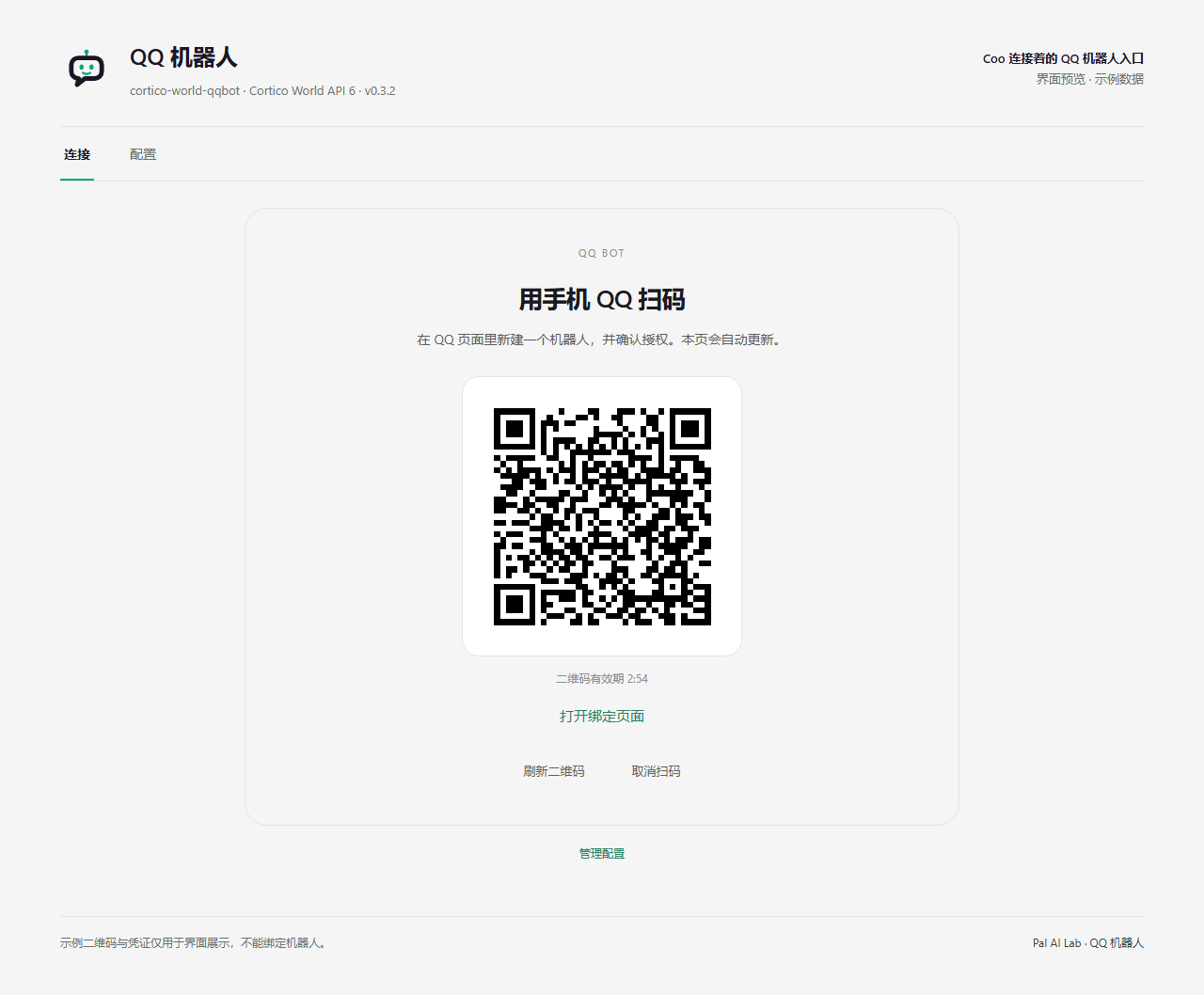
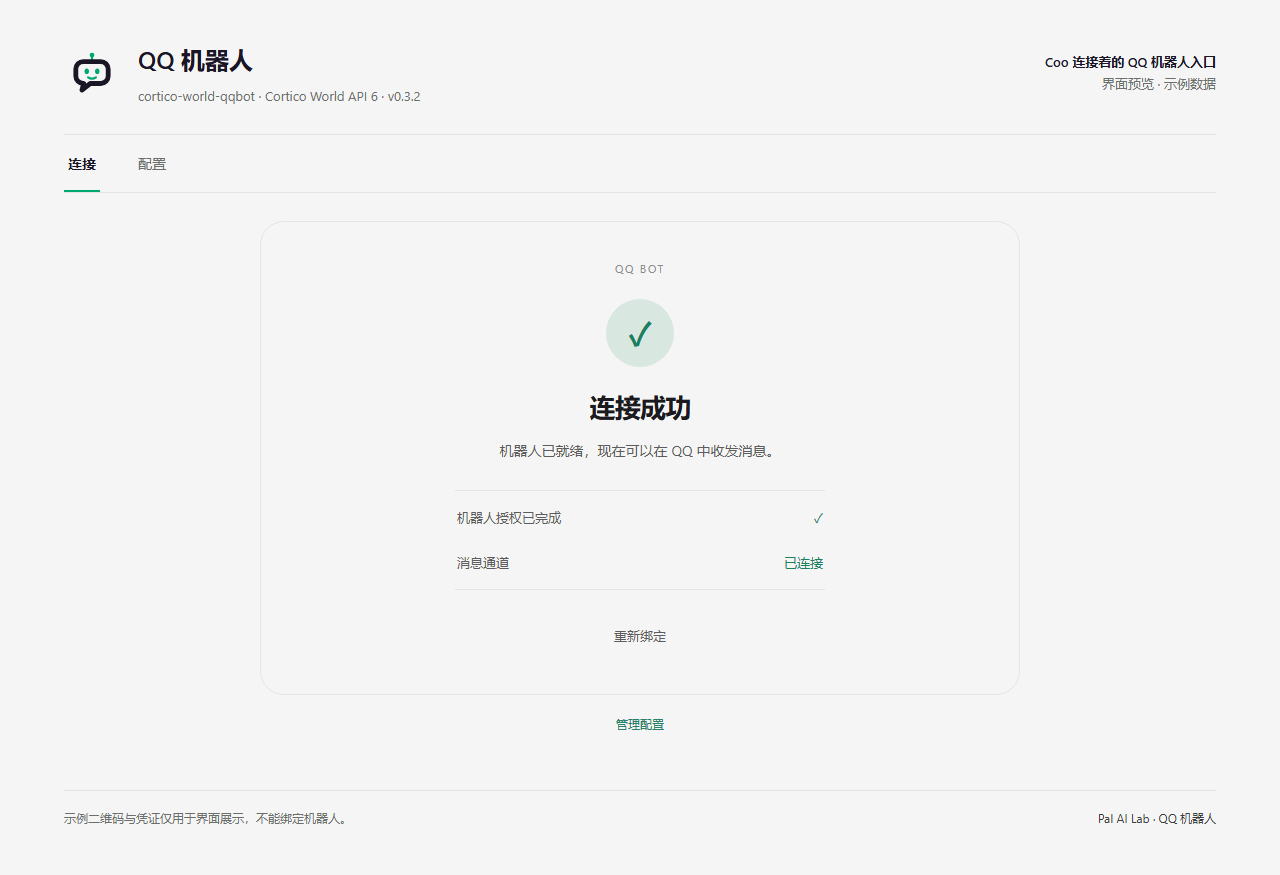
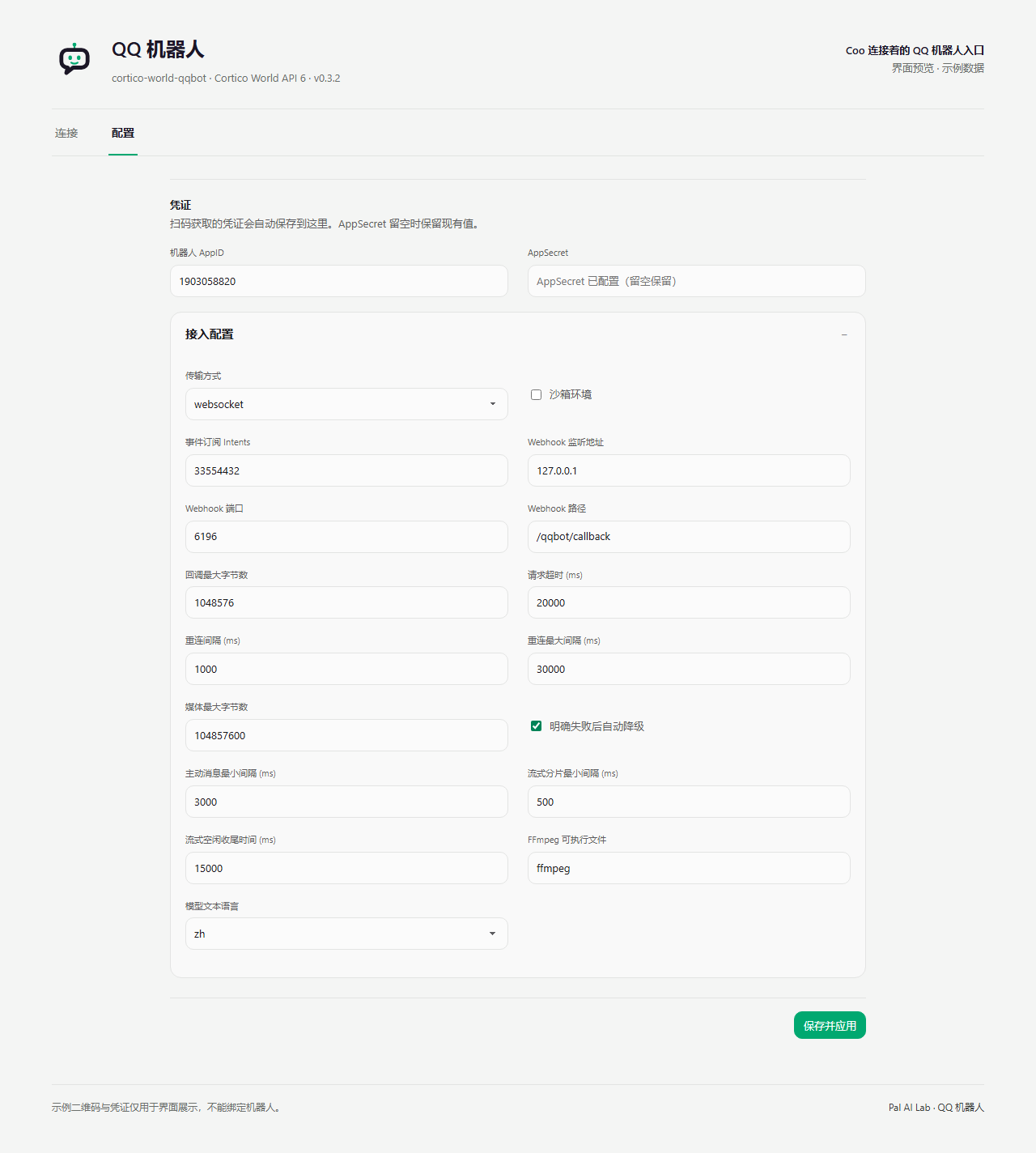
Panel previews
The screenshots render the actual extension panels with Cortico UI components and sample data. They contain no live QR authorization, bot credentials or private conversations. After UI changes, regenerate them with node scripts/screenshots/build.mjs; the steps are at the top of that script.
Install
Requires Node.js 22 or later. Sending voice and handing received voice to the model need FFmpeg (or ffmpegPath); nothing else does. The SILK codec is installed as an npm dependency. The main package targets Cortico World API 6 and is developed against the [email protected] SDK.
In Cortico or Coopanion's extension page, select World and install cortico-world-qqbot from npm. Restart Core to load it. From an existing Cortico installation, the equivalent command is:
cd extensions
corepack pnpm add cortico-world-qqbot
From a checkout:
corepack pnpm install --frozen-lockfile --ignore-scripts
pnpm build
pnpm verify
In Cortico or Coopanion's extension page, choose World → local directory and select this repository. Restart Core to load the extension. For a portable archive, run npm pack --ignore-scripts; the archive contains the runtime source, browser panel and self-description.
For an older host that still uses World API 5, use the API 5 archive from GitHub Releases, or generate it from source:
pnpm pack:api5Select the generated dist/api5 directory in the extension page. The command also produces a .tgz in dist/, with a client-content hash in its API 5 version so the host reloads updated UI assets. This fallback changes the entry point, manifest contract and WebUI method name; it uses the same transport and tool implementation. Regenerate it after source changes.
Connect
On the World's Connection tab, choose to scan with mobile QQ, scan the code, choose create a new bot and authorize it. The page waits for the result, saves the credentials and connects; it shows success once the message channel is ready.
- QR codes expire after about three minutes and are renewed automatically, three times in a row before the page waits for Refresh QR code.
- The credentials are tried for an API token before they are saved. When none comes back (seen after picking an existing bot), the page asks for a new scan and saves nothing.
- A scanned bot is a personal bot: by default only you can message it directly; it can join only groups you own or manage; anyone else must be added as a test user under Development settings on the QQ open platform.
- While the bot is not connected, mobile QQ shows it as offline.
AppID, AppSecret and transport settings live on the Configuration tab, where credentials can also be entered by hand. The AppSecret is shown only as configured. AppID is stored at worlds.qq-official.appId; the AppSecret is stored through WorldContext.storeSecret as CORTICO_QQBOT_APP_SECRET in the deployment environment. Leaving AppSecret blank keeps the saved value for the same AppID; a new AppID needs a new AppSecret.
The binding page is QQ's /qqbot/openclaw/connect.html. This extension is unrelated to the OpenClaw project and only uses QQ's binding and bot APIs.
The default transport is the WebSocket gateway with intents 33554432 (direct messages, group @-messages and all group messages). To receive group messages that do not @ the bot, the group owner sets the bot's message range to all messages on its profile page.
For Webhooks, set transport to webhook and point QQ's callback URL at the configured path. The default listener is 127.0.0.1:6196/qqbot/callback; provide the public entry through an HTTPS reverse proxy (QQ accepts ports 80, 443, 8080 and 8443). A Webhook connection state means the local server is listening, not that QQ has called it.
Limits and stickers
QQ's limits on the bot entry are in the environment prompt, each with a way to handle it. Every send receipt says whether the message went out as a reply, a proactive or a wakeup message, and how many replies and how much time remain; platform rejections name the limit they hit.
| Limit | Basis | | --- | --- | | Direct chats: up to 4 replies within 30 minutes of each message | Documented as 60 minutes and 4 replies; on 10-27 a reply 31 minutes later still arrived, and 30 minutes leaves margin | | Groups and channels: up to 5 replies within 5 minutes of a message | Documentation | | Anything beyond that is proactive, and the recipient can turn proactive messages off | Documentation; proactive direct messages were delivered on 10-27 | | Wakeup messages exist only in direct chats: four periods in the 30 days after the person last wrote, one each | Documentation; a second one in the same period returned 40034122 | | Messages older than 2 minutes cannot be recalled | Documentation | | Stickers go out as images; no faces, pokes or reactions | Documentation |
Without a reply target, a message replies to the latest message in that conversation that still accepts one, and is proactive only when none does. A proactive direct message refused with 40054013 or 40034105, or sent to someone who turned proactive messages off, goes out as the period's wakeup message instead.
The prompt asks Coo to keep stickers in a dedicated place in its memory, describe the picture and when it fits wherever a name can go, and use stickers freely, in the same message as the text. Where and how they are stored is up to the Persona; a Persona that cannot keep files works as before.
Event flow
Incoming messages become qqbot.message; interactions, relationship changes and other dispatches become qqbot.notice. Both use origin: external and trigger: debounce. Core stores and batches them; the Persona decides whether to act. Raw content, mentions, references, attachments and message_scene remain in meta.data.
The text that reaches the model has the same shape as Cortico's built-in QQ World, one line per message:
#12 [DM 21:32] user (A1B2C3): [reply to #11] there? [emoji:呲牙] [image]
#13 [DM 21:33] you: here
#14 [group 9F2E01 21:34] Alice (7C4D10): @you look
[system] DM user (A1B2C3) turned off your proactive messages
#n is a short number the World assigns to a QQ message; tool arguments reply_to, message and before take it. Each sender is shown as name (tail). The tail is the last 6 characters of the sender's union_openid when QQ sends a non-empty one, otherwise of the id QQ uses in that conversation (user_openid in direct chats, member_openid in groups, the user id in channels), so a changed nickname keeps the same tail. Groups show the sender's QQ nickname, since QQ sends no group nickname; direct chats usually carry no name, and a missing name reads user or member; channels show nicknames. The full ids are in meta.sender (openid, plus union_openid when present). Faces render by name, quotes of recorded messages as [reply to #n], unrecorded quotes with their text. Attachments show as [image], [voice], [video name] or [file name]. Send receipts read [sent #n → conversation, reply] and state whether the message went out as a reply, proactive or wakeup message, and any downgrade. The environment prompt lists known conversations and their addresses.
Each message carries a routing target; tools write addresses as c2c:<OpenID>, group:<group OpenID>, channel:<channel ID> or dms:<guild_id>:
| target.kind | target.id |
| --- | --- |
| c2c | author.user_openid |
| group | group_openid |
| channel | channel_id |
| dms | The direct message's private guild_id |
Message IDs are deduplicated per platform event type and target; notices use their event ID when present. The in-memory cache keeps 10,000 identities and is restored from the most recent 10,000 stored World events. WebSocket reconnects resume from the last persisted sequence during the running World instance. A process restart creates a new gateway session.
Outgoing sequence reservations (qqbot.attempt) and platform receipts (qqbot.sent, qqbot.removed, qqbot.acknowledged) are archived with deliver: false. Sending therefore does not wake the Persona again. Sent records include the request and platform response; API acceptance does not prove recipient read status. HTTP 401 triggers one authentication retry. Explicit rate limits allow at most two retries, each waiting no more than five seconds. Configured downgrades handle only explicit rejections: expired reply anchors can become proactive sends, and denied Markdown can become text. Content moderation, permissions and quotas are not bypassed. Timeouts, HTTP 5xx or missing message IDs leave delivery unknown and never trigger an automatic resend.
Tools
| Tool | Contract |
| --- | --- |
| qqbot_send_message | Text, optionally with one image or a voice bar on its own, each a log:/mem: handle or public URL; quote=true shows the quote; optional native keyboard object. |
| qqbot_send_media | Video, files or several images: exactly one public URL or host-managed log:/mem: attachment; local paths are rejected; types 1 image, 2 video, 3 voice, 4 file. items sends up to eight sequentially. |
| qqbot_stream_message | followModel=true forwards the next model round’s public reply to a selected target; also supports manual C2C parts. |
| qqbot_delete_message | Recall a bot message in the given target. |
| qqbot_list_targets | Known targets, recent reply anchors and proactive reception state for this AppID. |
| qqbot_read_history | Message history for this AppID as lines, optionally for one conversation (to); before takes a message number. |
| qqbot_read_attachment | Read by message number and 1-based attachment index; quoted=true reads from the quoted message. Voice becomes WAV for Core. |
| qqbot_ack_interaction | Explicit platform acknowledgement with a result code from 0 to 5. |
Address with to; reply_to takes a message number, replies to it and uses its conversation, so to can be omitted. An unrecorded number is passed to QQ as a message ID. eventId replies to an event and excludes reply_to. delivery supports reply, proactive, auto and wakeup. auto chooses a recent anchor within a conservative age and sequence budget, then uses proactive delivery when none is available. wakeup requires C2C and platform permission. Omitting both anchors and delivery means auto. Known opt-outs or removed-bot relationships block proactive sends locally; passive replies remain possible. Target state and sequence reservations are restored from this account’s archive.
Scheduled notifications use the host’s existing alarm_set, alarm_list and alarm_cancel. Preserve the conversation address from qqbot_list_targets in the reminder, then send with delivery=proactive when awakened. The extension adds no scheduler. By default, each proactive attempt waits three seconds after the previous attempt completes, including rejected attempts and fallback retries. QQ permissions, quotas and recipient settings still apply.
followModel=true explicitly selects a target and forwards only the next round’s public text, excluding reasoning and tool arguments. Anchored C2C replies stream at the configured interval; proactive notifications, groups, channels and guild DMs buffer into ordinary messages. Explicit streaming endpoint 404/405 responses also enable buffered delivery. Round end, another tool call, cancellation, conversation changes and idle timeouts close the reply. Manual C2C parts use content, reuse the returned streamId, and retain the target, format, anchor and sequence; finish defaults to true. Partial failures never replay the complete reply. Uncertain continuations remain blocked after process restart.
Attachment reads accept HTTPS URLs on qq.com, qq.com.cn, qpic.cn, ugcimg.cn and their subdomains, checking every redirect and omitting bot authentication headers. Core decides whether the current model supports the returned MIME type. URLs and metadata alone are not treated as image or audio perception.
Channels and guild DMs support text, Markdown, remote images and multipart host attachments. C2C and groups support images, voice, video and files. The default media read limit is 100 MiB; outgoing limits are additionally 30 MiB for images, 20 MiB for voice and 100 MiB for video/files. QQ may impose tighter limits. Files of 5 MiB or more use chunked uploads with plan validation, per-part confirmation and final merge. Uploaded handles are cached according to QQ’s TTL. Media batches stop on failure and return accepted items plus the failing index, without replaying the batch.
Outgoing voice is decoded by FFmpeg to 24 kHz mono PCM and encoded as Tencent SILK. Incoming SILK and common audio become WAV, bounded to ten minutes. Missing FFmpeg or malformed audio produces an explicit error. Audio URL downloads validate public addresses and pin DNS at every redirect; decoding disables nested file/network protocols. Speech recognition is left to an audio-capable model through Core. Interaction acknowledgements require an explicit tool call within QQ’s deadline.
From 0.2.3, qqbot_send_media accepts only public HTTP(S) URLs or existing attachments resolved through Core’s log: / mem: store. It does not open model-supplied filesystem paths. Legacy path arguments, file: URLs and path traversal disguised as attachment handles are rejected, including in batches. fileName is display metadata only. FFmpeg receives audio bytes through stdin with only the pipe protocol enabled; the model cannot supply commands or conversion options.
To send a local image, audio clip, video or document, first upload it through the host’s attachment flow or use an attachment produced by a host tool. Pass the returned log: / mem: handle as blob, the original filename as fileName, and the corresponding fileType (1 image, 2 video, 3 voice, 4 file). Audio conversion, channel image uploads, chunking and batch sending remain available. Existing scripts using path must migrate to blob or a public url. No general filesystem permission can be enabled in this extension.
Configuration
All keys are under worlds.qq-official. Defaults and validation are in src/config.ts.
| Key | Default | Effect |
| --- | --- | --- |
| enabled | false | Host-controlled activation. |
| appId | empty | Bot identity; requires restart. |
| transport | websocket | websocket or webhook; requires restart. |
| sandbox | false | QQ sandbox API endpoint; requires restart. |
| intents | 33554432 | Gateway event subscription bitmask; requires restart. |
| webhook.host, port, path | 127.0.0.1, 6196, /qqbot/callback | Listener address; requires restart. |
| webhook.maxBodyBytes | 1048576 | Callback size limit; requires restart. |
| timeoutMs | 20000 | Network timeout; requires restart. |
| reconnectMs, maxReconnectMs | 1000, 30000 | Gateway reconnect backoff bounds; requires restart. |
| maxMediaBytes | 104857600 | Media read limit, also capped by outgoing type limits; immediate. |
| autoFallback | true | Downgrade explicit rejections; override per call with fallback=false. |
| proactiveIntervalMs | 3000 | Minimum proactive send interval. |
| streamIntervalMs | 500 | Minimum stream part interval. |
| streamIdleMs | 15000 | Close streams after this idle period. |
| ffmpegPath | ffmpeg | Audio converter executable. |
| modelLanguage | zh | Model-facing Chinese or English; takes effect immediately. |
The operator panel supports all eleven Cortico UI languages. Model instructions live in src/model-text.ts; UI copy lives in src/strings.ts.
Development and distribution
pnpm describe regenerates describe.json. pnpm check:extension runs the SDK's manifest, construction and self-description validators without starting a connection. Optional built-ins missing from the published SDK's dependencies are excluded from tool-name collision checking, with a warning. The package metadata follows the Cortico extension registry; registration in that registry and publication to npm are separate operations.
Publishing a GitHub Release runs the release workflow: it verifies and builds the package, attaches the main and API 5 compatibility tarballs to the release, and publishes the main tarball to npm with provenance. Draft releases do not publish. The release tag must exactly match v<package.json version> (for example, v0.2.1). Stable versions use npm's latest tag; GitHub pre-releases and versions with a prerelease suffix use next. The API 5 tarball is only attached to GitHub Releases.
Before the first automated release, configure a Trusted Publisher in the npm package's settings:
- Provider: GitHub Actions
- Organization or user:
Pal-AI-Lab - Repository:
cortico-world-qqbot - Workflow filename:
release.yml - Environment name: leave empty
- Allowed actions: enable direct publishing with
npm publish
The workflow uses OIDC on a GitHub-hosted runner, so no NPM_TOKEN secret is needed. If the package does not exist on npm yet, publish it once from an authenticated local environment before configuring its trusted publisher. For each subsequent release, update package.json and CHANGELOG.md, commit the changes, and publish a GitHub Release at the matching tag. Use a new, unpublished npm version each time; the workflow does not bump versions automatically.
Tests use real local HTTP/WebSocket servers, Ed25519 and AES-GCM, the Cortico JSONL event store, and the SDK's browser UI primitives. They cover persistence, reconnection, deduplication, proactive throttling and opt-outs, model reply streaming, downgrades, uncertain-delivery recovery, chunked transfers, real audio codecs, media boundaries, binding and panel disposal. Automated tests never contact QQ or use an operator deployment. Live service checks run separately. The experimental tag remains because permissions and media support require validation for each QQ application.
Protocol references: AstrBot QQ Official, AstrBot Webhook, and QQ's API documentation. This package contains an independent TypeScript implementation; no AstrBot runtime is needed.
Licensed under AGPL-3.0-or-later; see LICENSE.