
crann
v2.1.0
Published
Effortless State Synchronization for Web Extensions

Maintainers
 mocleye
Readme
Crann: Effortless State Synchronization for Web Extensions

npm i crann
Table of Contents
- Core Features
- Quick Start
- Configuration
- Store API (Service Worker)
- Agent API (Content Scripts, Popup, etc.)
- React Integration
- RPC Actions
- State Persistence
- Migration from v1
Core Features
- Minimal size (< 5kb gzipped)
- Multi-context sync - Content Scripts, Service Worker, Devtools, Sidepanels, Popup
- No message boilerplate - Eliminates
chrome.runtime.sendMessage/onMessage - Reactive updates - Subscribe to state changes
- Persistence - Optional local or session storage
- Full TypeScript - Complete type inference from config
- React hooks - First-class React integration via
crann/react - RPC Actions - Execute logic in the service worker from any context
Quick Start
1. Define Your Config
// config.ts
import { createConfig, Persist } from "crann";

export const config = createConfig({
  name: "myExtension", // Required: unique store name
  version: 1, // Optional: for migrations

  // Define your state
  isEnabled: { default: false },
  count: { default: 0, persist: Persist.Local },

  // Define actions (RPC)
  actions: {
    increment: {
      handler: async (ctx, amount: number = 1) => {
        return { count: ctx.state.count + amount };
      },
    },
  },
});
2. Initialize the Store (Service Worker)
// service-worker.ts
import { createStore } from "crann";
import { config } from "./config";

const store = createStore(config);

store.subscribe((state, changes) => {
  console.log("State changed:", changes);
});
3. Connect from Any Context
// popup.ts or content-script.ts
import { connectStore } from "crann";
import { config } from "./config";

const agent = connectStore(config);

agent.onReady(() => {
  console.log("Connected! Current state:", agent.getState());

  // Update state
  agent.setState({ isEnabled: true });

  // Call actions
  agent.actions.increment(5);
});
4. Use with React
// hooks.ts
import { createCrannHooks } from "crann/react";
import { config } from "./config";

export const { useCrannState, useCrannActions, useCrannReady } =
  createCrannHooks(config);

// Counter.tsx
function Counter() {
  const count = useCrannState((s) => s.count);
  const { increment } = useCrannActions();
  const isReady = useCrannReady();

  if (!isReady) return <div>Loading...</div>;

  return <button onClick={() => increment(1)}>Count: {count}</button>;
}
Configuration
The createConfig function defines your store schema:
import { createConfig, Scope, Persist } from "crann";

const config = createConfig({
  // Required: unique identifier for this store
  name: "myStore",

  // Optional: version number for migrations (default: 1)
  version: 1,

  // State definitions
  count: { default: 0 },

  // With persistence
  theme: {
    default: "light" as "light" | "dark",
    persist: Persist.Local, // Persist.Local | Persist.Session | Persist.None
  },

  // Agent-scoped state (each tab/frame gets its own copy)
  selectedElement: {
    default: null as HTMLElement | null,
    scope: Scope.Agent, // Scope.Shared (default) | Scope.Agent
  },

  // Actions (RPC handlers)
  actions: {
    doSomething: {
      handler: async (ctx, arg1: string, arg2: number) => {
        // ctx.state - current state
        // ctx.setState - update state
        // ctx.agentId - calling agent's ID
        return { result: "value" };
      },
      validate: (arg1, arg2) => {
        if (!arg1) throw new Error("arg1 required");
      },
    },
  },
});
Store API (Service Worker)
The Store runs in the service worker and manages all state:
import { createStore } from "crann";

const store = createStore(config, {
  debug: true, // Enable debug logging
});

// Get current state
const state = store.getState();

// Update state
await store.setState({ count: 5 });

// Get agent-scoped state for a specific agent
const agentState = store.getAgentState(agentId);

// Subscribe to all state changes
const unsubscribe = store.subscribe((state, changes, agentInfo) => {
  console.log("Changed:", changes);
});

// Listen for agent connections
store.onAgentConnect((agent) => {
  console.log(`Agent ${agent.id} connected from tab ${agent.tabId}`);
});

store.onAgentDisconnect((agent) => {
  console.log(`Agent ${agent.id} disconnected`);
});

// Get all connected agents
const agents = store.getAgents();
const contentScripts = store.getAgents({ context: "contentscript" });

// Clear all state to defaults
await store.clear();

// Destroy the store (cleanup)
store.destroy();
// Or clear persisted data on destroy:
store.destroy({ clearPersisted: true });
Agent API
Agents connect to the store from content scripts, popups, and other contexts:
import { connectStore } from "crann";

const agent = connectStore(config, {
  debug: true,
});

// Wait for connection to be ready
agent.onReady(() => {
  console.log("Connected!");
});

// Or use the promise
await agent.ready();

// Get current state
const state = agent.getState();

// Update state
await agent.setState({ count: 10 });

// Subscribe to changes
const unsubscribe = agent.subscribe((changes, state) => {
  console.log("State changed:", changes);
});

// Call actions (RPC)
const result = await agent.actions.doSomething("arg1", 42);

// Get agent info
const info = agent.getInfo();
// { id, tabId, frameId, context }

// Handle disconnect/reconnect
agent.onDisconnect(() => console.log("Disconnected"));
agent.onReconnect(() => console.log("Reconnected"));

// Clean up
agent.disconnect();
React Integration
Import from crann/react for React hooks:
import { createCrannHooks } from "crann/react";
import { config } from "./config";

// Create hooks bound to your config
export const {
  useCrannState,
  useCrannActions,
  useCrannReady,
  useAgent,
  CrannProvider,
} = createCrannHooks(config);
useCrannState
Two patterns for reading state:
// Selector pattern - returns selected value
const count = useCrannState((s) => s.count);
const theme = useCrannState((s) => s.settings.theme);

// Key pattern - returns [value, setValue] tuple
const [count, setCount] = useCrannState("count");
setCount(10); // Updates state
useCrannActions
Returns typed actions with stable references (won't cause re-renders):
const { increment, fetchData } = useCrannActions();

// Actions are async
await increment(5);
const result = await fetchData("https://api.example.com");
Important: Event Handler Usage
When using actions as event handlers, always wrap them in an arrow function:
// ✓ Correct
<button onClick={() => increment()}>Click me</button>

// ✗ Incorrect - will fail silently
<button onClick={increment}>Click me</button>
Why? When you pass
incrementdirectly, React calls it with aMouseEventas the first argument. DOM events are not serializable and cannot be sent through Chrome's messaging API, causing the action to fail silently.In development mode, Crann will log a warning if it detects an event being passed to an action.
useCrannReady
Check connection status:
const isReady = useCrannReady();

if (!isReady) {
  return <LoadingSpinner />;
}
CrannProvider (Optional)
For testing or dependency injection:
// In tests
const mockAgent = createMockAgent();

render(
  <CrannProvider agent={mockAgent}>
    <MyComponent />
  </CrannProvider>
);
RPC Actions
Actions execute in the service worker but can be called from any context:
// In config
const config = createConfig({
  name: "myStore",
  count: { default: 0 },

  actions: {
    increment: {
      handler: async (ctx, amount: number = 1) => {
        const newCount = ctx.state.count + amount;
        // Option 1: Return state updates
        return { count: newCount };

        // Option 2: Use ctx.setState
        // await ctx.setState({ count: newCount });
        // return { success: true };
      },
    },

    fetchUser: {
      handler: async (ctx, userId: string) => {
        // Runs in service worker - can make network requests
        const response = await fetch(`/api/users/${userId}`);
        const user = await response.json();
        return { user };
      },
      validate: (userId) => {
        if (!userId) throw new Error("userId required");
      },
    },
  },
});

// From any context (popup, content script, etc.)
const agent = connectStore(config);
await agent.ready();

const result = await agent.actions.increment(5);
console.log(result.count); // 5

const { user } = await agent.actions.fetchUser("123");
console.log(user.name);
ActionContext
Action handlers receive a context object:
interface ActionContext<TState> {
  state: TState; // Current state snapshot
  setState: (partial: Partial<TState>) => Promise<void>; // Update state
  agentId: string; // Calling agent's ID
  agentLocation: BrowserLocation; // Tab/frame info
}
State Persistence
Control how state is persisted:
import { createConfig, Persist } from "crann";

const config = createConfig({
  name: "myStore",

  // No persistence (default) - resets on service worker restart
  volatile: { default: null },

  // Local storage - persists across browser sessions
  preferences: {
    default: { theme: "light" },
    persist: Persist.Local,
  },

  // Session storage - persists until browser closes
  sessionData: {
    default: {},
    persist: Persist.Session,
  },
});
Storage Keys
Crann uses structured storage keys: crann:{name}:v{version}:{key}
This prevents collisions and enables clean migrations.
Migration from v1
Key Changes
| v1 | v2 |
| ------------------------- | ------------------------- |
| create() | createStore() |
| connect() | connectStore() |
| Partition.Instance | Scope.Agent |
| Partition.Service | Scope.Shared |
| crann.set() | store.setState() |
| crann.get() | store.getState() |
| callAction("name", arg) | agent.actions.name(arg) |
| Config object literal | createConfig() |
Migration Steps
- Update config to use
createConfig():
// Before (v1)
const crann = create({
  count: { default: 0 },
});

// After (v2)
const config = createConfig({
  name: "myStore", // Required in v2
  count: { default: 0 },
});

const store = createStore(config);- Update terminology:
// Before (v1)
partition: Partition.Instance;

// After (v2)
scope: Scope.Agent;- Update React hooks:
// Before (v1)
import { useCrann } from "crann";
const { get, set, callAction } = useCrann();

// After (v2)
import { createCrannHooks } from "crann/react";
const { useCrannState, useCrannActions } = createCrannHooks(config);- Update action calls:
// Before (v1)
await callAction("increment", 5);

// After (v2)
await agent.actions.increment(5);
Why Crann?
Browser extensions have multiple isolated contexts (content scripts, popup, devtools, sidepanel) that need to share state. The traditional approach using sendMessage/onMessage forces a painful pattern:
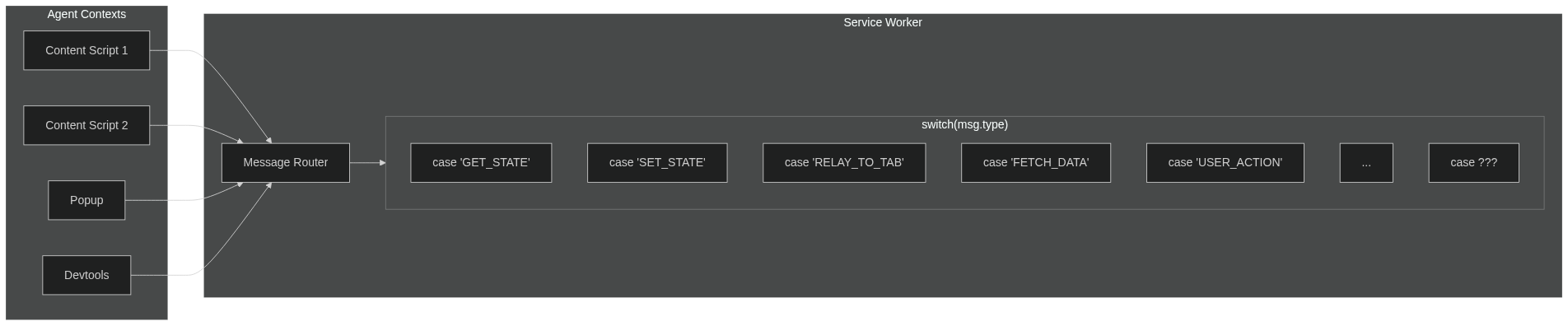
The problem with sendMessage / onMessage:
- Agents can't message each other directly—everything routes through the service worker
- Your service worker becomes a message router with growing
switch/casestatements - Every new feature means more message types, more handlers, more coupling
- Manual async handling (
return truein Chrome, different in Firefox) - Hand-rolled TypeScript types that may or may not stay in sync
With Crann:
- Define your state and actions in one place
- Agents sync automatically through the central store
- Full TypeScript inference—no manual type definitions
- No message routing, no relay logic, no
return true - Focus on your features, not the plumbing
License: ISC
Repository: github.com/moclei/crann