
create-better-t-stack
v3.47.0
Published
A modern CLI tool for scaffolding end-to-end type-safe TypeScript projects with best practices and customizable configurations

Maintainers
 aman-varshney
Readme
Create Better-T-Stack CLI
A modern CLI tool for scaffolding end-to-end type-safe TypeScript projects with best practices and customizable configurations
Sponsors
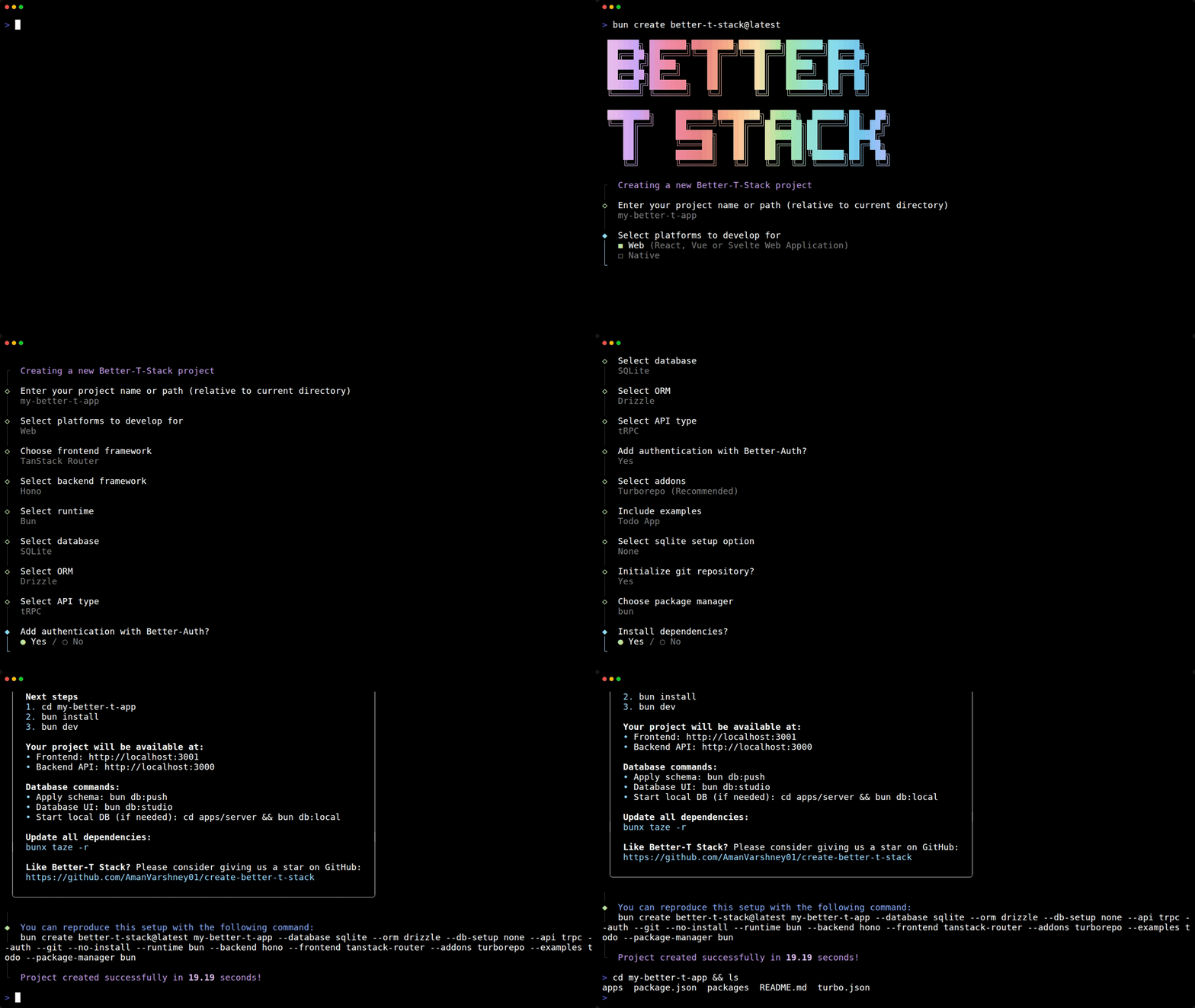
Quick Start
Run without installing globally:
# Using bun (recommended)
bun create better-t-stack@latest

# Using pnpm
pnpm create better-t-stack@latest

# Using npm
npx create-better-t-stack@latest
Follow the prompts to configure your project or use the --yes flag for defaults.
Requirements
- Node.js 22 or newer to run the CLI with Node.js. The selected framework may require a newer release; the CLI checks the exact stack before writing files.
- Bun 1.4 or newer is recommended. Bun 1.2.14 remains the minimum because generated workspaces use dependency catalogs.
- pnpm 10.26.0 or newer when using pnpm (catalogs and
allowBuilds). - npm 11.16.0 or newer when using npm (
allowScripts).
Docker Compose 2.24 or newer is required by generated Docker stacks. Git, Rust, Docker, and platform SDKs otherwise remain optional and are only needed when you use their corresponding generated commands.
Features
| Category | Options | | ------------------------ | ----------------------------------------------------------------------------------------------------------------------------------------------------------------------------------------------------------------------------------------------------------------------------------------------------------------------------------------------------------------------------------------------------------------------------------------- | | TypeScript | End-to-end type safety across all parts of your application | | Frontend | • React with TanStack Router• React with React Router• React with TanStack Start (SSR)• Next.js• SvelteKit• Nuxt (Vue)• Solid (SSR)• Astro• React Native bare Expo• React Native with NativeWind (via Expo)• React Native with Unistyles (via Expo)• None | | Backend | • Hono• Express• Elysia• Fastify• Self (fullstack inside the web app)• Convex• None | | API Layer | • tRPC (type-safe APIs)• oRPC (OpenAPI-compatible type-safe APIs)• None | | Runtime | • Bun• Node.js• Cloudflare Workers• None | | Database | • SQLite• PostgreSQL• MySQL• MongoDB• None | | ORM | • Drizzle (TypeScript-first)• Prisma (feature-rich)• Mongoose (for MongoDB)• None | | Database Setup | • Turso (SQLite)• Cloudflare D1 (SQLite)• Neon (PostgreSQL)• Supabase (PostgreSQL)• Prisma Postgres• MongoDB Atlas• None (manual setup) | | Authentication | • Better Auth• Clerk | | Styling | Tailwind CSS with a shared shadcn/ui package for React web apps | | Addons | • PWA support• Tauri (desktop applications)• Electrobun (lightweight desktop shell)• Starlight and Fumadocs (documentation sites)• Biome, Oxlint, Ultracite, or Vite+ (linting and formatting)• Lefthook, Husky (Git hooks)• evlog (request logging for server/fullstack backends)• MCP, Skills (agent tooling)• OpenTUI, WXT (platform extensions)• Turborepo, Nx, or Vite+ (monorepo orchestration) | | Examples | • Todo app• AI Chat interface (using Vercel AI SDK) | | Developer Experience | • Automatic Git initialization• Package manager choice (npm, pnpm, bun)• Automatic dependency installation |
Usage
Usage: create-better-t-stack [project-directory] [options]

Options:
  -V, --version                   Output the version number
  -y, --yes                       Use default configuration
  --template <type>               Use a template (mern, pern, t3, uniwind, none)
  --database <type>               Database type (none, sqlite, postgres, mysql, mongodb)
  --orm <type>                    ORM type (none, drizzle, prisma, mongoose)
  --dry-run                       Validate configuration without writing files
  --auth <provider>               Authentication (better-auth, clerk, none)
  --payments <provider>           Payments provider (polar, none)
  --frontend <types...>           Frontend types (tanstack-router, react-router, tanstack-start, next, nuxt, svelte, solid, astro, native-bare, native-uniwind, native-unistyles, none)
  --addons <types...>             Additional addons (pwa, tauri, electrobun, starlight, biome, lefthook, husky, mcp, turborepo, nx, vite-plus, fumadocs, ultracite, oxlint, opentui, wxt, skills, evlog, none)
  --examples <types...>           Examples to include (todo, ai, none)
  --git                           Initialize git repository
  --no-git                        Skip git initialization
  --package-manager <pm>          Package manager (npm, pnpm, bun)
  --install                       Install dependencies
  --no-install                    Skip installing dependencies
  --open <target>                 Open in an editor, IDE, or coding agent after creation
  --db-setup <setup>              Database setup (turso, d1, neon, supabase, prisma-postgres, planetscale, mongodb-atlas, docker, none)
  --web-deploy <setup>            Web deployment (cloudflare, docker, vercel, none)
  --server-deploy <setup>         Server deployment (cloudflare, docker, vercel, none)
  --backend <framework>           Backend framework (hono, express, fastify, elysia, convex, self, none)
  --runtime <runtime>             Runtime (bun, node, workers, none)
  --api <type>                    API type (trpc, orpc, none)
  --directory-conflict <strategy> Directory strategy (merge, overwrite, increment, error)
  --manual-db                     Skip automatic database setup prompts
  -h, --help                      Display help
Agent-Focused Commands
# Raw JSON payload input (agent-friendly)
create-better-t-stack create-json --input '{"projectName":"my-app","yes":true,"dryRun":true}'
create-better-t-stack add-json --input '{"projectDir":"./my-app","addons":["wxt"],"addonOptions":{"wxt":{"template":"react"}}}'
create-better-t-stack create-json --input '{"projectName":"db-app","database":"postgres","orm":"drizzle","dbSetup":"neon","dbSetupOptions":{"mode":"manual"}}'

# Runtime schema/introspection output
create-better-t-stack schema --name all
create-better-t-stack schema --name createInput
create-better-t-stack schema --name addInput
create-better-t-stack schema --name addonOptions
create-better-t-stack schema --name dbSetupOptions
create-better-t-stack schema --name cli

# Local stdio MCP server
npx create-better-t-stack@latest mcp
To install Better T Stack into supported agent configs with add-mcp and avoid relying on a global CLI install:
npx -y add-mcp@latest "npx -y create-better-t-stack@latest mcp"When you scaffold with the mcp addon, Better T Stack itself can also be installed into supported agent configs through add-mcp using a package runner command instead of assuming a global CLI install. For Bun projects, the generated config uses the equivalent bunx create-better-t-stack@latest mcp server command inside add-mcp.
For MCP project creation, prefer install: false. Long dependency installs can exceed common MCP client request timeouts, so the safest flow is to scaffold first and run your package manager install command afterward in the project directory.
Telemetry
This CLI collects anonymous usage data to help improve the tool. The data collected includes:
- Configuration options selected
- CLI version
- Node.js version
- Platform (OS)
- How the CLI was driven (prompts, flags,
--yes, JSON, the programmatic API, or the MCP server)
Separately, one anonymous failure event is sent when a scaffold breaks (stage and error class, never full messages or paths). See the analytics documentation for details.
Telemetry is enabled by default in published versions to help us understand usage patterns and improve the tool.
Disabling Telemetry
You can disable telemetry by setting the BTS_TELEMETRY_DISABLED environment variable:
# Disable telemetry for a single run
BTS_TELEMETRY_DISABLED=1 npx create-better-t-stack

# Disable telemetry globally in your shell profile (.bashrc, .zshrc, etc.)
export BTS_TELEMETRY_DISABLED=1
The CLI also honors the cross-tool DO_NOT_TRACK=1 convention (https://consoledonottrack.com), and --disable-analytics skips telemetry for a single run.
Examples
Create a project with default configuration:
npx create-better-t-stack --yesValidate a command without writing files:
npx create-better-t-stack --yes --dry-runCreate a project with specific options:
npx create-better-t-stack --database postgres --orm drizzle --auth better-auth --addons pwa biomeCreate a project with Elysia backend and Node.js runtime:
npx create-better-t-stack --backend elysia --runtime nodeCreate a project with multiple frontend options (one web + one native):
npx create-better-t-stack --frontend tanstack-router native-bareCreate a project with examples:
npx create-better-t-stack --examples todo aiCreate a project with Turso database setup:
npx create-better-t-stack --database sqlite --orm drizzle --db-setup tursoCreate a project with Supabase PostgreSQL setup:
npx create-better-t-stack --database postgres --orm drizzle --db-setup supabase --auth better-authCreate a project with Convex backend:
npx create-better-t-stack --backend convex --frontend tanstack-routerCreate a project with documentation site:
npx create-better-t-stack --addons starlightCreate a minimal TypeScript project with no backend:
npx create-better-t-stack --backend none --frontend tanstack-routerCreate a backend-only project with no frontend:
npx create-better-t-stack --frontend none --backend hono --database postgres --orm drizzleCreate a simple frontend-only project:
npx create-better-t-stack --backend none --frontend next --addons none --examples noneCreate a Cloudflare Workers project:
npx create-better-t-stack --backend hono --runtime workers --database sqlite --orm drizzle --db-setup d1Create a self-hosted fullstack project on Cloudflare with D1:
npx create-better-t-stack --backend self --frontend next --api trpc --database sqlite --orm drizzle --db-setup d1 --web-deploy cloudflareCreate a self-hosted project that ships as Docker containers (web + server + database via Docker Compose):
npx create-better-t-stack --frontend tanstack-router --backend hono --runtime bun --database postgres --orm drizzle --db-setup docker --web-deploy docker --server-deploy dockerCreate a minimal API-only project:
npx create-better-t-stack --frontend none --backend hono --api trpc --database none --addons noneCompatibility Notes
- Convex backend: Requires
database,orm,api,runtime, andserver-deployto benone; auth can bebetter-auth,clerk, ornonedepending frontend compatibility - Backend 'none': If selected, this option will force related options like API, ORM, database, authentication, and runtime to 'none'. Examples will also be disabled (set to none/empty).
- Frontend 'none': Creates a backend-only project. When selected, PWA, Tauri, Electrobun, and certain examples may be disabled.
- API 'none': Disables tRPC/oRPC setup. Can be used with backend frameworks for REST APIs or custom API implementations.
- Database 'none': Disables database setup and requires ORM to be
none. - ORM 'none': Can be used when you want to handle database operations manually or use a different ORM.
- Runtime 'none': Only available with Convex backend, backend
none, or backendself. - Cloudflare Workers runtime: Only compatible with Hono backend. If a database is used, MongoDB is not supported.
- Cloudflare D1 setup: Requires
sqliteand either--runtime workers --server-deploy cloudflareor--backend self --web-deploy cloudflare. Forbackend self, D1 is supported onnext,tanstack-start,nuxt,svelte,solid, andastro. - Addons 'none': Skips all addons.
- Examples 'none': Skips all example implementations (todo, AI chat).
- Nuxt, Svelte, Solid, and Astro frontends are only compatible with the oRPC API layer
- PWA support requires TanStack Router, React Router, Next.js, or Solid
- Tauri desktop app requires TanStack Router, React Router, TanStack Start, Next.js, Nuxt, SvelteKit, or Astro
- Electrobun desktop app requires TanStack Router, React Router, TanStack Start, Next.js, Nuxt, SvelteKit, or Astro. Desktop packaging uses static web assets, so SSR-first frontends need a static/export build before desktop builds will work.
- AI example is not compatible with Solid or Astro. With Convex backend, it also excludes Nuxt and Svelte.
Project Structure
The created project follows a clean monorepo structure:
my-better-t-app/
├── apps/
│   ├── web/          # Frontend application
│   ├── server/       # Backend API
│   ├── native/       # (optional) Mobile application
│   └── docs/         # (optional) Documentation site
├── packages/         # Shared packages
└── README.md         # Auto-generated project documentation
After project creation, you'll receive detailed instructions for next steps and additional setup requirements.