
create-crucible
v1.4.0
Published
Scaffold a landing page with a full AI agent system built in — DESIGN.md, GUARDRAILS, skills, token enforcement
Downloads
967

Maintainers
 ryanda9910
Readme
crucible
Scaffold a landing page with a full AI agent system built in.


npm create crucible@latest my-project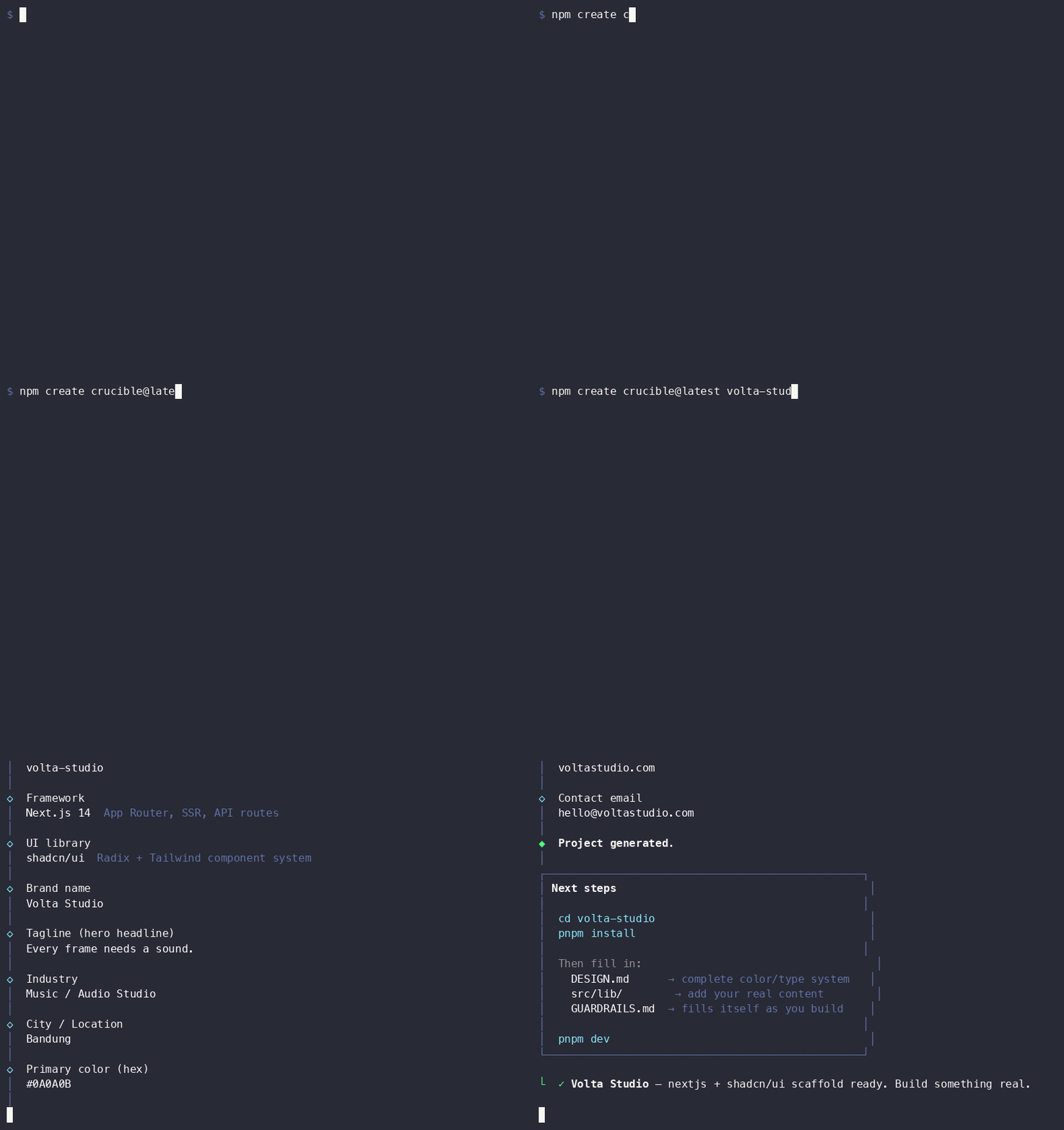
Answer 15 questions. Get a landing page scaffold where AI works inside a design system — not against it.
┌  crucible
│
◇  Project directory name
│  volta-studio
│
◇  Framework
│  Next.js 14 — App Router, SSR, API routes
│
◇  UI library
│  shadcn/ui — Radix + Tailwind component system
│
◇  Design aesthetic
│  Dark Studio — dark bg, cinematic, moody
│
◇  Who is this for?
│  Brand / Organization
│
◇  Brand name
│  Volta Studio
│
◇  Tagline
│  Every frame needs a sound.
│
◇  Primary color (hex)
│  #0A0A0B
│
◇  AI coding tool
│  Cursor — adds .cursor/rules/
│
  ... 5 more prompts (industry, city, domain, email, figma url)
│
└  ✓ Volta Studio — nextjs scaffold ready. Build something real.
What's inside
Every scaffold ships two layers on top of each other:
AI system files — framework-agnostic, always included:
| File | Purpose |
|---|---|
| CLAUDE.md | Session briefing — brand, stack, workflow rules |
| DESIGN.md | Design system ground truth (colors, type, spacing, motion) |
| GUARDRAILS.md | Failure memory — pre-loaded with common AI mistakes |
| .claude/skills/copywriter | Role constraints for copy tasks |
| .claude/skills/qa-mobile | Role constraints for mobile QA |
| .claude/skills/ui-designer | Role constraints for UI work |
| .claude/skills/code-review | Pre-deploy code review: TypeScript, security, performance, hygiene |
| scripts/check-design-tokens | Blocks hardcoded hex values at commit |
Framework source — pre-wired to your brand:
| File | Purpose |
|---|---|
| src/lib/site.ts | Single source of truth for brand name, domain, email |
| src/components/ | Hero, Services, Process, Contact, Header, Footer |
| API route | Zod-validated contact form + honeypot spam protection |
Supported frameworks
| | Framework | Best for | |---|---|---| | ⬛ | Next.js 14 (App Router) | SSR, API routes, SEO-heavy pages | | 🟠 | Astro 4 | Static sites, best Lighthouse scores | | 🔵 | Vite + React | SPA, client-side only | | ⬜ | Vanilla JS | No framework, minimal, fast |
UI library support
Choose your component system at scaffold time. Deps are injected into package.json and providers are wired up automatically.
| UI Library | Next.js | Astro | Vite + React | Vanilla | |---|:---:|:---:|:---:|:---:| | Tailwind CSS (default) | ✅ | ✅ | ✅ | ✅ | | shadcn/ui | ✅ | — | ✅ | — | | Ant Design 5 | ✅ | — | ✅ | — | | Material UI 6 | ✅ | — | ✅ | — | | Mantine 7 | ✅ | — | ✅ | — | | Chakra UI 3 | ✅ | — | ✅ | — | | daisyUI 4 | ✅ | ✅ | ✅ | — | | Bootstrap 5 | ✅ | ✅ | ✅ | ✅ | | None (plain CSS) | ✅ | ✅ | ✅ | ✅ |
Provider setup, components.json, and UI_SETUP.md are generated per choice — no manual wiring.
AI tool support
Choose your AI coding tool at scaffold time. The same skill rules (copywriter, qa-mobile, code-review) are written in tool-native format:
| AI Tool | Rule location | Invocation |
|---|---|---|
| Claude Code (default) | .claude/skills/ | /copywriter, /qa-mobile, /code-review |
| Cursor | .cursor/rules/*.mdc | @copywriter, @qa-mobile, @code-review |
| Windsurf | .windsurf/rules/*.md | Model decides (trigger: model_decision) |
| Continue | .continue/rules/*.md | Manual invocation |
| GitHub Copilot | .github/instructions/*.instructions.md | Applied by file glob |
Claude Code skills (.claude/skills/) are always included regardless of which tool you chose.
What gets personalized
| Variable | Example |
|---|---|
| BRAND_NAME | Volta Studio |
| TAGLINE | Every beat tells a story. |
| PROFILE_TYPE | brand or individual — adapts CTA labels and section copy |
| DESIGN_THEME | dark-studio, brutalist, glassmorphism, … — injects aesthetic guidance into DESIGN.md |
| PRIMARY_COLOR | #1A1A2E — or auto-extracted from Figma |
| ACCENT_COLOR | #E94560 — or auto-extracted from Figma |
| CITY | Bandung |
| DOMAIN | voltastudio.com |
| EMAIL | [email protected] |
Design themes
12 world design aesthetics — each injects typography, motion, component, and anti-pattern guidance into DESIGN.md § 0:
minimalist · dark-studio · brutalist · glassmorphism · retro · editorial · corporate · playful · cyberpunk · swiss · organic · luxury
Figma import
# Set token in env to skip the prompt:
FIGMA_TOKEN=fig-pat-... npm create crucible@latest my-project
Provide a Figma file URL at the last prompt. Color styles and text styles are extracted from the file. If style names contain primary, brand, accent, or cta, the colors override PRIMARY_COLOR / ACCENT_COLOR and are written into tokens.css and DESIGN.md.
After scaffolding
cd my-project
pnpm install

# Complete your design system:
#   DESIGN.md     → fill in type scale, spacing, component patterns
#   src/lib/      → add real content (services, work samples, testimonials)
#   GUARDRAILS.md → grows as you build

pnpm dev
Why this exists
AI output quality is a function of the constraints you give it.
Slop     = AI + no context
Not slop = AI inside a design system + guardrails + concrete specs
A crucible is the vessel where raw material transforms into refined output. Your brand inputs go in, a constrained AI-ready scaffold comes out. The walls are set. The AI works inside them.
Documentation
Full docs at ryanda9910.github.io/crucible — getting started, framework guides, AI system reference, adding a new framework.
Requirements
- Node.js ≥ 18
- pnpm (recommended) or npm
Contributing
See CONTRIBUTING.md. New framework templates, GUARDRAILS entries, and accessibility fixes are especially welcome.
git clone https://github.com/ryanda9910/crucible.git
cd crucible
pnpm install
pnpm dev   # run CLI interactively
Commits must follow Conventional Commits. Commitlint enforces this on every commit.
License
MIT © ryanda9910