
create-fullstack-boilerplate
v3.0.0
Published
A powerful CLI tool to generate fully configured full-stack applications with React frontend and Express backend. Includes authentication middleware, database configuration, protected routes, route-based Axios instances, and encryption setup - all ready w

Maintainers
 muhammad-huzaifa
Keywords
Readme
create-fullstack-boilerplate


A powerful CLI tool to quickly scaffold a complete fullstack application with React, Node.js, Express, and Sequelize with multi-database support. Get started building real features instead of spending time on project setup!
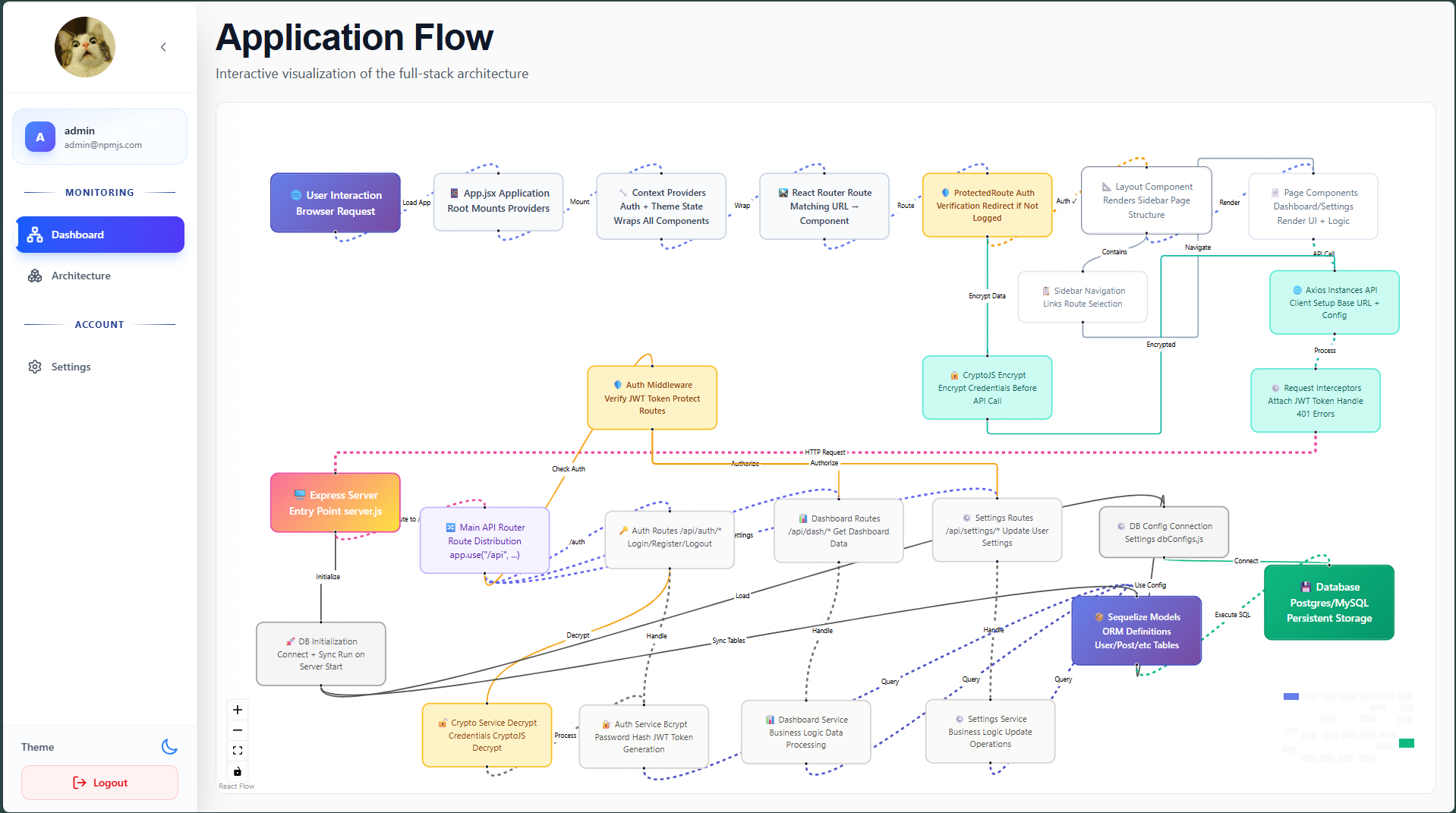
✨ Features
- 🚀 Quick Setup - Create a production-ready fullstack project in minutes
- 🗄️ Multi-Database Support - Connect to multiple databases (MySQL, MariaDB, PostgreSQL)
- 🔧 Interactive CLI - User-friendly prompts guide you through setup
- 📦 Modern Stack - React 19, Node.js 20+, Express, Sequelize, Tailwind CSS, DaisyUI
- 🔌 Dynamic Database Addition - Add new databases to existing projects
- 🛣️ Route Generator - Quickly scaffold new API endpoints with services
- 🔐 Authentication Ready - JWT-based authentication out of the box
- 📝 Comprehensive Documentation - Detailed READMEs for both frontend and backend
- 🎯 Best Practices - Following industry-standard project structure
📋 Prerequisites
- Node.js >= 20.0.0
- npm or yarn
- Database Server (MySQL, MariaDB, or PostgreSQL)
🚀 Quick Start
Create a New Project
npx create-fullstack-boilerplateOr install globally:
npm install -g create-fullstack-boilerplate
create-fullstack-boilerplate
Follow the interactive prompts:
- Enter your project name
- Choose your main database dialect (MySQL, MariaDB, or PostgreSQL)
- Optionally add an extra database
- Optionally initialize a Git repository
The tool will:
- ✅ Copy project template files
- ✅ Configure databases
- ✅ Install all dependencies
- ✅ Test database connections
- ✅ Set up environment variables
Start Development
cd your-project-name

# Start backend server
cd backend
npm run dev

# In another terminal, start frontend
cd frontend
npm run dev- Backend runs on:
http://localhost:5000 - Frontend runs on:
http://localhost:5173
🗄️ Database Management
Add a Database to Existing Project
Navigate to your project root and run:
npx create-fullstack-boilerplate add-dbThe CLI will prompt you for:
- Database identifier (e.g.,
REPORTING_DB,ANALYTICS_DB) - Database credentials (host, port, username, password)
- Database name
- Table/model name
- Whether to define table attributes now
Defining Table Attributes
When adding a database, you can choose to define your table schema interactively:
- Primary Key: Define your primary key column (name, type, auto-increment)
- Other Attributes: Add as many columns as needed with:
- Column name
- Data type (dialect-specific options)
- Length/precision (for VARCHAR, DECIMAL, etc.)
- Constraints (NOT NULL, UNIQUE, DEFAULT values)
The tool automatically:
- Creates a folder in
Models/[DB_NAME]/ - Generates the model file with your schema
- Creates database configuration file
- Updates
DB/dbConfigs.js - Adds credentials to
.env - Tests the database connection
Data Types by Dialect
The CLI provides appropriate data types based on your selected database dialect:
MySQL/MariaDB:
- INTEGER, BIGINT, FLOAT, DOUBLE, DECIMAL
- STRING (VARCHAR), TEXT
- BOOLEAN, DATE, DATETIME, TIME
- JSON, BLOB, ENUM
PostgreSQL:
- INTEGER, BIGINT, FLOAT, DOUBLE, DECIMAL
- STRING (VARCHAR), TEXT
- BOOLEAN, DATE, TIMESTAMP, TIME
- JSON, JSONB, BYTEA, UUID, ARRAY, ENUM
🛣️ Route Management
Add a New Route
Navigate to your project root and run:
npx create-fullstack-boilerplate add-routeThe CLI will prompt you for:
- Route name (e.g.,
users,products) - Route path (e.g.,
/users) - Whether authentication is required
This automatically:
- ✅ Creates
routes/[routeName]Routes.jswith CRUD endpoints - ✅ Creates
services/[routeName]Service.jswith business logic stubs - ✅ Updates
routes/index.jsto register the new route - ✅ Applies authentication middleware if requested
Generated Route Structure
// routes/usersRoutes.js
GET    /users      - Get all users
GET    /users/:id  - Get user by ID
POST   /users      - Create new user
PUT    /users/:id  - Update user
DELETE /users/:id  - Delete user
Each route delegates to a corresponding service function where you implement your business logic.
📁 Project Structure
your-project/
├── backend/
│   ├── DB/                    # Database configurations
│   │   ├── DBInit.js         # Connection initialization
│   │   ├── dbConfigs.js      # Database registry
│   │   └── [DB].config.js    # Individual DB configs
│   ├── Models/               # Sequelize models
│   │   ├── index.js         # Model loader
│   │   └── [DB_NAME]/       # Models per database
│   ├── routes/              # API endpoints
│   │   ├── index.js        # Main router
│   │   └── *Routes.js      # Feature routes
│   ├── services/           # Business logic
│   │   └── *Service.js    # Service functions
│   ├── middleware/        # Express middleware
│   ├── .env              # Environment variables
│   ├── package.json
│   ├── server.js        # Application entry
│   └── README.md       # Backend documentation
└── frontend/
    ├── src/
    │   ├── components/  # React components
    │   ├── pages/      # Page components
    │   ├── services/   # API clients
    │   ├── App.jsx
    │   └── main.jsx
    ├── public/
    ├── .env
    ├── package.json
    ├── vite.config.js
    └── README.md      # Frontend documentation
🔧 Configuration
Backend Environment Variables
# Server
PORT=5000
CLIENT_URL=http://localhost:5173

# Security
JWT_SECRET=your_jwt_secret
PASSWORD_ENCRYPTION_KEY=your_encryption_key

# Database Example (created when you add a database)
MAIN_DB_USER=root
MAIN_DB_PASSWORD=password
MAIN_DB_NAME=mydb
MAIN_DB_HOST=localhost
MAIN_DB_PORT=3306
Frontend Environment Variables
VITE_API_URL=http://localhost:5000/apiImportant: Vite requires environment variables to be prefixed with VITE_.
💻 Usage Examples
Accessing Databases in Your Code
// Import all databases
const databases = require('./Models');

// Access specific database
const { MAIN_DB, REPORTING_DB } = databases;

// Use models
const { User, Product } = MAIN_DB;

// Sequelize operations
const users = await User.findAll();
const user = await User.findByPk(1);
await User.create({ name: 'John', email: '[email protected]' });
Creating API Endpoints
After generating a route with add-route, implement your service logic:
// services/usersService.js
const { MAIN_DB } = require('../Models');
const { User } = MAIN_DB;

exports.getAll = async (req, res) => {
  try {
    const users = await User.findAll();
    res.json(users);
  } catch (error) {
    res.status(500).json({ message: 'Error fetching users', error: error.message });
  }
};
Making API Calls from Frontend
// src/services/api.js
import axios from 'axios';

const api = axios.create({
  baseURL: import.meta.env.VITE_API_URL
});

// Add auth token to requests
api.interceptors.request.use((config) => {
  const token = localStorage.getItem('token');
  if (token) {
    config.headers.Authorization = `Bearer ${token}`;
  }
  return config;
});

export default api;

// src/services/userService.js
import api from './api';

export const getUsers = () => api.get('/users');
export const createUser = (data) => api.post('/users', data);
📚 Technology Stack
Backend
- Node.js - JavaScript runtime
- Express - Web framework
- Sequelize - ORM for SQL databases
- JWT - Authentication
- bcryptjs - Password hashing
- colors - Terminal output styling
- dotenv - Environment variable management
Frontend
- React 19 - UI library
- Vite - Build tool
- Tailwind CSS 4 - Utility-first CSS
- DaisyUI - Component library
- React Router - Routing
- Axios - HTTP client
- Recharts - Data visualization
🎯 Best Practices
- Environment Variables: Never commit
.envfiles - Database Models: Organize models by database
- Service Layer: Keep business logic in services, not routes
- Error Handling: Always handle errors and provide meaningful messages
- Authentication: Use JWT tokens stored in localStorage
- Validation: Validate input on both client and server
- Documentation: Update READMEs when adding features
🔒 Security Considerations
- Change default JWT secrets in production
- Use environment variables for sensitive data
- Implement rate limiting for APIs
- Sanitize user inputs
- Use HTTPS in production
- Keep dependencies updated
🐛 Troubleshooting
Command Not Found
# Reinstall the package globally
npm install -g create-fullstack-app
Database Connection Failed
- Verify database server is running
- Check credentials in
.env - Ensure database exists
- Check network connectivity
- Verify port is not blocked
Port Already in Use
# Windows
netstat -ano | findstr :5000
taskkill /PID <PID> /F

# Linux/Mac
lsof -i :5000
kill -9 <PID>
Module Not Found
# Reinstall dependencies
cd backend && npm install
cd ../frontend && npm install
📖 Additional Documentation
After creating your project, refer to:
backend/README.md- Complete backend documentation including Sequelize usagefrontend/README.md- Complete frontend documentation including React patterns
🤝 Contributing
Found a bug or have a feature request? Please open an issue on GitHub.
📝 License
ISC
👨💻 Author
Muhammad Huzaifa
🙏 Acknowledgments
Built with modern tools and best practices to help developers start building features faster!
Happy Coding! 🚀
Get started in minutes, not hours. Focus on building features, not boilerplate.