
create-mycv
v0.1.0
Published
Scaffold mycv: your CV as a site — six designs (API explorer, terminal, OpenAPI spec, git repo, status page, RPG sheet), ten languages, static, deploys to GitHub Pages.

Maintainers
 soyhub
Readme
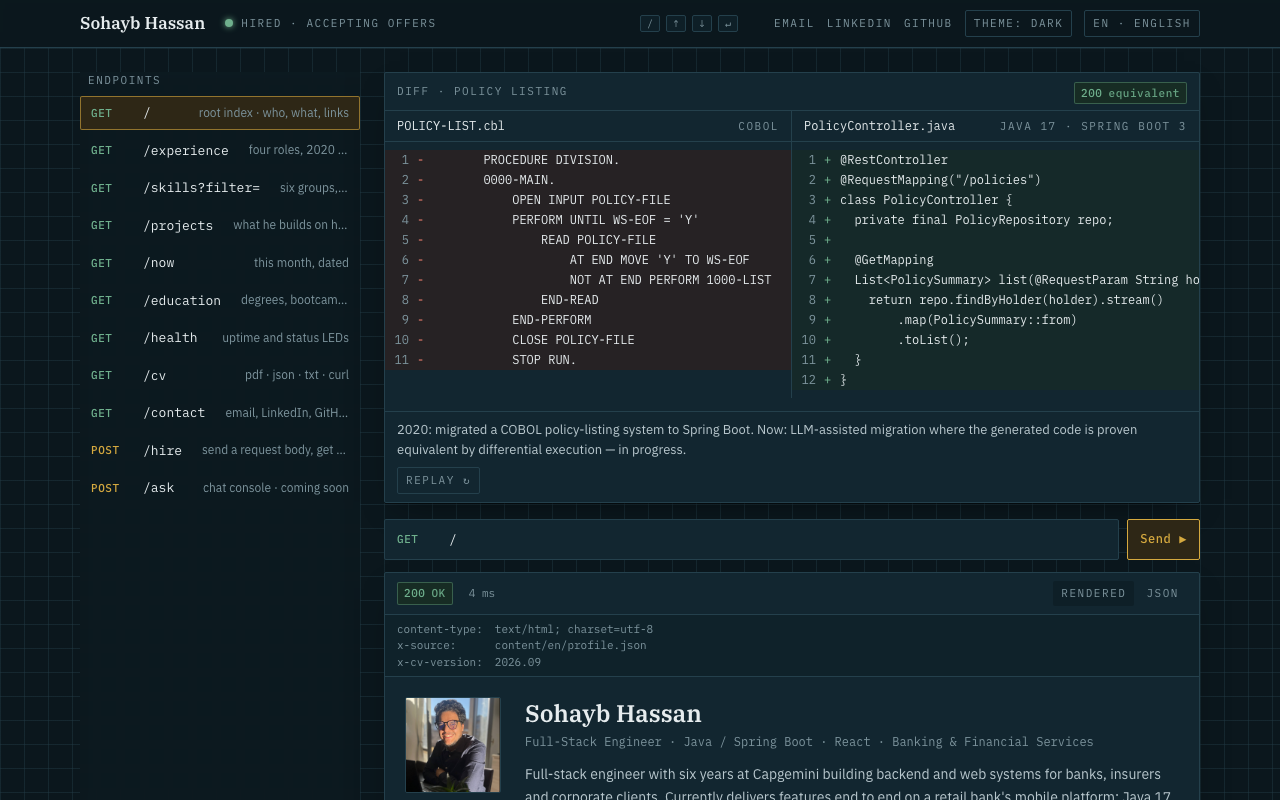
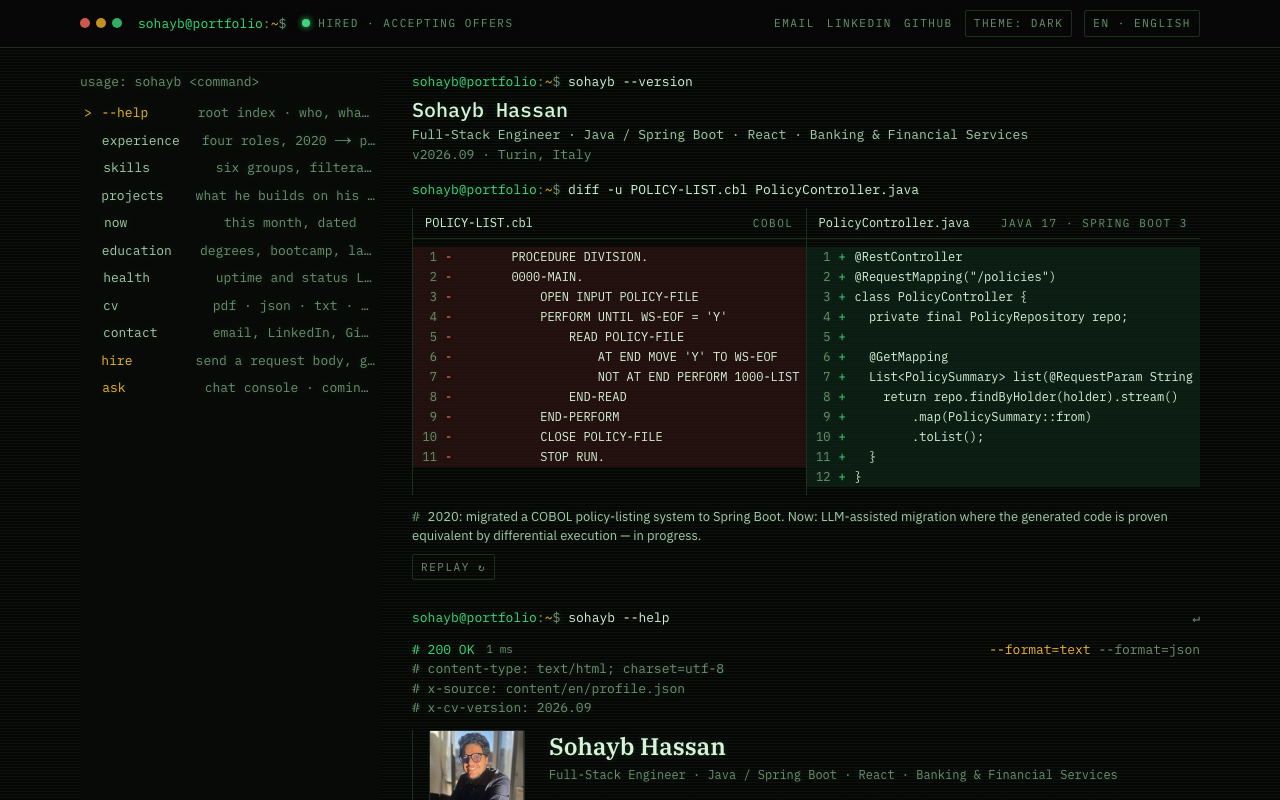
| console — API explorer | terminal — CLI |
| :-----------------------------------------------: | :-------------------------------------------------: |
|  |
|  |
|
|
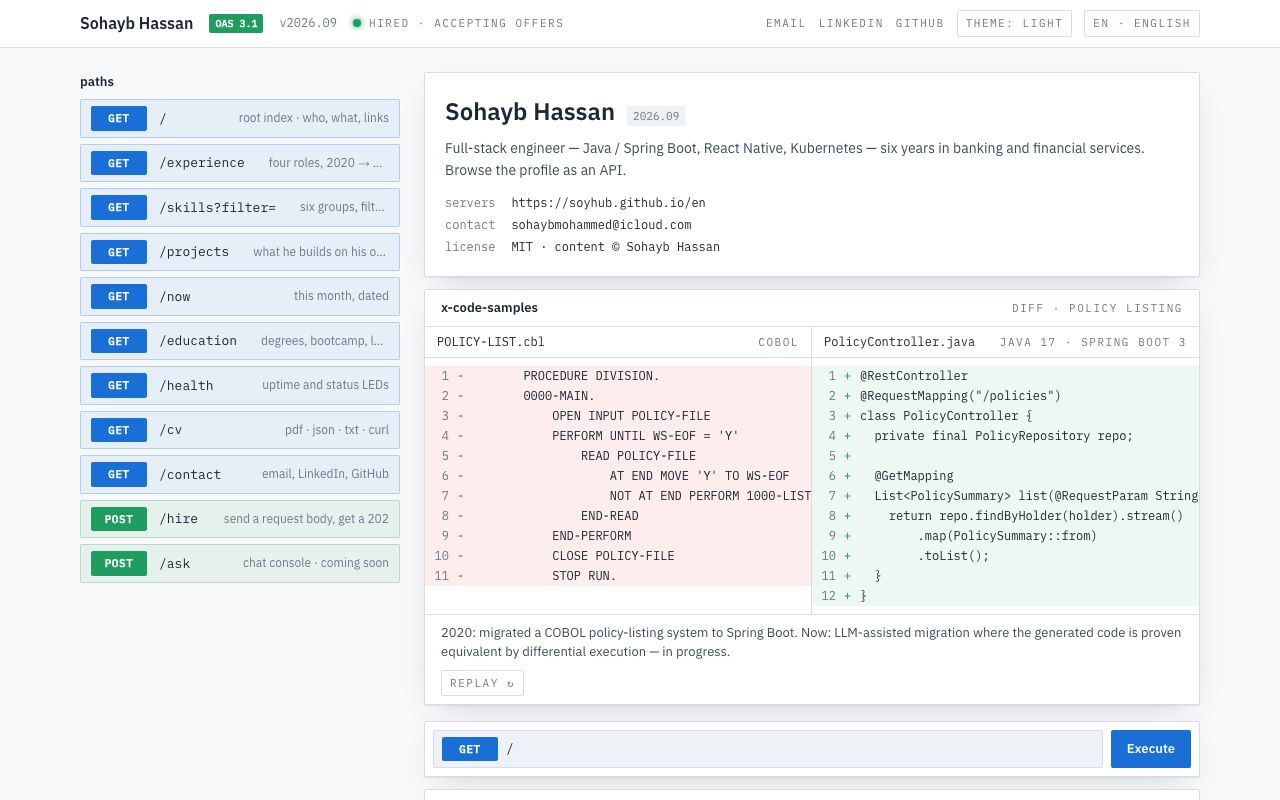
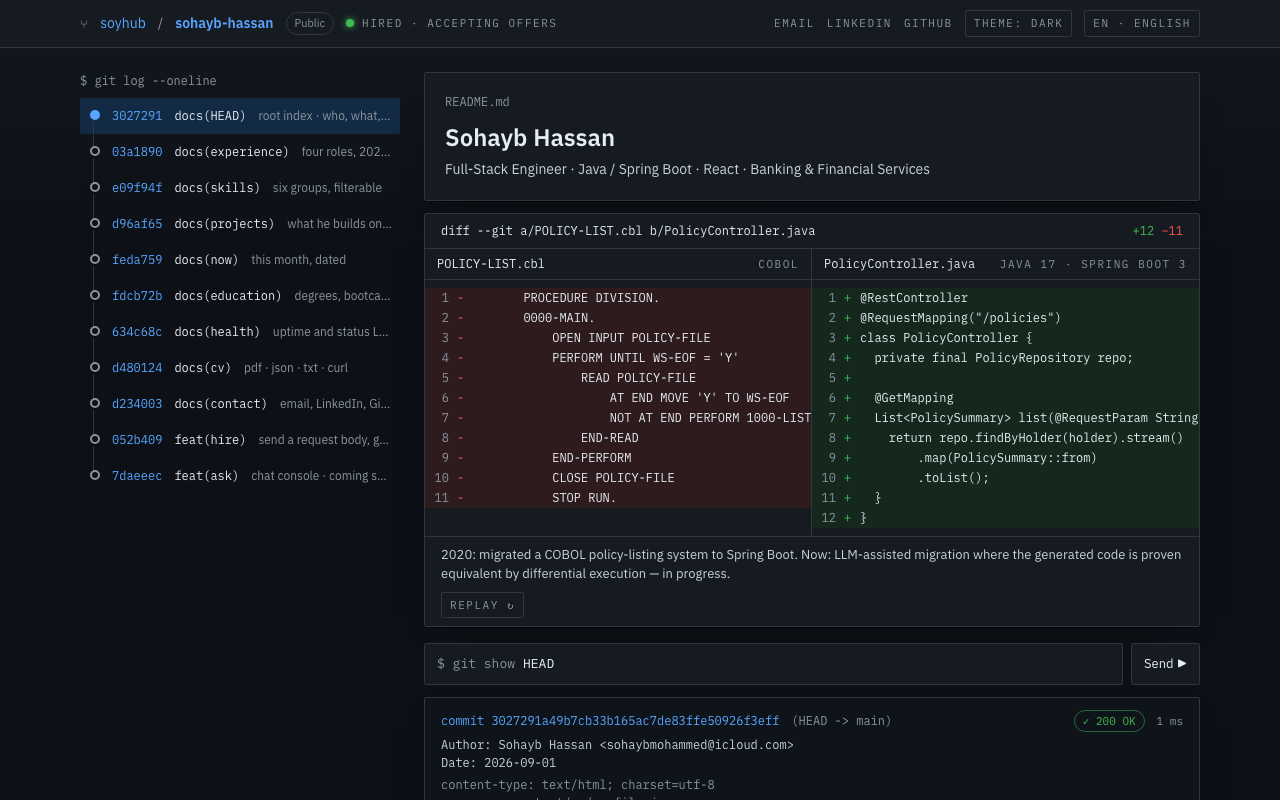
| openapi — Swagger spec | git — repository |
|  |
|  |
|
|
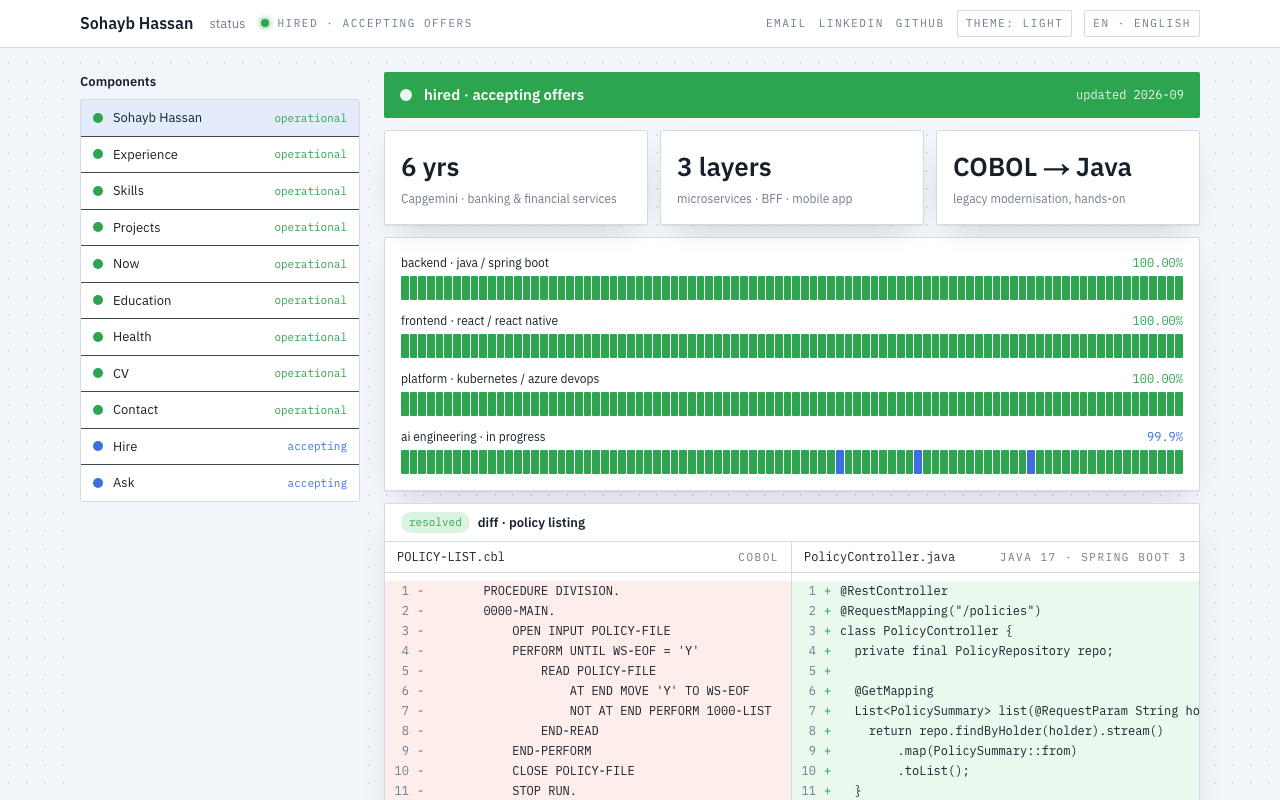
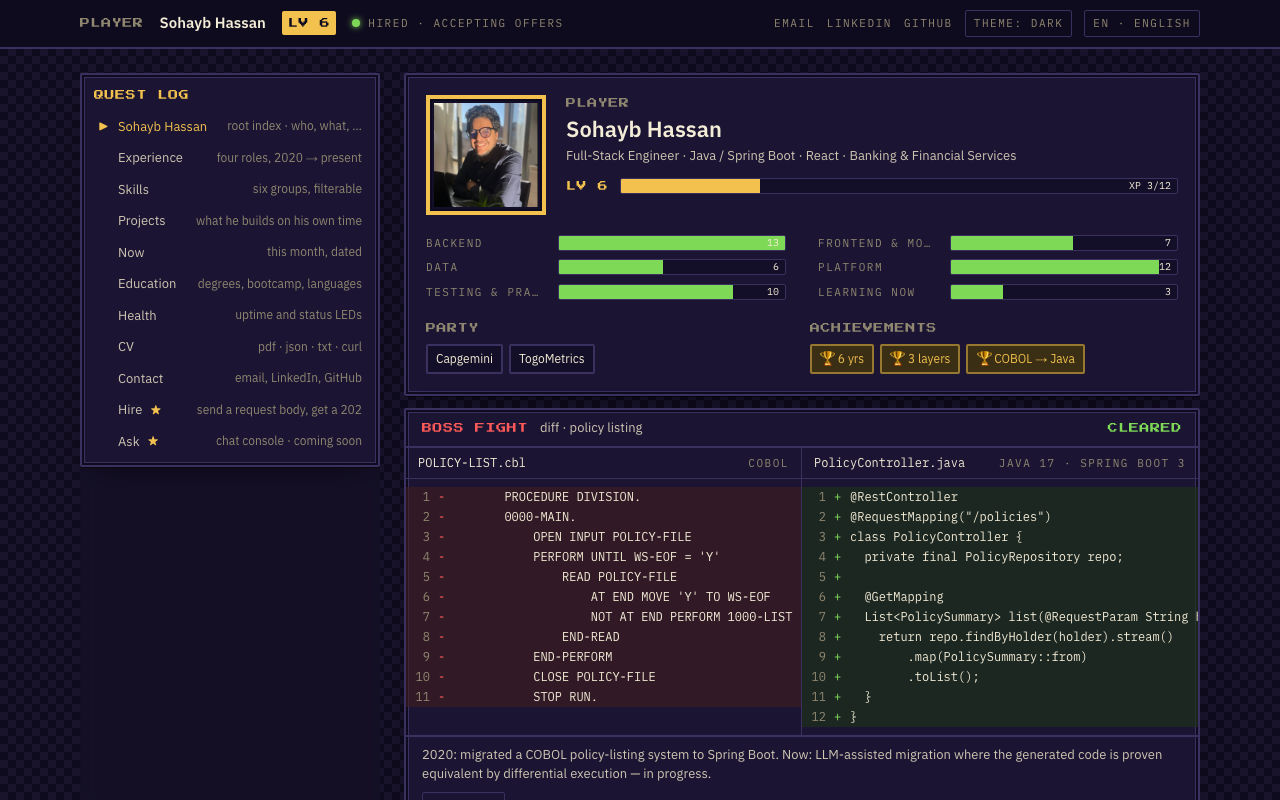
| status — status page | rpg — character sheet |
|  |
|  |
|
Why
Recruiters skim; engineers click. This site gives both something to do: an endpoint list with keyboard
navigation, a request bar you can type into, a response frame with a Rendered tab and a JSON tab, and
real machine-readable outputs (/cv.json, /cv.txt, /llms.txt) for the tools that read profiles
these days. Everything renders from one JSON file per language, content/<lang>/profile.json, so the site, the JSON
Resume, the plain-text CV and the PDF never drift apart.
Quick start
npm create mycv my-site        # pick a design: -- --theme git
cd my-site
pnpm install
pnpm dev                              # http://localhost:3000
You get a working site with a fictional sample persona. Replace the JSON in content/en/ and
messages/en.json, drop your photo in public/photo.png, and you're done — no code involved.
Requires Node.js 20+ and pnpm (corepack enable).
Prefer a fork? Clone this repository as is (it is the author's live site and the template at once), then:
pnpm install
pnpm dev
pnpm test           # guards: valid JSON, no placeholders, no phone numbers, no denylisted names
pnpm build          # static export in out/ — also regenerates the PDFs and the favicon
Scaffolder options
npm create mycv [dir] -- [--theme console|terminal|openapi|git|status|rpg] [--lang en] [--from <url|dir>]| Flag | Default | What it does |
| --------- | ---------------------------- | ----------------------------------------------------------- |
| --theme | console | The design to start with ("theme" in content/site.json) |
| --lang | en | The single language kept; add more later |
| --from | the GitHub tarball of main | A URL to a .tar.gz, or a local checkout for development |
Requires Node 20+ and tar on the PATH. The package has no dependencies; the template is fetched
from the repository at run time, so it is always the current version.
Deploy to GitHub Pages
- Create a repository named
<your-username>.github.ioand push this code to itsmainbranch. - In the repository: Settings → Pages → Source: GitHub Actions.
- That's it.
.github/workflows/deploy.ymlbuilds and publishes on every push. The site URL is read from GitHub, so there is nothing to configure —robots.txt,sitemap.xml, canonical links and social-preview images all point at the right host.
Any other static host works too: pnpm build and upload the out/ folder.
Make it yours
Everything personal lives in content/ and messages/ as plain JSON — no code to touch. Each file
points at a schema, so an editor like VS Code autocompletes the fields and underlines mistakes as you
type, and pnpm build refuses a file that doesn't fit, telling you exactly which field is wrong.
| Edit | To change |
| ----------------------------- | ------------------------------------------------------------------------------------------------------------------------------------------------------------- |
| content/<lang>/profile.json | Every CV fact: name, title, contact links, summary, three headline tiles, experience, projects, skills, education, languages. One file per language. |
| content/<lang>/now.json | The dated /now page, per language. |
| messages/<lang>.json | Every sentence the site itself says: page titles and descriptions, the hero caption, endpoint labels, buttons, the PDF headings. One file per language. |
| content/site.json | Settings shared by all languages: the theme, the list of languages and the default one, the hero's before/after code, the easter-egg path, the endpoint list. |
| content/knowledge/*.md | The chat console's corpus (also published as /llms-full.txt). Skip it if you don't switch the chat on. |
| public/photo.png | Your photo, square. |
To add an endpoint: add an entry to endpoints in content/site.json, its texts under endpoints
in each messages/<lang>.json, create app/[locale]/(explorer)/<path>/page.tsx (copy
education/page.tsx), and put your view in components/views/. A test fails if the lists don't match.
Languages
The site ships in ten languages — en, it, ar, es, fr, de, pt, ru, hi, zh — each
at its own URL (/en/…, /it/…), with hreflang links, a per-language sitemap, <html lang> and
right-to-left layout where the script needs it. / sends the visitor to their browser language
(remembering the last choice from the switcher in the top bar), and the old language-less URLs
redirect too.
To drop a language, remove it from locales in content/site.json. To add one, add its code there
and create messages/<code>.json, content/<code>/profile.json and content/<code>/now.json —
copy the English ones and translate the values; a test checks that every language has the same keys.
Routing and translations use next-intl.
Every language gets its own /<lang>/cv.pdf, /<lang>/cv.txt and /<lang>/cv.json; llms.txt
and the chat corpus are in the default language. The bundled fonts cover Latin, Greek and Cyrillic;
for hi and zh the PDF build fetches a Noto face once (into a gitignored cache). The PDF engine
has no right-to-left layout, so ar gets the default-language PDF, and the share cards for ar,
hi and zh use the default language too.
Themes
Set "theme" in content/site.json. Each one is a different design — its own navigation,
request area, response frame, hero and palette — over the same content and URLs:
| Theme | The metaphor |
| ---------- | -------------------------------------------------------------------------------------------------------- |
| console | An API explorer: request bar, endpoint list, response frame with headers and a JSON tab. The default. |
| terminal | A CLI: <name> --help, a shell prompt, command output ending in a blinking cursor. Monospace, phosphor. |
| openapi | An API contract: Swagger-style info block, paths with method pills, a Responses panel. Light and clean. |
| git | A repository: endpoints are commits on a graph, pages are git show, the hero is a diff with +12 −11. |
| status | A status page: availability banner, metric tiles, 90-day uptime bars, components list. |
Every theme has a dark and a light variant (the toggle in the top bar switches between them; the
visitor's choice is remembered) and a default mode. The palette also colours the favicon, the share
cards and the PDF. A theme lives in themes/<name>/ and exports TopBar, Nav, Request,
Frame, Hero, Footer and Shell; its colours are in lib/themes.ts. To add one, copy a folder,
register it in lib/chrome.ts and lib/themes.ts, and add the name to the enum in content/schema.ts.
Icons and share cards
All generated from your content at build time — nothing to draw: favicon.ico (16/32/48), PNG
icons, the Apple touch icon and the 192/512 manifest icons (from the initial of your name), and a
1200×630 Open Graph card per page (the home card carries your photo). Change the design once, in
lib/icon.tsx or lib/og.tsx.
Publishing rules
The tests refuse to build a site that contains a phone number, a date of birth, an unfilled
[[placeholder]], or any name you list in content/denylist.local.json (gitignored — put former
clients and colleagues there). Describe clients by sector, not by name. See content/README.md.
What you get
- Every section is an endpoint — a real page with its own URL, a Rendered tab and a JSON tab,
response headers, and a latency chip. Keyboard:
/focuses the request bar,↑↓move,↵sends. - Animated hero — a before/after diff that "migrates" line by line and lands on
200 equivalent. POST /hire— a JSON body the visitor edits; Send opens their mail client with it. Nothing is stored.- Machine-readable CV —
/cv.json(JSON Resume),/cv.txt(80 columns, ANSI colours forcurl),/cv.pdf(generated from the same content at build time),/llms.txtand/llms-full.txtfor crawlers that read. - SEO done — per-page titles and descriptions, canonical URLs, Open Graph and Twitter cards with a
generated image per page,
sitemap.xml,robots.txt, a web manifest, and Person + WebSite JSON-LD built from your profile. - No cookies, no analytics, no tracking. Dark and light theme, remembered locally.
- Responsive — works from 320px up; the endpoint list becomes a scroll strip on phones.
- Ten languages — URL per language, hreflang, RTL, a switcher that remembers the choice.
- Six designs — API explorer, terminal, OpenAPI spec, git repository, status page, RPG character sheet — one setting.
Architecture
content/<lang>/profile.json ─┐                       themes/<theme>/
content/<lang>/now.json      ├─ zod loaders ──┐         TopBar · Nav · Request · Frame · Hero · Footer · Shell
messages/<lang>.json ────────┘  (content/)    │              ▲
content/site.json  (theme, locales, endpoints)│              │ lib/chrome.ts picks one by site.theme
                                              ▼              │
                       app/[locale]/(explorer)/<endpoint>/page.tsx
└─ EndpointResponse ── chrome.Request + chrome.Frame ── components/views/<View>- Content is data. Every fact and every sentence lives in JSON, validated by
content/schema.tson load;*.schema.jsongive editors autocomplete. Nothing underapp/,components/,lib/orthemes/names a person. - Themes are chrome. A theme is a folder exporting seven components; views, routes, metadata and languages don't know which theme is active. Adding one is a folder plus two registry lines.
- Languages are routes.
next-intlmounts everything under/[locale]/;/and old language-less URLs redirect in the browser (static hosts can't negotiate). - Everything derives. JSON-LD, JSON Resume, the plain-text and PDF CVs, the favicon set and the Open Graph cards are generated from the same profile at build time.
The stack, explained
| Library | Version | What it does here |
| ------------------------------------------------------------------------------- | ------- | -------------------------------------------------------------------------------------------------------------------------------------------------------------------------------------------------------------------------------------------------------------------------------------------------------- |
| Next.js | 16 | The framework. App Router with React Server Components: pages render to static HTML at build time (output: "export"), so the site is plain files. Route handlers produce cv.json, cv.txt, llms.txt; metadata routes produce sitemap.xml, robots.txt, the manifest and the Open Graph images. |
| React | 19 | UI. Client components only where there is interaction (request bar, tabs, keyboard nav, theme toggle, forms). |
| Tailwind CSS | 4 | Styling, with the palette declared once as CSS variables in globals.css and exposed as utilities (text-brass, bg-sunk, border-hair…). |
| TypeScript | 5 | Types for the content model (content/profile.types.ts) so a typo in your CV data fails the build, not the visitor. |
| next/og | — | Renders the social-preview PNGs from JSX at build time (lib/og.tsx). |
| @react-pdf/renderer | 4 | Renders content/profile.json to public/cv.pdf in prebuild (scripts/build-pdf.tsx) — the download can't drift from the site. |
| gray-matter | 4 | Parses the front matter of the knowledge chunks for /llms-full.txt and the search index. |
| zod | 4 | Validates the content JSON on load (content/schema.ts) and generates the *.schema.json editors use; also validates chat requests. |
| @anthropic-ai/sdk | — | Streams Claude answers with strict tools for the chat console (optional, see below). |
| @upstash/ratelimit + redis | — | Per-IP and daily caps for the chat console (optional). |
| Vitest · ESLint · Prettier | — | pnpm test, pnpm lint, pnpm format. |
Scripts: pnpm dev, pnpm build (runs prebuild: search index + PDF), pnpm test, pnpm lint,
pnpm typecheck, pnpm build-pdf, pnpm build-favicon, pnpm build-schemas (after editing
content/schema.ts), pnpm build-index, pnpm evals.
The chat console (optional)
POST /ask is a retrieval-grounded chat over your profile: hand-rolled BM25 plus optional
Voyage embeddings fused with reciprocal rank fusion, Claude with strict
tools that render as UI blocks (timeline, skill matrix, project card, contact card, status codes),
scope enforced by the system prompt and measured by evals/scope.jsonl. It needs a server, so on the
static GitHub Pages build the page shows coming soon.
To switch it on, deploy to a Node host (Vercel works with zero config):
Copy
lib/chat/handler.tstoapp/api/chat/route.tsand removeoutput: "export"fromnext.config.ts.Set the environment variables:
| Variable | Purpose | | -------------------------------------- | ---------------------------------------------------------------------------------------------------- | |
ANTHROPIC_API_KEY| Required. Usage is billed to you; the daily caps inlib/chat/limits.tsbound it. | |VOYAGE_API_KEY| Optional. Adds embeddings to retrieval; without itpnpm build-indexwrites a BM25-only index. | |KV_REST_API_URL,KV_REST_API_TOKEN| Optional. Upstash Redis for rate limits and the daily spend cap (UPSTASH_REDIS_REST_*also works). | |CHAT_DISABLED=1| Kill switch. | |CHAT_DENYLIST| Comma-separated names the console must never say. | |NEXT_PUBLIC_SITE_URL| The public URL, for canonical links (set automatically on GitHub Pages). |pnpm evalsruns retrieval recall (offline) and the scope test (calls the model).
Project layout
app/                [locale]/(explorer)/* pages, (root)/ redirects, cv.json, cv.txt, llms.txt, sitemap, robots, icons
components/         explorer/ (frame, request bar, endpoint list), views/ (one per endpoint), ui/, console/
content/  messages/ ← everything you edit (per language)
i18n/               next-intl routing, navigation, request config
lib/                chrome (theme registry), themes (palettes), icon, og, seo, serializers, chat/, rag/
themes/             console, terminal, openapi, git, status, rpg — one folder per design
scripts/            build-pdf.tsx, build-favicon.tsx, build-schemas.ts, build-index.ts
tests/  evals/      publishing guards, serializer tests, retrieval and scope evals
.github/            deploy workflow (checks, scaffold smoke test, Pages), brand assets and screenshots
packages/           create-mycv — the `npm create` scaffolder (no dependencies)
samples/            the fictional persona a scaffolded project starts with
Contributing
See CONTRIBUTING.md: the checks, how to add a theme or a language, and how the scaffolder is published.
License
MIT. The profile content and photo describe a real person and are not part of the licence — replace them with your own.